

This suite of sampling, effects and live performance software, with a bundled 65GB library, is feature-rich but also up against heavy competition. Can it make its mark?
Yellow Tools are a German company who started producing CD‑ROM‑based sample content back in the days when men were men and samplers were mostly white and rackmounted. Their involvement with soft sampling dates back to the early noughties — they released the sample‑based instruments Culture, Majestic and Candy between 2003 and 2005, and followed them up with a fully‑fledged sampler, Independence, shortly afterwards.
While software‑based samplers and sample players were quite a big deal in 2003, they're not now, and Yellow Tools' current flagship instrument, Independence Pro — the subject of this review — goes up against some industry‑standard heavyweights in today's market.
Independence What?
 Independence Live presents a simpler face, suitable for live performance. Multiple multi‑channel layered and split projects can be loaded, and remain pre‑cached for quick program changes.
So what exactly is Independence Pro? It's actually a little suite of software. The main attraction is Independence 2, which is a software sampler that runs as a stand‑alone application or as a plug‑in in AU or VST format on Mac OS 10.4 or later, or Windows XP and Vista.
As with any 'proper' sampler, you get to load, edit and loop your own audio, control the way it's mapped onto the keyboard, and tweak hundreds of other parameters. However, no‑one would blame you if you only ever used the bundled library, and Independence Pro's runs to a chunky 65GB. It offers a typical workstation‑style spread of instruments: pianos, guitars, orchestral, organs, pop horns, drums, percussion and synths. Those earlier specialist libraries, Culture, Majestic and Candy (specialising in percussion, electric basses and saxes, respectively), are thrown in, and there are some tempo‑locked arpeggiated and sequenced patches too. I'll talk more about these later.
Alongside Independence 2, the stand‑alone‑only Independence Live presents a streamlined interface for accessing the sound library in a live situation. The plug‑in‑only Independence FX splits off (you guessed it) Independence 2's effects section so that it can be applied to any other track in your DAW. There are in the region of 45 processors, effects and 'helpers', including Yellow Tools' convolution reverb, Origami.
Independence Pro is clearly a complex beast, and it would be virtually impossible for a review to dig into every single little detail. So I'm going to concentrate on what seems to me the really crucial factors of the Independence 2 plug‑in: the operational 'feel', mixing and effects, the sound library, the unique features and the potential for expansion. Taken together, these will hopefully give you a good idea of just what's on offer.
User Interface
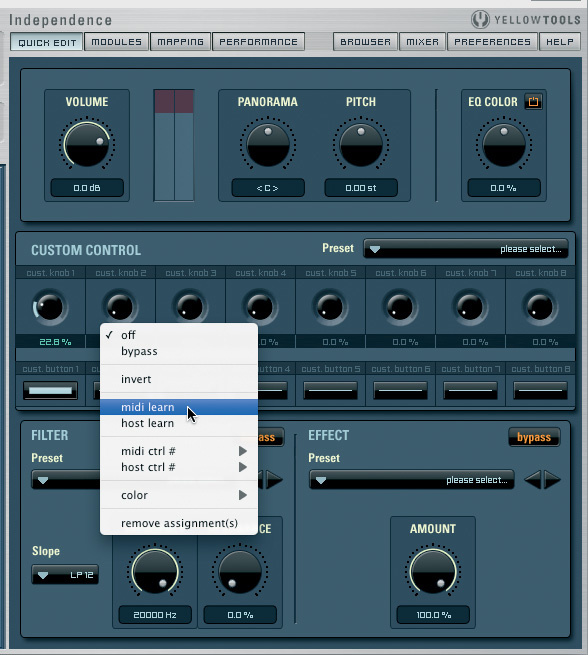
 Two more of Independence's edit screens, accessed via the top row of buttons. All your usual sample-manipulation functions are available in the Mapping view (on the left), while Quick Edit is the not‑unwelcome 'idiot' screen, which also includes some helpful real‑time MIDI-controller mapping functions.
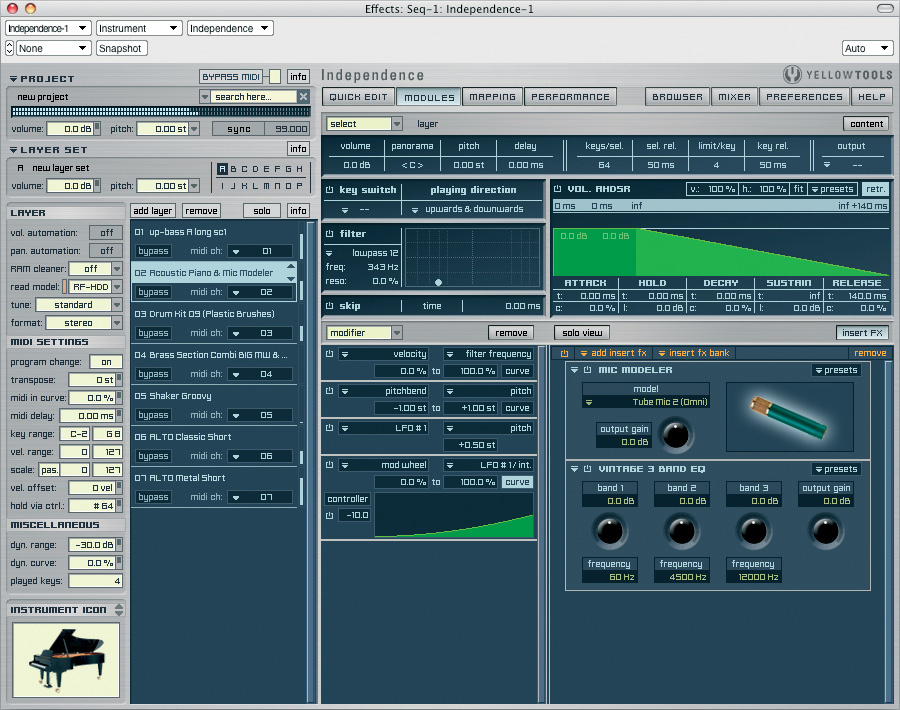
The roughly 900x650 pixel plug‑in window is busy, but well organised. On the left, you normally see a list of all the loaded patches (or 'layers', in Yellow-speak), and detailed information relating to the currently selected layer, and on the right, eight different editing areas appear, selected with buttons along the top. The usual suspects are all here: a mapping editor, synth architecture and insert effects modules, and a Performance editor that controls the subtleties of legato and repeated‑sample substitution.
For easy sound tweaking, a Quick Edit panel puts volume, pan, pitch, a filter, a reverb and real‑time MIDI control up front. There's also a file browser with search facilities, the built‑in mixer (which can be set to use the whole window, if necessary), and a preferences and help panel.
Most typefaces used are squared‑off and quite contemporary (in a retro sort of way), but this makes them clear and easy to read at their small sizes. All in all, it's an effective interface, and I found it easy to get going without needing the manual. Hmm — the manual... No printed copy was supplied so I downloaded a PDF from the Yellow Tools web site. While it tries hard to be comprehensive, it's frequently obscure, partly because of some clunky English translation. At times it falls seriously short — for example, the description of how sample 'zones', 'sections' and 'alternates' interrelate is not clearly explained. Also, I never worked out how effects could be applied to keygroup‑like sections and alternates, even though there's an implication that it's possible to do that, and this was one of the few areas in which the software itself was less than intuitive.
Another quick criticism is that there appears to be no way to change the behaviour of mouse drags for adjusting the knobs: they're circular only, which is at odds with every single other bit of software on my Mac.
Mixmaster
Being capable of playing back so many multitimbral layers, Independence needs a useful effects and mixing environment — and it has one. Each layer gets a mixer channel, and these are supplemented by stereo and mono output channels, bus channels (for shared effects, and so on) and the mysterious 'custom channels', actually a kind of group. All have unlimited insert effects slots and (except the bus channels) five bus sends. Independence publishes its output channels to your DAW's mixing environment, so it can also work as a true multi‑output instrument in compatible hosts.
There are plenty of options for managing mix views and layout, and a track grouping feature too. However, I found the latter very unstable, and most attempts to use it led to uncharacteristic freezes and crashes of my DAW, Digital Performer. Let's hope that's on Yellow Tools' fix‑list. Automation of mixer faders (and, indeed, most effect and Quick Edit page parameters) is possible, but it has to be laboriously set up in tandem with the DAW, using numbered 'host control' links. External control is also possible via MIDI, using a similar scheme, but at least individual layers can be set to respond to MIDI Continuous Controllers 7 and 10 (volume and pan) messages.
Independence's built‑in effects are numerous, and really rather good. They're grouped into nine logical categories and include all the usual EQs, compressors, delays and reverbs you'd expect to find, and a few things you might not. Highlights include the Vintage three‑band EQ, the 2D filter (with five slopes, up to a suffocating 72dB per octave), a decent chorus, a thick tube distortion and some flexible delays. Added to this is a bunch of 'Helper' effects — not very sexy but immensely useful gizmos such as a gain stage, stereo width control, metronome and reference tone generator. Finally, taking pride of place, there's Origami, a convolution reverb with a bundled IR library, and three modellers, for preamps, cabinets and mics. All are classy‑sounding, and not too heavy on the CPU.
Sound Library
 This is Independence's mixer in its 'Full View' mode, occupying the whole window. No photo‑realism here, but it's no less effective for that.
The sound library is supplied on nine dual‑layer DVDs and is logically organised into 25 sections. Within those sections, patches are helpfully grouped and categorised. Many include pre‑configured effects that provide tone alternatives, or help to make the sounds 'production ready' from the word 'go'.
Much of the library is extremely impressive. Both acoustic and electric basses are outstanding: meaty, with plenty of articulation options and lots of life and presence. The Majestic supplementary library adds yet more depth. You get versatile standard and Mexican acoustic basses, and multiple Fender (and other well‑regarded manufacturers') electrics. I found the guitars almost as good — and I'm not usually a fan of sampled guitars. Acoustics include various steel‑strung, a Spanish, and a super‑bright Ovation electro, while what seems to be a single Strat covers all electric duties. The clean sounds take effects and distortion well, but there are also some well‑judged power chord sounds, which, again, work well as part of a mix but have some minor tuning glitches in one small region. These are easy enough to fix in 30 seconds, but it's a shame you have to.
I was also very impressed with the saxophones, both in the main library and the Candy add‑on. Saxes seem to be a sort of 'acid test' of programming and sample provision, and on the average hardware ROMpler keyboard are frequently dire. But here the basic quality and playability is outstanding, and there can be up to 11 key‑switched or individually selectable articulations per instrument. The Pop Brass Section is another winner — not over‑complicated but immensely usable, with plenty of attitude.
Percussion, especially the 'ethno' variety, is yet another strong area. There's a thunderous Taiko set, which seems destined for numerous nature documentary soundtracks, very good cymbals, and more extremely usable stuff like barrels, a cajon, talking drums and tabla. Once more the add‑on Culture library extends the range both in breadth and quality.
So if these are the star turns, what of the remainder? The drum kits, both acoustic and electric, definitely get my thumbs‑up. They're instantly usable, dynamic, contemporary‑sounding, and with plenty of range that extends to brush kits and some obscure and lo‑fi electronic offerings.
I'm less enthusiastic about the pianos. Two acoustics and a honky‑tonk are fine and playable, and have some character, but the bass end is rather boxy, and there are tuning issues down there too that could be a problem for classical projects. Electric pianos leave a lot to be desired. Supposedly an 'E‑Piano' and an 'FM‑Rhodes', they both sound like a DX7 to me and are a million miles from the organic growl and soul of an electro‑mechanical original.
The orchestral sounds, which are apparently sourced from the Kirk Hunter library, didn't drive me wild, but can create some convincing textures, and if you heard them coming out of a workstation keyboard you'd be bowled over. It's mostly staccato and sustain articulations only for the brass, with no solo instruments. Winds are only solos, though there are a few more articulations on offer. I noticed an odd feature of the short and staccato clarinet articulations, already quite an edgy sound to begin with: the original sample has masses of reverb on it, so playing typical phrases that include notes of differing lengths results in a weird effect where the reverb comes and goes in a most unnatural way. Strings (which, again, include no solo instruments) are recorded in their stage positions in five articulations, and I was pleased to see that the sustained strings are looped to keep going indefinitely. Pipe organs are fine, comprising a handful of fairly similar registrations from a single instrument.
Synths offer the usual fare: 'classic' basses, leads and pads on the whole, but with apparently a little more sonic variety on offer in the arpeggiated patches. Some raw waveforms are offered, too, which will give programmers some more flexibility to fashion just the sound they need if the presets won't do.
That about covers what's in the library. Now for what's not there — and get ready for some glaring omissions. If you're after electric organs, string machines, harmoniums, accordions or Hammonds you'll be sorely disappointed, as, incredibly, there isn't a single one. And Yellow Tools aren't big on mallets and harmony instruments either. There's a lone vibraphone that combines a restricted pitch range with a single, undamped articulation, but no sign of a glock, xylophone, marimba, tubular bells, harp, celesta, clavinet or harpsichord — and these are bread-and-butter instruments for all sorts of pop production and music-for-picture work. Similarly, no choirs or vocal sounds of any kind. Timpani? Disastrous! Both in the main library and in Majesty, just two pitches are offered, about a minor third apart, and panned right and left.
The sound quality is not too bad, but you'll have to do your own mapping, with consequent transposition drawbacks, to get something truly useful for orchestral scoring, and there are no glisses or rolls, either. This is all particularly hard to understand when sizeable chunks of sample time are devoted to the likes of an orchestral anvil (a couple of samples would have been enough), a watering can (I'm not kidding), and a 'cow moo' toy. Now, I love my cow moo just as much as the next man, but the sad fact is that for many composers and producers, Independence will prove to be anything but self‑sufficient, and will have to be supplemented with other libraries.
Special Features & Expansion
A really unexpected feature of Independence 2 is VST hosting of both effects plug‑ins (which appear alongside the bundled effects) and virtual instruments (which show up as new layers). It's certainly a novel concept, though one which may have more relevance for the stand‑alone application or Independence Live than the plug‑in. Sadly, though, I was unable to assess it, as the presence of any VST plug‑ins in Independence's separate VST Plug‑ins folder caused a freeze and crash on my Mac, both of the stand‑alone application and of Digital Performer, which was hosting the plug‑in. The feature is completely undocumented, so there was no way to immediately troubleshoot it. Maybe Windows users will have more luck.
Yet another interesting concept is the use of MIDI files alongside audio in the mapping editor. By placing MIDI files that relate to their fellow audio zones, you can trigger complex sequences by playing only one note. More sophisticated still, an 'Arranger' feature analyses chords you play, makes the appropriate harmonic modifications to a loaded MIDI file, and triggers a layer (or VST instrument) of your choice. It's not for everyone, maybe, but a clutch of Arranger presets show the potential of this system.
Finally, easier to understand, for sure, and getting my unqualified support, is Yellow Tools' provision for multiple tuning systems. Dozens of alternative scales are provided, covering historic and Eastern systems, and you can design your own, too.
When it comes to expanding your Independence horizons, it looks as if Yellow Tools have some new add‑on libraries in the pipeline, offering yet more percussion, acoustic guitar, acoustic drums, pop brass and synths. To load third‑party libraries, you'll need to rely on the venerable Translator by Chicken Systems. Yellow Tools offer a free download of a version that converts Akai S1000/3000 CDs and Soundfonts, and a reduced rate ($49.95) deal for one that reads most other major formats. This wasn't available to test, so I can't vouch for it.
As Independence is a proper sampler, you can, of course, import your own samples in standard audio formats such as WAV and AIFF. But here you run into another odd feature: only audio files (or aliases/shortcuts) in a special Independence audio file folder can be dragged and dropped or imported. Try from elsewhere in your operating system or DAW and they'll be rejected. I wasn't keen on this. I like to choose where I keep my samples, and creating an alias or shortcut (the only workaround) feels rather labour‑intensive in the cut‑and‑thrust of composition or production.
Conclusion
Independence is a weird mix. Its sound library is bigger than its direct competitors, and much of it sounds really wonderful, but there are some whopping holes that could prove a real problem unless you're already covered with additional libraries or hardware instruments. The user interface is good, on the whole, and most aspects of operation are logical and predictable, but the crazy restriction on importing new audio could prove a real pain if you're a 'roll your own' samplist, and there are no built‑in third‑party library import facilities. The crashes I experienced took the shine off things too, but might not be representative of others' experience.
I'm inclined to say that if you're looking for a single do‑it‑all library this is probably not the product for you. But if you can deal with the quirks, or want to use it as a heavyweight supplement to existing libraries and instruments, there could be a heck of a lot to like.
Alternatives
Taking into account only fully‑fledged, cross‑platform software samplers, Independence Pro has just a handful of rivals: Native Instruments Kontakt 3, MOTU MachFive 2, Steinberg Halion and IK Multimedia's Sampletank 2XL. There are enormous differences between them, in the size and make‑up of their sound libraries, their third‑party library compatibility, and their approach to copy protection, but all have been reviewed in Sound On Sound. So either dust off your old copies or surf over to www.soundonsound.com and use the search facility to find out which one will float your boat.
Installation & Copy Protection
Copying over nine DVDs worth of sound library is never going to be a laugh a minute, but otherwise installation of Independence Pro is easy. However, authorising it for first use is a less straightforward process. Yellow Tools use their own type of USB dongle — a compact yellow thing, appropriately — and while dongles of any kind will always polarise opinion, this one was, for me, less appealing than the widely‑used Pace iLok. For starters, it doesn't come with Independence Pro and you have to buy it separately. Then, the licence isn't pre‑installed and you have to download one on to it. This can only be done by installing a new preference pane on your Mac, or an application in Windows, and using it to submit a code on-line — and even then it's a bit obscure. I also question the fundamental logic of burdening any software that's destined to be used in a live situation with a dongle. Still, after all the hoop‑jumping the system proved reliable.
Pros
- Big, bold, production‑ready sounds from a generous 65GB library.
- Notably good basses, saxes and percussion.
- Comprehensive sample manipulation and organisational features.
Cons
- Big holes in the library: no pop/rock organs, choirs or harps, and shameful mallet instrument and timpani provision.
- Restrictive sample‑import options.
- Third‑party library import relies on additional software (at extra cost other than for Akai S1000/3000 and SoundFonts).
- Caused some repeatable crashes on my system.
Summary
An often impressive sampler with a whopper of a bundled library, but some significant omissions, and puzzling restrictions too. It'll make many very happy, but take a moment to consider if it'll cover all your requirements before clicking that 'Buy' button.
information
Time+Space +44 (0)1837 55200.