

With recent revisions to the Take feature, Logic Pro 9 now has all the tools you need to craft the perfect vocal track.
The voice is arguably the most important element in modern music production. In the average pop number, it's often the only recognisably human component, and because everyone knows what a voice is supposed to sound like, it's immediately obvious when something is wrong with the recording or mix. If you do a trawl through SOS's extensive on‑line archive, you'll find quite a few articles on vocal recording techniques, microphones and preamplifiers (see 'Voxing Clever': /sos/1997_articles/mar97/vocalrecording.html) and, because of the abundance of low-cost, decent microphones and preamplifiers available, there's no longer any excuse for not being able to capture high‑quality vocal recordings. However, in the same way that an attractive person can still enhance their natural appearance with a good haircut and nice clothes, a pristinely captured vocal recording can still benefit from some extra work in Logic Pro: a kind of cosmetic enhancement for the larynx, if you like. Logic Pro contains enough of the tools you'll need to craft the perfect vocal.
Monitor Reverb
A lot of singers like to have a little reverb in their monitors when tracking to help them pitch correctly. You can use one of Logic Pro's reverb plug-ins for this, but there are a couple of things you need to be aware of. You'll need to have Software Monitoring switched on in the Audio Preferences window, and if you just insert a reverb plug-in onto the recording track, you're likely to encounter latency issues, even if you are working at very low buffer sizes. So, it's best to create a send to a bus (which will automatically create an associated aux track) and add your reverb there, where any latency is effectively just adding a bit more pre-delay to the reverb. If you're using an interface with zero‑latency monitoring, assigning this send as a pre‑fader (selected from the Send pull‑down menu) and dragging the recording track's level right down allows you to monitor the vocal itself directly in the hardware monitor chain, but with reverb from your Logic bus.
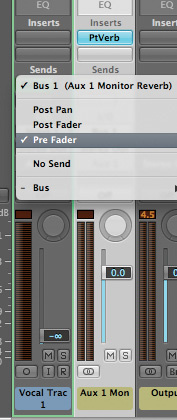 Watch out for latency issues when using a software reverb whilst recording. To get around this, it's best to create a send to a bus and add your reverb there.
Take Two
Many people gave up on Logic Pro's Take and Quick Swipe features when introduced in version 8 after becoming frustrated by the various bugs and limitations, but most of these issues were addressed in version 9. You can, of course, still use the old technique for assembling takes by recording a pass, copying it to a new muted track, and chopping and dragging the best sections to a separate 'comp' track. However, using Takes has many advantages over this method. Since Logic Pro packs each new pass of a vocal into the Take folder while automatically muting the last one, it's possible to just run over the vocal several times without having to worry about dropping in and out or dragging regions around onto new tracks. This is particularly useful when you're working alone, as it doesn't get in the way of the creative process: just press record, sing, go back to the start and repeat until you have enough takes.
Clicking on the small arrow to the left of the Take folder reveals each of the recordings, with the comp lane assigned to the track itself at the top. You can swipe the sections of each take that you want to play back on the comp lane, and easily audition different passes by clicking on the other takes above or below the swiped regions. These regions within the Take folder can be shifted around by toggling the default Take folder editing mode to 'off', either by clicking on the small block icon on the right of the Take folder, using the associated key command, or from the pull‑down menu. Once you've done this, swiped sections can be cut out using the scissors tool and then dragged with the mouse or nudged via key commands just as if they were normal track‑based regions. Using the Take folder enables you to swipe the different sections of each take that you want to play back. The regions themselves can then be shifted around by toggling the editing mode to 'off' using the button circled in red here.
With earlier versions of the Take feature, there were many reports of recordings being placed randomly out of time when reloading a project. If you're still concerned about this, you can always 'flatten' the comp track to create a permanent audio file by using the menu item accessed from the right‑hand pull‑down arrow on the Take folder. However, if you do this, you'll lose the ability to use your takes in other creative ways. For the best of both worlds, Alt‑drag the Take folder to another track, mute the copy and flatten the original before saving the project.
If the pitching of your vocal isn't as spot‑on as you'd like, Logic Pro's automatic Pitch Correction plug-in can help correct minor tuning discrepancies. It can also make a stab at the synthetic sound so beloved of modern pop productions. Once inserted on the vocal track, the plug-in analyses the notes being sung and corrects them to the nearest pitch. You can bypass any notes you don't want to correct and, if you set the Response slider to 'fast', create that sliding vocal effect made famous by Antares' Auto‑Tune in automatic mode. Logic Pro's plug-in is not as transparent as the Antares software and lacks a manual mode for less obtrusive correction, but it's still a useful tool in some situations.
Modern pop and rock vocal recordings often suffer from sibilance as a result of an attempt to get them to cut through a busy mix by boosting upper‑ and mid‑range frequencies. I'm not a fan of de‑essers, as they tend to make the voice sound unnatural, so I prefer to de‑ess (and de‑pop) a vocal by bringing down the level of each of the offending sibilants using volume automation. If you click and drag the mouse around the sibilant area while holding down the Shift, Ctrl and Alt keys, four automation nodes are created, which can then be dragged around to 'duck' the audio. It's a time‑consuming process, but can really make the difference in a mix. Once you have automation working on a track, you can change the level of all nodes on that track, either by Alt‑clicking at the beginning to select all the nodes and dragging them all up or down, or by inserting Logic Pro's Gain plug‑in and using its level fader. Both methods will easily allow you to produce 'vocal up' and 'vocal down' mixes. It is possible to de‑ess vocals by reducing the level of offending sibilants with volume automation.
Exportise
Now you've constructed the perfect comp from all the takes, those 'also ran' recordings can still be used in a creative fashion. Using a copy of the Take folder, or by selecting the 'Export active comp to new track' menu item, you could, for example, create a 'second best' take and use it to double the lead vocal in various sections of the song. You can also use these, otherwise discarded, passes to create backing vocals; using a slightly different recording will always sound more natural than just copying and processing the lead vocal. If you've managed to obtain several usable takes, you can create multiple backing vocal tracks from these. Of course, all these comps will be near‑copies of the lead vocal comp, so to turn them into useful backing vocals, distinct from the main vocal, we'll have to use some of Logic Pro's other processing tools.
Artificial Harmonies
How you go about creating harmonies in Logic Pro depends on several factors, the main ones being the musical key of the song and which intervals you wish to add as harmonies. A third-party plug‑in, such as Celemony's Melodyne, makes creating harmonies much easier, as you can drag around the pitch, position and duration of individual notes in a recording as if they were MIDI data. But, while Logic Pro lacks such a sophisticated tool, there are still quite a few things you can do to create harmonies from alternate takes. The simplest is to use Logic Pro's Pitch Shifter II plug‑in. This generates harmonies in semitones and cents (100th of a semitone), which can then be mixed in with the original, though you'd set this at 100 percent to create a 'pure' harmony. These intervals are fixed, however, so some of the notes generated may not be in the correct key. You can get around this by automating the plug-in's interval settings at the required points.
Another method would be to cut out these sections, copy them to a new track and insert another Pitch Shifter II plug-in, which will adjust just this section to the required pitch. Actually, there's nothing to stop you cutting a whole vocal take into individual phrases or notes, copying each to its own track (with a separate Pitch Shifter II each) and adjusting the harmonies to taste.
 The Formant feature of Logic's Vocal Transformer plug‑in can be used to change the sound of the singer significantly. However, be wary of audio artifacts that could result from heavily processed vocals.Logic Pro's Vocal Transformer plug‑in has a Formant feature that, if used in small amounts, can change the apparent gender of the singer, which may help to make a backing vocal sound less like near copies of the original lead vocal when used in conjunction with pitch changing. Logic Pro's pitch-adjustment plug‑ins do create audible audio artifacts, which get worse the further you move from the original pitch. However, by running these processed vocals through echo, reverbs and modulation plug-ins (such as the Ensemble or Chorus), you can mask these to a certain extent. As backing vocals are often mixed lower than the lead, these artifacts can usually be made inaudible.