

If you can't afford to shoot with multiple camcorders, it may not matter: with a little trickery and a single camcorder, you can produce pretty much the same results.
Just as it would be rare to make a professional band recording with a single microphone, single‑camera video shoots in the professional video world are equally uncommon. Multi-camera shoots capture the action from different angles, providing a variety of footage and letting the video editor pick the best parts and edit them together into a seamless video. Multiple perspectives keep up the interest level, and give the audience the illusion of being in different places on or near the stage.
In an ideal world, you'd have multiple camcorders shooting from different angles: one dedicated to close‑ups, one taking wide shots of the band, one picking up audience reactions, and so on.
Unfortunately, multi‑camcorder shoots require not just multiple camcorders, but multiple people to operate them. If you're on a tight budget, or just getting started with video, it's likely you'll have only one camcorder and one operator. That's where this article comes in! Remember that videos are all about smoke and mirrors, deception, and trickery. You are not shooting a documentary, your job is to provide a pleasing, and hopefully exciting, visual experience — and all's fair in love, war, and creating a music video.
Start With The Sound
Big‑time movies typically shoot the picture, then add the audio. This explains why it's difficult to alter video in traditional DAWs that import video tracks: they're designed to leave the video track pretty much intact, and let you cut audio to it. You definitely need to be able to edit the video in an NLE, or you won't be able to use the following techniques. For your music video, it's best to get the music right, then add the video afterwards. It's much easier to edit the footage from our fake multi‑camcorder shoot if the audio is tweaked to perfection and sounds great.
If you're shooting a live gig, the audio should be recorded via a direct feed from the mixing console, using a stand‑alone hard disk recorder, CD‑R, or solid‑state recorder (such as those from Roland, M‑Audio, Zoom and the like). If you can afford to go first‑class, use something like a Korg MR1 or MR1000. For 'studio' videos, use a well‑mixed recording. Don't depend on your video camcorder's audio, but always leave the built‑in mic turned on so that it records audio. We'll see why in a bit.
Whether your audio comes from concert footage or the studio, get someone who really knows how to master to do the mastering. Clean up any noise, use compression if necessary, apply EQ — whatever it takes to make the audio outstanding. This is important not just for the obvious reasons, but because if there are any rough spots in the video, good music will distract people!
 What appears to be an extreme amount of EQ worked perfectly to 'master' some otherwise dreadful camcorder audio.And what if you can't get good-quality audio? Well, any audio is better than none. I've often 'mastered' camcorder audio so that it is at least usable, and in some cases, surprisingly good (see above).
Get Real
Before describing in detail how to fake it, there is actually an easy way to do a two‑camcorder shoot with one person and two camcorders. Set up one camcorder on a tripod for a wide shot of the entire band, and let it run on automatic mode. If there's a quality difference between the two camcorders, this should be the higher‑quality one. In addition, have a 'mobile' camcorder so that you can get action shots and close‑ups of the various band members as they solo and do other (hopefully) interesting things. You certainly don't want to miss one of the players biting off a chicken's head or something equally exciting, so keep an eye out!
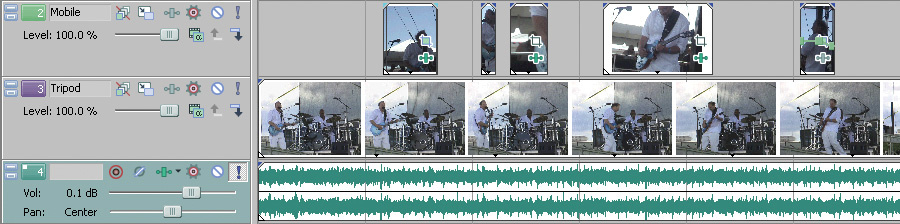 In this screenshot from Sony Vegas, the lower video track is from a camera on a stationary tripod, while the cutaways in the upper video track are from a 'mobile' camera.While you're editing, cut to the stationary video during the times when the mobile camcorder is moving around from a shot of one band member to another. The quality of the still camera should be good enough that you can pan, zoom and add motion to the image in the edit, though the camcorder doesn't move. You'll certainly want to zoom this shot in close enough so that you don't capture yourself doing shots with the mobile camcorder. You can then weave between the two sets of footage to create a compelling video.
Also, don't forget that a lot of people bring camcorders to concerts, even if only on their iPhones. At one recent gig, I thought I was stuck with a single‑camcorder shoot, but it turned out that someone in the audience had been off to one side with a camcorder and had captured the entire concert. Perfect! We got in touch, I received a copy of the footage, and I had a real two‑camcorder shoot. Her shots were questionable in some places, but that's where the special effects and cutaways (described later) come into play.
Multi‑Take Faking
For this next technique, let's assume you're making a video of a group under controlled conditions, such as in a rehearsal studio. Have the group play to a predictable tempo (perhaps a drum machine or click track) and you can simulate the effects of a two‑camcorder shoot just by shooting the same tune multiple times from different angles. Lay the video footage over the high‑quality audio track, obtained from a gig or in the studio, and cut away.
For example, you might take a shot where you record only the singer, another of the rhythm section, another of the guitarist, and then one with a distant view of the band as a whole. When it's time to edit, line up all these tracks and nudge the audio on each track to match up with the master, high‑quality audio track. There may be some drift over time, but it really doesn't matter, because the camcorder audio won't make it into the final edit. If the visuals are off by a few milliseconds compared to the audio, no one is going to notice. Besides, as you'll be cutting back and forth among various takes, you can make sure that each take is lined up properly with the master audio if there is any drift.
If you're pressed for time, another option is to simply play the master audio over the studio monitors or a PA, and have the band lip‑sync, making it easy to get multiple takes. However, lip‑syncing for a convincing effect is not always easy. Interestingly, I've often found that a group playing music without the reference audio (but to a reference click or drum machine) will actually generate audio that lines up better than lip‑syncing. I suspect this is because they're 'feeling' the music more, and therefore matching up more readily with their previous takes.
I have also run into situations where the visual of, for example, the lead singer might be stunning but some words just don't line up with the mastered music. In almost all these cases, I've been able to fix the video by using a velocity curve on the video to speed it up or slow it down, thus having the visuals match the music (see above). This may sound as though it'd be tedious and difficult, but any decent software lets you 'scrub' at low playback speeds, letting you see exactly where the visuals and audio need to line up. No one will notice these small speed variations unless the visuals are way out of sync with the audio.
 Here's an example of how a velocity curve was added to a lead vocal, changing the speed of the video to match the visuals to the audio.Although I've stressed recording to a consistent tempo, it may not be absolutely necessary, especially if you have enough footage to be able to do quick cuts. If the keyboard player is only on for a few seconds before a cut to the bassist, there won't be enough elapsed time to see the keyboard player drift out of sync.
Do pay attention to the lighting, because you won't want to have dramatic changes when going from one piece of footage to another. Become familiar with issues such as setting white balance so that the lighting is consistent, ensuring that colours end up looking true; most camcorders let you set white balance to compensate for different illumination sources, such as sunlight, halogen lights or incandescent lighting). You don't want half of the shots looking like they were taken at noon on a sunlit day, and the others inside a darkened club. There are ways to compensate for these differences in video editing programs but, just as with audio, it's always best to get the material right at the source.
Faking It For Real
If you're making a video of a one‑time‑only live gig, matters get a little more complicated. Suppose you want to create videos of the band's two big 'hits.' Capture wide shots that take in most of the band on those two songs; during the songs that won't be used, use the opportunity to cheat! Take potential cutaway shots — facial shots, audience reaction shots, and shots of musicians where you don't see their hands moving on the instruments too clearly. Even if these aren't too closely associated with the audio, you can lay them in over the video and no one will be the wiser. For example, if the lead singer is dancing when not singing, you can probably lay this in anywhere vocals aren't happening, as long as you pay some attention to lining up the moves with the beat.
Here's another trick, if circumstances allow. After the show's over, before the band breaks down, take close‑ups of the lead singer singing the song (always useful shots to have) with the band in the background. Not possible? Then shoot the singer singing — with or without the band — against any nondescript background that looks similar to that of the real performance. You're just looking for close‑ups you can cut to the audio later. Ideally, the singer would sing along to recorded audio of the gig from your solid‑state recorder or equivalent, but if you're cutting in specific phrases, the timing probably won't matter that much.
Some Assembly Required
Now that you have the footage, it's time to put it together. Import the mastered audio track into your video-editing program, then the video with the wide shots. Do include the audio stream from the cameras too, so you can match it to the mastered audio, as mentioned previously. Next, remembering that creating a successful video is all about editing (even more so than audio), it's time to assess your footage.
Play the main wide shots and consider where you're going to add variety. Let's say that after the keyboard player finished a great solo, you panned the camcorder back to the lead singer but shook the camcorder a bit while panning. Is the video doomed? Of course not! Right after the keyboard solo, you can cut in a shot of the audience clapping and cheering. It could be from a different song, or even from a different concert. I won't tell anyone!
You don't have to go back to the wide shot of the singer. For the first few words, cut away to some of the video footage you recorded of the singer singing while the band was breaking down. Match up the video as best you can to the audio. Let's suppose, worst case, that the singer sang without a reference, and rushed a bit; now's the time to use the 'velocity envelope' trick to slow the motion down. To add more interest, you can crossfade from the close‑up back to the wide shot.
This is where you can use the facial shots you took while the band were playing other songs. Suppose the guitarist is about to play a solo and you're zooming in from the wide shot to frame the guitar a bit better. Throw in a face shot to cover the transition. As with the audience reaction shot, it doesn't need to be from the same song. A grimacing guitarist face is going to look pretty much the same anyway. As long as there isn't a close‑up of the fret‑hand, you're probably OK. The toughest instrument is drums, because the drummer will be moving rhythmically; use all your editing mojo to line up the motions with the rhythm of the music.
Now it's confession time. I've not only used close‑ups of hand motions from players playing different songs, but even different players. If you're zoomed in or out enough, and the part is short, no one can tell.
Ready For The Big Time
You shouldn't expect to try all these processes at one time and have everything work perfectly, as they'll take a little practice. One crucial element is learning the material you're shooting: know when the solo kicks in, when the lead singer points at the audience dramatically, when the elves come out carrying the 19-inch replica of Stonehenge, and the like. Make sure the primary camcorder captures all these moments, because they're the most important part. In between, you'll be able to use the alternative footage, as described.
Just remember that if the audio is great, you're already two‑thirds of the way there. Get the eye candy right too and you'll have the audience in the palm of your hand.
Special Effects

Although you don't want to over-use special effects, they can come in very handy for covering up glitches. For example, imagine you've missed the first bar of the keyboard player's solo (you still had your camcorder on the drums, because the drummer was spewing fake blood like Gene Simmons and it looked kind of cool).
Time to bring out the effects! Certain effects, like 'pixellation' (where you can change the pixel size to make the video 'blockier'), 'glow,' and 'light rays' remove detail from the shot. Use any clip of the keyboard player when the solo begins, and if you process it enough, no one will know you missed the solo's real intro. Crossfade with the original footage, and reduce the amount of effect during the crossfade so that the effect is gone when you return to the correct footage. Yes, special effects can look cool, but they can also help gloss over inconsistencies.
Adding some 'glow' effect (shown here) can cover a multitude of video sins. During this brief transition to the next shot, it's impossible to tell that I'm not actually playing what's on the audio track.