

 Photo: Mark Ewing
The Kaoss Pad Entrancer builds on the success of the Kaoss Pad 2, offering the same versatile X-Y pad-driven audio processing capabilities, but adding video processing to give you real-time control over both sound and vision.
There have been superstar DJs all over the world for years, but the concept of the VJ (video jockey) has taken longer to get going, although it's been big in Japan for a while. Now that the idea is beginning to find favour in other cultures too (see the links near the end of this article), recent developments like Roland's V-Link connection protocol (which permits the sync'ing of video to other MIDI gear), and Korg's new affordable video-orientated processors and mixers begin to make sense. The new Kaoss Pad Entrancer under review here adds video functions to those of the earlier audio-only Kaoss Pad 2, which seems to have found a niche predominately in the DJ market. However, as Mike Senior pointed out in his SOS November 2002 review of the Kaoss Pad 2, you shouldn't dismiss this unit if you're not into DJ'ing. With a selection of 100 audio effects and the ability to manipulate them in real time via the X-Y touch pad, it's actually a fantastic way to add exciting sonic textures to any live performance, regardless of musical style.
As the Entrancer includes the same audio functions from the KP2 Kaoss Pad, I'm not going to go into detail about those aspects of this unit — you can find Mike's KP2 review on the SOS web site for that information. In broad terms, the Entrancer includes 100 audio effects, 100 video effects, two sample memories, eight Program memories, a tempo-sync function and an X-Y touch-pad for real-time manipulation. Whereas the KP2 gives you only audio effects such as filters, delays, reverbs, a vocoder, a synth, and sample-manipulation features, the Entrancer's video-processing functions offer manipulation of the video sources by adding video noise, stretching, freezing, splitting, spinning, or colouring your images, generally allowing you to distort the picture in all sorts of interesting ways.
Whilst there are dozens of software VJ programs out there, they tend to be far more complex, primarily because many of them integrate functions to generate raw material as well as the means to process it. The Entrancer is really all about real-time hands-on video processing, and in this role it excels and is truly creative.
Mixing It
You can use the Entrancer purely for audio processing, as with the KP2, or solely for video processing, or both at once. Audio can be used as the source to modify the video imagery in real time either directly or by using the Tap/BPM function. You can call up any of the 100 video effects which can be allocated to eight different Program Memories for fast recall, making it possible to move through a variety of video effects as the music progresses. In addition, you can work with the X-Y pad to create a range of fabulous visual effects.
 The Headphone socket, associated Volume control, second main (video-only) input and all-important Input 1/2 toggle selector switch are all found on the front edge of the KPE1.Photo: Mark Ewing
All of these 'instant' effects make it very easy to add live visuals to any show and give you control over how images change in real time. In addition, if you're into totally programmed performances using sequencers and a bunch of MIDI gear, you can use MIDI to control both the audio and video effects selection. For a one or two-person show, this is great for adding professional visuals to your performance. With just an LCD video projector, a DVD player and a Kaoss Pad Entrancer, you can produce a mighty visual experience to back you up on stage for very little effort.
 The rear edge of the KPE1 is busier, with the connectors for the main audio and video output, the other audio and video input, MIDI and power. The small switch in the middle allows you to determine the format of the video the KPE1 will be using: NTSC is the US standard, while PAL is used in Europe and elsewhere.Photo: Studio Mark Ewing Tour shots Bill Nelson
To get something out of the audio side of the Entrancer, it's best to feed it something. However, the video side is different, in that the unit can produce automatic video effects without having to process any video signal; you can just plug it in and watch the pretty pictures. These visuals are a collection of simple waveform, spectrum-analysis and oscilloscope-type imagery which the sound controls. The unit really comes into its own when you feed it a video signal, be it from a live video camera or moving imagery from a VHS or DVD player.
Movement is the key here, as it's the basis for generating really exciting results. By manipulating raw source material, you can impose different video effects and modify the output in real-time using the X-Y pad. When you perform a pad movement you like, you can even record the pad motion and keep it repeating. The two Sample memories let you record up to six seconds of motion each and allow you to 're-effect' them as source material in your performance. For example, you can sample a still image (a logo, say) into one memory and mix it into the video stream as required throughout a show.
KPE1 Specification
Effects: 100 video, 100 audio, 100 combination audio/video.
Inputs: Two (Input 1, on the rear of the KPE1, accepts a composite video signal via a phono connector, and stereo audio via left and right phono connectors, while Input 2, on the front edge of the KPE1, is video-only, accepting an S-Video signal via a mini-DIN socket or a composite video signal via a phono. Inputs 1 and 2 are switchable).
Main outputs: One (on the rear of the KPE1. An S-Video signal is available via mini-DIN, composite video is available on a phono, and individual Left and Right phonos handle the stereo audio output).
Headphone output: One (via quarter-inch stereo jack, on the front edge of the KPE1, with associated Volume control).
Sampling frequency: 44.1kHz.
A-D/D-A conversion: 20-bit linear.
MIDI connectors: In & Out.
Video format: Switchable between NTSC (the US standard) and PAL (the European standard).
Power supply: 7V DC (via external AC adaptor).
In The Box
The KPE1 is all about performance, and at the heart of this, as on the earlier KP2, lies the X-Y touch pad. Moving your finger around the Entrancer's pad horizontally or vertically creates smooth changes in the sound, the video or both, whereas tapping the pad in different positions gives you more dramatic changes. The pad also changes colour when you touch it, helping to create a very cool mini light show on stage. As far as the video side is concerned, the pad allows you to change various key parameters of the currently selected video-processing effect; in total, the KPE1 offers 100 different effects grouped into themes. Some of the effects are self-explanatory and will be familiar if you've ever worked with video processing before, such as Emboss, Wipe, Mirror, Squash and Spin, while others are more cryptic, such as Dispersal, Sketch and Random Snap.
Typically, moving your finger around will change the current image's scale, coloration, amount of stretch, spin speed, and forward or backward movement (this is great for 'scratching' a video sample), and the FX Balance knob tends to control the depth of the effect. When the unit is operating in 'Combi' mode, where audio and video manipulation is simultaneous, choosing a particular video effect also calls up a complementary audio effect (or what Korg deem to be complementary, at any rate — the choice is not left to the user). For example, auto-rotation of the video image is combined with a tape-echo treatment, while the Emboss video effect is combined with a phaser. The speed of movement is instant, and there's no discernible lag in the video display — if you wish, you can swirl your video around, spinning and flipping it until you make your audience ill. Oh, and on that point, Korg do include a warning about the very real danger of visually induced epileptic fits, so don't overdo it.
 The KPE1's controls and main X-Y pad are sensibly backlit for ease of use in dark surroundings — and it looks cool, too!Photo: Mark Ewing
There are eight Program Memory buttons where you can store any of the 100 effects for instant recall. This is particularly important in a live performance, as you don't really want to be dialling through 100 options looking for what you want. Unlike the two Sample Memory locations, these Program memories are stored when the unit is switched off, and will remain so until you overwrite a memory location with another choice. From a performance point of view, whilst the eight memory buttons are clearly backlit and well spaced, the lack of a 'write' or 'scribble' strip underneath them means you have to resort to sticking a length of masking tape on the unit and write any prompt notes on that instead. However, on the positive side, Korg have thought through the ergonomics of the KPE1 and must be congratulated for grouping all the buttons and switches in very handy positions and making them all backlit. This made the unit a joy to use live in the typical low lighting conditions on-stage during the recent Bill Nelson tour (see the box on the next page for more on this).
Apart from the X-Y pad, Program Memory buttons and the Hold, Sample,and Rec/Stop buttons along the front edge, the other main performance tool is a centre-sprung toggle switch on the right labelled 'Pad Motion' in the upper position or 'Mute/Freeze' in the down position. Depending on your style of VJ'ing, this switch could well become the most frequently used control on the whole unit; it can really bring a performance to life. In the Audio mode, it allows you to mute the sound on and off so that you can superimpose your own rhythm onto the music. In Video mode, it freezes the motion of any image currently being played.
With the switch pushed upwards, the unit functions in the Pad Motion mode and lets you record up to six seconds of your finger movement or tapping on the X-Y pad. Once captured you can play the captured motion back by holding the switch up. This is designed very much as a temporary performance 'macro' and it immediately disappears when you touch the pad again. This is great live, because it means you can grab bits of sound and video manipulation on-the-fly, build up 'phrases' and repeat them over the top of the music or video if you wish.
The final performance feature to look at is the Tap/BPM function. Tempo values (in beats per minute) may be entered in one of three ways. You can dial in a specific tempo value using the Program/BPM knob, or switch into the auto-detect mode, where the KPE1 tries to lock onto a strong beat from the incoming music signal. Finally, you can tap along to the beat in manual mode and eventually the unit will sync up for you. There is actually a fourth way to sync, which is to use an external MIDI Clock signal (from a sequencer or drum machine, say).
Several of the 100 effects in the audio and video selection are specifically designed for use with the BPM function, allowing the tempo to drive the visual effects and produce all sorts of dazzling colour shows, pulsating waveforms, spectrum analysis, lissajous figures and many more effects, all sync'ed to the beat.
Video Sampling
The sample modes let you sample visual material in a number of ways. As with the 'audio-only' KP2 Kaoss Pad, there are two Sample memories accessed via the two buttons on the front of the unit at the bottom edge. You can sample a still image into memory by feeding an image into the unit and then pushing the Mute/Freeze toggle level and hitting the Sample memory button number 1 or 2; it's all very fast. Once sampled, you can treat the image by selecting an effect and then mess about with the X-Y pad to create new imagery.
As mentioned earlier, you can use the same Sample memories to sample up to six seconds of motion video in both memories, and re-effect and manipulate them with the X-Y pad if desired. If you sample two different 'micro-movies' into these sample memory locations, you can use them to build interesting visual rhythms in an interactive way, and you can sample both audio and video, which is great for combined DJ and VJ work. Whether you use the Sample memories for stills or motion video, they are very 'temporary' and meant to be used as part of a live performance. Once you switch the unit off, the samples are lost.
Korg Krossfour KF4 Vision Mixer
 The KF4 Krossfour video mixer. Any of the four possible video inputs can be assigned to fader positions A and B, and then the fader is used to blend between the currently selected inputs. Here input 1 is selected for Fader position A, and input 2 for B. The person mixing can check what's on any of the four video inputs at any time without affecting the main output by attaching an optional video monitor and using the Monitor Select buttons at the top of the unit.Photo: Mark Ewing
The Korg Krossfour is a very useful stand-alone four-channel vision mixer. Its solid aluminium construction, colour and size indicate that it's been designed to complement the Kaoss Pad Entrancer, but it is equally usable in its own right.
Four video inputs are available for use with live cameras, VHS, DVD or computer sources. The idea is that you allocate each of the four sources to fader positions labelled A and B. For example, you could have a DVD player connected to Input 1 and routed to position A, and a live video camera plugged into Input 2 and routed to position B. By moving the KF4's main fader between A and B you can visually crossfade from one source to another, or position the Fader mid-way and blend the two images together. There are four different fader curves associated with the transition from fader position A to B (selected via a switch on the front of the Krossfour), and these range from the normal smooth crossfade to faster curves which result in a more instant fade from one image to another.
 The front edge of the KF4. Different fader curve types are selectable via the switch on the left, and the important Mode switch allows you to experiment with Chroma-key type image-superimposition effects, or instantly switch the main output to all black or all white. The fourth video input and the output for the optional video input monitor are also located here.Photo: Mark Ewing
It's important to mention that all of the Input selection buttons have two functions. Pressing a button once selects the input to be assigned to A or B, but pressing the button twice causes that input to ignore the source and set itself to one of four Modes, either Black, White, Chroma-key or Luminance-key, as determined by a switch on the front edge of the unit.
 The rear panel of the Krossfour houses the power and video-format selector switches, the inlet from the external power supply and the main video outputs and inputs — or most of them. As you can see from the picture on the left, video input 4 is on the front of the unit, presumably due to lack of space at the back. This was the right choice, however; the connections are better spaced as a result, and allow access more readily.Photo: Mark Ewing
The Mode function is very useful in a live performance context, as you can instantly 'kill' a video image by making the screen black or white. Alternatively, you can assign any Input to the fader position which is not currently live and fade across to it (for example when fading to black at the end of a performance). The Chroma and Luminance Key features are great for superimposing one image onto another, allowing you to mix one image into either the chroma or luminance part of the video signal of another image. There's even a small adjustment knob to allow you to fine-tune the extent of the superimposition. It's not really going to give you broadcast-quality back-projection type superimposition, but it's still very usable for effecting the overall image, and a worthy inclusion.
The last button to mention around the Input select buttons is marked Hold. As the name suggests, pressing this button will freeze the current image.
Finally, a set of buttons along the top of the unit allows you to select any of the four input sources (or the currently live output) for viewing on an optional external monitor. This feature is very useful for cueing up a source before you bring it into the vision mix. Thankfully, all of the buttons and the A-B fader are backlit, which is exactly what you want when you're fumbling around in a live venue in the dark!
My only reservation about the KF4 is the same one I have for the KPE1 — the power cable and connector are so flimsy for a unit otherwise so well designed for live use. In a nutshell, the Krossfour is a simple little unit that does its job perfectly well.
KF4 Specification
Inputs: Four (Input 1, on the rear of the KF4, accepts S-Video via a mini-DIN connector, or composite video via a phono connector. Inputs 2, 3, and 4 accept only composite video via phono, and input 4 is on the front of the unit).
Main output: One (on the rear of the KF4, in S-Video format via mini-DIN connector or composite video on a phono jack).
Monitor output: One (on the front edge of the KF4, on phono jack only as a composite video signal).
Switches: Fader Curve (four crossfade types), Mode (offering instant black or white backgrounds, and Chroma-key and Luminance-key image-superimposition effects), plus a Fine control knob for adjusting the 'Keying' level.
Video sampling: 8-bit, 13.5MHz.
Video format: Switchable between NTSC and PAL.
Power supply: 7V DC (via external AC adaptor).
Connection Points
The overall construction of the KPE1 is very solid and sports connectors on both the rear and front edges (sensibly, the included headphones socket and associated volume control are located at the front). As the unit is aimed at the serious hobbyist/semi-pro market, all of the connectors on the box are of a 'consumer' type ie. phono, DIN, and mini-DIN sockets rather than broadcast-standard BNC or XLR connectors. This is fair enough, though, as the chances are that you'll be plugging in the outputs from a VHS, DVD or a video camera as well as standard stereo audio.
Video Input 1 provides a video and audio input whereas Input 2 only provides video. Only one of these inputs can be in use at any point in time, so a switch on the front edge of the KPE1 allows you to select between the two. If you want to choose between more than two sources, this is where the separate Krossfour vision mixer would be useful; there's more on this in the box on using the KPE1 live below.
Finally, if I have a moan about any of the connectors on this unit it must be the power adaptor socket. In this day and age, we all seem to have to live with the 'wall-wart' adaptor; an understandable but often hated short cut which allows manufacturers to make the same basic unit for use worldwide and then make separate external power supplies with the correct voltage for different territories. However, in a live context, where a unit such as the KPE1 is being handled all the time, and is certainly subject to lots of vibration, the simple push-in power adaptor plug is a poor choice. Every night I used the KPE1 live, I had to gaffer-tape down the power cable to keep it in place. Whilst I realise it would be impractical to manufacture the unit with a fixed power lead, the use of a better 'screw-on'-type chassis socket and line plug would have put me at ease.
Right On Cue
You can think of the KPE1 as a kind of 'video synthesizer'. So, whether you're looking to get into the VJ club scene, add a dramatic visual backdrop to your live show or produce interesting video manipulation in a performance art environment, the Kaoss Pad Entrancer is a super little unit that's well built, simple to operate and is bursting with audio and visual possibilities. When you add in the Krossfour vision mixer, it makes for an excellent compact setup that'll serve you well in any live context.
Using The KPE1 & KF4 Live
Back in October 2004, Bill Nelson invited me to get involved in producing the visuals for his 30th Anniversary Be-Bop Deluxe & Beyond Tour, sponsored by Sound On Sound. Given the limited budget, there was no chance of getting a massive video production together, so I looked around for equipment that would contribute a lot to the visual experience without necessitating the use of broadcast-type gear.
 Bill Nelson live on tour in Autumn 2004, with the KPE1/Krossfour combination providing video effects on the screen behind him.Photo: Beck Studios, Wellingborough
The Korg Kaoss Pad Entrancer and its sister unit, the Korg Krossfour mixer, seemed to be the perfect solution. With the addition of a couple of budget video cameras and some visual content fed from a domestic DVD player, this compact setup provided everything I needed to fill a two-hour live show every night, while keeping the visuals fresh for anyone who attended more than one gig.
For the tour, I had the challenge of having to work in different venues around the UK, from small clubs to large theatres. The space available beside the mixing desk was always restricted, so the compact size of both these Korg units really paid off.
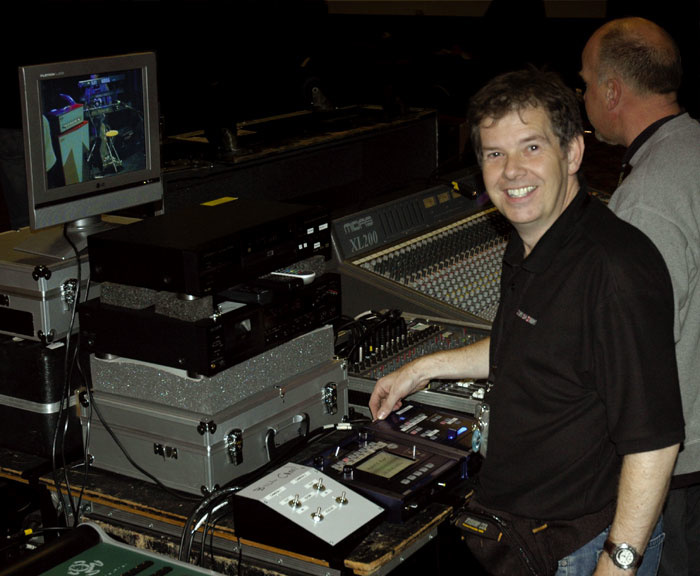 The author on the Bill Nelson tour with his live video mixing rig. The LCD monitor at the top was for checking the four inputs to the Krossfour video mixer without affecting the main output to the on-stage screen. Below that is the DVD player used for the pre-recorded video material during the show, and at the bottom are the white control unit for the two cameras used on stage, plus the Entrancer and Krossfour (right). The Korg units both had to have home-made 'labelling' added due to the lack of built-in scribble strips.
Before the tour started, I created some motion video content for each song in Adobe Premiere and burnt this to DVD. On tour the DVD was played directly into video input 1 on the Entrancer, where I manipulated it in real time. In a simple setup, you could get away with just these two pieces of kit. However, as this was a two-hour concert and Bill Nelson would talk between songs, I needed to fade out the video being projected on the stage screen between each song. As there is no way of doing that easily on the Entrancer, I needed a simple vision mixer, and this is where the Korg Krossfour came to the rescue.
The Krossfour also worked perfectly with the two live video cameras. The setup was simple. The Entrancer was plugged into Input 1, and the two cameras into Inputs 2 and 3. Input 4 was unused and set to Black, although it is possible to make any channel on the Krossfour black at any time, regardless of the device attached to it. Typically, I'd start off a concert with Input 4 assigned to fader position B, and the fader fully set to B, outputting a blank screen. Then, once the DVD started playing, I'd fade across to position A, which would have the DVD output assigned to it, thus bringing the movie on the DVD onto the main stage screen. The Krossfour's Monitor output was plugged into an LCD TV, so I could preview images before I committed myself to fading them up on the large live screen. This was particularly useful for checking the feeds from the live cameras for the numerous guitar and sax solos, allowing me to make sure that they were correctly zoomed in and focused before fading the picture up into the overall mix.
When you're running a live show like this, reliability is absolutely paramount. Personally, I would not have trusted a computer-based software solution in this situation, and a system crash part-way through a live concert was not a risk I was prepared to take!
Both the Entrancer and the Krossfour are solidly built units in metal boxes with rugged, well-sized buttons and switches, and control knobs designed for heavy use. There's nothing fragile about this kit, which is exactly what you need on the road.
VJ Web Links
If you'd like to find out more about VJ'ing, there are plenty of sites on the Internet with further information. Here are three starting points:
CHANNEL 4
This VJ microsite was recently launched by UK TV company Channel 4.
AUDIO VISUALISERS
A good site which provides lots of info about the history of video synthesizers and VJ software.
VJ CENTRAL
A community site covering the VJ scene.
Pros
- Simple to use.
- Rugged construction is excellent for live use.
- In most cases, the KPE1 is a more suitable solution for live video processing than software-based alternatives.
Cons
- Separate power supply.
- No 'scribble strip' below the Program Memory buttons.
Summary
Don't think of the KPE1 as being purely for DJs, or indeed VJs; as well as incorporating all the excellent audio and X-Y controller features of the Kaoss Pad 2, it can be used by anyone who wants to add live video effects to their performances.
information
KPE1, £599; Krossfour, £499. Prices include VAT.
Korg UK Brochure Line +44 (0)1908 857150.