

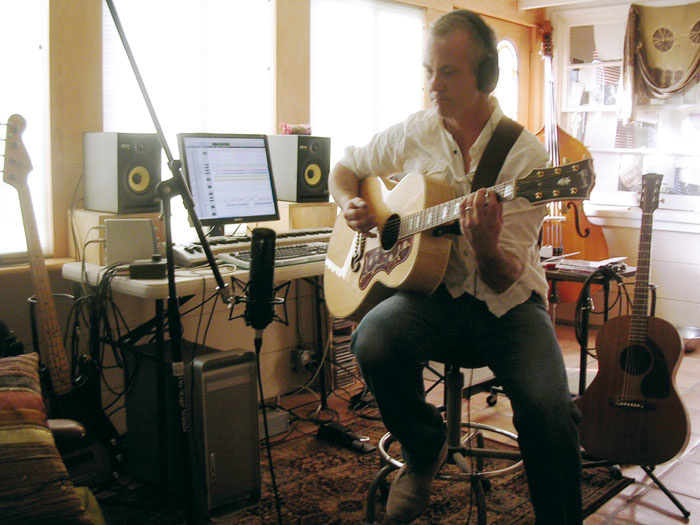
 J.P Fitting, laying down guitar for this month's Mix Rescue track, 'Prisoner Of Routine'.
This month, we invited a guest mix-rescuer, Luke Fletcher, to create an authentic '60s feel.
When embarking on any mix, the first question has to be "what sound and feel to the music does the client want?" In this case, the answer was that he wanted the feel of the late '60s, along the lines of the Kinks' 'Waterloo Sunset', but also a full clean sound, using modern recording techniques (see the 'Rescued This Month' box for more details of the brief).
I received the recordings for 'Prisoner Of Routine' as WAV files, which I imported to create a basic arrangement in Pro Tools. The outputs from Pro Tools were sent to my desk (a Soundtracks CM4400), allocating each track in Pro Tools its own individual track on the desk. I set all the input levels and faders (leaving all tracks without EQ), sat back, and listened to the mix.
You should always listen to the track you are about to mix with as little processing as possible, as this allows you to assess the quality and depth of the individual recordings, giving you a feel for how the tracks can blend together. I've noticed a tendency these days, when using software-based recording facilities, for people to process the audio and virtual instruments instantly after recording them — that is, applying compression, reverbs, EQ, modulators, and so on. My advice is that if you have recorded the sounds you want at the optimum level and accurately, then you really have no reason to do much processing until the final mix stage of your track. This allows you to weight your mix accurately or, in other words, to work out how best to fit the individual tracks into the context of the whole mix.
The first thing I noticed on 'Prisoner' was that a lot of the tracks were quiet and lacking in body. The sounds of the tracks seemed to be missing the essential frequencies that would allow you to distinguish them individually when all the tracks are mixed together: basically, they were lacking character. So, before applying any processing to bring the 'body' back to the tracks, I normalised all the tracks in Pro Tools, to bring them to a useable level. It is often worth doing this before you mix — though only if it is needed. Good recordings, with healthy levels within the frequency range of the instrument, will avoid the need. Loud, undistorted recordings mean better material to work with and consequently less processing in the mix.
I had to normalise the toms, bass guitar, overheads, some vocals and electric guitars, and with this job done, I set about trimming and removing unwanted noise and sounds on some of the tracks. If you look at the screen shots on this page, you will see how much has been removed. This is a good practice because it reduces the amount of unwanted noise within the mix, as well as freeing up your computer hard drive's read-write head for other duties.
The last preparatory thing I had to do was arrange the tracks in the same order as on the desk: I tend to stick to conventions here, with drums first, then bass guitar, followed by acoustic and electric guitars and, last but not least, the harmonies and lead vocals. Now I was ready to start processing each individual track.
Drums
There was a lot of microphone spillage on the drum tracks so, when listening to the tracks individually, it was hard to define the drum sounds that were recorded. I solo'd the bass drum recording and noticed that the microphone had picked up the snare sound as much as it had the bass drum — and the rest of the kit was not far behind in level either. To top it off, the bass drum lacked punch, as if it was a small cardboard box rather than a drum — this was not good and needed repairing! I used the four-band EQ within Pro Tools to reduce the frequencies where the snare and cymbals interfered the most with the bass drum (high mids, high frequency). If you find you have to take tops off the bass drum like this, don't panic, because the bass drum doesn't need too much top end — maybe just a little bit in the high-mids to produce the click sound. To ensure that I did not lose too much from the high mids, I used the Q control to narrow the bandwidth of the EQ. I also used harsh compression (with a 6:1 ratio) within Pro Tools to make the volume of the bass drum beats more consistent. I only applied a bit of this process, as overdoing it had the potential to destroy what sound I already had to work with. To finish off the processing, I routed the track to an inexpensive Behringer Composer. The purpose for this was to use its expander-gate to smooth the bass drum sound out with a hint of soft compression.
 Much of the work on this mix was about improving the quality of the recorded raw material. The two screen shots show the view before (top) and after (bottom) the cleaning and restoration process that Luke carried out in Pro Tools.
The snare drum provided the backbeat and needed to be perceived clearly throughout the song. It was not as bad as the bass, but it was still a little weak, so I routed the snare directly to a Neve EQ unit and thence to the desk. I applied some minor EQ adjustment within Pro Tools, but kept it to the bare minimum, just filling the holes within the overall sound of the snare. What the snare needed was presence, and that's exactly what the Neve preamps supply. I also used the EQ on the preamp units to improve the sound: job done.
The hi-hats also suffered from significant spillage from the rest of the kit. Personally, I would not recommend removing unwanted spillage by gating the hi-hat: cymbals and gates just don't mix in my book. To bring out the hi-hats, I removed nearly all of the bass frequencies and then swept through the high-mids on the desk to find the sound of the stick striking the hat. I then applied 7dB of boost to the desired frequency and reduced the overall gain. The result was a bright hi-hat that had hardly any other sound interfering with it.
All the toms were recorded onto one track which, again, had lots of spillage, but this was easy to correct. Using Pro Tools, I simply cut out the offending spillage between the tom hits, leaving me with good clean tom tracks. The recording of the toms was actually not bad, and only needed some low-mid boost to make them sound a little fatter.
The overhead recordings were supplied as a stereo track, which I patched to two separate channels and panned accordingly. Overhead microphones generally capture the whole kit and when the resultant recording is mixed in correctly you achieve the effect of live drums. However, when mixed with the rest of the drums these tracks sounded as if they had been recorded live in a garage. I had already got the rest of the drums sounding as good as I could and this meant that all the lower frequencies were covered — so all I needed from the overhead tracks were the cymbals. As with the hi-hat, I removed a lot of the bass frequencies, and added some high-mids, but this time not as much as for the hi-hats: I applied 2-3dB of boost to the mids, but I also removed 6dB from the low-mid and low frequencies. The result was some nice, crisp-sounding cymbals.
With the drums now sonically repaired, I panned the drum tracks to give a nice stereo feel and, with this done, the drums were ready for the mix.
Rescued This Month
J.P Fitting is a musician from Burbank, California, who records and plays around the LA area and is also one of the musicians for the Comedy Central Network TV show The Naked Trucker & T-bones Show. He also played bass on three songs on the new Nickelodeon Records Sponge Bob Square Pants album, Best Day Ever (how could we refuse a request from someone who has worked with an artist as revered as Sponge Bob?).
J.P told us: "I recorded this song, Prisoner Of Routine, in my home studio via Pro Tools LE 7 and an M Box, running into a souped-up G5 using a Pearlman mic, a Vox Tonelab for electric guitars, and a Fender P-Bass direct. I had Andy Paley overdub live drums later. I was going for a kind of Waterloo Sunset vibe, trying to do a '60s-flavoured pop song, but it's not quite there. The tambourine and acoustics don't sit right and some of the drums vary a little off the 'grid' that I recorded all the beds to. I wanted that 'Hal Blaine' big-fill kind of drum track, and I think it's almost there, performance wise. I tried to play a melodic, Brian Wilson-inspired bass line, and added some baritone, à la 'Good Vibrations' , for more flavour, which I'm not sold on now. I feel the song is almost there but I'm not thrilled about the lead vox sound, the drums, the doubled acoustics or the tambourine. It isn't adding up for me. I love and subscribe to your mag and would be thrilled if you could help me with my mix!"
Bass Guitar
The next step was to get the bass guitar sound. The bass guitar recording sounded 'thin', by which I mean that the lower mids and bass would ideally have been more present within the recording. These frequencies are essential to achieve a clear bass sound, as that's where we perceive the fundamental tone of the bass. To set things right, I decided once again to bring out the Neves. I patched one of the Neve EQs into the insert on the bass channel of the desk. The character imparted by the Neve resulted in an instant improvement, even without using any EQ. I then started to apply EQ, using the four-band parametric EQ within Pro Tools, as I wanted to try and bring some of the lacking frequencies back before doing anything on the desk. I'm a great fan of hardware EQ, but I chose not to use the desk or the Neve for a good reason: analogue is great, if you have good equipment, but one drawback is the electronic noise generated by circuitry and op-amps. So if you start to apply EQ and overall gain to a track that is thin (missing fundamental frequencies) on an analogue desk, you will find that the floor noise will significantly increase. Quite a bit of processing was needed to repair the bass sound, but I only raised the frequencies that were lacking in volume. I prefer not to apply EQ to existing prominent frequencies within the sound because, though this may sound good at the time, when it comes to mixing, you usually find that a lot of the tone from the bass will be lost. Instead, try to raise the frequencies that are underneath the predominant ones, as this will allow more control over the tone and presence when mixing. To beef up the sound of the bass I used a Tubetech 1A stereo compressor. If you don't have access to something like this there are plenty of good plug-in alternatives you could use.
Acoustic Guitars
The acoustic guitars came as one stereo and one mono track. They didn't sound bad, but the stereo recording had the left track sounding in phase, and the right track out of phase, which meant that it sounded rather as though a flange effect had been applied. No amount of repair could fix this, which meant I couldn't use the stereo track. However, the performance on the mono track was very similar to that on the stereo track: Eureka! All I had to do was replace the right side of the stereo track with the mono track and pan it accordingly. Using the preamps, I created separation between the individual tracks (without applying any of the EQ), as well as adding a little body to each guitar track.
About Luke Fletcher
This month, we invited Luke Fletcher to do a mix rescue for J.P Fitting (see the 'Rescued This Month' box). Luke cut his teeth as a studio assistant, working with artists such as Primal Scream, and as a recording and mix engineer with various artists, including The Wedding Present. We asked him to tell us a little about his approach to recording and mixing.
"I've been into music and sound since the age of four and I'm 45 now, so it's a long and bloody story and I won't go into it here. But I will say that what fascinated me the most and drew me into music making was that, when hearing sounds coming out of any system, the music sounded as if the people who created it were performing live just for me. Before you ask, no, I haven't had a dodgy mushroom breakfast today: it's the only way I can really find to describe what I was listening to at the time and how, still to this day, I perceive sound.
 Mix Rescuer Luke Fletcher, with a stack of his beloved outboard!"What really got to me all those years back was that, when I closed my eyes, it felt as if I was in the same room as the artists playing. How could this be — was there a miniature cloned band inside my music system? (Now you really are thinking I had a dodgy breakfast...) I may have lost my naivety, but this question has nonetheless interrupted my much-needed beauty sleep many times (take a look at my picture, you'll understand).
"My quest to discover the answer to this all-important question led me to explore the world of mic/line preamps. The technology used in the preamps of the '60s and '70s was producing a particular sound — a presence within the recordings. But before anyone mentions valves (which seem to be particularly in vogue these days) I should point out that by the mid '60s transistors had pretty much superseded valves, and nearly every desk being manufactured at that time used solid-state technology. In fact, the only mainstream valve desk manufacturer I know of today is TLA, and their valve desk was developed in the late '90s (custom valve desks were produced before the TLA, but nothing on any significant scale).
"Knowing about the technology that was used in particular places and in particular eras allows you — at least to a degree — to recreate the sonic qualities of the music created there and in that period. So if you want to your mix to sound and feel like that of a certain period, then in my book you must use some of the technology that was used at the time. The problem here is that much of that type of technology is rare and expensive — or just bloody expensive — and it is therefore beyond the reach of the average project studio owner.
"Lucky for me, then, that I am the proud owner of six Neve/Tweed EQs that I had custom built by Funky Junk. Also, as you can see from my equipment list [elsewhere in this article], I do tend to have a lot of outboard analogue equipment and, yes, I do have some valve compressors too. Stories of gear acquisition can get long and boring, so I won't waste time writing about that!
"Of course, you're not limited to hardware. You can recreate the sound of the '60s, '70s or '80s using your computer and software as well, just by selecting certain plug-ins. However, I tend to find that digital processing results in too clean a sound, and doesn't colour the sound in any way generally. To compensate for this, there's a growing tendency for people to use outboard preamps to bring presence and body back to their mixes."
Electric Guitars
The electric guitars presented a problem, in that tons of noise produced by the electric guitar amps during the original recordings was nearly drowning out some of the guitar tracks altogether. Using a Rebus noise gate, I removed some of the amp noise, but this affected some parts of the song where the guitar performances used the effect of the guitar fading out. I really could not do much about this due to the nature of the recording, but the client had stipulated that they wanted the electric guitars to dominate the mix more than the acoustic guitars. To achieve this, I needed to bring out the presence within the electric guitars. Yes, you've guessed it: I turned to the Neve mic/line amps and their EQ to boost the overall frequencies, and then used the EQ on the desk to allow me to remove the unwanted noise. There's a good descriptive saying that all producers and sound engineers use in this scenario (I should stress that I am not referring to the artist or the song construction, merely the sound quality of the recording!): 'You cannot polish a turd'. So the end result was a compromise between removing some of the noise and achieving sufficient tone and boost on the guitars.
Vocal Harmonies
Before looking at the lead vocals, I turned to the harmonies, which presented another problem. The volume for the harmonies varied throughout the recording, as if no compression or limiting had been used. I felt that if I used compression now I would need to compress the tracks so severely that the sound would be suffocated by the compression process, and limiting would also be too severe. There is an easy answer to this, but it is a long and tedious process: I went into Pro Tools and drew in level automation for all the recordings on all the tracks for the harmonies, line by line. This seemingly took forever, and the mouse button practically became embedded into my finger, but the happy result was equal volumes, without undesirable dynamic processing. Two harmony parts were then panned to nine and three o'clock, with a third at dead-centre.
Remix Reaction
J.P Fitting: "Luke did a stellar job of mixing 'Prisoner Of Routine'! I'm really honoured that you guys would take the time to do this, and I think it's a pretty neat and even surreal experience doing mixes across the dark void of cyberspace! I'm really grateful to you guys: thanks a lot."
Lead Vox
The lead vocal was in need of major repair, as the recordings had as much presence as a dead dog. The performance also presented obstacles, as there were some very big dynamic changes. I started by using the EQ within Pro Tools, and then routed the track to the Neve EQ. After this, I patched the signal to the Tubetech 1A, and then back to the desk. Using the EQ on the Neve, I gave the vocals more body, which had the effect of improving the overall vocal performance. With this done, I could then compress the vocals to control the volume of the track. Because I had to use quite a lot of compression to regulate the vocal volume, I found that some of the top end of the vocals had been dulled. This is normal when applying a lot of compression, and it makes the signal chain important: when you come across this, it is a good idea to ensure that the EQ is applied after compression. Due to the fact that I had to give the vocals body before compression, I could not use the EQ in Pro Tools or on the preamps (you don't have the luxury of millions of instances in the hardware world!) but I did have the parametric EQ on the desk to use, which allowed me to put some sparkle back in the vocals. To do this I raised the HF by 3dB and also used the high-mids to reinforce the presence that had been lost slightly during the compression process.
Percussion
This just left some percussion tracks, which unfortunately were slightly out of time. This meant that when they were added to the rest of the mix there were some timing issues in relation to the other instruments. I decided at that point to move the percussion tracks manually in Pro Tools to correct as best I could the timing of these tracks.
On With The Mix
With everything processed and ready to go, I hit play and started to raise the faders for the drums. After the drum tracks were mixed to my satisfaction, I unmuted the bass guitar and listened to how they blended together. I could hear all the individual drums and could easily feel the separation between the drums and the bass guitar. My main mission was over: I had rescued the recordings, and now felt the main structure for the song was strong enough to bring all the other tracks into the mix. I brought up the acoustic guitars which, as described above, were panned left and right. When listening to the them, I noticed that the centre of the guitar sound was missing slightly, so I decided to EQ the out-of-phase acoustic guitar and add it at the centre of the stereo field. I kept the volume down for this track and applied an EQ cut on the high-mids so that the tone could not be noticed, but the underlying body helped to fill the gap between the two panned acoustic guitars, and the mix was now starting to sound more like a song.
 The four-band EQ used to clean up the bass drum before mixing. Luke used the Q control to narrow the bandwidth of the EQ, in order to remove unwanted spill from other instruments without losing the high-mids that produce the click sound of the beater. This was done before severe compression was used to bring a more consistent level to the kick beats.The electric guitars were mixed in next. I panned these tracks hard left and right, and placed one electric rhythm guitar just off-centre, to the left. To meet the brief, and maintain clarity in the mix, I had to allow the electric guitars to dominate the acoustics. This meant keeping the acoustic guitars low in the mix, so that the electric guitars would not clash with them (this would reduce any frequency cancellation on the top end produced by the guitars). This balance seemed to work well and had a pleasing effect on the ear.
The last tracks to add to the mix were the vocals. The backing vocals were panned left and right and, with some minor EQ adjustment on the desk, seemed to fit well. The main vocals I kept in the centre, but when playing the mix back I found that they were occasionally dropping out. This was due partly to the recorded levels and partly to the fact that the mid frequencies of the vocals clashed with the acoustic guitars and backing vocals — so, even with all the processing done to the main vocals, I was still encountering problems. To process the vocals more would not help: I needed to find and cut the clashing frequencies on the other parts. This would create a hole in the mix to allow space for the main vocals to come through. I swept through the high-mids on the offending tracks to find where the frequencies were clashing the most (the quickest way to do this is turn up the gain for the high-mids to its maximum and then quickly sweep through the frequency range using the frequency control pot either on your desk or the computer). Once I had found the frequencies I reduced them by 3dB on all the tracks, and then added 3dB to the same frequency for the main vocal. At last I could hear the main vocals clearly in the mix all the way through the song.
Luke's Equipment List
Alongside his Pro Tools system, Luke uses a wide range of outboard gear to mix with, ranging from the esoteric (such as the Neve EQs) to bargain-basement units such as the Behringer processors listed below. If you have the space, it may not be as expensive as you think to build a modest hardware setup based around an analogue desk. Getting hands on: in these software-dominated times it's easy to forget the convenience and immediacy offered by a good old-fashioned desk, patchbay and outboard gear.
- Soundtracs CM4400 desk
- MCI/Sony 24 track 2-inch tape recorder
- 16-track Pro Tools system.
- Tascam 48 2-track half-inch tape recorder
- Panasonic SV3700 DAT recorder
- TLA C1 compressor
- Tubetech 2A stereo compressor
- Rebus RA301 compressor
- Rebus RA201 compressors (x4)
- DBX 160 compressor
- Behringer MDX 2000 compressors (x2)
- Behringer MDX 2200 compressors (x4)
- Rebus Filter Gates (x2)
- Klark Teknik Filter Gate
- Neve/Tweed mic/line amps (x6)
- Rebus 402 stereo digital delay
- Bell Delay (Grey) 5-minute delay
- Lexicon LXP1 reverbs (x2)
- Lexicon Reflex multi-effects
- Alesis Mididverb 3 reverb
- Digitech Quad 4 multi-effects
- Digitech Studio Harmoniser
- Yamaha FX500 multi-effects
As for the rest of Luke's gear, there's plenty, but we haven't the time nor the space!
Reverb
To finish the mix, I needed to create the feel of the '60s but with a modern touch, and to do this I looked mainly to reverb. Applying reverb would also allow me to better place the tracks within the mix, and create further separation between the instruments. In the '60s, studio engineers started to use more effects in studio recordings than had previously been the case, and more experimentation happened in the studios, as the artists began to have a greater say in how their material was recorded and mixed. So, rather than the earlier technique of a stereo reverb wash over the entire mix, reverb was now being used on individual instruments, and varied with each track to create different effects. What reverbs, I hear you ask? Well, in the '60s, chamber reverb, spring reverb and — the latest technological advance of the day — plate reverb were used. These, then, would be the reverb types to help me recreate that authentic '60s feel. Using other types of reverb will tend not to give you the right character for the mix (though there are now some very good software models and impulse responses for convolution reverb plug-ins). I'm sure this is quite obvious to some, but from time to time it's easy even for reasonably experienced engineers to forget the basic rules for creating certain textures. While Luke wanted to use the flavour of the Neve preamps to warm the bass sound, the actual EQ'ing was done in Pro Tools. That way the EQ came before the limiting in the signal chain.
I set up reverbs on three aux channels on the desk. You don't need hardware for this: you can try it in your sequencing software. Using reverbs and delays as aux (or 'send') effects rather than inserts really does make mixing a lot simpler. I applied a rich plate reverb setting on my Lexicon LXP1 to the backing vocals, snare drum and acoustic guitars, and varied the amount for each instrument by using the aux send control for each track. I used another Lexicon to produce a small plate reverb, to which I sent the main vocals and electric guitars. The last reverb I used was a medium chamber reverb from my Alesis Midiverb 3 (dirty, but nice!). This I applied to the cymbals, and also used a bit on the snare. Working with the reverbs for at least an hour, I eventually acquired the sound that I was looking for.
I was happy that I'd captured the '60s feel (and, in fact, I recorded a very '60s-style mix, which you can hear alongside the final mix on the SOS web site — see the 'Hear The Difference' box for details). I then applied some other effects, to balance the '60s feel with a slightly more up-to-date sound. I also gated drums and added effects to the guitars and vocals using the Digitech Quad. The setting was a super chorus that I hoped would make the vocals (both main and backing) and the electric guitars richer.
Finishing Off
At last I'd finished the basic mix. As I was working with outboard, I would need to record the mix into Pro Tools, but I didn't want to do this until I had had a break from hearing the track: I would advise anyone doing a final mix to make sure they take a decent break after setting the mix up before recording everything. You should find that when you return to the mix your ears will be fresh, and you'll be better placed to make judgements about it. So two days later I returned to the studio and played the track, and I felt that I could slightly improve the sound with minor EQ and reverb adjustments. This did not take long, but I did have to stop myself from going too crazy through over-analysis, so I recorded everything back into Pro Tools and my work was done.
A Final Word
As you read this article, you'll have noticed that, while I'm happy to embrace software, I tend to use a lot of outboard for mixing. Many people think of hardware as being prohibitively expensive but you can actually get your hands on good outboard these days for very little money. If you have the option of using an analogue desk alongside your computer, you will find that the reverb processors I used in this mix can be purchased second-hand for about £50 to £75 each, and the sonic quality of these units is exceptional for the price. As for the Neves and Tubetech, I realise that these may be out of reach for many people, but this is an area where software is making things much more accessible: regular readers of SOS will know that there are now some very good plug-ins available that emulate the classic effects and processors, from companies such as Universal Audio, Waves and TC Electronic.
You'll also have noticed that most of the difficult and time-consuming work on this mix was about improving the quality of the original recorded tracks. Though it takes time to learn the skills of mixing, it is always a lot easier when you start with clean, well-recorded tracks. No matter how much cleaning up you do, you can only do so much with your mix when the recording quality is below par. So always do your best to ensure that your initial recordings are made at their optimum volume. This should allow you to achieve a good — or even great — mix. Trust me!
Hear The Difference For Yourself!
We have posted before and after mixes of 'Prisoner Of Routine' on the Sound On Sound web site, at www.soundonsound.com/jun07/articles/mixrescueaudio.htm/
 originalmix-0607.mp3
This is the initial mix, as sent to us by JP Fitting and described in the main article and the 'Rescued This Month' box.
finalmix.mp3This is the final mix by Luke Fletcher.
sixtiesmix.mp3Given the material that inspired the feel of this track, Luke also experimented with another mix to achieve a '60s-style sound, limiting himself to the sort of technology used in studios of the '60s. This is the result. Notice the much softer drums and quieter electric guitars.