

The updated SL range rejoices in touch‑sensitive knobs and sliders, and in Novation's ingenious Automap technology.
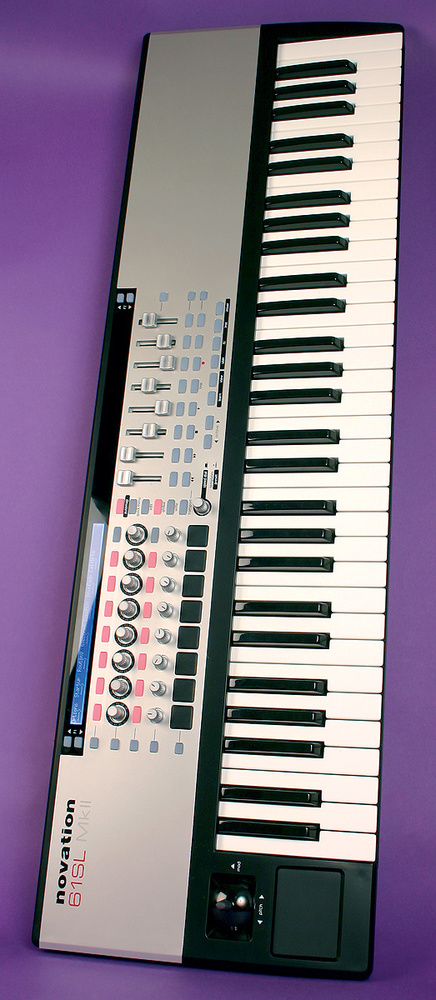
From their origins as synth designers, Novation have, in more recent years, carved out an enviable niche for themselves as manufacturers of hardware controllers for budget‑conscious musicians. Under review here is their latest 61‑note knobular controller keyboard, the 61SL MkII. As is apparent from the name, this has evolved from the already popular first‑generation Remote SL controllers and incorporates a number of innovations (such as the clever Automap automatic controller assignment utility) from other recent Novation products such as the Nocturn. As with the old Remote SLs, there are four models to choose from: 25-, 49- and 61-note keyboard versions, and a Zero version that offers the controls without a keyboard.
The front-panel controls are almost the same as those of the previous generation, excepting, of course, that eight of the knobs have been replaced with continuous rotary encoders. The back panel, however, is identical to the older SLs and features a 9V power input, USB port, sockets for control and expression pedals, and four MIDI ports: the usual In, Out and Thru, plus an extra Out.
Touch Of Class
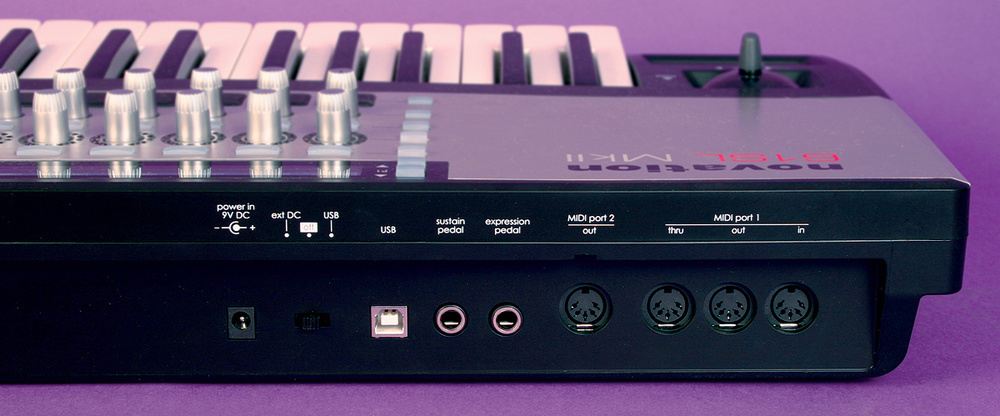 The SL MkII's back panels offer the same connections as the previous SL models.
The most significant update is that all the knobs and sliders are now touch‑sensitive. You probably don't need me to tell you that this provides a big leap forward in speed of use straight away, and Simon Sherbourne has already waxed lyrical about this aspect of the Nocturn when he reviewed it in the August 2008 edition of SOS. Backlit buttons and LED rings surrounding the endless rotary encoders transmit a tremendous amount of information to the user, which is likewise of enormous help. Although the other knobs and faders don't provide this visual feedback and hence, like all unmotorised controls, have the potential to be in a position that doesn't reflect the value of the software parameter that they're controlling, Novation have at least dealt with this situation fairly elegantly: either the controls can 'pick up' the parameters the moment they're moved (sensibly, not just when the control is touched), or the parameter can wait until the physical control is moved through its current value before latching on.
Against all this, though, has to be set the fact that the 61SL MkII does away with one of the two backlit LCDs of its forebears, leaving only the one above the rotary encoders. Novation valiantly attempted to spin this as offering "more focused menu operation”, but I reckon I'd take my chances with menu operation blurring (whatever that is) in return for a second display lined up above the right‑hand bank of faders and buttons, because I found myself forever grabbing the wrong control by mistake, and felt the need to pause for a moment before pressing buttons, to be sure I had the right one. A cost‑cut too far, I'd say, as it partially undermines the most important characteristic of the unit: quick and easy usability.
 Novation's Automap application makes it easy to map the 61SL MkII to your software's controls.Much as I might poke fun at the phrase "focused menu operation”, Novation have actually overhauled the Remote SL menu structure for the MkII versions, and while I couldn't personally compare it with the original Remote SL, I did find it very easy to navigate — more so, in fact, than on any other LCD‑based hardware unit I've used. What's particularly good is that each of the eight parameter positions in the display can be controlled by the rotary encoder for rapid value adjustment and the two buttons above and below it for increment/decrement, depending on which is most suitable for that particular parameter. You can also just touch the encoders to navigate through the menu layers, which is quick as the wind. What a shame this kind of hardware control wasn't economically viable 20 years ago when hardware samplers (remember them?) were in the ascendant...
The additional Quick Menu is nifty too, giving you one‑button access to Bank Select and Program Change messages, keyboard transpose settings, and the global tempo setting in your software. Dedicated buttons also allow quick access to the Automap server application, its Learn mode, and its various Browser pages. The operation of the 61SL MkII's Automap functionality is very similar to that of the Nocturn, so rather than retreading old ground here, I'll refer you to Simon Sherbourne's detailed Nocturn review for the full run‑down on that — and for descriptions of how the Speed Dial and generic MIDI controller facilities work as well.
In Use
My impressions of using the 61SL MkII with both Steinberg Cubase 5 and Cockos Reaper software were extremely positive. The touch‑sensitive controls, speedy controlled assignment, and masses of visual feedback all added up to a very pleasant experience.
Some users may find that the closer‑packed control spacing makes the touch sensitivity a slightly mixed blessing, given that it responds to the lightest of touches — it's easy to divert the LCD display by accident while hitting the buttons, for example. However, this is a pretty minor niggle given the obvious benefits of the touch‑sensitivity overall and the availability of the more spaciously laid‑out Nocturn. It also seems churlish to have too much of a pop at the rather haphazard initial Automap assignments (which Simon also found when working with the Nocturn), given that Novation are at the mercy of plug‑in developers and Automap's initial assignments can so easily be changed and stored for future use. In fact, the lack of a second LCD screen is the only gripe I can really muster with any enthusiasm.
What's beyond doubt is that, overall, the 61SL MkII is a very worthwhile update to the Remote SL concept, presenting a pretty mature vision of what a hardware controller for the masses should offer: affordable and near‑universal control that is both fast and simple to use. As such, it deserves to win Novation a big crowd of new friends.
Alternatives
The most direct competition to the 61SL MkII comes from M‑Audio's similarly priced Axiom Pro 61, which features its own Hypercontrol function for automatic control mapping. However, it doesn't have the touch‑sensitive controls of the Novation. Edirol's PCR800 also features 'Dynamic Mapping' of controllers with some applications, although the list of supported software appears at the moment to be fairly limited and, again, there are no touch‑sensitive controls.
Pros
- Touch‑sensitive knobs and faders.
- LED encoder rings and backlit buttons provide lots more visual feedback.
- Streamlined LCD menu structure.
Cons
- One of the two previous LCD read‑outs has gone walkies.
Summary
This new version of the SL, supercharged with touch‑sensitivity and twinkly lights from the Nocturn, presents a very appealing package for anyone wanting hardware control of their sequencer, plug‑ins and virtual instruments.
information
Novation +44 (0)1494 462246.
American Music & Sound +1 800 994 4984.