

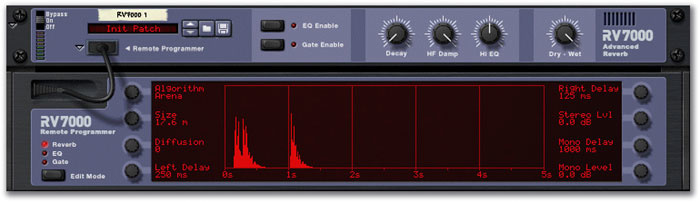
 Here, the Arena algorithm — which would ordinarily produce a very long reverb decay — is providing a rhythmic delay pattern. Increasing the Decay (top panel) and Diffusion parameter values blurs the distinct delays but the rhythmic feel remains.
This month we present a closer look at the RV7000 Advanced Reverb, plus a handful of effect-related hints and tips.
The RV7000 Advanced Reverb is an essential part of the Reason rack, adding a sophisticated ambience to our collection of all-electronic devices. Its algorithm list includes some great true-stereo simulations of typical spaces, but the device goes further than that. Non-reverb algorithms are provided, as is the wherewithal to push the realistic reverb types to creative extremes. It all adds up to an excellent tool for your Reason sound-design arsenal.
O, Delay
As an example, take any of the standard reverb algorithms, set the Size parameter to minimum, set the Decay parameter on the top panel to minimum, and perhaps also set Diffusion, if provided, to minimum (or maximum!). Play with the Pre-delay settings, where available. The result is a simple delay effect, but with a sense of space on the single tap, almost like having a rhythmic reverb.
The Small Space algorithm is immediately rewarding: its smallest Size setting results in a severe comb-filtering effect that instantly produces a resonant fixed flange. The Room Shape and Wall Irregularity parameters provide different colours, and Mod Rate and Depth parameters push the effect more towards a traditional flange — if a real space did this, you'd probably be on drugs! The Pre-delay only goes up to 250ms (an eighth note if your song's tempo is 120bpm), but that's enough to provide useful delays in many circumstances. (See the 'Time, Please' box for hints on working out sync'd delay times, or set by ear, like the old days!)
Other algorithms that offer Pre-delay also have a maximum value for this parameter of 250ms, but 'Arena' is a different case. Left, right and mono delays are part of this algorithm, with a maximum value of 1000ms each (and no tempo-sync option). There's no feedback setting, as would be found on a standard delay, but the three taps have enough flexibility to let you create some interesting rhythmic effects. Increase the Size and Decay parameter on this — or any other reverb algorithm being used more for delay — and a ghostly, delayed 'triggered sample' effect is created. Add gating (this is enabled with the dedicated button in the small upper panel, but edited in a separate window on the drop-down programmer) and an urgent, stuttering feel is added. Play with the gate's Hold and Release parameters to enhance this.
Pre-delay Hint
The Pre-delay setting in the RV7000 's standard reverb algorithms would normally be used to maintain the clarity of the audio being processed and reduce any tendency for it to be 'swamped' by the effect. For example, a lead vocal (suitably chopped, and loaded into a Reason sample device) being treated with reverb will nearly always benefit from around 70-100ms of Pre-delay. This helps preserve the definition of the vocal, making it sound more 'forward' than if Pre-delay were not used, even if the reverb process is quite extreme.
We touched briefly on the RV7000 's multitap delay and echo algorithms last month. The latter at first appears to be a pure delay effect, but Diffusion and Spread parameters add a bloom to the individual taps that can be increased to produce a slightly out-of-control reverb with rhythmic pulsing. Echo has a tempo-sync option for the echo taps alone, plus a non-sync'able 250ms Pre-delay. Use the latter parameter to add an off-kilter feel to the otherwise in-tempo echoes. Subtle or obvious polyrhythms can be produced when applying this effect to percussion parts.
Also try not using the Tempo Sync option, keeping the Spread parameter very low and the Decay parameter at a medium to high level. This produces a boingy, retro tape-head delay effect that's well worth having. The antique effect can be enhanced by simulating the dulling effect of worn heads with the global HF Damp parameter in the top panel.
Quick Tips
It's possible to choose an RV7000 algorithm, edit all parameters visible in the remote programmer, change to another algorithm and make some more edits, and then return to the earlier algorithm and find all the original changes intact. This range of different edits even survives the saving of a song or an RV7000 patch: reload a song or patch, choose different algorithms, and the settings you made for those algorithms will be intact. The exception is the three parameters — Decay, HF Damp and Hi EQ — in the main panel: any settings made here remain the same no matter which algorithm has been selected.
Don't forget that RV7000 edit parameters can be automated or assigned to external MIDI controllers — even the algorithm-selection parameter. What's more, if you do automate algorithm changes, all the parameters allied to the current algorithm can also be automated: the knob to parameter assignments aren't fixed. Automating RV7000 parameter changes can lead to a very busy controller lane in the sequencer edit mode, but offers amazing potential for highly creative use of reverb effects. Do be aware, however, that changing algorithms, and some parameters, can cause clicks; this is especially the case with reverb algorithms that have long decays.
There might be times when you'd like to dedicate an instance of the RV7000 to a single effect (such as tempo-sync'd multi-tap delays on a lead synth patch) while still having another RV7000 as a main reverb processor. Remember to tweak the wet/dry balance control of the dedicated 'single-effect' RV7000 so that you hear a mix of dry and treated audio.
Put It In Reverse
I mentioned in a 'quick tip' in this column a couple of months ago that the RV7000 's reverse reverb algorithm doesn't fake its reverse effect in the way that some budget digital effects processors do, and that it's worth exploring for just this reason. In response to a reader query, I'll just explain in a little more depth how to achieve the effect I was alluding to.
To produce the reverse effect, the RV7000 samples the input audio, creates a reverb effect, reverses it, then plays it back with the original audio at the end of the reverse 'tail'. The result is pretty close to that produced by playing a tape backwards. It's a bit processor-hungry, and can be strange to work with, conceptually, at first, but in truth it's logical. To use the effect sensibly, you may find that you need to 'time-slip' any audio or sequenced performances being effected, so that the replayed sampled audio appears in the right temporal location. Luckily, this is made easy courtesy of the algorithm's Tempo Sync parameter. Let's illustrate with an example.
 In this simple example, a cymbal hit appears on beat one of bar four in the sequencer edit window. The note that it triggers is processed by a long reverse reverb. Tempo Sync is on, with a length value of 16/16, or one full 4/4 bar. As a result, the dramatic reverse effect starts on beat one of bar four and gradually builds, with the cymbal crash finally appearing on bar one, beat one of this four-bar loop. Note that because this is a reverse reverb algorithm, the 'decay' parameter controls the length of the perceived fade-in of the effect.
Say you'd like to create a dramatic reverse cymbal effect. First of all, insert a MIDI event in a sequencer track, routed to a Redrum, that triggers a cymbal sound in that kit. Route the individual output for that sound to the input of an RV7000. Choose the reverse algorithm, turn on Tempo Sync and select a 'length' value of 16/16 (for a full 4/4 bar). It's also a good idea to set the global Decay parameter to a high (or full) value, so that the process produces a really long reverse fade-in effect. Pressing Play now would cause the cymbal reverse effect to start with the MIDI note-on event, the actual cymbal sound appearing one full bar later. That problem is fixed by simply dragging the note-on back one bar. Now the reverse effect will still start with the note-on, but the original sound will appear exactly where you want to hear it.
You may find it inconvenient to tie up an RV7000 just for this effect, perhaps once or twice in a song. The solution is to set up the devices required to create the reverse effect, mute all else in the rack, set up a loop for the length of the effect and use 'Export Loop As Audio File' from the File Menu. (Maybe create a folder just for this purpose, so that you don't lose the audio file later!) The file can then be imported into an NN19 sampler, since it'll be an AIFF or WAV. Set the NN19 to fixed pitch, by disabling Keyboard Tracking (with the button just above the Amp Envelope controls). Assign the track that had the original cymbal hit in it to the new NN19, which will now trigger the sample. It's exactly the right length to fade in with the original sound appearing on the correct beat, as with the 'live' RV7000 example, and you get the effect you want with lower CPU demands.
Time, Please...
 JC Lemay's calculation suite features a rather useful delay calculator.When you're working with delays that have no specific tempo-sync option, sync is still possible but you need to know the right delay time to produce a given note length at the current tempo. The formula is straightforward: 60,000 divided by tempo, multiplied by 0.5 gives you the time in milliseconds to produce an eighth-note delay. Double or halve that to get other note/delay values, or add half to get a dotted value. Triplets are trickier: multiplying the 60,000/tempo figure by 0.1666 produces a reasonably accurate value for a 16th-note triplet.
But why not make life easy on yourself with a specialised calculator? There are plenty available, but a favourite of mine is from JC Lemay (also available in French) at http://mp3.deepsound.net/eng/samples_calculs.php. It's free, uses Java, and loads into any web browser on Mac or PC. Just key in a tempo and a chart of delay-time values for 12 different note lengths (including dotted and triplet examples) is displayed. The calculator is actually a suite of 11 useful tools, offering various handy sample- and tempo-related calculations for accurate timestretching, pitch-shifting and so on.