

The major audio and MIDI recording applications are slowly migrating to Mac OS X, and the latest to arrive is Digidesign's Pro Tools. The upgrade also introduces powerful new project management features, Groove Template functionality and a more powerful LE version.
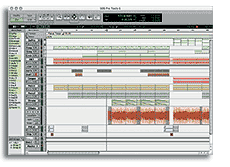 Version 6 of Pro Tools has finally arrived, drawing to a close the long diversion in development while Digidesign re-engineered their front-end software for Apple's OS X platform. As I write, the Windows and Digi 002 versions are still at 5.3, but the availability of Pro Tools 6 for XP and 002 shouldn't be too far away. As well as OS X compatibility, PT6 sees the introduction of two major new features (Digibase and Groove Templates), quite a few smaller tweaks and additions, and some power-ups for the LE version. I tested PT6 at both ends of the Pro Tools continuum: on a HD system running on a G4 desktop, and LE on an iBook/M Box combo.
|

First Impressions
Pro Tools 6 sports the first major GUI redesign since version 4 was released a few years ago. At first glance the new Aqua look, with its shiny rounded edges and new fader caps, bears quite a resemblance to Digital Performer. Luckily, you can still find everything pretty easily; the only change I found distracting was that the Selection and Location time indicators have switched places. I might question the 3D look of the newly coloured regions in the Edit Window, which although done subtly, makes it difficult to see if there are fades at the boundaries when you're zoomed out. One thing I noticed straight away was that the general responsiveness when moving around and editing is quite a bit slower compared to Pro Tools 5 running under OS 9 on the same computer -- but in fairness, you're aware of this in most OS X programs on all but the fastest Macs.
A pleasant surprise was discovering that Digidesign have finally come up with a classy demo song, although it dampened my warm feelings towards my new iBook 800 when I got a 'CPU too slow' error. However, it only took a small boost of the hardware buffer to get me up and running, and I shouldn't complain because the LE demo probably has more plug-ins running than you could have squeezed from a basic TDM system a few years ago.
All Your Digibase Are Belong To Us
There are more than just cosmetic changes in Pro Tools 6, and one of the biggest additions is the Digibase feature. Digibase is actually the collective title for a suite of new media and project management utilities to be found in Pro Tools' Windows menu. The Workspace 'Browser' is the main tool, and provides a hierarchical listing of all your storage spaces that looks similar to a Mac Finder or Windows Explorer window. The Workspace provides the ability to sort files from within Pro Tools, but will mainly be used for finding (with the built-in search facility) and importing audio and video files. Audio files are accompanied in the window by 'thumbnail' waveform displays, and can be auditioned by clicking a small speaker icon. Files can be dragged directly from the browser into the Edit Window timeline or into the Region List, and what's particularly nice is that any file or audio format conversions are taken care of without annoying messages.
The Workspace is the first integrated method of searching, auditioning, and importing audio Pro Tools has ever had. In PT5 the standard Import Audio panel could audition but not search, and if you searched and imported from the Mac Finder, you couldn't audition. Dragging in large files will reveal that Pro Tools now supports background processing, so even if there are a large number of conversion, copy or consolidation jobs underway you can carry on working. A new Task Window keeps you informed of progress in background processes.
Another task that is now handled in the background is finding missing audio files in a session. Pro Tools 5 already excelled at handling missing media, due to the use of unique file IDs that ensured you always got the right thing. As well as PT6 postponing this task until after the session is opened, other improvements include a Relink window that appears when the system can't find something, and 'media off-line' warning lights in the Edit Window. This kind of stuff may not make for sexy product demos, but it's what puts the 'pro' into Pro Tools.
TDM systems have a couple of extras in this area. The Workspace is able to create and access what Digi are calling Catalogues (well, Catalogs actually). These are an extension of what Digidesign's parent company Avid call 'bins' in their Media Composer video editing software. Catalogs are collections of pointers to volumes or files, and can be used to collect together regularly used files and share them among other projects or Pro Tools systems. Catalogs can reference material that is not actually present on the local system, so they can be used to drag in audio from another studio location or even sample CDs. Off-line files used in this way can then be automatically relinked to the Session when the actual media is available.
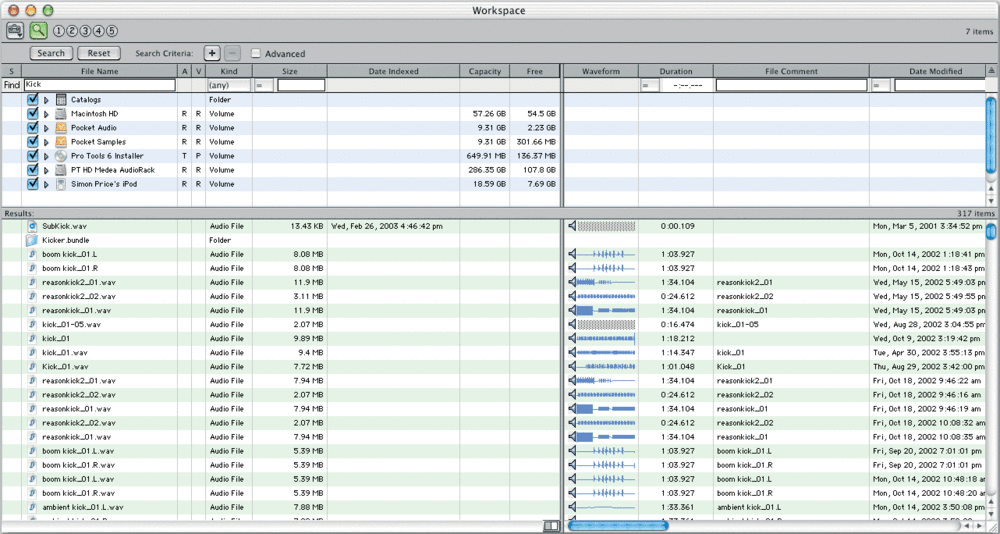 The new Digibase features provides sophisticated project management tools. The Workspace window can be used to sort, browse, audition and search for audio files
The other TDM-only enhancement is a complete overhaul of the Import Tracks command, which is now called Import Session Data. In Pro Tools 5 tracks from other Sessions could only be added in their entirety, as new channels with all audio and automation tied together. Import Session Data allows any layer of data ('playlist') from a track to be brought in either as a new track, or overlaid on an existing track. This is a manageable way of selectively handling layers of automation separately from the audio they overlay, which is useful for trying alternate audio while keeping your mixer moves or plug-in automation. A nice touch is that you can drag a Session icon from the Workspace into the timeline, and see a ghost indication of the Session contents. When you drop the icon, the Import Session Data window pops up so you can specify the nature of the import.
Both TDM and LE get the Project Browser window. This is similar in appearance to the Workspace, but focuses only on listing all files in use by the current Session. The Project Browser can be used for more than simple reference, however: in particular, it can selectively move media to new locations and re-link the Session to reference the new files. Applications of this include consolidating scattered files into one place, sharing playback load among drives, and quickly splitting video and audio files in Pro Tools AV systems.
|
Groove Templates
After Digibase, the largest new area of functionality is the creation and use of Groove Template files. These are quantisation maps for capturing and applying the 'feel' of an audio performance. Pro Tools 5 on TDM systems had an effective but very inflexible method for doing this: Beat Detective was used to detect the 'hits' or transients in the recording, and the actual tempo map of the Session was warped to align with these points. Other audio or MIDI regions could then be quantised to the tempo map in order to copy the original part's timing variations. The new PT6 method saves the information discerned by Beat Detective as a Groove Template file instead, which can then be applied to audio and MIDI regions without messing with the master tempo track. In addition to user-created grooves, PT6 comes with a library of factory presets, which as you can see from the screenshot are rather cheekily mapped from other sequencers!
 New to Pro Tools 6 is groove quantising functionality. Digidesign obviously want users of other sequencers to feel at home here...When applying a Groove Template to audio, Beat Detective is used (meaning that this facility is available on TDM systems only) to detect and separate individual notes/hits, and a new Conform page loads the template and shifts the new regions into place. For MIDI, a Groove Quantise command has been added to the MIDI menu. What's extra special is that MIDI can also take on the dynamic variations of the original recording. These are measured and stored as part of the template along with the timings, and are reproduced in the MIDI selection by altering note velocities. There's no doubt that Groove Templates are a powerful addition to the already formidable Beat Detective, and it's great having a proper range of quantise types for MIDI, but I do have a couple of gripes. Curiously, it's not possible to create a groove template from a MIDI selection, although one would think this was a trivial challenge compared to assessing an audio waveform. Presumably the necessary code is already there in Beat Detective, so hopefully some kind of 'Extract Groove from MIDI' command will appear in the MIDI menu in the future. It also means that you are reliant on Beat Detective, so LE users cannot create groove templates and are left to use presets or files created elsewhere. This is one of those things that is bound to irritate LE customers when they look around at their Cubase and Logic-using peers.
MIDI Tweaks
Groove Quantise is not the only change in the MIDI department: there are a number of feature additions, while the move to OS X has forced a switch in the basic foundation of Pro Tools' MIDI communcication. OMS (Open
Music System) is a feature that many users will not be sorry to lose from the Mac version of Pro Tools (though I say 'respect' to a clever and long-serving piece of code). Pro Tools 6 uses the Apple Core MIDI Services, with the Audio MIDI Setup (AMS) utility used to detect and configure MIDI devices. AMS should be an easy switch for OS 9 users, as the setup panel is very simlar to that of OMS Studio Setup, with icons for interfaces and instruments that you connect with virtual cables. As with OMS and PT5, all objects and channels declared in AMS appear as I/O options in MIDI tracks in the Pro Tools mixer. It all works very smoothly, and is probably a little simpler than OMS, as you are using a system that's built into the OS.
 A significant limitation on PT6's groove quantising facility is that Groove Templates can only be created using Beat Detective, which is only available in the TDM version and can only extract groove data from audio parts, not MIDI parts.
One thing that's lost, though, is that the Apple MIDI Services don't offer any equivalent to OMS's IAC (Inter Application Communication) busses, which allowed MIDI data to be exchanged between separate applications running at the same time. With this in mind, Digidesign have built four multi-channel internal inputs into PT6, which can be addressed by other software. The manual recommends a freeware utility called MIDI Patchbay for creating internal MIDI conduits with software that doesn't have these internal inputs. I decided to do this with Propellerhead's Reason, which would normally use Rewire 2 for this kind of thing. After a bit of head-scratching trying to understand the setup program, this worked fine: I could send MIDI to instruments in Reason from MIDI tracks in Pro Tools. However, PT6 still can't generate MIDI Beat Clock to drive loops or sequences in other apps.
Unfortunately, after this initial run, Pro Tools would not launch, each time causing one of those full-system freezes that you're not supposed to get in OS X! Trashing all Pro Tools' system preferences (not to mention MIDI Patchbay) got me up and running again, but what with Direct Connect missing and this backward step with internal MIDI routing, it's plain to see that there's a lot riding on getting Rewire 2 running in Pro Tools as soon as possible.
New MIDI features include a doubling of the MIDI track count to 256, and the crucial new Restore Performance command. This addresses what was, to my mind, the single biggest MIDI problem in Pro Tools, which was that Quantise operations were destructive within the MIDI region. This meant duplicating and keeping track of either regions or playlists in order to be able to return to the original recorded timings. Restore Performance reverses any MIDI operations that have been performed on a MIDI selection. Experimentation suggests there's a limit to how far you can take this -- for example, dramatically moving notes manually is not reliably reversible -- but the main thing is being able to experiment freely with quantising, transposing and so on.
The other milestone is that Pro Tools 6 is the first version to feature Digidesign's MIDI Time Stamping (MTS) technology. This aims virtually to eliminate MIDI timing errors for soft synths running within Pro Tools, as well as message sent to hardware devices connected to MTS-compatible MIDI interfaces (such as Digi's own MIDI I/O box). It achieves this by intelligently reading ahead and managing MIDI events instead of just churning them out serially as they are encountered in the timeline. Obviously, any response latency at the destination is out of MTS's control, but the user can help here by using PT's MIDI track offset capability. Offsetting also gets around the problem of audio latency in LE when monitoring your MIDI devices through Pro Tools. Finally on the MIDI front, I found one small new preference nice when editing. You can now specify the track height that is selected when you hit the zoom toggle (E) key. By choosing 'extreme', it's possible to emulate a Cubase or Logic feel, where a MIDI region zooms to fill the screen with the piano-roll display when 'E-keyed'.
|
LE Improvements
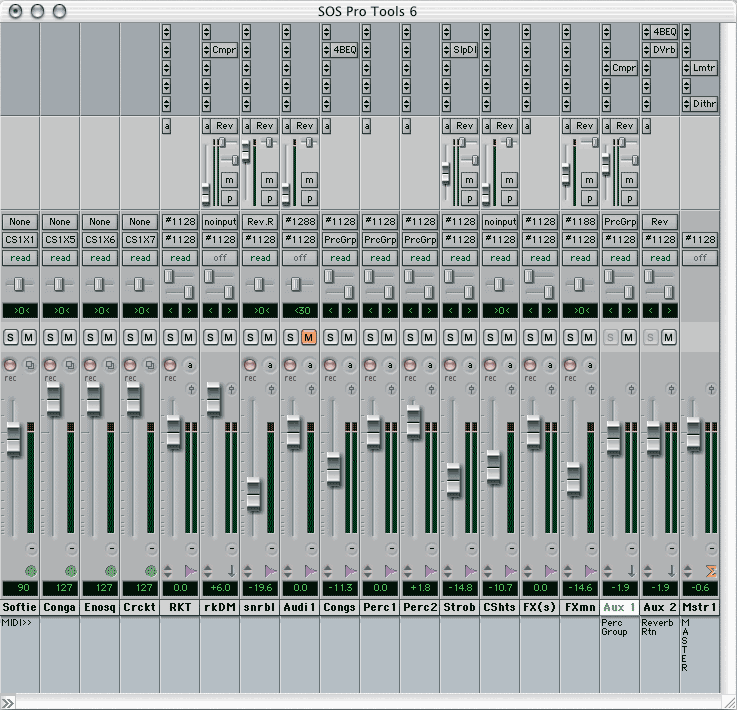 Provided they don't require the mixer configuration to change, it's now possible to insert TDM plug-ins during playback.With version 6, Pro Tools LE has been made more powerful, after Digidesign's reassessment of some of its limitations. For a start, the audio track count increase from 24 to 32 is now standard, having been introduced earlier as a version 5 beta. More importantly, the way this track limit is handled fixes a problematic situation when moving projects between LE and TDM-equipped studios. Before, any tracks over the 24/32 limit in a Session coming from TDM were dropped completely when the Session was loaded in LE. Now LE shares TDM's ability to open more tracks than can actually be played back (up to 128), using a 'voicing' system for selecting which 32 tracks are audible.
You can't use the TDM trick of assigning more than one track to the same voice when audio doesn't overlap on those tracks, but if you're a dab hand at using mixer automation, you can simulate the same effect by moving non-overlapping audio sections to a share a track. If you want to work on a big TDM Session within LE you at least have options now, even if it means bouncing some tracks together. The other improvement of particular note is the stealing back of the so-called Command Focus mode, which adds a host of single-key shortcuts to just about every key on the keyboard. These really speed up moving around and editing in LE, and make it much friendlier to TDM users who are moving a project across or using LE as part of a mobile rig.
Conclusions
For a release mainly anticipated for one thing -- OS X compatibility -- Pro Tools 6.0 has a lot of new features. Having said that, Digidesign have not gone for a major conceptual revolution (although background processing and Digibase are important developments). Instead, they have made what most users will agree is a much smarter move: a solid rewrite of what's good about the software, with some well-chosen tweaks and additions. All the changes were high on users' wish lists, suggesting a commitment from Digi to take on board customer feedback. Digibase and the new Beat Detective functionality reconfirm Pro Tools as the no-brainer choice for day-to-day professional audio production, in both music and TV/film post-production, while significant progress has been made for desktop music producers, thanks to the new MIDI features and beefed-up LE version. There's still some work to do with regards to integration with other popular software packages, but the upcoming Rewire 2 support should make Pro Tools as tempting to the home/project studio user as it already is to the pros.
Extra Goodies
Pro Tools ships with a number of standard plug-ins, collectively known as the Digirack. Recently the list has been looking a little uninspiring, so Digi always have some kind of plug-in bundle offer on the go. An unexpected bonus in Pro Tools 6 is that a few extra plug-ins (some of which were previously paid extras) are now included as part of Digirack:
- DFX is a suite of process-based off-line (Audiosuite) effects, including a flanger, chorus, multi-tap delay and ping-pong delay.
- D-Verb is a basic reverb, which comes in both Audiosuite and RTAS/TDM (real-time) versions.
- Pitch (TDM-only) is the real-time pitch adjuster and harmoniser previously sold as DPP1.
- Click is a really useful new plug-in, which simply generates a sample-accurate tempo click.