

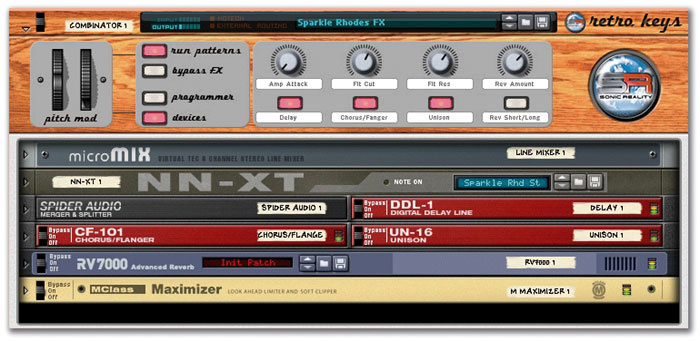
 A Sonic Reality combi patch from the Retro Keys Refill collection. Note the customised skin applied to the Combinator's controller panel.
This month, new Refills and tweaking techniques for Reason v3, plus the usual haul of time-saving tips.
Of course, this month's most important Reason news is that v3 is now available. A full review can be found in this May 2005 issue, so have a glance over that to see if Propellerhead have been reading your mind as to which new features to add.
The enhancements and additions, while not perhaps filling all the gaps in our favourite virtual studio, are pretty impressive. Certainly, existing users should order their updates as soon as possible: the new mastering tools and the awesome Combinator are well worth the expenditure. If you need any persuasion to make the upgrade, or simply like the sound of a good deal, surf over to Propellerhead's web site and visit the shop (www.propellerheads.se). Here, you'll not only be able to simply buy the £69 v3 update (which can alternatively be sourced from your local hi-tech music dealer), but can also be tempted by one of five special bundles featuring T-shirts and/or special deals on Recycle and the Drum Kits and Strings Refills.
Re-release Refills
Recently I've really enjoyed reviewing Sonik Synth 2, a co-production between sample masters Sonic Reality and IK Multimedia (the Sampletank people). I found its wide range of raw samples very impressive. SR are also behind the Sonic Refill range of Reason-compatible sound libraries, currently 20 strong, with various compilations also in the catalogue. Two volumes of synths, plus rhythm section, retro keyboards, acoustic folk, world percussion, pianos and organs, bass, symphonic and Mellotron are just some of the collections' themes.
It just so happens that SR have contributed patches and samples to the new Reason v3 factory sound banks. They might also be first off the mark with new third-party content for v3. Three volumes of the Sonic Refill collection (Retro Keys, Vocal Textures and Mello-T) have been updated for v3, adding new Combinator patches to already comprehensive libraries. The rest of the range will be updated over the coming months. Interestingly, Sonic Reality v3 Refills will be available from Propellerhead's on-line shop as keenly-priced downloads — but be warned that they're huge!
I've had a listen to the first three updated collections, and the quality and variety is great. I'm sure I recognise some samples from Sonik Synth 2, but this is no great problem: I liked a lot of that material, and having it available in the form of NNXT patches is very convenient. The new Combis are also pretty good, stretching the raw material into more sophisticated shapes. For example, the electric pianos and organs of Retro Keys are given a classic or modern sheen courtesy of appropriate layering and effect processing. Check out www.propellerheads.se or the web site of Sonic Reality (and Propellerhead) UK distributor M-Audio (www.maudio.co.uk) for more details.
Going Flatpack ing
Another developer quick off the v3 mark is Lapjockey. You may recall their first release, the Flatpack Refill reviewed back in July 2003's Sound On Sound. This large and varied romp through the sounds of classic synths, keyboards and drum machines scored with slick presentation and audio quality. Again, some of this group's work can be found in the expanded v3 factory Refill, and a demo of the forthcoming Flatpack 2 is included on v3's installation disks.
 Lapjockey follow up their Flatpack Refill with Flatpack 2, a patch from which is illustrated here. You'll notice the customised look for Combinator, a practice which seems to be catching on...
From the brief example supplied with Reason v3, Flatpack 2 is going to be a good collection. Combinator is exploited to the max as a starting point for some serious synthesis experimentation, and the name of the game seems to be sound design in ways undreamed of with earlier versions of Reason. FP2 really goes for it in terms of analogue emulation and the creation of involving soundscapes.
The team have developed several 'shells' that form the basis of their patches. Kilburn powers classic synth recreations: raw synth waveforms have been sampled, and then a given instrument's signal path is emulated using Reason devices in the Combinator. The Scope shell is dedicated to the generation of "soundscapes, pads, textures and just about any kind of rich evolving sound beds you can imagine". Boxmoor is the shell for the creation of Combinator-based drum machines, and Rex Dex is a collection of REX-based loop players. Existing and new effects have also been 'combined' into a new collection of patches.
Flatpack 2 is due soon, and I'm sure SOS will give it the once over when it's available. Until then, www.lapjockey.com is worth a visit for more info.
Quick Tips
If you already have your v3, here's a little routine you might like to try. If you've used individual songs to collect chains of effects or other interconnected devices, for re-use in other contexts, why not spend some down time turning the elements you want into combis? It's literally as simple as highlighting the desired devices and choosing 'Combine' from the Edit menu (see main body). After sorting out the input and output audio routing, and perhaps adding a mixer of some sort to merge any parallel audio streams that might be orphaned, name and save the result as a Combinator patch for even easier access later. Of course, devices can be cut and pasted from the main rack into Combinator, if desired. A development of this idea is highlighting an entire rack of devices and turning it into a combi. Having such 'template songs' as Combinator patches rather than normal songs could save you some time. It's still possible to address individual devices in a combi from the main sequencer, and choosing 'Uncombine' from the Edit menu removes the Combinator and places its combined devices in the main rack.
The new Micromix stereo line mixer in v3 has just one auxiliary send. If you'd ideally like to feed more than one effect from a single instance of Micromix (and don't just want to add a Remix to whatever session or Combi you're using), use a Spider Audio to split the aux send to multiple effects. You may not have individual control over each 'send', but it can be a good compromise for parallel processing.
A new test routine not previously available within Reason comes courtesy of the MClass Stereo Imager. Both its upper and lower bands have a range of mono through normal stereo to very wide stereo. Set both bands to mono, place the device at the end of the audio chain, then use the device's bypass/on switch to create an instant test for mono compatibility. Audio is heard in mono, or effectively in mono, in many environments, and it's useful to have a handle on phase issues (which can be caused by excessive use of the Stereo Imager 's extreme width settings) that can cause problems for a mix when played in mono.
If you own Propellerhead's Recycle, you may already know that some annoying clicks can be quickly removed from slices that are not quite accurate by simply adjusting the Attack and Decay parameters in the amplitude envelope. Doing so can save lots of time over doing it properly in Recycle (by moving slices markers individually). If you haven't done so and find a loop to be a bit clicky when loaded into Dr:Rex, the Attack and Decay parameters can be used to eliminate clicks without changing the character of the loop too much. Having said that, changing the character of the loop may inspire you to go further with your envelope experiments. A slightly soft attack allied to a fast decay can make a REX loop sound very different from the original audio file. Tempo-sync'd LFO effects, routed to pan or filter cutoff, can also change the feel of a REX loop immensely.
A simple way to create a fat, phasey sound in a device such as Subtractor or Malström is to enable both oscillators and detune them. Adjust the fine-tuning control in a positive direction for one oscillator and in negative values for the other. Anything up to +7/-7 sounds rich and moving, but further detuning will start to sound, well... out of tune! A similar idea could be used in Combinator, where two whole devices could be detuned against each other in the same way. Panning detuned devices can also add to the space and width of the resulting stereo image.
Bands Apart
Reason v3's new MClass processor collection adds the kind of mastering tools that many have tried to emulate with what was previously available in Reason. Without further ado, here's a technique for creating a simple multi-band compressor (just two independent frequency bands) with MClass devices. You need a Stereo Imager and two Compressor s from the MClass family, plus a Micromix stereo line mixer. To create this ganged processor, we'll be exploiting the Stereo Imager 's 'separate output'. This device provides stereo width enhancement on two bands, separated by a simple crossover-frequency control. It's equipped with a 'separate' output, so that one band can be processed separately from the other.
 The final split-band compressor chain. These devices could easily be 'combined' as a Combinator patch. I'd loaded a piece of mixed digital audio into the NN19 shown here to test the chain's effectiveness.
- Flip to the back panel, and route the main stereo out of the Stereo Imager to the input of one Compressor. Then route the separate out to the other Compressor 's input. It's up to you whether the separate out is switched to output the high or low band, though this choice has an impact on the next step of the technique. (The illustration above has the low band chosen, though it's not visible from the front!) While you're at the rear, route the outputs of each Compressor to an input each on the Micromix.
- Return to the front panel and enable the Stereo Imager 's 'hi' solo switch (if you've chosen the high band as your separate out, solo the 'lo' band on the front panel). Set like this, both bands have their own independent outputs, ready for compression. You might like to label your Compressor s in some useful manner — 'Low Band' and 'High Band', for example.
That's pretty much all there is to it: the Stereo Imager 's crossover-frequency control determines the frequency range of each band. If it's set full left, everything below 100Hz will be treated by the 'low band' Compressor and everything else by the 'high band'. You still have full control over the stereo image of each band.
Moving the low band's width control towards mono can give the processed audio a more focused bottom end, while the opposite (extreme width enhancement of the low-frequency range) creates a 'fuzzy' mix (low frequencies don't have much directional information and make more impact if not over-processed by stereo effects).
It would be possible to use a Spider Audio device to merge the two MClass Compressor outputs, using their output gain controls to balance the frequency bands, but the Micromix facilitates a tidier setup, complete with solo'ing and muting options that you can use while you're setting everything up.
Effect chains such as this are ideal for converting into a Combinator combi. Make this setup in Combinator to start with, or highlight all the devices and select 'Combine' from the Edit menu. The result is an instant Combinator patch.