

Live 7 saw the the introduction of some powerful new features for integration with hardware instruments, effects units, and Rewire applications.
 The External Instrument device is not just about hardware synths: it also provides slick integration with Rewire and multitimbral plug-ins.Most of the popular DAW applications have followed a similar evolution in the way that they work with external hardware instruments. In the days when software was predominantly used for sequencing, MIDI tracks were used to control hardware synths, and the audio from these instruments was patched into a hardware mixer. As the software itself took over the role of the mixer, many synths were plugged directly into the computer's audio interface, and brought up on audio tracks or input channels in the software. This is where Live was when we last discussed this subject in the February 2007 issue of SOS.
Like most of the competition, Ableton have now addressed the fact that having separate MIDI and audio tracks for hardware synths and Rewire clients is untidy and often confusing for new users. Most other applications have instrument tracks which combine the features of MIDI and audio (or aux input) tracks. Live already did something similar when using software instruments — when a soft synth is dropped onto a MIDI track, the audio output of the plug-in is handled by the MIDI track, which automatically becomes a hybrid MIDI and audio track. Live 7 extends this functionality to hardware instruments and Rewire clients, in essence by making the external device appear like a plug-in in Live.
Instrument Plug-outs
Ableton haven't added an extra track type to Live 7: the new functionality is accessed via a plug-in ('plug-out' maybe?) called the External Instrument device. The screen on the next page shows two MIDI tracks. The one on the left is a standard MIDI track with no devices. The second track has the new External Instrument device in it — shown in the Device View below the mixer. Notice that the main I/O section of the track has changed, with audio output options replacing MIDI. Sends have also appeared, as the channel is now handling an audio signal. So far this is the same as if you'd added a software instrument, but the External Instrument adds MIDI output routing and audio input routing to the track.
 The MIDI track on the right has an audio path, thanks to the External Instrument plug-in on its Device Chain.In the screen, I've routed the MIDI side of the track to the MIDI output on my interface, transmitting on MIDI channel 1. When armed, the track now routes MIDI to my trusty old Yamaha CS1X synth, which is connected to the MIDI Out port on my Audio Kontrol 1 interface. The audio side of the track is set to monitor inputs 1/2 in stereo. Accordingly, I've connected the audio outputs of my synth to these physical inputs on my interface. The result is that I can now play the synth, record MIDI Clips, monitor the audio and process it with audio effects, all from a single Live track. As with a software instrument, if I later decide to record the synth parts as audio, I can bus the MIDI track's output to an audio track. There is also another trick for committing the track to audio, as we'll see later.
The External Instrument device has some other controls, such as the Gain knob, which trims the level of audio coming in from the hardware instrument. It's important to note that this is a digital, post-audio interface, gain change, so should not be used in place of correct hardware gain structure. In other words, you should always try to set the correct input level using your instrument's output level control and the input gain control on your audio interface. If your signal is clipping at the audio interface, turning the Gain control down in Live is not going to help. A very useful utility is the Peak level indicator to the left of the Gain knob. This displays the highest signal peak coming from the external device. Clicking the display resets the peak value.
At the bottom of the External Instrument device is a Latency control. This allows you manually to adjust the timing of any MIDI that is played back from Clips, in order to correct any delays that occur before the signal enters Live. This works by sending MIDI data early, so has no effect when you are playing the instrument live. Live has an effective automatic delay compensation system, which corrects for any processing delays in Live, and the latency caused by the hardware buffer. This means that the only latency you need to worry about is the response time of the instrument to MIDI, and any latency caused by the A-D converters in your interface. In most cases, this latency is low, and is often negligible. We will be returning soon to the subject of delay compensation and latency in a future Live workshop.
Re: Rewire
The functionality we've discussed so far concerning external hardware instruments, can equally be applied to external software applications running as Rewire clients. Remember, Rewire provides both MIDI connections and audio connections between audio applications (as well as synchronisation and transport linking). Therefore, a Rewire client is not really any different to a hardware synth connected by MIDI, with audio connections back to the software.
 Making MIDI and audio connections to individual instruments in Reason.Let's take a look at an example using Reason. Reason is, of course, not just a single instrument: it's a virtual rack, capable of hosting multiple synths, samplers, drum machines and so on. Each of these devices can be addressed individually from Live. Typically, in the past, people have tended to set up a single stereo return from Reason into Live, rather than use individual tracks. With External Instruments you can bring the audio from each separate Reason instrument into Live on the same MIDI track you use to play it.
Launch Reason after Live, and it will automatically connect to Live as a Rewire client. Now, create the device, or devices, in Reason that you want to use in Live. In the main screenshot on the first page of this article, Reason is running alongside Live with a rack I've created as an example. It features a Subtractor synth, a Redrum drum machine, a Combinator instrument, and a Thor synth. Notice that I've not created a mixer. This is because I plan to route each Reason device directly to a separate track in Live, rather than submixing in Reason. The screen above shows the rear view of the rack (with the instruments folded away). Each instrument's output has been routed to a separate output on Reason's Hardware Interface module, which is where Live will pick up the audio.
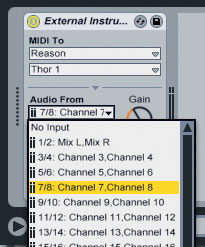
The next step is to create a MIDI track in Live for the first Reason instrument you want to use. In the following example, we'll use the Thor synth. Drop an External Instrument device from Live's Instrument list onto the new MIDI track. There are now three settings that need to be configured, as shown in the three screenshots below. With the hardware synth, a physical MIDI output was selected, but now we'll choose Reason as the target. Instead of MIDI channels, the second menu nows shows a list of available destinations in the client; we'll choose Thor 1. Finally, you need to set the audio input for the track. Because we chose Reason as the MIDI device, the Audio From menu shows only a list of audio sources available from Reason. Here we see all the possible connections from the Reason Hardware Interface, as both individual mono ports, and stereo pairs. Thor is connected in stereo to outputs 7 and 8 in Reason, so that's what we'll choose in Live. Easy.


Freeze & Flatten
Some instrument plug-ins offer multiple outputs, allowing them to be used as multitimbral workstations. Even though such instruments are running within Live, the External Instrument plug-in can be used to control and monitor individual sound sources within the plug-in. Let's look here at an example using Native Instruments' Kore 2. In the main screenshot on the first page of this article, Kore 2's plug-in window shows its internal mixer, containing two separate sound patches. I've routed the two channels in Kore to separate plug-in outputs (outputs 2 and 3), and set each sound to respond to a different MIDI channel. These settings are made within the plug-in, not Live, so the exact procedure will vary from one plug-in to the next.
 Freezing and Flattening is a great shortcut for recording MIDI tracks as audio.In the screenshot, the second Live track (which I've named 'Kore A: VCS Pad') is selected, so you can see the External Instrument device on its Device Chain. This time, instead of choosing a physical MIDI port, or a Rewire destination, I've chosen the instance of Kore on track 4 as the MIDI target. I've then chosen MIDI channel 1. Again, Live intelligently displays the audio outputs of the MIDI target in the Audio From menu, in this case Kore's eight stereo outputs. This way of working avoids the inefficiency of putting a separate instance of Kore on each track. In the case of Kore, this also it makes it easy to switch between the sounds with the hardware controller. Another advantage of this technique with any multitimbral instrument or sampler is that you can save your basic sonic palette in one plug-in instance, and recall it in any Live set.
Using the External Instrument device means that you can work easily with hardware and software instruments without committing parts as audio recordings. The External Audio Effect (see box, below) lets you integrate your favourite outboard gear into your mix. The trade-off in both cases is reduced portability: if you take the project to another studio without the same gear, parts will be missing or will sound different.
The traditional engineering solution to this problem is to 'print your effects', meaning to record any 'live' effects to tracks. This can be time-consuming to set up, but with Live there is a neat way to record everything you need in one pass, with no setup time. The trick is to use the Freeze function. All you need to do is select the tracks that you want to commit to audio. You might want to do a Save As first, or duplicate the tracks in question so that you can go back and make changes later. Now, choose Freeze Track from the Edit Menu. Live will automatically initiate a play-through of the song, recording everything it needs from external audio sources and effects. With your frozen tracks still selected, choose Edit / Flatten Track.
The audio on any tracks with external effects inserts will be replaced with a version recorded through the effects (as shown in the screen above). Any MIDI tracks controlling external instruments via the External Instrument device will be replaced by audio tracks, with the audio recorded in place. Everything is done in situ, without any complicated bussing or extra tracks, and you can walk away with an unplugged version of your session.
External Effects
 The External Audio Effect lets you add hardware inserts anywhere in a track's Device Chain.Complementing the External Instrument device is the External Effects plug-in, found in the Audio Effects sub-folder of the Live devices. This device serves a simpler, yet equally valuable, purpose: allowing hardware inserts to be added to an audio track. Most DAWs follow the Pro Tools 'slots with drop-down menus' approach to providing inserts in their mixer channels. These can either be used to insert a plug-in effect, or to create a physical routing to and from a pair of hardware connections. Live has never worked like this, instead providing each track with a graphical view where a Device Chain can be assembled via drag-and-drop. Until Live 7, it's not been possible to route to and from an external hardware effect within a track. The External Effect provides this feature as a device which can be dropped into a track's Device Chain.
As well as controls for setting which audio inputs and outputs to use, External Effect provides gain trims for both output and input, a phase invert button, and a dry/wet control, making for probably the most sophisticated implementation of inserts in any DAW. The dry/wet control should be used with caution as it will cause phase cancellation problems in many cases. It is better to leave this control at 100 percent, and use the dry/wet control on the external effect if available. There also appears to be a bug with this control, in that when set to zero percent some of the wet signal is still audible.
The Latency control allows you to correct for any delays incurred by the round trip through the effect. As we've already seen, Live automatically compensates for the hardware buffer anyway, so you only need to worry about the trip through the interface, and any processing latency in the hardware effect.