

Focusrite's Saffire Pro interfaces already offer excellent value for money, but imagine if you could add two channels of any preamp you wanted...

It's fair to say that when Focusrite and Sintefex first unleashed their 'Liquid' technology, in the form of the Liquid Channel (reviewed in SOS July 2004), many in the world of audio production were stunned. Pretty much any preamp, EQ and compressor of note had apparently been 'modelled', to create arguably the most flexible channel strip in history — and the results of using it were pretty damned good too.
While the 'dynamic convolution' process behind the EQ and dynamics emulations was easy enough to understand (to simplify: lots of DSP running multiple‑snapshot convolution), the preamps were rather more complicated, employing a combination of electronics and dynamic convolution to create emulations. That approach was necessary to let a connected mic 'see' the different impedances that would be presented by the real thing.
Focusrite were able to hive off the EQ and dynamics section to create a separate, much more affordable product (the Liquid Mix, reviewed in SOS July 2006, and later the Liquid Mix 16, which was more affordable still) — something that was simple to do because it was an entirely digital process. They were also able to put four of the preamps into a separate unit (the Liquid 4 Pre, reviewed in SOS March 2008). This brought the cost per preamp down a little, at the expense of trading the Liquid Channel's transformer for a 'gyrator' that emulated the behaviour of the transformer. The Liquid preamps, though, have remained the preserve of those with a serious budget, and even second‑hand units have held their price well.
Actually, I should say had remained, because the Liquid Saffire 56 audio interface brings that technology well within reach of the home studio. This new product marries two of the Liquid preamps with Focusrite's Saffire Pro audio interface technology. They may have dropped the 'Pro' from the name, but the result is far from amateur.
Ins & Outs
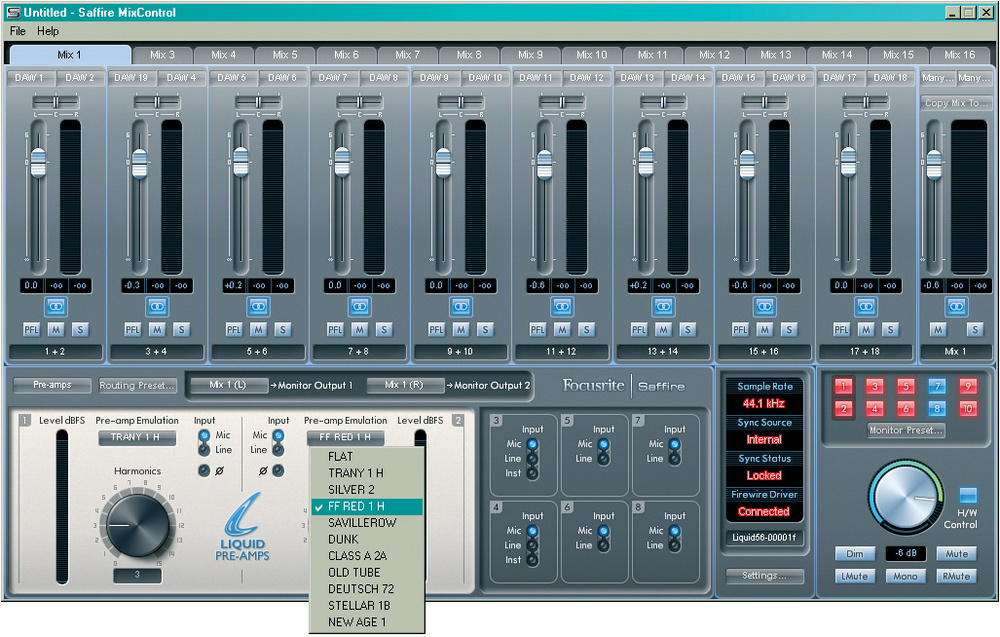 The preamp emulations are selected via the Saffire Mix Control software, which also includes a useful tabbed mixer.
What you get is for your money is a fully featured Saffire Pro audio interface with lots of analogue, digital and MIDI I/O, including eight mic and line inputs and eight outputs. Essentially, it's a Saffire Pro 40 but with a few extra bells and whistles: there are additional ADAT or S/PDIF optical connectors, taking the total I/O count up to 56; two of the Saffire preamps can be swapped for Liquid ones; there are front-panel buttons to control phantom power, high‑pass filtering and polarity for each channel; separate mic and line inputs are provided on both XLRs and jacks, rather than the Pro 40's Combi XLRs; and, finally, the additional features mean that it occupies 2U of rack space.
I won't dwell too long on the Saffire side of the hardware; if you want to know more about that, have a read of Sam Inglis' Saffire Pro 40 review in SOS January 2009. Suffice to say that you get eight decent, whisper‑quiet, clean‑sounding Saffire preamps that offer plenty of gain — particularly good value for money. If you want to further increase the analogue I/O, the ADAT connectivity makes the Liquid Saffire ideal for use with expansion units such as Focusrite's Octopre LE. In short, it's a well specified audio interface in its own right.
Soft Centre
Before I look at the preamps themselves, I feel that I should comment on the Saffire Mix Control software, which I found inspirational and frustrating in equal measure.
The inspiration comes in the form of the tabbed mixer. You can create 16 separate mixes, each of which can be accessed at the click of a tab. Although it isn't the software's raison d'être, I could imagine using it to create several stem‑ or bus‑based mixes from a DAW project — a vocal‑up and vocal‑down mix, for example. Would that such a function were available in Cubase or Pro Tools! Of course, this feature is also great for creating different monitor mixes for 'the talent' you're recording.
But I experienced some significant frustrations. Firstly, although you have the option to listen to the pre‑ or post‑fader signal, the channel meters show only the pre‑fader signal. You're only able to visually see the result of fader movements via the input meter on the main stereo bus. This is a puzzling omission, since a pre/post‑fader option would be a simple addition.
Secondly, I found the channel routing counter‑intuitive. The inputs and outputs are labelled as mono, even though you can stereo-link the input channels. The output routing switches are always labelled in mono, such that you have four separate 'buttons' for, for example, headphone output 7, output 8, headphone output 9, and output 10. What this means is that the two stereo headphone outputs (which are labelled 'Headphones 1' and 'Headphones 2' on the unit) monitor outputs 7+8 and 9+10 respectively. It's perfectly functional, and not a show‑stopping problem by any means, but there's certainly scope for simplification. The headphone outputs themselves spit out a healthy signal, sufficient to drive high‑impedance cans.
My third software gripe is the rigidity of the routing, which lacks the flexibility of its competitors. Although you can route any input to any output, you can't route the same input to multiple outputs: to do so, you must create separate mixes in the tabbed mixer. Ideally I'd like to see the addition (even as an option) of the more flexible matrix‑routing approach of, for example, RME and Digidesign. That said, it's something I missed only on occasion. I'd probably soon forget that it was ever a concern — and if you've never worked with a matrix based system, you'll probably wonder why I bothered to mention it.
I found one little bug, too. You can control monitor level via a knob on the hardware, or via a dial in the software. In the software, the default monitor setting on the dial is a sensible ‑19dB, but when I clicked to monitor via hardware, this leapt to 0dB, which is potentially a problem for your tweeters, and your eardrums! This only happened the first time, and Focusrite confirmed that this was an error, which they'll be sorting out soon — but it may be something to be aware of.
Liquid Lite?
 The rear panel hosts the considerable I/O complement: two ADAT (or optical S/PDIF) I/O ports, eight analogue mic and line inputs, 10 analogue line outputs, S/PDIF coaxial I/O, MIDI I/O, word clock and, of course, an IEC inlet and two Firewire ports.
And so, without further ado, let me introduce the stars of the show: the two Liquid preamps. The inputs for these are presented on the rear on XLRs, but are white so that you can pick them out at a glance. Looking closely at the specifications on Focusrite's web site, you'll see that when running no emulations these pres offer an almost identical performance to the six Saffire preamps, with up to 60dB of gain (which is plenty). It is worth repeating that those are very nice, whisper‑quiet preamps in their own right.
As with the earlier products, the Liquid preamps employ a combination of electronics and DSP to mimic the emulated preamp, in this case via the gyrator approach of the Liquid 4 Pre, rather than the more expensive transformer‑based design. There are fewer models than on the earlier 'full‑fat' Liquid preamps, but I don't see that as a huge problem. Although it's nice to have every flavour under the sun, and while I'm sure that the cost of the higher‑end Liquid products will be justifiable for some, my own feeling is that as long as I have a decent selection available, I'm perfectly happy. If you've ever used the Liquid Mix, with its proliferation of models, you'll know what I mean: think about how many of the emulations you actually use regularly. There's only a handful I've felt the need to get to know and use on a regular basis, and I suspect that it would be a similar situation with the Liquid preamps.
Thankfully, Focusrite have done a decent job of narrowing your options. I won't dwell on the models in detail, because we've already discussed them in the Liquid Channel and Liquid 4 Pre reviews, but as you can see from the table below, you get a good, broad range of vintage, modern, tube and solid‑state preamp designs; 11 in total (including the 'flat' preamp), which cover just about every eventuality I can think of in the studio. I didn't have the opportunity to A/B them with the original units, but they certainly capture the flavour of the originals, and they all sound very different and very usable. If you're the sort of person who wants something specific that isn't here, I'd hazard a guess that you're one of those who is prepared to pay for it!
There are a couple of other ways in which the design of the Liquid preamps is limited. Preamps aren't only useful for microphones, of course — they often include a line or instrument input that enables you to capture a nice, colourful DI signal from a bass or guitar. Unfortunately, you don't have that option here: although you get two instrument inputs, these are the standard ones from the Saffire Pro range (which, admittedly, offer a nice, clean DI signal), and the only thing you can add colour to with the preamp emulations is mic signals. I'd love to be able to use the preamp flavours on DI, or as an insert effect within my DAW. Focusrite tell me that this isn't a limitation of the Liquid Saffire but is a wider limitation of the Liquid preamp technology, because the electronics have been optimised to interact with the microphone, which, after all, is the primary purpose.
One issue — at least for those who have already invested in nice interfaces — is that you can only use the Liquid preamps with the Liquid Saffire 56 acting as your main audio interface. Despite the inclusion of plenty of digital I/O, there's currently no way in which to use it to augment your existing setup. So if you want a Liquid Saffire, you'll need to choose between it and your current audio interface, or attempt to use them together via an aggregate device driver. As things stand, if I want to add Liquid preamps to my RME Fireface 800, I still need to splash the cash on a Liquid Channel or Liquid 4 Pre. Adding the ability to run this as a stand‑alone unit would please a lot of people, but I suspect this isn't in Focusrite's interests, and we can only hope that a digital 'Liquid 2 Pre Lite' will follow!
Conclusion
Reading back over this review, I can see some criticism, and you could be forgiven for thinking that I'm being a bit down on this product. But the criticisms are, for the most part, fairly minor, and often nothing more than a wish‑list. The reality is that this is an excellent package for the money, and that it is unique. For only a couple of hundred poundsfew hundred dollars more than a Saffire Pro 40, you get much more: more I/O, more physical connectors and, crucially, two incredibly versatile, good‑sounding Liquid preamps that you would otherwise have to pay out a significant chunk for. In fact, if you're content with the 'limited' range of emulations on offer here, you could buy this and a Liquid Mix 16 for less than a grand$1600 on the street, and effectively have two Liquid Channels at your disposal. Which is, quite frankly, incredible.
.
Vital Statistics
- Firewire audio & MIDI interface.
- Compatible with: Mac OS 10.4 and above, Windows XP SP2 and Vista.
- Analogue line inputs: eight, balanced, on jacks.
- Mic Preamps: eight, balanced on XLR (two with a 'Liquid' option), plus two high‑impedance instrument inputs.
- Analogue outputs: 10, balanced, on quarter‑inch jacks.
- Headphone outputs: two, replicating outputs 7/8 and 9/10, on quarter‑inch jacks.
- Digital inputs: stereo coaxial S/PDIF and two optical S/PDIF or ADAT.
- Digital outputs: stereo coaxial S/PDIF and two optical S/PDIF or ADAT.
- Other I/O: MIDI, two‑channel internal 'loopback' input.
Preamp Emulations
The Liquid Saffire 56 offers you the following 'flavours' of preamp:
Emulation Name Emulated Preamp
Trany H API3124+
Silver 2 Avalon VT‑737SP
FF Red 1 H Focusrite RED1
Saville Row Helios console
Dunk Manley Slam!
New Age 1 Millennia HV3D
Class A 2A Neve 1073
Old Tube Pultec MB1
Deutsch 72 Telefunken V72
Stellar 1B Universal Audio M610
Flat No emulation running
Pros
- Incredible value.
- Well-chosen range of preamp emulations that all sound great.
- Good audio interface in its own right.
- Alternative mix tabs are very useful.
Cons
- Can't DI via the Liquid emulations.
- Limited I/O routing options.
- Mic pres/ADAT connectivity not stand-alone.
Summary
With the Liquid Saffire 56, Focusrite's Liquid preamp technology has finally begun to filter down to the home studio market. Despite a few minor limitations, you get an awful lot of preamp for your money, with an excellent audio interface into the bargain.