

Not only can Reason's Thor synth be used as an effects unit for other signals, it can also act as a hub for combining instruments and devices into true modular synth structures.
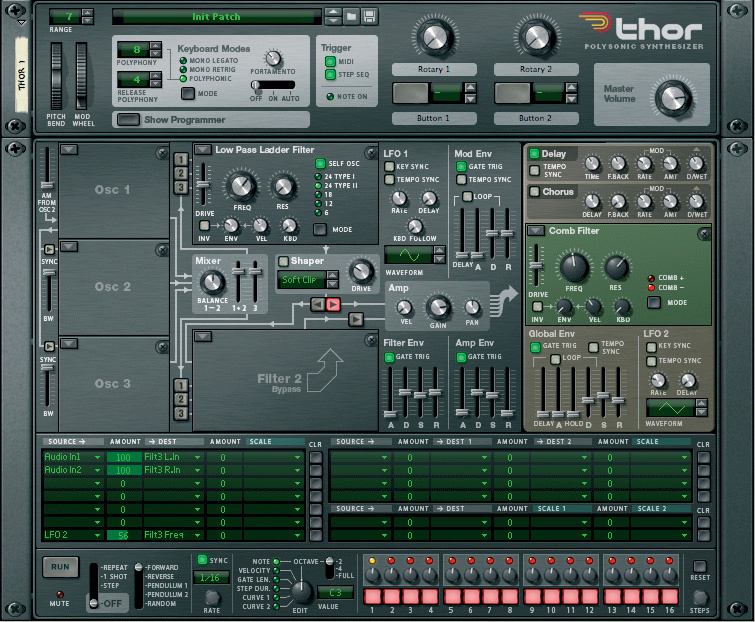 Thor's front panel, with audio input routing and filter modulation configured in the matrix at the bottom.
Those of you who like to tinker at the back of Reason's rack will have no doubt noticed that the Thor synth sports four audio inputs and outputs, and four general purpose CV inputs and outputs. Why all these connections on a self-contained synth? Well, Thor has a nice master filter and effects section that's just asking to have other instruments routed through it. Additionally, audio can be routed in or out of Thor at various points along its semi-modular signal path, offering the exciting possibility of linking up other instruments with Thor to create monster modular synth patches.
Patching Through Thor
We'll start by simply routing another device's output through Thor's master filter and effects section. Not only is this a really useful technique, it also demonstrates how to configure inputs in Thor's routing matrix. We'll begin by connecting the outputs of an NN19 sampler to audio inputs 1 and 2 of a Thor synth, and then connect the Thor's main outputs to a 14:2 Mixer.
In order to hear anything, you need to use Thor's modulation/routing matrix to connect the audio inputs to a suitable destination. Before doing anything else, right-click on the Thor and choose Initialise Patch to remove all the default assignments. Next, click the Show Programmer button on Thor's front panel. At the bottom of this extended display (shown in the screen above) is the routing matrix. Each slot in the matrix allows you to create a connection between two parts of Thor. You choose a source and destination from pop-up menus and adjust the signal level within the Amount field. The Scale setting lets you adjust or modulate the signal level with another control (e.g a knob) or signal (e.g an LFO).
We need to route the audio from inputs 1 and 2 to Thor's FX section. The entry point for the master section is a stereo input to the Filter 3 module. Accordingly, I've routed Audio Input 1 to Filter 3 Left In, and Audio Input 2 to Filter 3 Right In. Once this is set, you should hear audio from the sampler being passed through Thor.
Thor FX
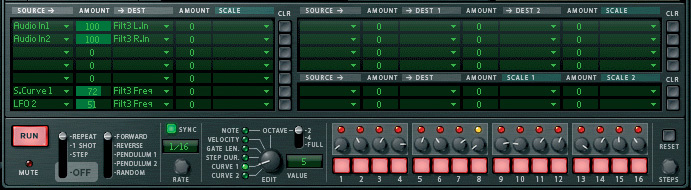 The settings for modulating the filter with Thor's step sequencer.
Thor's master section is the brown section on the right-hand side of the front panel. At the top is a nice chorus effect and a delay. The delay is especially useful, as it features stereo spread and delay-time modulation, both of which are lacking on Reason's main delay unit. Both of the effects are particularly good for fattening and enlivening mono sounds.
The filter section offers access to Thor's interchangable filter modules: the Low-pass Ladder, Comb, Formant, and State Variable filters. In the screen above I've chosen the Comb filter which sounds great on the default NN19 Farfisa patch that's being used here. To make things more interesting, you can delve into Thor's modulation options. In the Thor shown in the main screen, I've used the matrix to route LFO 2 to the filter's frequency, which, with the Comb filter, creates a lovely swept flange effect.
Thor also has a built-in step sequencer which is great for modulating the filter. In the screen to the bottom left I've used the Step Sequencer's Edit knob to view the Curve 1 sequence, then right-clicked on it and chosen Randomise Sequence. I've then routed this sequence to the Filter's Frequency using the matrix. One thing to remember when using the Step Sequencer is that it will, by default, trigger notes on the Thor. The simplest way to stop this is to turn off the Step Seq button in the Trigger section of Thor's main panel. You can also disable Thor's internal sound generation by removing the Osc 1 module, or by switching off all the gate buttons on the sequencer.
Finding Your Voice
 Thor's step sequencer can control multiple instruments by distributing CV signals.
So far so good; we've gained a couple of new effects and a suite of filters that other instruments can be routed through. But what about the rest of Thor, with its multi-mode Shaper, dual filter path, and envelope generators? Unfortunately things get a bit more complicated if you want to access these features, because they are modules that belong to Thor's Voice section. All the dark grey modules on Thor's panel are polyphonic or 'per voice', which means that each played note on Thor has its own virtual version of each module. The Global section that we've been using so far is much simpler, being a single signal path that the mixed output of Thor's Voice section normally routes through.
If you want to route external signals through any of the grey modules, you have to bear some things in mind. First, to pass audio through this section Thor needs to receive a gate signal (either from a CV connection or a MIDI note). This will open a voice for incoming audio to pass through. However, the Amp Envelope is hard-wired to the Amp, so any audio passing through will always be amplitude modulated by the Amp Envelope. This makes it impractical to use the grey modules as simple effects devices for an external audio signal, except perhaps in the case of Dr.REX loops (see the 'Enhanced Loop Player' box).
Go Modular
 These matrix assignments allow you to trigger and transpose the step sequencer with MIDI notes.
What you can do with Thor's Voice section is potentially more interesting: you can link the grey modules up with simple external sources in the same way that you would use a true modular synthesizer. If you synchronise the MIDI notes between other instruments and a Thor, you can pass monophonic notes through Thor's modules. The loss of polyphony is not too bad in this case; as Jyoti Mishra's modular feature pointed out in last month's SOS, polyphony is not a viable option with modulars anyway.
For this technique we'll start with the same basic building blocks: a Thor and an NN19. We only need a mono connection this time, so just connect the left output of the sampler into Thor's Input 1. In the matrix, connect Audio Input 1 to Filter 1 > Audio Input. This is usually the best place to start, as with no further configuration your signal will get routed to the Shaper via Filter 1, followed by the Amp, before being passed on to the main effects section.
At this point you'll still not hear anything, because the Thor is not getting a MIDI note when you play the sampler. Just like a real modular, you need your keyboard to trigger your oscillator (NN19) at the same time as your envelopes (Thor). Regular readers will know that the easiest way to send the same MIDI events to multiple devices is to stick them all in a Combinator. Simply select the Thor and the NN19, right-click on one of them, and choose Combine. Now when you play your controller keyboard you should be able to hear something.
You can now use Thor's modules as though the sound were coming from one of Thor's oscillators — the filters and envelopes in Thor are essentially replacing the ones on the sampler. To get predictable results you should set the Amp Envelope on the NN19 to minimum attack and maximum sustain and release, and switch off the filter. It's also important to reduce the Polyphony setting to one, so that the whole hybrid patch is operating monophonically. Otherwise you may hear older decaying notes re-appear from the NN19 when Thor's envelopes are triggered.
Next Steps
 A finished example of a hybrid modular synth.
Once you've mastered the basic idea, you can add more sound sources. You can route more than one of Thor's audio inputs to the same destination (typically Filter 1) and they'll be mixed together. You can also combine Thor's own oscillators with the incoming signals for more sonic variety. To get an idea of what you can build from multiple sound sources see the 'Keeping It Raw' box, which describes a finished modular patch..
If you've made it this far through all this geeky synth patching, you're either ready for a nice lie down, or to add keyboard‑controlled step sequencing. One of the best features of Thor's step sequencer is that it can be triggered and transposed by MIDI notes. This means you can set up a note sequence, then play it at different pitches by holding single notes on your keyboard. If you're patching in external sound sources, you can still do this, but you need to get the step sequencer to control all the instruments involved at once.
The screen at bottom of the previous page shows the physical connections required for sequencing our modular combo: Note and Gate CV signals need to be fed from Thor's sequencer outputs to the samplers. As there's more than one instrument, a CV splitter is being used to distribute the signals. The screen to the left shows the modulation and sequencer set‑up: MIDI Gate is routed to Step Sequencer Trigger, and MIDI Note is sent to Step Sequencer Transpose.
Pick & Mix
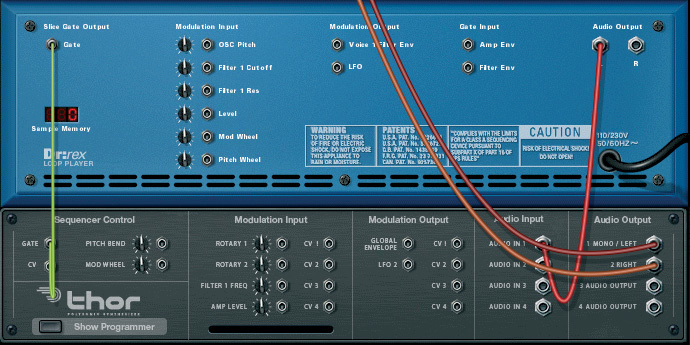 The connections necessary to use Dr.REX's Slice Gate Output to sync Thor's envelopes with beats.
We've only looked at some of the possibilities for using Thor as a hub for combining devices. Any of Reason's other instruments can be used in place of the NN19 samplers. Also, we've mostly used Thor's default, pre-wired signal path, and just tapped into at different points. However, the routing Matrix can be used to break Thor's default structure, and route audio directly from one module to another. Going further, you can use Thor's extra audio connections to patch out to other effects and back. There are a huge range of possibilities to explore, and whatever monstrosity you build, you'll have had lots of fun doing it and will have created a truly unique instrument.
Keeping It Raw
If you like the idea of building your own Reason modular synths, you should check out the set of NN19 patches called Synth Raw Elements in the Factory Sound Bank. These are samples of simple waveforms from a number of classic synths, and are designed to be stacked and mixed together to create more complex patches. A finished example of a modular Combinator patch that uses these samples can be found in the Reason Factory Sound Bank. Create a Combinator, click the patch browser and navigate to Factory Sound Bank / Combinator Patches / Lead Synth / Moog Monosynth. In this Combi, four NN19 samplers act as simple oscillators, using the Minimoog raw waveform presets. The front panel of Thor can be used to shape the sound just as if it were a basic Thor patch, even though all the sound sources are actually external to Thor.
Enhanced Loop Player
The Dr.REX Loop Player teams up with Thor rather nicely, and can be routed through the whole of Thor's signal path more easily than other instruments. This is because when it's being used to play back a loop, Dr.REX is more-or-less monophonic, and generates its own gate signals in sync with the beats its playing. The screen here shows the simple connections that are required for this technique. Dr.REX's Slice Gate Output generates a gate at each slice (transient) in the loop, which, when wired as shown, triggers Thor's envelopes in time with beats. This means that you don't need to put the devices into a Combinator, you just need to trigger the REX player. With these physical connections, use the routing matrix to send the loop to Thor's Filter 1, and get the full benefit of the Shaper, envelopes, LFOs and step sequence modulation.