

As explained last month, synthesizing the sound of an acoustic piano is difficult, but it can be done reasonably realistically, as the 1986-vintage Roland JX10 shows. We find out how Roland managed it...
Last month, I concluded my discussion of the acoustic piano by promising to show you how the not-very-humble (and highly underrated) Roland Super JX10 analogue polysynth can create a satisfactory piano sound. And I will. But if you're expecting a simple set of instructions suggesting that you patch the output of the voltage-controlled doodah to the input of the exponential wotsit, you're barking up the wrong sequoia. That's because — before we're in a position to do so — we must first investigate an area of synthesis not yet covered in Synth Secrets.
 Oscillator synchronisation (or 'sync') has been around since the birth of analogue synthesis. Nevertheless, it's one of the least understood facilities on any synthesizer. To be honest, that's not surprising... it's a non-linear operation, and it comes in at least three flavours. But given our well-defined target (ie. a decent analogue emulation of the piano sound) I'm going to narrow our focus to concentrate on the variety and implementation that will best help us to achieve this. It's the most common form, and it's called hard sync.
What Is Hard Sync?
 Figure 1: A perfect ramp wave.Unless this is the first copy of Sound On Sound you've ever held, I'm sure that you'll have read at least one review or retrospective of an analogue or virtual-analogue synth containing the cliché that it's "capable of tearing sync sounds". Some of us (I fear that I should hang my head in shame) have even been guilty of writing it. Indeed, it's quite possible that you've spent far too many hours twisting the pitch knob of a sync'ed oscillator to make it go 'zeeeooooww'. But what, precisely, is happening to the waveform as you do so?
 Figure 2: A perfect square wave.Figure 1 shows the output from a perfect ramp wave oscillator. It's not an analogue, software-generated, digital, or any other type of ramp-wave oscillator... it's just a representation of a perfect ramp-wave oscillator, and it has a frequency of some arbitrary value, which I'll call 'F'. We will also call the waveform the slave waveform from now on, because this is the signal that will be affected by the operations we perform.
Now we're going to consider a second waveform — a perfect square wave — with a frequency of twice F. I've shown this in Figure 2. This is the master waveform, because it is the one that affects the slave.
 Figure 3: Deriving triggers from the master waveform.Next, let's assume that, by the magic of electronics, we can extract a series of triggers from the master waveform, and that a trigger occurs each time the master wave completes a cycle. The resulting triggers occur at each of the positions shown in Figure 3. We're now going to use these triggers to perform an innovative trick: we'll reinitialise the slave waveform (or, to be a bit more scientific, reset the phase of the slave to 0 degrees) each time a trigger is encountered, as shown in Figure 4.
 Figure 4: Reinitialising the slave at a frequency of 2F.In this case, the result is another ramp wave. Although it's generated by the slave oscillator, it has the same frequency as the master, but half the amplitude of the original slave. If this seems to be a rather arcane way to double the frequency and halve the amplitude of a signal, I agree. It's not very interesting, but let's persevere...
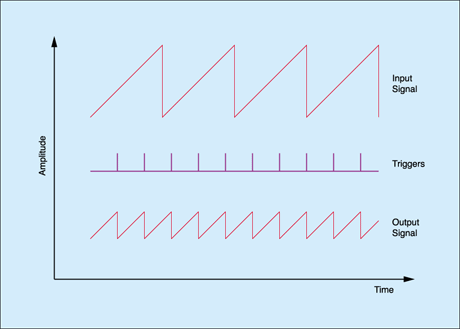 Figure 5: Reinitialising the ramp wave at (8/3)F.At first sight, it seems that little happens when we alter the pitch relationship between the master and the slave. To illustrate this, I will change the frequency of the master from 2F to (8/3)F, as shown in Figure 5. The result is much the same as before; we have obtained another ramp wave with the same frequency as the master, but this time with even lower amplitude. Boring!
If you consider Figures 4 and 5 again, you might see the reason why we are obtaining such uninteresting results. It's because, up to this point, we have considered two cases where the master frequency is higher than that of the slave. So let's now consider a couple of instances where the slave is set to the higher frequency.
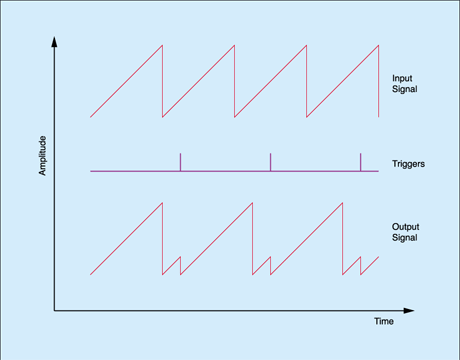 Figure 6: Synchronising an oscillator of frequency F using a master of 0.8F.Figure 6 shows such a situation, with the master running at 0.8F. In this example, the slave has time to complete a whole cycle, plus a little bit, before it is reset. The resulting waveform is much more interesting than before, with an unusual harmonic structure that you cannot easily obtain by other methods. Nonetheless, the output frequency is again the same as the master. Indeed, no matter what the relative frequencies of the two oscillators may be, the output frequency will always be equal to the master frequency. This is the first rule of hard sync:
- When two oscillators are hard-synchronised, the pitch of the output is equal to the pitch of the master.
But this isn't the end of the story. Let's consider what happens when we increase the slave frequency further with respect to the master.
 Figure 7: Sync'ing a ramp wave slave of higher frequency than before.As you can see in Figure 7, a ramp wave of higher pitch is able to complete more of its cycle, or more cycles, before it is reset, thus creating a different waveform. As always, the pitch is that of the master, but the tone is different from that shown in Figure 6. So here's the second rule of hard sync:
- When two oscillators are hard-synchronised, then if the master frequency is lower than the slave frequency, changing the pitch of the slave changes the timbre of the output.
These changes are not subtle. The output is a ramp wave whenever the slave frequency is a whole number multiple of the master frequency, but at any point in between, strange-sounding variations on the slave waveform are created, and the harmonic structure of the slave is similarly affected. So if you sweep the slave frequency up or down, the output of the sync'ed oscillators changes constantly, from ramp waves through many exotic variants, back to ramp waves again, and continues to change for as long as you keep changing the frequency of the slave. This is what gives hard sync its ability to generate such distinctive sounds.
Before moving on, I should mention that, although these examples have used ramp waves as the slave, there's no reason these days why we can't use other waves. But in practice, there used to be an important reason. The electronics in analogue synths generally limited the use of hard sync to ramp and pulse waveforms. With modern digital synths, which offer greater flexibility with regard to their waveforms, you can obtain a wider range of effects, including tonal changes when the master frequency is higher than the slave frequency (see the 'More On Oscillator Sync' box below).
More On Oscillator Sync
 Sync'ing a sine wave of frequency F using a master of frequency 2F.The first few examples in this article suggest that you cannot generate new timbres when the master frequency is higher than the slave frequency. This is not strictly true, although it is true when the slave waveform is a ramp or square wave.
Fortunately, some synths allow us to synchronise different waveforms, and it is easy to show that if we use an alternative (such as the sine wave in the diagram on the right) we can create new waveforms even when the master waveform is at the higher pitch.
Generating Hard Sync
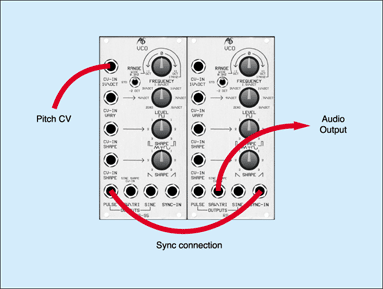 Figure 8: An oscillator with a Sync input.We can recreate all of the waveforms and sounds we've discussed so far using just two oscillators, provided that the intended slave has a 'sync' input. The Analogue Systems RS95 VCO shown in Figure 8 here is a good example of such an oscillator, and it will generate hard sync provided that you apply a square (-ish) signal of suitable amplitude to the 'Sync In' socket in the lower right-hand corner of the panel.
 Figure 9: Physically sync'ing one RS95 oscillator to another.Figure 9 shows how we connect two of these oscillators to generate and play sync'ed sounds. Firstly, we must patch the keyboard pitch CV to the pitch CV input on the master oscillator, whereupon the first rule of hard sync, as stated earlier, allows us to play the patch in standard fashion. We then direct the square-wave output from the master oscillator to the 'Sync In' of the slave. The circuitry within the slave converts the master waveform to the series of triggers described in Figure 3, and these reinitialise (or 'synchronise') the slave waveform as I illustrated in the subsequent examples. Taking the signal from the slave's sawtooth output allows us to hear the complex waveforms generated. Figure 10 shows this patch in standard Synth Secrets format.
The sound produced by Figure 10 is interesting for two reasons. Firstly, it has a timbre quite unlike the square and sawtooth waves used to generate it. Secondly, only the master is tracking the keyboard, so the frequency relationship between the master and slave is different for each note, resulting in different tones for each. Nonetheless, the timbre remains static within a single note, and if this were the limit of sync's capabilities, we would require additional tools such as dynamic filters to inject some life and tonal variation into the sound.
 Figure 10: A simple 'sync' patch.
However, it's possible to overcome this by making use of the second rule of hard sync mentioned earlier, and setting up (for example) a triggered contour generator to sweep the pitch of the slave (see Figures 11 and 12 below). If you set the ADSR correctly (please ignore the positions of the knobs in Figures 9 and 11... they are all set to 12 o'clock by default) the pitch of the slave is modulated to create dramatic sweeps of tone each time you press a key. In fact, if you offset the pitches of the two oscillators correctly, and apply the right amount of gain to the sweep signal, you will recreate the powerful sync sounds obtained from vintage synths such as the Moog Prodigy.
 Figure 11: Patching a swept sync sound.Of course, there's no reason for you to limit the sync modulation to a single ADSR contour generator, and with a more powerful pre-patched (or modular) synth, you will be able to use all manner of modulation sources. You need only look at the front panel of an ARP Odyssey to see what is possible; pitch modulation of the slave can be provided by an LFO, an ADSR envelope, S&H, the mixed VCO1/VCO2 signal produced by the S&H mixer, noise, and even an external CV... plus numerous combinations of these. The possibilities are enormous, and this is just one reason why players are still able to coax new variations of sounds from the Odyssey — a synth that celebrated its 30th birthday this year!
It might now seem that we're a long way from our original quest to synthesize the acoustic piano. But if you cast your mind back a month, you'll remember that there were two primary reasons why we were unable to create a convincing piano patch using conventional oscillators, filters, and so forth. One of these was because we could not imitate the natural resonances and reverberations of the piano soundboard and body. The other was that, although we used contour generators, filters and amplifiers to mould the overall shape of the sound, we were unable to recreate the dramatic timbral changes that occur at the start of every piano note.
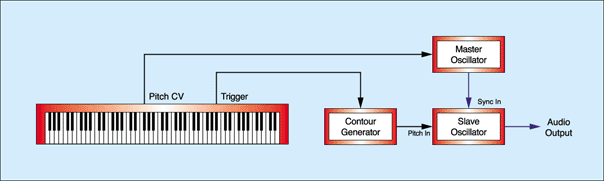 Figure 12: Creating a swept sync sound.
Happily, we now have a powerful tool to help us overcome this, because hard sync is capable of much more than the aforementioned 'zeeeooooww' sounds. It is one of the easiest ways to imitate the sound of a hammered or plucked string, and it's used in some of the most evocative harpsichord and clavinet sounds ever produced by an analogue synth. But I'm getting ahead of myself...
Synthesizing The Piano Timbre
I have already stated that the Roland Super JX10 is capable of producing a useable piano sound. I know this from experience, because I used Roland's factory 'H1: Acoustic Piano' Performance as a stage piano for a couple of years. Falling somewhere between my RMI Electrapiano and the pair of MKS20s that I eventually adopted, it had a character of its own, and contributed to tracks that might have ended up quite different had they been written with a 'real' piano to hand.
As you may be aware, the JX10 is essentially two Roland JX8Ps in a single box, with a bunch of extra parameters that allow you to combine two JX8P 'Tones' (which we would normally call 'patches') into a single 'Patch' (which is what most people would call a 'performance'). It is a hybrid synth, with DCOs (Digitally Controlled Oscillators) and the quantisation of parameter values that is necessary if patches are to be stored in memory (to understand why quantisation and memories go hand in hand, please refer back to Synth Secrets 21, in SOS January 2001. The JX10 utilises a 'digital parameter access' programming system in which every voice parameter has a number and an associated value.
The tables show the oscillator settings for the 'Piano 1-B' factory Tone, which comprises half of the 'Acoustic Piano' Patch. Unless you're practised at reading tables of this nature, they may not mean much at first sight, so let's sort them out...
|
The first table shows the settings for Oscillator 1, also known as DCO1. This is a simple oscillator with controls for octave range, waveform, tuning (in semitones), LFO modulation depth and envelope depth. As you can see from the table, its output is an 8' square wave with no tuning offset or modulation.
The next table shows the settings for Oscillator 2, or DCO2. This offers the same controls, plus additional parameters for Cross Modulation and fine tuning. And there, in the Cross Mod options, is the clever bit... Sync1, which is hard sync of DCO2 (the slave) by DCO1 (the master).
The pitch of DCO2 is determined by parameters 21, 24 and 25, and these place it 14 semitones and 10 cents above DCO1. This means that, if not modulated by the LFO or an envelope, the slave will complete two-and-a-bit cycles for every master cycle, and its output will look much as shown in Figure 7. However, parameter 27 tells us that an envelope is modulating DCO2, so things are a little more complex than they might otherwise seem. No matter; let's move on...
The third table contains just two parameters; the modulation settings for DCO1 and DCO2. The first determines whether keyboard velocity will affect the amount by which the Envelope Depth parameters (numbers 15 and 27) will affect the pitches of DCO1 and DCO2, but since it's set to 'Off' we can ignore it. The second parameter (number 32) determines which of the Tone's Envelope Generators will provide the pitch modulation whose amplitude is specified in parameters 15 and 27, and with what polarity. The '^1' setting means that Env1 is the modulation source, and with positive polarity.
Now, as we saw a couple of paragraphs ago, the amount of pitch modulation applied to DCO1 is zero, but parameter 27 in DCO2 shows a maximum value of 99. This means that the pitch of DCO2 will be swept dramatically by Env1, which in turn means that there will be a huge variation in its sound as the contour progresses.
 Figure 13: 'Piano 1-B' oscillators.
Given that both DCOs in each voice of a JX10 Tone track the keyboard, we can represent parameters 11 to 32 as shown in Figure 13. This is identical to the classic 'swept' sync sound depicted in Figure 11, with the addition of keyboard tracking of DCO2.
|
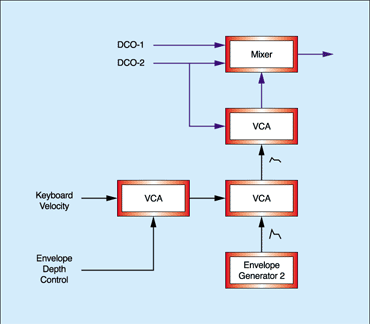 Figure 14: 'Piano 1-B' mixer.The last table on this page, which shows the Mixer's parameters, tells us how the oscillators' outputs are mixed before being passed to the rest of the VCF/VCA signal path. Parameter 41 determines that, as well as driving the sync input of DCO2, the audio output of DCO1 is contributing 25 percent of its maximum amplitude to the mix. This means that it is performing two roles: one as the sync master, the other as a conventional audio source.
Parameter 42 suggests that the output from DCO2 is mixed at full amplitude (most JX10 parameters span a range from zero to 99) but this is not the whole story, because parameters 43, 44 and 45 also control the level of DCO2. The table shows that the positive polarity of EG2 is raising the level of DCO2 even further, according to the shape of its contour, and subject to a gain determined by playing velocity (the JX10 offers four keyboard response curves, programmed as Dynamics settings '1', '2', '3', or 'Off'). If all this sounds a bit of a jumble, don't worry, because it's much simpler to interpret as a block diagram, as shown in Figure 14.
 Figure 15: 'Piano 1-B' timbre generation.
Adding Figure 14 to Figure 13 gives us Figure 15, which shows how the JX10 produces the raw sound for the 'Piano 1-B' Performance.
 Figure 16: The contour generated by Env1 (affects the tone of the sync'ed sound).Now we need to define the actions of two Envelope Generators. The tables below show these, while Figures 16 and 17 show the contours themselves (on a JX10, setting Key Tracking to '1' means that the envelope times are halved from the bottom of the keyboard to the top, while setting Key Tracking to '2' means that they are quartered. This increasing of Decay and Release rates at higher pitches imitates the natural response of acoustic instruments).
The Action Of Env1 & Env2
 Figure 17: The contour generated by Env2 (affects the amount of sync'ed sound).The tables below show that Env1 is modulating the pitch of DCO2 (the slave), so there's a rapid blip of sync sweep (and therefore a huge tonal blip) at the start of the note. This goes some way toward imitating the massive changes in harmonic structure that occur during the piano's hammer strike, and the exchange of energy among harmonics when the hammer bounces off the string.
The initial phase of the sound is followed by a constant Sustain. Roland chose the Sustain Level such that the waveform generated by hard sync (with DCO2 offset by 14 semitones and 10 cents plus the Sustain Level) produces an appropriately 'wiry' tone.
Finally, once you release the key, Env1 travels through its Release phase, so the tuning offset of DCO2 falls to 14 semitones and 10 cents (the tuning interval defined in parameters 21, 24 and 25) generating a second, gentler sync sweep as it does so.
The mild tracking of approximately 20 percent is appropriate, because although these elements of the piano's sound become more rapid as you play further up the keyboard, they do not become dramatically so.
|
You'll remember that parameter 41 fixes the amplitude of DCO1 at approximately 25 percent. This means that we have an 8' square wave permanently present in the sound. At the same time, parameter 42 defines that DCO2 is permanently present at full amplitude.
 Figure 18: The relative contributions of the oscillators.However, both the final table and Figure 14 show that Env2 is affecting the amount of sync'ed sound in the final output from the mixer. I doubt that DCO2 is sliding from 200 percent at the start of the note to 100 percent at the end, so I suspect that something like Figure 18 is closer to the truth. Curiously, this means that the un-sync'ed sound from DCO1 becomes more important as the note progresses.
Putting It All Together
It would be nice to say that we have now plumbed the depths of the JX10's 'Piano 1-B' Performance but, inevitably, this is far from the whole story. If we were to leave the Tone in this state, it would drone on forever, as implied by the orange and purple arrows on the right of Figure 18. Pressing a note on the keyboard would merely produce blips of interest, as shown by the green section of the diagram. Clearly, we need to add more sound-shaping elements, and the JX10 provides these in the form of a conventional subtractive signal path. Unfortunately, we've run out of space for this month, so I'll complete the Tone next time, adding the VCF and VCA, and then demonstrating some other clever tricks that the JX10 has up its electronic sleeves. Until then...