

 Wrap yourself in Embracer...
We take a closer look at the Embracer, Tonic and Monologue plug-ins that come supplied with Cubase SX.
It's only a few month since we had the v2.2 update of Cubase SX, and now of course v3 is almost upon us (see review elsewhere in this issue). Introduced with v2.2, and mentioned briefly in the July 2004 Cubase Notes column, were three new plug-ins: two VST instruments (Embracer and Monologue) and a VST effect called Tonic. These three offer plenty of creative scope and Cubase Notes hasn't yet covered them in any depth — so here goes...
Give Me A Hug
While an Embracer may sound like a character from an Arnold Schwarzenegger film, in SX it's a new polyphonic synthesizer that specialises in producing pad and atmospheric sounds. On the whole, Embracer features a relatively simple and unfussy user interface, and it's capable of producing some very usable sounds. However, perhaps its most intriguing feature is the surround sound output option, of which more in a moment.
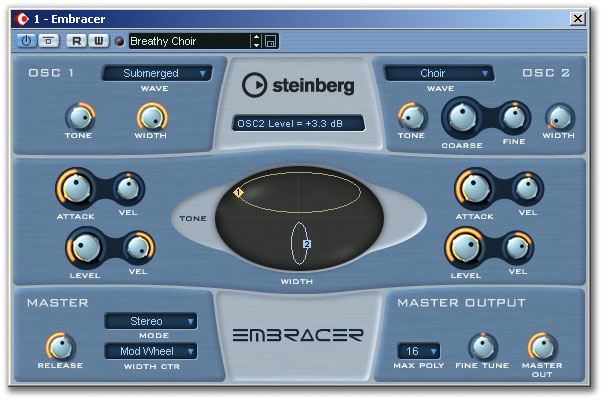
The synth's architecture features two oscillators, each with 12 waveforms to choose from. These include string-like, choir-like and organ-like sounds, as well as some rather more 'electronic'-sounding tones, such as 'Metal Phase'. Each oscillator features level, attack, stereo width and tone controls, which seems like a fairly basic control set, but it does make it easy to mix and match between the waveforms and to blend the two oscillators to produce a surprisingly diverse range of sounds. As shown on the screen shot, the central 'eye' controller provides an X/Y control matrix which duplicates the tone (vertical axis) and stereo width (horizontal axis) controls, with an ellipse for each oscillator. This is neatly executed and makes tweaking a sound a very intuitive process (no PhD in synth programming is required here!). These controls offer some interesting sound-shaping possibilities. For example, in the screen shot, one oscillator is producing low-frequency sound with little stereo width, while the other is dominated by high-frequency response and wide stereo. With the mod wheel set to control the degree of stereo width, it's easy to open up the high-frequency stereo image of the sound (to add a little movement) without the bottom end losing its focus in the centre of the stereo image. The drop-down menu in the Master section also allows the Width Control to respond dynamically via velocity, aftertouch or envelope.
Other controls include coarse and fine tuning for Oscillator 2 only; these can be used for detuning, to create fatter sounds (the preset patch 'The Abyss' is a nice example). The Master section includes a global Release control for the amplifier envelope, while the Master Output section allows the maximum polyphony and overall output level to be set.
When a new instance of Embracer is created, two stereo channels appear within the SX mixer. By default, all the output is fed to the first of these, which in turn is directed at the main stereo out. However, if SX is configured for a surround project, the second output pair will feed the left and right surround speakers (Ls and Rs). Changing the output setting in the Master Section from Stereo to Surround activates this output pair within Embracer. Of course, the SX surround panner can be used to re-direct the two outputs within the surround field as required. However, as with stereo width, described above, it is possible to change the balance between the two stereo outputs via the mod wheel. The sense of 3D space created if the surround channels are gradually added to a pad sound is really quite addictive. The only downside is that the relative output from the individual oscillators to each of the stereo outputs can not be adjusted. This said, each instance of Embracer has a pretty low impact on the CPU (less than three percent on my P4 2.4GHz test system) so some creative doubling of parts can easily be done. An additional sense of space can also be created by applying different processing to the two stereo outputs. Some kind of filter is just the thing — which brings us to Tonic... see the box overleaf.
Filter Tips: Exploring Tonic
Tonic emulates the characteristics of an analogue filter and is similar to the filter within the Monologue synth. It can be switched between mono and stereo output, has low-pass, band-pass and high-pass modes, various envelope-triggering modes, a step sequencer for LFO shape, and an X/Y matrix pad for additional real-time modulation of any two of the plug-in's parameters.
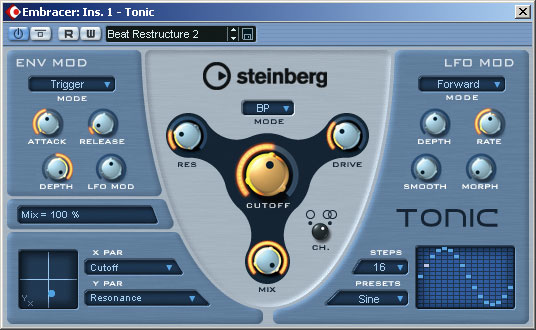 Sonic magic via Tonic.
The central portion of the display features the filter-type drop-down menu (choose from 24dB, 18dB, 12dB and 6dB low-pass filters, plus a 12dB band-pass and 12dB high-pass version) and the usual Resonance, Cutoff, Drive and Mix controls. These operate in the standard fashion — although, as with any filter, do take some care when experimenting; extreme resonance settings produce self-oscillation, so watch out for your speaker cones! If the controls in the Env Mod section are left in neutral (as in the preset 'Deep Bass', where the settings mean that the filter is not influenced by this section), the combination of the filter and LFO Mod sections can provide a fairly standard range of filter-sweep effects, with the Depth and Rate controls operating as expected. The Smooth control (surprise, surprise!) smooths between the LFO steps, with high values being best for the kind of gradual filter changes that might be suitable to gently alter a pad sound, for example. The Morph control adds increasing randomness to the LFO pattern (and this is reflected in the Step Window), with some interesting results, although if you want to experiment with this parameter you should turn down the Smooth control to zero, so that the random steps in the LFO pattern become more obvious. A range of preset LFO step patterns are provided (Sine, Sine+, Cosine, Triangle, Sawtooth and Square) but you can also draw your own. The number of steps can be set between one and 16.
Up to this point, Tonic is a fairly standard filter plug-in, but add in the Env Mod section and things can get far more interesting — or downright weird, depending upon the settings used. (Leave the LFO Mod control set at 12 o'clock for the moment.) The Env Mod section offers three modes of operation: Follow, Trigger and MIDI. Follow responds to the input signal's volume, to dynamically influence the filter cutoff. By contrast, Trigger uses the input signal to trigger the envelope to run through a complete cycle. Follow mode, in particular, allows some additional expressive control, depending upon the dynamics of the input signal — and the 'Zap' preset provides a good starting point for experimentation.
MIDI mode uses MIDI notes to trigger the envelope (either live from a keyboard or from a recorded MIDI track — simply set the MIDI output of the track as Tonic in the Inspector), with the filter cutoff tracking the note number. This does take some experimentation to get right and, fortunately, Steinberg have provided a small number of Tonic presets that use this setting. With Tonic strapped across the output of a suitably cheesy soft brass pad in Embracer, I was able to create instant Queen 'Flash'-style rhythmic chords — although I'm sure it's also possible to find something that is actually useful to do with it! For the ultimate in Tonic weirdness, engaging the LFO Mod control in either Trigger or Follow modes causes the envelope level to modulate LFO speed. This can produce some really interesting results with drums, radically altering the sound and feel of a loop. However, it is more difficult to control with other types of sounds, as it's very easy to get the filter dynamics out of sync with the fixed tempo of a rhythm track. But while the Tonic filter is perhaps not in the same class as something like PSP's Nitro, it is very efficient with CPU resources and, with the exception of the LFO Mod control, easy to use.
Bargain Basement
Next in line is Monologue and, for me at least, this is the highlight of the trio. Monologue is a monophonic virtual analogue synthesizer based on physical modelling technology and primarily intended for producing bass or lead sounds. It features two oscillators, with choices of sawtooth, square and sub waveforms for Osc 1, and sawtooth, square and triangle waveforms for Osc 2. Oscillator 2 also features PWM control, which adjusts the pulse width of the square wave. The Sync button synchronises the pitch of Osc 2 to that of Osc 1, and when this is active adjusting the pitch of Osc 2 alters tone rather than pitch. There's also a noise generator for white noise, and this is useful for creating drum or percussion sounds, as demonstrated by a small number of the supplied presets ('Acid Kick' has a nice thump to it, for example).
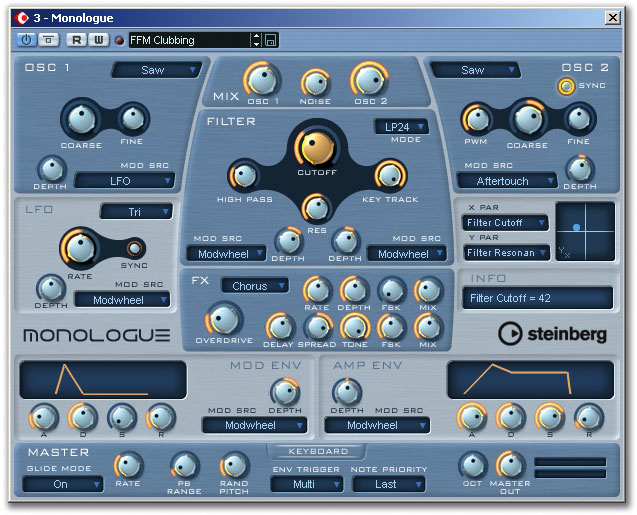 Fancy a free virtual analogue monosynth? Check out Monologue.
Monologue features two filters: a simple high-pass and a multimode one that shares many of the features of Tonic, as described above. A single LFO is included, which can be tempo sync'd, and there are four-stage ADSR modulation and amplifier envelopes, which can both have modulation sources and depth specified. The Master section includes a Glide switch with a rate control, as well as master output level and note priority controls, and the feature set is rounded off by a very useful effects section with a choice of chorus, phaser and flanger, plus separate delay and overdrive effects. As with Embracer and Tonic, an X/Y pad for real-time modulation of any two parameters is also provided.
The excellent selection of presets makes a good job of demonstrating the versatility of Monologue, and it's achieved at a very low CPU cost: on my test PC, a single instance of Monologue barely registered on the Performance meter.
My only real grumble is that setting the rotary controls in all three plug-ins can be fiddly. Although the actual value is displayed in a small panel as a control is adjusted within each plug-in, manual entry of values does not seem to be possible. This is particularly irritating when trying to set the Rate control in Tonic. This minor complaint aside, these plug-ins are well worth exploring, if you haven't already done so.