

 Photo: Mike Cameron
Kawai's last few digital pianos have been finely wrought things of beauty: solidly built keyboards with an amazingly realistic playing action and beautifully sampled piano timbres. But their latest claims to surpass all of those. Can it possibly be true?
The MP8 is the latest flagship addition to Kawai's acclaimed MP range of digital stage pianos, following on from the excellent MP9000 (SOS January 2000) and the MP9500 (SOS January 2003). Fans of the MP9000 proclaimed it to be 'near-perfect' — not least because of its superior AWA Grand weighted keyboard action. It also sounded rather splendid. The MP9500 received yet more accolades for its improved AWA Grand Pro action, and introduced a more flexible Setup mode, allowing up to four internal/external sounds to be layered together, as opposed to the MP9000's two internal and two external layers. The MP8 brings yet more to the table — in short, the design philosophy is 'more of everything'.
Beauty & The Beast
The MP8's new black livery and dark wooden end cheeks are striking and sensual, lending the instrument a sense of gravitas befitting a quality grand piano. The basic layout and appearance of the panel remains largely unchanged from previous models apart from some additional buttons at the right-hand end, and four red and four green LEDs accompanying the four sliders on the left — more on which later. The remaining front-panel controls, EQ and Effects sections have been carried through from the MP9000 and MP95000 — a detailed description of these can be found in that January 2000 MP9000 review.
Rear-panel connections (see the final page of this review) are also much as before, with two differences. Firstly, the headphone socket is gone, having been relocated to the front (left) of the instrument. This is sure to please everybody who has ever complained about rear-mounted headphone sockets — myself included! Secondly, keeping in vogue with the current trend, a USB connector is provided. No specific editing software is bundled with the MP8, so in this case USB is provided simply as an alternative to using conventional MIDI connections. Windows XP and Mac OS X both include generic USB device drivers — Windows 2000/98SE users will need a suitable driver, which can be downloaded from www.kawai.co.jp/english/Download1.html. USB is not supported for Mac 9.xx, so a standard MIDI interface will be needed.
Features & Sounds
Kawai have not just doubled, but tripled the polyphony previously offered on the MP9000 and MP9500. The MP8 can play a whopping 192 notes, allowing for the most pedal-heavy, cadenza-laden performances to be reproduced without missing a note. This is clearly of benefit when playing layered sounds — even with all four layers addressing internal sounds, a respectable 48 notes of polyphony is always available.
 The main volume slider, zone level faders, keyboard zoning controls, and four rotary controls at the left end of the MP8. The latter controls can be used to adjust effects, EQ, sound envelope parameters, or to send MIDI controller data, as on the original MP9000.Photo: Mike Cameron
The MP8 provides a sizeable set of 256 sounds, laid out in eight sound categories — Piano, Electric piano, Drawbar, Organ, Strings/Vocal, Brass/Wind, Pad/Synth and Bass/Guitar. Each category has eight principal variations, and each of those variations has a further four sub-variations, accessed via the four new A,B,C & D buttons below the two rows of eight preset buttons.
The acoustic piano sounds are as good — if not even better — than those on the previous MP models. Kawai's Harmonic Imaging system works extremely well, providing almost seamless dynamic variation and a consistent (although in places not perfect) tonal balance across the keyboard. The slightly plummy 'Concert Grand 2' and the Elton John-flavoured 'Studio Grand 2' get my vote as personal favourites, but all the variations are eminently useable, and are designed to suit a wide range of musical styles. The samples all sound as if they have been recorded using close-miking techniques — the tone is highly detailed, more so than if the microphones had been placed at a greater distance. This may not be to everyone's taste, and as such the MP8 arguably lends itself (in a DI'd recording situation) more to modern music styles. Of course, if you were giving a classical recital using the MP8 in a hall, the audience would provide its own distance! To further improve realism, there are two new additions to the pianos' edit parameters — String Resonance and Damper Effect. These give independent control over the reverberant 'thump' heard when notes are played with the sustain pedal down (Damper Effect) and the amount of sympathetic overtones created by other strings in a specific note's harmonic series (String Resonance). Both can be turned off if they prove distracting, which can be the case in headphones, but it seems less of a problem on speakers. These parameters replace the MP9000 and MP9500's Sympathetic Resonance, which on those instruments was provided as an EFX effect.
There are also plenty of new and varied patches to be found, such as Steel Drums, Nylon Guitar, Scat Vocals, Bassoon, Pan Flute, Banjo and Pedal Steel to name just a few, and there are even four basic Drum kits lurking at the end of the Bass/Guitar category. Sonic highlights include the Rhodes soundalikes, which are fun to play and would certainly pass muster on stage or in the studio. The '60s E-Piano' is a tad too bright and 'clipped' to be a convincing Wurlitzer, but could easily pass as a Hohner Pianet N (think The Zombies 'She's Not There'). The FM-style electric pianos are pleasingly nostalgic, creating a suitably convincing 'LA' feel when layered with the acoustic pianos. Other sounds are less authentic (the woodwinds instantly bring to mind Roland's SH2000 synth, and the Clavinets come across as disappointingly 'fake' and synthetic) but this is offset by a number of very useable Drawbar Organs (featuring the Rotary EFX) and some rather comely String textures.
Sound Comparisons
As mentioned elsewhere in this review, the MP8's piano sounds compare favourably with some of the high-octane software pianos on the market. Out of interest, I did a direct comparison with two pianos that I hold in high regard — the Roland SRX11 Complete Piano expansion board installed in my XV5080 (a version of which apparently graces Roland's new RD700SX), and Vintaudio's Yamaha C7 (close-miked version) running under NI Kontakt 2. The Vintaudio C7, incidentally, uses 4GB of samples, comprising six velocity layers with pedal up, down and release layers. The SRX11 has no pedal down or release layer, but all 88 notes have been sampled across four velocity layers. The MP8 appears to have been sampled at every fourth semitone, and has a release layer but no pedal down layer (although it does have the Damper Effect and String Resonance to compensate). The number of velocity layers on the MP8 is harder to determine — clearly Kawai's Harmonic Imaging method is very effective!
I chose three existing projects to run in Sonar, each of which was piano-driven but with the emphasis varying between rock and orchestral. The results were very illuminating — all three pianos acquitted themselves admirably. However, what did become clear is that there is no such thing as the universally 'perfect' piano sound. Where one piano suited a certain piece, it sat less comfortably in another. The MP8 is arguably the most versatile of the three, having more tonal variations to choose from — however, within classical/orchestral passages the SRX11 was the most effective, possibly due to the fact that its samples are not as close miked as the MP8 or C7, hence it sounded more natural in a classical context. Both the MP8 and SRX11 responded in a very consistent and musical manner to the pre-recorded performances' key velocities, whilst the C7 tended to over-react slightly at lower velocities.
On a slightly less glowing note, I noticed the MP8 was prone to some MIDI timing discrepancies, which were especially noticeable when playing back a quantised piano sequence alongside other quantised (zero-latency) software instruments. The discrepancies varied from negligible to delays of anything up to 20ms, which may not sound like much but is distinctly audible, particularly within a simple arrangement. As these 'latencies' are not consistent, they cannot be compensated for by simply shifting the part (or recorded audio) forward in time — that just makes certain notes occur early rather than late. Something is clearly awry here, but admittedly, it's less of a problem on this keyboard, which is clearly designed to be played rather than triggered, than on, say, a multitimbral synth module. In these days of excellent software-based piano instruments and affordable (and much more compact) rack units, I can't believe there will be many people, or indeed anyone, who would buy the MP8 solely as a sound source for triggering over MIDI, so the problem, whilst certainly extant, is arguably limited by the MP8's very nature. Nevertheless, if they can, it would be good if Kawai could do something about this!
Multitimbre Modes
 The display's a bit of an '80s throwback in terms of its size, but then there isn't too much that needs to be accessed or viewed with it, so it's not too much of a problem.Photo: Mike CameronLike the MP9000 and MP9500 before it, the MP8 can also function as a 16-part multitimbral instrument. The manual is extremely reticent about this, stating that you can do it but omitting to explain the procedure — which is bound to cause great frustration to MIDI technology novices! The procedure is actually straightforward, and of course requires the participation of a MIDI sequencer. Firstly, the MP8 must be set to Multitimbre mode in the System menu. Two such modes are offered, the difference being how the MP8 interprets MIDI program change commands. Mode 1 responds to bank and program changes by number according to the list set out in the MP8's manual. Mode 2 responds to program and bank changes by name according to the GM standard — so if your sequencer is configured so that you can specify 'acoustic bass' as the sound you want, the relevant MP8 channel will select the nearest equivalent sound. Since the sounds for individual channels cannot be directly assigned from the MP8 panel, sending program change messages is the only means to select the parts' sounds.
There are compromises to using Multitimbre mode — for example, the only effects available to each part are Reverb and Chorus. Unless I'm missing some glaringly 'obvious' hidden parameters, the other EFX effects appear not to function at all — and again, the manual makes no reference to this. As a result, the Drawbar presets (which normally use the EFX Rotary effect by default) don't sound as they should in this mode. This is curious, as the older MP9000 allowed EFX to be used on parts 1&2.
Multitimbre mode also caused some strange things to happen when using the USB connection. My sequencer (Sonar 4) took a worryingly long time to start up, Sound/Setup selection was erratic (with buttons refusing to respond), and I lost USB input several times while in this mode, although the MP8 happily played back recorded data. None of these problems occurred using standard MIDI connections.
The AWA Grand Pro Keyboard
First seen on the MP9500, the AWA Grand Pro keyboard constitutes Kawai's attempt to replicate the touch and feel of the company's own Concert Grand EX acoustic piano. The result is a fairly heavy action which will certainly delight some players, whilst conversely being initially quite hard work for those used to a lighter action. My initial impression was that it is distinctly heavier than many acoustic pianos I've played, but after a few hours of playing, you soon get used to the extra muscle power it demands. You also begin to appreciate the enhanced sense of dynamic control this keyboard brings — especially at the lower end of the velocity range.
To help players adapt to the feel of the keyboard, the MP8 provides five preset velocity curves — the normal default 'linear' response plus 'light', 'light+', 'heavy' and 'heavy+' choices. Most people will probably be happy with the normal setting — however, if none of these curves feel comfortable, the MP8 very obligingly offers two user-definable curves. To define a User curve, simply play the keyboard in a manner that feels natural to you (the manual suggests turning the volume off so you won't be distracted by what you hear). When you've finished playing, the MP8 analyses your touch and scales the velocity response to match the gentlest and hardest notes you played. This seems to work quite well — the resulting curve feels quite comfortable to play, although you may subsequently find yourself tempted to redefine the curve according to each piece of music you're playing!
One small criticism concerning the manufacturing finish is that the top corners of the keys (on the review model, at least) are rather sharp — so if you're planning on doing sweeping Hammond glissandi, make sure you have a first-aid kit to hand!
Sound & Setup Modes
On the MP9000 they were called Sound and Setup mode. In MP9500 parlance they were referred to as Single and Multi mode. Now the MP8 has reverted to calling them Sound and Setup... so how do these modes operate on the MP8? Basically, Sound mode provides access to 256 preset tones, arranged by category as described previously. Setup mode provides 256 user memories in which to store all your edited sounds and master-keyboard configurations.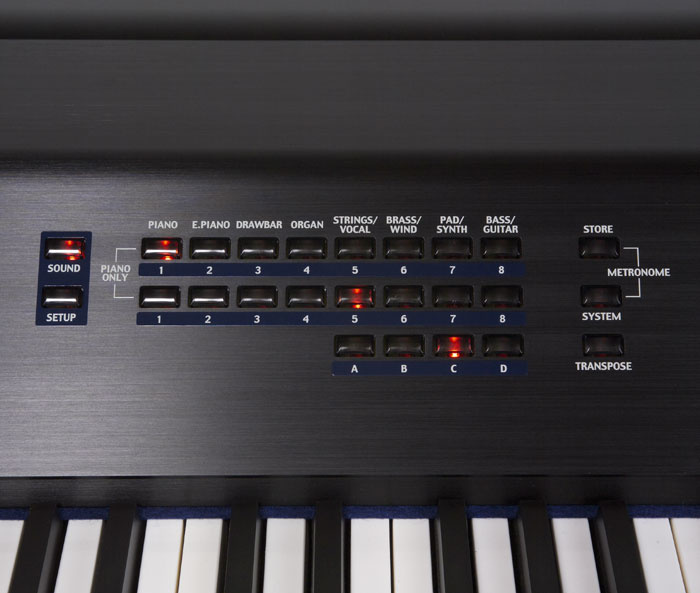 Patch-selection and management controls are to the right of the MP8's top panel, including the buttons for switching between Sound and Setup mode.Photo: Mike Cameron
When first powered up, the MP8 presents itself in Sound mode; any of the 256 Presets selected in this initial state will call up a single sound. However, although the primary function of this mode is to select single sounds, its secondary function is to serve as your editing palette. From here, you can activate any or all of the four zones, select sounds for each zone, edit those sounds, apply effects, set zone key ranges, and so on. So rather than merely being an operational state from which you select single preset sounds, Sound mode is also a creative starting point — a single preset 'Setup' in itself wherein all the MP8's parameters are freely editable. For example, you could make zones 1 to 4 active, layering four different internal sounds together, while zones 2 and 3 simultaneously transmit data to external MIDI devices on different channels, and the MP8 will remain in this state until you either change something or power off the MP8. Once you have created the sound and master keyboard configuration you want, you simply save it to any of the 256 Setup memory locations for later recall. If you wish to quickly return Sound mode to its original 'single sound' state, simply press the first two 'number 1' preset buttons simultaneously (marked 'Piano Only) and you're back to scratch.
To make it easier to identify which zones are addressing internal sounds, external devices or both of these, each zone fader is now accompanied by a pair of status LEDs. If the red LED is lit, that zone is assigned to an internal sound. If the green LED is on, the zone is transmitting data from the MIDI output. If both LEDs are on, then that zone is assigned to an internal sound and the MIDI output. The large zone on/off LEDs below the faders normally glow red when a zone is active — however, if a zone has been set to less than the full 1-127 key range, it will glow green to indicate that zone operates over a restricted key range.
XLR Outputs
 There are a couple of changes from the MP9500's rear panel — firstly, the headphone socket has sensibly been moved to the front, and MIDI interfacing is now possible via the new USB port on the right. Otherwise, the connectors — stereo out on jacks and XLRs, five-pin MIDI trio, expression pedal and footswitch jacks, and socket to attach the damper and soft pedal — are unchanged.Photo: Mike Cameron One further (but not visible) rear-panel change is to the XLR outputs; on previous models, these outputs rather perversely bypassed the Master Volume and internal EQ. On the MP8, the EQ settings do affect the XLR outputs, although the Master Volume slider remains bypassed as before. This latter point is less of a problem when playing single sounds (you can simply raise or lower that sound's Zone fader), but becomes rather inconvenient when playing layered Setups, where the balance between the layers is critical — there is no single fader to control the level of the total sound. Admittedly, you can go into Edit mode and change the Setup's Master Volume setting there, but this wouldn't be an ideal solution if you needed to change level on stage in a hurry. Alternatively you could connect an expression pedal and use that to alter the volume, but I suspect most people would rather opt for the standard jack outputs so they can use the front-panel fader!
Conclusion
The MP8 is a fine instrument, comparable with the better Giga-sized software pianos out there. In fact I'd wager that if you sat the MP8 next to a computer and told people they were playing some top-flight software piano from the Kawai's keyboard, most would accept it without question. Which leads me to wonder whether Kawai's next step might be to develop a truly comprehensive, gigabyte-sized piano sample set that would rival or improve upon the best of the software pianos. High-capacity 1GB and 2GB flash RAM cards are commonly available now that don't cost the earth — so why not take advantage of today's inexpensive memory technology and use it inside a stage piano?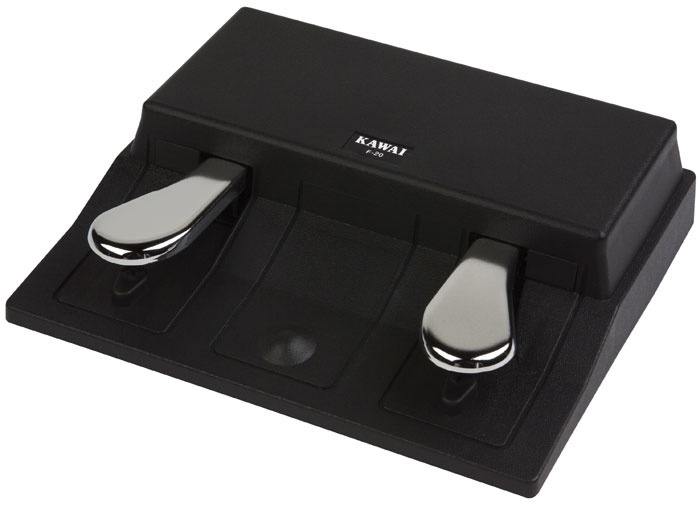 The F20 sustain and soft pedal unit supplied with the MP8.Photo: Mike Cameron
As a master keyboard, the MP8 may not offer the same level of control as the current crop of dedicated, purpose-built units — but it certainly provides more than you'd expect from your average digital piano. There's no arguing the quality of the MP8's keyboard, which lends a great deal of pleasure to playing those great piano sounds. Whether you feel the keyboard action is appropriate for all your playing tasks is very much an individual choice — I personally found the MP8's action slightly heavy for general non-piano applications. Rather like trying to trim your fingernails with garden shears, it's not necessarily the right tool for every job, leading me to prefer my trusty semi-weighted synth-action keyboard for tackling most non-piano parts.
If the MP8 contained only the piano sounds, it would be a fantastic instrument. As it is, the wide range of additional sounds should prove a welcome bonus for players who major in piano but need a little extra firepower, especially in a live context. Anyone who has previously considered investing in one of Kawai's MP pianos should now be especially attracted by the huge polyphony of the MP8, and for those looking to incorporate it into a live MIDI rig, those 256 programmable Setup configurations make it an even more attractive proposition. Find one, play it, and try not to want it.
Brief Model Comparison Chart
| MP9000 | MP9500 | MP8 | |
| PRESET SOUNDS | 16 | 64 | 256 |
| SETUPS | 64 | 64 | 256 |
| POLYPHONY | 32 | 64 | 192 |
| KEYBOARD ACTION | Enhanced AWA Grand action | AWA Grand Pro action | AWA Grand Pro action |
| VOLUME/EQ TO XLR OUTS | No | No | EQ only |
| WEIGHT | 34kg | 32kg | 32kg |
| HEADPHONE SOCKET | Rear-mounted | Rear-mounted | Front-mounted |
Pros
- Arguably the best-sounding digital stage piano on the market.
- A wide range of additional sounds.
- 192-note polyphony.
- High-quality weighted keyboard action.
Cons
- Weight of keyboard action takes some acclimatisation.
- Needs two people to lift it — worth remembering if you do plan to use it live...
- Master Volume slider bypassed when using XLR outputs.
- Significant timing latency when played via MIDI — although on a keyboard designed for live playing, this may not bother potential users much.
Summary
The Kawai MP range goes from strength to strength, with more of everything. The great piano sounds the company has become known for are enhanced by 192-note polyphony, 256 user-programmable Setups, a wide range of supplementary sounds and Kawai's top-of-the-range AWA Grand Pro 88-note keyboard action. Try it, and then try to resist it!
information
£1999 including VAT.
Kawai UK +44 (0)1480 474751.
+44 (0)1480 474752.