

Software guitar amp modelling has been around for a while, but GTR is Waves' first foray into the field — and as you'd expect, they've made a huge effort to get it right, even hiring guitar maker Paul Reed Smith to design a bespoke preamp.
Waves are one of the best established plug-in companies around and have an enviable reputation for well thought-out, good-sounding processors. They've so far steered clear of the software instrument market, preferring to concentrate on sound processing, but their new Guitar Tool Rack sees them entering the guitar amp modelling arena at a very serious level. It consists of a software package augmented by a hardware WPGI preamp that might best be described as a guitar-optimised DI box; Waves sought the help of guitar design guru Paul Reed Smith to make this behave exactly like the input stage of a typical guitar amplifier. Apparently Paul was also involved in the voicing of the amplifier models.
In addition to amp and speaker modelling, Guitar Tool Rack also offers a comprehensive set of 23 guitar stomp effects plus a tuner that can be used chromatically or set to custom guitar tunings. The pedals are called up separately from the amp model and are not complete plug-ins in their own right, but can be opened up in virtual 'floor unit' plug-ins that each hold two, four or six virtual pedals. Doing it this way means that any of the different stomp effects can be set up before or after the amplifier model as is most appropriate. For example, gates, distortion and fuzz tend to come before amps while delay and reverb are usually applied afterwards.
Most of the effects are familiar 'staples' such as EQ, compressor and gate, delay, reverb and various modulation effects such as phaser, flanger, chorus and wah. There are also several types of distortion effects and an octaver as well an interesting reverse delay with additional twists, such as pitch-shifting, called Lay'D. MIDI control from an external device is simplified by virtue of a straightforward MIDI learn function and full parameter automation can be handled by sequencers that support plug-in automation. In Logic, the parameter names also show up correctly in my Logic Control. Naturally, these stomp effects can be used in any audio track, though for guitar use, Waves understandably recommend you use them with your Waves Amp plug-in.
Waves Amp is designed to emulate a range of classic amp sounds, but these are arranged by degree of dirtiness rather than by cryptic clues as to the actual amps they were modelled on. They can be further modified using familiar amp drive and bass, middle, treble and presence tone controls, as well as a choice of modelled speaker cabinet types, microphones and on or off-axis mic positions. The amps range from clean vintage to modern high-gain with all the usual stages inbetween, and each is designed to give the same dynamic response as a real amplifier. Inevitably there are presets to get you started, but equally inevitably, you get the best results if you work at the settings and come up with your own tones.
Once you have a suitable amp sound set up, you can then place your choice of stompboxes both before and after the amplifier; the software is intelligent enough to handle the mono/stero designation depending on what stomp effect is in which part of the signal chain.
Hardware Requirements
Because guitar modelling needs to be applied in real time in order for the player to hear the results, a low-latency system is essential, but most DAWs based on modern computers should be able to to achieve this. Pro Tools TDM users obviously benefit from very low latency, but most native systems these days can also go low enough: for me, a 128-sample buffer size at a 44.1kHz sampling rate proved quite acceptable. GTR works on both Mac (OS 10.3.8 and above) and PC (Windows XP) platforms and requires a minimum of a 1.25GHz G4 or a 1.7GHz Pentium 4. Pro Tools users need to be running version 6.7 or higher.
Note that GTR works with Pro Tools HD and HD Accel hardware at sample rates up to 96kHz but Pro Tools Mix systems are not supported at all. The plug-ins are also available in the native RTAS and off-line Audiosuite formats for use in Pro Tools. TDM hardware supports running any plug-in on up to a single DSP element but a single plug-in cannot run on multiple DSPs. This creates some inherent limitations where not all the plug-ins will be able to run under TDM in all situations. Digi HD Core and HD Process types running at up to 48kHz will allow all the stomp plug-ins to be available but the Waves Amp plug-in will run only in mono; for stereo you need to open two instances and route accordingly. The full manual is available on the Waves web site and gives more details of the limitations when working under TDM. As a VST or AU plug-in, the system runs at up to 48kHz and no other restrictions apply other than those imposed by maxing out your CPU.
Amps, Speakers And Mics
When you first load the Waves Amp plug-in, one minor irritation is that an info screen loads first and you have to click on this to get to the 'real' plug-in window. The same is true of the virtual stomp pedalboards, which load as separate plug-ins.
In the studio, it is not uncommon to record the same amp using two different microphones or even to use two different amps at the same time. To help emulate this, the Waves Amp plug-in comes in several variants. Mono Amp feeds a single cabinet/microphone filter while Mono Dual Cab lets you feed the amp section through two different cabinet/mic setups which are then summed back to mono. Mono-to-Stereo is similar but keeps the two cabs in stereo, while Stereo Amp is actually a dual-mono configuration, accepting a stereo input and outputting in stereo: the left input goes through the amp model to cabinet 1 while the right input goes directly to cabinet 2. If your DAW allows, you can also route to two instances of the plug-in at the same time to achieve the effect of recording two different amplifiers. The six mic emulations include dynamic, ribbon and capacitor models with a choice of on or off-axis placements, which provides a useful range of natural-sounding tonalities.
 The Waves Amp plug-in includes seven different amp models, plus cabinet emulations that can be placed in mono or stereo configurations.
A total of seven amp models are included. Direct combines light EQ with mild dynamics processing and can be used with any cabinet and mic combination, or with none at all. Clean is based on a tube amp with relatively little distortion, while Edgy sounds like a '60s tube amplifier that can be either clean or quite dirty depending on how much gain is used. This is quite responsive to picking pressure or to the guitar volume control setting. Drive gives a bluesy growl that can be escalated to a saturated rock sound, but it can still play pretty clean at low drive levels. Crunch is perhaps the definitive solo setting, and also gives a pretty convincing grunge sound. Odd harmonics are exaggerated at higher drive settings and even at low drive levels, the sound never cleans up enough to be described as clean.
Hot is suitable for power chords and more aggressive soloing while Modern Lead most definitely goes to 11 for ultra-high-gain soloing and power chords. Regardless of which amp is called up, there's a Drive control as well as bass, middle, treble and presence, but these act differently according to the amplifier type. Interestingly, the tone controls (other than presence, which adds boost only) can either deliver cut or boost, with flat being the mid position. A neat touch is that the drive control is arranged so that the amp output level doesn't change when more drive gain is applied, making it easy to fine-tune your sound without constantly changing the output level. The amp plug-in can be bypassed completely for a clean DI sound, or you can bypass just the amp and leave the cabinet and mic models running.
Each cab has its own volume control and in the stereo configurations, each also has a pan control. Where dual cabinets are being used, each has a phase-invert switch which affects the sound when the two cabinets are combined, but there's no way to add a variable delay to just one of the cabinets to simulate the effect of varying the microphone distance of one mic in a dual-mic setup, which I feel is a missed opportunity. There's also a master output gain control that can be used to get as much level as possible out of the plug-in without clipping. Metering is available in the centre, with a red clip indicator.
Stomp Effects
No guitar effects collection would be complete without its distortion and overdrive pedals and this one is no exception. The Distortion stomp is hotter then Overdrive and comes in mono and stereo configurations with drive, level, tone and contour controls, the latter acting as kind of 'fat' filter. Fuzz is reminiscent of the old '60s fuzzboxes (though to my ears not quite as raspy) and has controls for sustain, level and tone so it couldn't be simpler. Less familiar is Buzz, which features a resonant peak at the high-pass cutoff frequency for a kind of distortion/wah morph. The Metal stomp is distinguished by a dual-distortion engine for extra searing overdrive and includes low, mid and high tone controls with a variable-frequency mid-range bell filter.
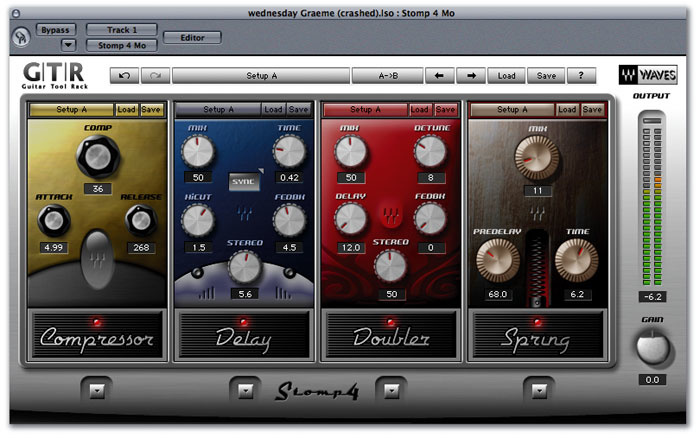 GTR effects and processors are loaded into the Waves Stomp 'virtual pedalboard' plug-ins.
Moving on to the modulation arena we find a Flanger with a wide range of adjustment and a neat LFO sync option. Vibrolo is a combination of tremolo (amplitude modulation) and vibrato (frequency modulation), again with a sync'able LFO. There are also separate Vibrato and Tremolo stomps as well as a panner and a phaser, again sync'able. Chorus (mono or stereo) is also in this section along with the slightly more subtle Doubler, which creates a slightly delayed, pitch-modulated signal to emulate double tracking.
Octaver emulates the old octave divider pedals, and only works correctly on single-note parts. There's control over gain and panning of each octave and you can create both single- and double-octave drops at the same time, mixed with the dry sound. Another familiar face is the Wah-wah pedal, which can either work automatically from the input signal envelope or be controlled from a MIDI pedal or fader. The Wah-wah stomp has five controls for sensitivity, speed, range, mode and wah frequency. Pitcher is a more conventional pitch-shifter for creating automatic 'parallel' harmonies and pitch-shifting in mono or stereo. Shifts of up to one octave in each direction are available with both semitone step and fine-tune controls.
The other guitarists' favourites, delay and reverb, are not neglected either, and again Waves have chosen to keep the controls simple and pedal-like. The Delay stomp offers up to two seconds of delay time and is designed to give a warm, analogue sound. This can generate anything from simple mono delays to complex ping-pong stereo effects and the delay time can be sync'ed to tempo with variable high-cut filtering of the delayed sound. The clevery titled Lay-D combines conventional delays with reverse delays and pitch-shifting to provide the nearest thing to psychedelia offered by this package. You really have to hear it to appreciate what it can do but it's well weird!
The Reverb stomp is a room emulator type of reverb but much simpler than you'd expect from a DAW plug-in. It includes pre-delay, decay time and tone but there's nothing else to twiddle. Similarly, the spring reverb emulation mimics the kind of spring you'd expect to find in a guitar combo, except it doesn't go sproing when you kick it and it allows you to add pre-delay!
On top of these fairly obvious effects are the more subtle but no less important compressor and gate, which are combined into one very simple Gate/Comp stomp unit. These two stalwarts are also available separately in slightly more sophisticated forms alongside a three-band mono/stereo EQ stomp with bass, treble, mid boost and mid cut. If this isn't enough, you can also call up a six-band graphic EQ with a low-cut filter built in to suppress hum and rumble where each band has a ±12dB cut/boost range. The final plug-in isn't an effect at all but a very sensitive guitar tuner that can be chromatic (with an auto mode) or set to different open tunings.
Pedal Power
The 23 stompbox effects (see box for details) can be loaded into the Stomp 2, Stomp 4 or Stomp 6 'pedalboard' plug-ins depending on how many of them you wish to use. These pedalboards come in mono, mono-to-stereo and stereo variants, and appear in the host program's plug-in processor list. Stomps can be dragged around to change their order, and as with the amp plug-in, there are normal save and load menus as well as presets. However, it should be noted that as the amp and pedalboards are separate plug-ins, their setups are saved separately too — so if you have a killer sound that uses some pre- effects and some post- effects as well as an amp model, you have to recall three lots of plug-in patches rather than just one, as would usually be the case for other plug-ins that combine the amp and effects in the same plug-in. In Logic Pro you can simply save the whole channel strip along with its plug-ins as a user preset, but with other DAWs you'll have to make your own arrangements.
Each pedalboard has controls for input gain, Setup A/B, Previous Setup and Next Setup as well as output meters and a clip indicator. Setup A/B (which you can automate) allows you to change between two settings virtually instantaneously providing the same stompboxes are used and in the same order — only the settings change. Individual stompboxes can be bypassed.
Automation can be catered for in the host sequencer; each pedalboard has a bypass and up to seven parameters per slot. As the stompboxes have similar control configurations (typically three to five knobs) to their hardware counterparts, this is generally more than sufficient. Where relevant, delay times and LFO rates can be sync'ed to multiples of the song tempo. Most of the stompboxes have mono, mono-to-stereo and stereo versions except where the function dictates — for example, the panner needs to be stereo-out to make sense. MIDI control is also available by assigning the stomp controls to MIDI controllers enabling third-party MIDI pedalboards and similar devices to be used. MIDI assignments get saved along with your presets and a learn mode simplifies this process, allowing the parameter to be controlled to be chosen from a drop-down menu.
Though you could use the plug-ins with any high-impedance audio interface and a guitar, the included hardware (see box) is optimised for guitar and certainly does a very good job of preserving the tone of your guitar while keeping noise to a bare minimum if you use the jack or XLR line output — though I don't know why the XLR output is so noisy when set to mic level, as many other DI boxes work fine this way. I found the four-LED metering a little vague but if you double-check the levels in your DAW software there's no problem.
WPGI: The Hardware Plug-in?
Both unbalanced jack and balanced XLR outputs are available from the included WPGI preamp box, and in my tests there was a definite improvement in tone and feel when using this box compared to using the high-impedance DI input on my audio interface. However, for some reason, the balanced output from the box was quite noisy at the mic level setting, although the unbalanced jack or the XLR output fed into a line input behaved fine. If this is a technical limitation, then it would perhaps have been better to leave off the mic out setting altogether as it's bound to trip up some users.
A four-LED meter lets you set the input gain reasonably accurately but there's no phantom powering option, which is a shame — you need to use two 9V PP3 style batteries or an optional 12V power adaptor. To activate the unit, it must be switched on and a jack plugged into the instrument input. A warning LED shows when the battery is getting low. There's also a ground-lift switch, which you don't need to use when recording guitar, but it can be useful in avoiding ground-loop hum if you're using the system with a mains-powered sound source such as a synth.
Playing Around
To my ears, the amp model default settings sound very American with a fairly hard attack, bags of definition and a bright edge to the sound, but once you start to play around with different cabs and mics, pretty much the whole range of accepted guitar sounds becomes available. Using the Overdrive stomp with the tone turned down slightly also coaxes a much more British rock sound out of the Drive and Crunch amps. Further tailoring can be done by inserting EQ stomps before and after the amp model. I felt the models responded well to playing intensity, cleaning up nicely when the guitar volume control is turned down. Some of the heavier sounds also have a nice meaty chug to the low end, but I never felt the models made the guitar feel quite as 'springy' as when playing through a really good tube amp. In this respect, GTR feels similar to the best hardware guitar modelling solutions, though arguably is better than most when it comes to producing a believable clean or almost clean sound.
With the exception of the rather weird but very seductive Lay-D reverse echo/pitch-mangling pedal, the stomps are all fairly conventional and very well behaved apart from the octave divider, which I found to be almost unusable with my Strat as it tended to gargle and warble, no matter how cleanly I played my single-note lines. I've used hardware octave pedals and they're far more forgiving than this emulation. The delays, reverbs and modulation effects are, however, first-rate and behave very much like their pedal counterparts. I also liked the Compressor stomp as it adds a useful degree of sustain and energy in a very musical way. Compressor gain reduction is indicated by a simple meter in the centre of the pedal. As well as a comprehensive range of stompbox emulations, the GTR plug-ins include a well-specified guitar tuner.
Verdict
Though TDM users may face some limitations as to which stomps can be used at the same time due to DSP loading issues, VST and AU users should have no problem putting together just about any reasonable combination of amps and stomps. I though the amp sounds were really very good after some user tweaking, though the lack of a save feature that can store both an amp and its associated plug-ins at the same time is frustrating. I also felt that Waves missed out on a trick by not providing some way to create separate chains of stomps to process, or at least delay, the outputs from the two speaker cabinets independently — but they're not alone in this omission. To my knowledge, only Native Instruments' Guitar Rig allows this sophistication of stereo routing.
The hardware front end certainly improves the results that can be achieved, if you use the line output. There's still some residual noise when using heavily overdriven amps or effects, but this is to be expected and can be addressed reasonably effectively by using a Gate stomp prior to the amplifier. However, nobody yet seems to have cottoned on to the fact that dynamic noise filters (a high-cut filter where the cutoff frequency is controlled by the input signal envelope) work exceptionally well with guitars and are far more effective than gates at hiding hiss-type noise.
Overall, the GTR system does an exceptionally good job at modelling the sounds of real-world miked guitar amplifiers and the lack of emulations of specific amplifiers doesn't seem to restrict its flexibility at all. It doesn't always feel quite as springy as a real amp but a carefully set-up compressor stomp before the amp model can help redress this. Some pre- EQ built into the amp model rather than inserted as a stomp plug-in might have made fine-tuning the sounds a little faster, but after an hour or two playing with the package, I found it pretty easy to coax just about any guitar sound out of it, from twangy country to dense, searing modern metal. More importantly, it's also good at those tricky 'on-the-edge' sounds so loved by blues and vintage rock players. The standard of the effects is also generally very high indeed (other than that unruly octaver) and having the ability to sync certain effects to tempo makes them far more flexible in this respect than their hardware cousins. Waves' aim was to create a guitar plug-in that would satisfy the majority of professional players, and it will be interesting to see how many albums end up being recorded using GTR rather than a conventional miked amplifier.
Pros
- Very easy to use.
- Comes with guitar-optimised DI box.
- Simple but very musical-sounding stompbox emulations.
- Can create the whole range of contemporary guitar tones with a high degree of authenticity.
Cons
- The info screen that opens before the plug-in is irritating.
- Amp and stomp pedalboard settings are stored separately.
- XLR mic level output on the review model DI box produced noisy results.
- No way to delay one side of a dual-cabinet setup to emulate mic distance.
Summary
Rather than try to provide every possible feature going, Waves have opted to develop a simple, good-sounding system with enough flexibility to keep most players happy. Guitarists will inevitably disagree on whether or not it is a complete substitute for a miked amplifier but it is certainly capable of excellent results if you're prepared to step beyond the presets and fine-tune the sounds for yourself.
information
Native version £449; TDM version £899. Prices include VAT.
Sonic Distribution +44 (0)1582 470260.
+44 (0)1582 470269.