

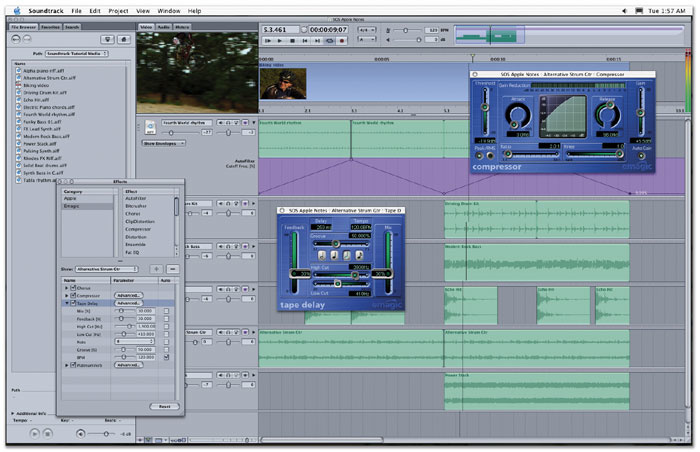
 Apple's Soundtrack is a loop-based music production tool aimed primarily at those who need to produce bespoke audio for desktop video work. Logic users may recognise some of the bundled effects.
The jungle drums are beating once again this month, as Apple begin shipping G5 Power Macs, and we take a closer look at Soundtrack, Apple's Acid-like loop-based music production tool, which is now available as a stand-alone product.
This month's Apple Notes was completed slightly later than its appointed deadline, because just as the column was being finished, Apple announced that their single-processor 1.6 and 1.8GHz G5 models were shipping. Since the Power Mac's announcement on June 23rd, Apple have apparently received 100,000 pre-orders for the three G5 models. The company report that the third machine, the currently top-of-the-range dual 2GHz, will be shipping, as promised, by the end of August. Availability of the G5-optimised Logic 6.2 was also announced on Emagic's web site almost too late to be included this month.
As discussed in last month's Apple Notes, the Power Mac G5s ship with Mac OS 10.2.7, and while neither this update or the forthcoming Panther release are true 64-bit operating systems, Apple have optimised the kernel in OS X for G5 systems from 10.2.7, in addition to fine-tuning the vector and maths libraries for 64-bit processing. It's not known if or when 10.2.7 will be released as an update for other systems, although Panther is apparently on course to be prowling around your Mac by the end of September or early in October.
Having had a chance to use Panther since writing about its introduction last month, I think the 'Expose' feature (again, see last issue) really is going to make Mac OS X easier to manage if, like me, you have lots of windows open simultaneously. There are numerous other improvements, which I'll have to wait until the release version to write about, and the whole system feels noticeably more responsive. Expose itself is as smooth as a baby's proverbial!
There has been much discussion amongst Mac musicians of the PCI-X slots in the new G5 machines, as described in last month's Apple Notes, and while many developers are still waiting for the opportunity to carry out tests, MOTU (www.motu.com ) have already announced that their PCI424 cards are incompatible. But there's also some good news, because MOTU have developed a modified PCI424/G5 card, and current PCI424 users will be able to trade in their existing cards for a small charge.
However, the big rumour this month is the successor to the highly seductive Titanium Powerbook laptop, the much-anticipated (or should that be predicted?) 15.4-inch Aluminium. There's also been a great deal of speculation about whether the 12- and 17-inch Powerbooks would also be revised. The general consensus seems to be that while this won't happen, the new 15-inch model will be a comparatively radical change over its predecessor. But the best thing is that, thanks to the SOS time-distortion field, by the time you read this column you should already know more about the new Powerbook models than I do as I sit here writing!
Revision : New App Aids Rewired Soundtracks
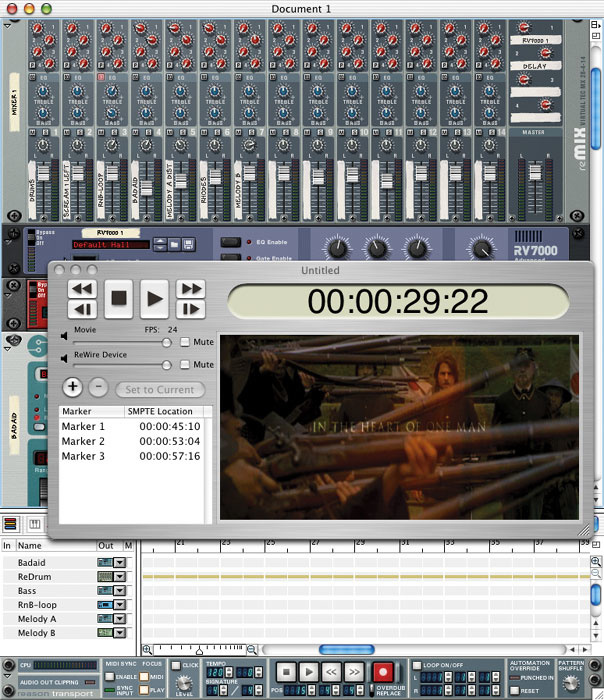 Granted Software's Revision provides a neat way for Reason and Live users to run video in sync with their music, without having to resort to a more fully-featured sequencer application.Applications such as Propellerhead's Reason and Ableton's Live are popular stand-alone music creation and production packages, but for those who want to use them when producing a soundtrack for a video, there are no built-in facilities for running a QuickTime movie in sync with the current song. Of course, thanks to Reason and Live's Rewire support, you could run either application alongside a sequencer such as Cubase SX and use the latter application's video facilities, since Rewire provides sample-accurate transport synchronisation between hosts and clients.
However, buying a copy of Cubase just to add video support to Reason or Live isn't particularly cost effective, which is where Granted Software's new Revision application comes to the rescue. Revision is basically a QuickTime movie player, but where it differs from, say, Apple's own QuickTime Movie Player application is that it acts as a Rewire host, so you can run the picture in perfect sync with Reason or Live as a Rewire client.
In addition to just playing back the movie in time, providing frame-accurate control as a by-product of Rewire's sample-accurate architecture, Revision also offers some nice touches, such as volume controls to balance the movie's original soundtrack with the stereo mix from your Rewire client. The Revision window is resizable (which, on the downside, makes it all to easy to lose the aspect ratio of the original video), and you set it to conveniently 'float' on top of your other applications. Last but not least, Revision has a handy marker feature that allows you to set and recall the current song position to SMPTE-based time locations.
A demo version of Revision that quits after 10 minutes use is available for download from www.grantedsw.com. The full, registered version costs only $29.95.
Inside Soundtrack
Aside from the lure of new Macs and operating system upgrades, Apple have also begun shipping Final Cut Pro 4, as previewed in June's Apple Notes. As most people know, one of the additions to this latest version is Soundtrack, a loop-based music production tool aimed, unsurprisingly, at those wanting to produce soundtracks for video productions. However, since this original announcement Apple took the opportunity on July 16th 2003, at the Macworld Creative Pro Conference and Expo, to release Soundtrack as a stand-alone application. It's available to buy right now for £249 and $299 in the UK and US respectively.
Soundtrack is a great deal of fun to play with, and if you've ever messed about with Acid on a Windows-based computer, you'll know what to expect — in fact, Soundtrack is supposedly written by the person who developed Acid in the first place, which explains some of the conceptual similarities. The look of the interface is derived from Final Cut Pro, adopting grey and pastels over the bolder, brushed-metal appearance of Apple's more consumer-orientated software. In typical Apple fashion, the program is pretty intuitive, no matter how much — or little — experience you have with desktop music software.
Going Loopy
You can locate suitable audio files on your computer in the navigation area to the left of the main screen, and simply drag them into the arranging area, where a track will be automatically created if there isn't one free already. Once in the arranging area, the loops can be copied ad nauseam, or, more impressively, transposed and time-stretched in real time, just as in Acid. The quality of such processing can be surprisingly good with the right material, so long as you stay within reasonable boundaries, and the real-time tempo manipulation is obviously of great benefit to those producing video soundtracks.
A fundamental requirement when producing audio for video is the ability for the user to create musical hitpoints at specific SMPTE timecode positions. With its ability to support video playback alongside your music, Soundtrack makes working with hitpoints fairly painless. It creates a so-called Time Marker in the video at a point where you want something musically relevant to happen, then enables you to drag this Time Marker onto a beat and calculates the necessary tempo change to make everything fit. And even though you're dealing purely with audio files, Soundtrack's on-the-fly timestretch processing ensures perfect playback, which is pretty impressive — not to mention pretty handy.
Apple supply a varied selection of loops with the program, and there's also a handy extra, called Soundtrack Loop Utility, that allows you to convert your own AIFF, Wave and Acid-format audio files for use in Soundtrack. The utility provides a way to specify what key the audio is recorded in, the number of beats, copyright information, and so on, and also allows you to search for loops by genre and instrumentation via Soundtrack. Third-party companies are sure to produce additional content for the program; sample library producers AMG (www.samples4.com) have already announced two titles.
The icing on the cake is perhaps the inclusion of a selection of effects taken from Emagic's Logic Platinum, including Auto Filter, Bit Crusher, Chorus, Clip Distortion, Compressor, Distortion, Ensemble, Fat EQ, Flanger, Modulation Delay, Noise Gate, Overdrive, Phase Distortion, Phaser, Platinum Verb, Stereo Delay, Sub Bass, Tape Delay and Tremolo. Any Audio Units effect plug-in can be used too. Apple also provide automation tracks for each instrument track, and it's even possible to choose which effects parameters you want to automate, alongside more typical parameters such as volume and pan.
Once you've completed your loop-based masterpiece, Soundtrack allows you to export it as a stereo audio file, as individual audio tracks, or as part of a QuickTime movie, with the video and the original soundtrack mixed with your own music. For more information about Soundtrack, be sure to check out Apple's web site at www.apple.com/soundtrack. There's an unofficial Soundtrack community at www.soundtracklounge.com.
Music Production To Go
While Soundtrack is a useful app, I don't think the current version will really appeal to the majority of SOS readers as a way of producing music. Acid, while only available for Windows, has evolved into a far more comprehensive application over the years, especially with its support for VST Instruments in the current version. Soundtrack is great for producing something quick for your work in Final Cut Pro, or for people to get started in loop-based music; but I think most musicians will favour something like Ableton's Live, which, for a similar price, affords more creativity and can integrate with other MIDI + Audio apps.
However, where Soundtrack is of interest to musicians, I think, is in the direction it will allow the producers of lower-budget projects to take for creating music. For example, while a picture editor might use off-the-shelf library music right now, with Soundtrack they might be tempted to produce something a little more bespoke, still using ready-made samples, but with the added flexibility of being able to change the tempo and arrangement to fit better with the picture. Maybe library and production music companies will even move into producing content for Soundtrack, rather than fairly inflexible set pieces. Watch this space.
Improving Icons In OS X's Audio MIDI Setup
 Adding your own icons to Mac OS X's Audio MIDI Setup utility is easy and gives that personal touch to your software configuration.While working on a review of Mackie Control this month, I created a new MIDI Device in OS X's Audio MIDI Setup (AMS) utility to represent Mackie Control, and it suddenly bothered me that my control surface was illustrated by a keyboard. If you're as anally retentive as I am, you'll probably know already that you can choose a different icon for a MIDI Device in AMS by opening the Show Device Info sheet, clicking on the current icon, and choosing another from the collection that appears as the sheet is automatically extended.
However, what you may not know is that you can also add your own custom icons for MIDI devices, allowing you to create a more visually accurate depiction of your studio equipment in the AMS utility. While this is obviously quite aesthetically pleasing, there's also a practical reason for doing it: easier identification of devices at a glance, if you have a large number in your onscreen studio representation.
The easiest way to make your own pictures available to AMS is to simply copy the appropriate image files to the 'Library / Audio / MIDI Devices / Generic / Images' folder. While common file formats such as JPEG and GIF are supported, you'll get the best results by making the image no larger than 128x128 pixels in size.
If you want to organise your pictures into Icon Sets, selectable from the Icon Sets pop-up menu in the AMS Icon Selection sheet, first create a new folder, bearing the name of your Icon Set, within 'Library / Audio / MIDI Devices/'. Next, create a folder called 'Images' within the folder you've just created, and copy the required image files into this folder. When you next start AMS, your custom Icons and Icon Sets will be available, so you can customise your onscreen studio to your heart's content.