

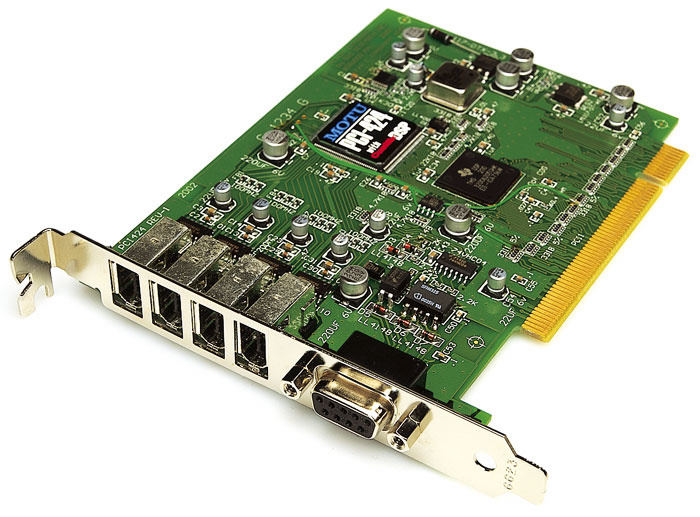
 MOTU PCI-424 card.
MOTU's range of PCI audio interfaces is based around a single PCI card, with three different rackmounting units offering combinations of analogue and digital I/O.
As well as being the first company to have brought a Firewire audio interface to market, Mark Of The Unicorn have continued to expand their range of PCI-based solutions. The range now consists of three interfaces, the 2408 Mk3, the 24I/O and the HD192, which are all developments of, or replacements for, previous models in the MOTU range. They all connect to the host computer using the same PCI card, the PCI-424, itself a development of the popular PCI-324. MOTU sell each interface bundled with a PCI-424 as a 'core system', and also offer the same range of interfaces without the card, as 'expansion I/O'.
The PCI-424 Card
Using a single PCI card for all three interface designs is a clever solution to the issue of expansion and integration. Adding more interfaces to a core system is easily achieved, since the PCI-424 has four 'Audiowire' sockets alongside the 9-pin ADAT sync connector, and each socket can host one expansion I/O. Since 24 is the highest number of channels supported by any of the interfaces here, one PCI-424 card could allow up to 96 channels of input and output (I/O) via a single PCI slot, at the appropriate sample rate. Furthermore, any combination of four of the interfaces can be connected. Audiowire is MOTU's proprietary audio protocol, which utilises standard 6-pin Firewire cables and connectors. Installing the card is as simple as for any short-form PCI card, and driver installation is handled by the software installer on the supplied CD.
A major development from the earlier PCI-324 is the inclusion of on-card DSP, which allows for highly flexible near-zero-latency monitoring controlled by the Cuemix Console application, of which more later.
Compatibility
The PCI-424 system is compatible with Mac OS 9 and X, as well as Windows 98/ME/2000/XP. The Windows software and utilities provide most of the functionality available on the Mac, with the exception of the Audiodesk application. As well as the ASIO driver, MOTU also provide a GSIF driver for use with Tascam Gigastudio, and a WDM driver for use with compatible hosts such as Sonar.
2408 Mk3
The 2408 MK3, as the name suggests, is the third incarnation of this popular interface, which offers a combination of connection protocols and metering options. The numerical designation refers to the fact that it offers 24 channels of simultaneous I/O, eight channels of which can be analogue.
 The 2408 Mk3 is designed to cater for almost every I/O requirement, offering eight-channel analogue in and out as well as 24 channels of ADAT and TDIF-format digital I/O.
The rear panel, from left to right, sports the following connectors:
- Word clock in and out. The Word in socket also doubles as a Video input allowing the interface to resolve directly to a video signal.
- S/PDIF. There is one stereo input and two stereo outputs. The second output simply duplicates the output of the first and allows the connection of a further digital device such as a DAT machine. These sockets also double as SMPTE timecode input and output, and the second output will still deliver S/PDIF digital audio even when SPMTE in and out are required.
- TDIF connectors. There are three 25-pin 'D' connectors, each of which handles eight channels of digital I/O. These share the output with the ADAT optical outputs, although the inputs can only be one or the other.
- The Audiowire socket for connection to the PCI-424 card.
- Three pairs of ADAT optical connectors for up to 24 channels of ADAT digital I/O.
- Two rows of eight quarter-inch balanced jack sockets for eight channels of analogue I/O.
- One pair of balanced quarter-inch jack sockets for main output. These duplicate the output of analogue channels 1 and 2, if one of the three eight channel banks into which the 2408 Mk3 is internally divided has 'analogue' selected as the desired format (using the PCI-424 configuration window).
The front panel is very clearly laid out, considering the large amount of information that the 2408 Mk3 needs to present. At the far left is a headphone jack with its own volume control, next to the main output volume control. Next come three sets of LEDs, which display input and output activity for each channel of the three banks of digital I/O. To their right is the metering for the analogue I/O. This is handled by five-segment LED meters measuring from -42dB up to 0dB. When the 2408 Mk3 is running under computer control rather than in stand-alone mode, these LEDs also operate as clock source indicators, a mode chosen by pressing the Select button. I should point out that I found the LED indicator legend extremely difficult to read if, for example, I needed to check the indicated sample rate. This was also the case for the three rows of stand-alone settings indicators — a case of too much information for such a compact space.
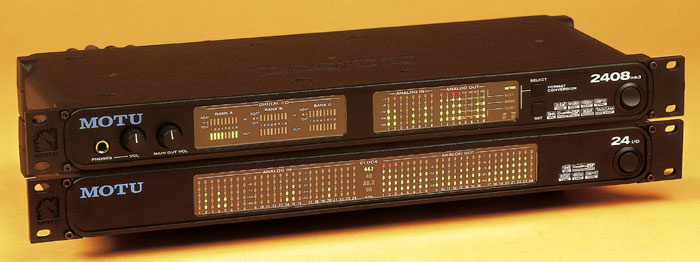 MOTU 2408 Mk3 (top) with 24I/O.
Stand-alone Mode
The final button (Set) on the front panel is only used when the interface is operating in stand-alone mode (either no compatible software is running on the host computer, or the computer is switched off). In this mode the 2408 becomes a format converter, and the Set button cycles through the Clock, Source and Bounce settings that determine how the interface operates in this mode. The Clock setting determines to which digital clock source the 2408 is slaved. The options are Internal, Digital (from the ADAT or TDIF inputs), Word Clock, Video or LTC (longitudinal timecode via an analogue input).
The Source setting determines which audio source will be the source of the transfer (in stand-alone format converter mode). This could be analogue (at +4 or -10 dB), stereo S/PDIF, ADAT (each of the three banks separately or all together) or Tascam (as per ADAT). The Bounce setting lets you redefine the order of tracks after conversion.
As mentioned above, the 2408 will support up to 24 simultaneous channels of I/O. This is when running at 44.1 or 48 kHz, at which sample rates the three internal busses will carry eight channels each (digital or analogue). When operating at 88.2 or 96 kHz, four channels of TDIF or ADAT digital are available per bank, while the analogue bank, if selected, remains at eight channels. Selecting three banks of digital I/O at these sample rates would thus yield 12 channels in total, and combining two digital banks with one analogue would yield a total of 16 channels.
Sample-accurate Sync
The PCI-424 system allows sample-accurate synchronisation with digital tape decks or hard disk recorders that support either the Alesis or Tascam sync formats. Audio can be transferred between compatible host software and recorder without the loss of a single data bit. Compatible hosts are Audiodesk and Digital Performer, which communicate with the PCI-424 card via the MOTU Audio System (not requiring ASIO drivers), and Cubase SX and Nuendo, both of which can fully utilise the sample-accurate location support features in the PCI-424 ASIO version 2.0 driver.
24I/O
The second of the interfaces is much more straightforward in what it can offer the user. Where the 2408 Mk3 is a veritable Swiss Army knife of supported formats and functions, the 24I/O offers 24 channels of analogue I/O at up to 96kHz, plain vanilla and no flake. The rear panel, correspondingly, has two rows of balanced TRS sockets. Both inputs and outputs have 128x oversampling converters (where the 2408 has 64x) and the outputs are switchable between -10 and +4 dB.
The rear panel also has a word clock connector that can function as an input or output, and the obligatory Audiowire socket. On the front panel of the 24I/O are two banks of 24 five-segment LED meters (for input and output) similar in function to the two banks of eight found on the 2408. Between these is a Sample Rate/Clock Source indicator, which is far easier to read than those found on the 2408.
Providing 24 channels of analogue I/O and nothing else implies that the intended use of this interface will either be as an extension of the functionality of the 2408 Mk3, or for the connection of lots of analogue outputs from various items of gear, monitored via an analogue mixer. Therefore it's not surprising to find that the 24I/O has no dedicated monitoring options of its own, either as a stereo pair or headphone outlet. Nor does it have mic preamps, likewise indicating that this is not intended to be a mixer replacement, but more of a supplement.
HD192
The third of the interfaces also offers a more specifically targeted feature set. The rear panel has 12 analogue inputs and outputs via female and male XLR sockets (hence the 2U rack size) capable of recording and playback at any standard sample rate between 44.1 and 192 kHz via 24-bit 128x oversampling converters. Alongside these connectors is an AES-EBU-format input and output via XLR that has its own clock, from which it can run as an alternative to the HD192 system clock. This means that the AES-EBU output can resolve either to the HD192's system clock, the AES-EBU input or the word clock input.
In addition you can choose to convert the sample rate of the AES-EBU output, either resolved to the system clock or independently clocked from its own clock crystal source. BNC connectors are provided for system word clock in and out, as well as AES word clock in, below which is the Audiowire socket.
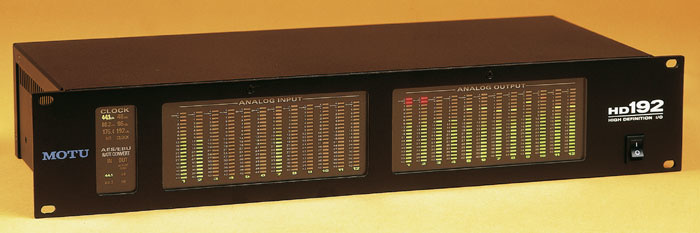 MOTU HD192.
The front panel provides two banks of 12 19-segment LED meters for the analogue inputs and outputs, as well as indicators for the variety of supported clock sources and AES-EBU sample-rate conversion.
MOTU On The PC
This is the first time I've had the chance to try out some MOTU audio interfaces, but I was keen to do so, partly because as Mike points out in the main text they have attracted a reputation of being problematic when used with PCs. My first visit was to the MOTU web site to download the latest PCI-424 PC drivers, and although the impression is given that there are multiple drivers available, in fact a single 1.7MB file supports Windows 98SE, ME, 2000 and XP, and the latest version 1.02 drivers dated 26th March 2003 were already on the supplied CD-ROM install disc.
Unusually, you have to run a Setup.exe file before installing the PCI-424 card, as Windows apparently doesn't perform a full install via Plug and Play (for instance, Windows 98 at one stage declared it to be a "PCI Early non-VGA Device"). I did this under Windows XP, opting to install the ASIO, WDM-MME, and GSIF drivers, but subsequently had to power down and up a couple of times before the card was correctly recognised, and then had to power the 24I/O down and up as well before this was detected, whereupon MOTU's PCI Setup Wizard utility (designed to detect what I/O devices are connected to the PCI-424) crashed my PC part-way through the procedure — a very rare occurrence!
I took great care to ensure that the PCI-424 had its own unique interrupt, and during the next few hours I tried cleaning the PCI card's contacts, re-seating it in its slot, swapping Audiowire cables and switching to the 2408 Mk3 and HD192, but apart from the HD192 being momentarily recognised and then crashing my PC again, it was no go. At this point I gave up and contacted Musictrack for a second opinion, and they suspected that the PCI-424 card might be faulty.
Sure enough, the replacement that arrived the next morning performed perfectly first time, but I did notice that the offending card had a revision 1 circuit board, while its replacement was revision 3 — I advise anyone buying a second-hand MOTU system to check this carefully before parting with any cash. Now that I could recognise the various I/O boxes I performed some critical listening tests, and was well impressed with what I heard using the ASIO, GSIF and WDM drivers. Cubase and ASIO were still working well down to 1.5ms latency, although after running Sonar's Wave Profiler I only managed a 23.2ms effective latency with the WDM drivers.
I then used Rightmark's Audio Analyser to perform some tests using the MME-WDM drivers, but once again ran into problems, only managing to complete a few before it dropped out with an error message. However, those that did finish were impressive, with a flatter frequency response than any other card I've tested to date, particularly at the bottom end where it was only 0.2dB down at 4Hz, and comparing the MOTU 24I/O box blind with my Echo Mia card I could easily pick it out as having much lower jitter (I could hear a lot further into reverb tails) and a tighter bass end. I measured dynamic range for the 24I/O at 24-bit/44.1kHz as an excellent 106dBA, but unfortunately I didn't manage to successfully run any other 24-bit tests at higher sample rates.
Motu's PCI Audio utility for changing sample rate, buffer size, and so on also gave me considerable problems, often leaving my PC permanently running with 100 percent CPU overhead even after I closed it down, and I never did get the MME-WDM drivers to function wholeheartedly, having to switch to Direct X ones to run the MOTU I/O units simultaneously with my Echo Mia under Cubase SX for comparison purposes. After a total of at least 12 hours' testing, two PCI-424 cards, and three different MOTU I/O boxes I threw in the towel, and can only recommend that PC users tread very carefully. Like many other PC musicians, you may have no problems installing and running MOTU products, particularly with the ASIO and GSIF drivers, but do make sure you can get a full refund if you run into problems like mine. This is most definitely a case of caveat emptor! Martin Walker
Control Panels
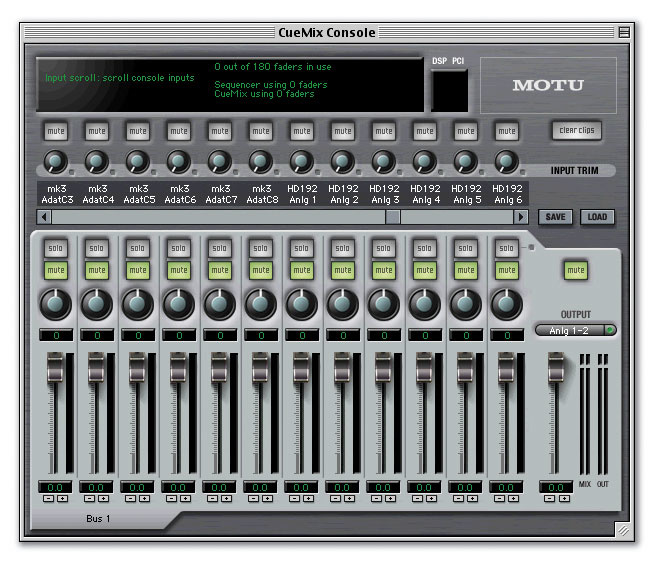 The MOTU Console utility. When you have more than one interface connected to the PCI card, as in this case, the Console simply adds its channels onto those of the first system.Running the installer on the supplied CD in Mac OS 9 installs three folders' worth of software. A MOTU folder in the System extensions folder contains the PCI-424 driver and the MOTU Audio System, for use with Audiodesk and Digital Performer, while a PCI-424 Consoles folder is installed at the root level of your system drive. This contains the MOTU PCI Console, which gives you access to all the basic settings in the PCI-424 card and connected interfaces, and also the MOTU SMPTE Console and the Cuemix Console. The third folder is a MOTU Audio/Audiodesk folder, again at the root level of your system drive. This contains the Audiodesk application, the MAS Plug-ins folder and the Audio Setup Wizard application. Audiodesk resembles a cut-down, audio-only version of Digital Performer, allowing the recording, playback, editing and mixing of audio without the need to purchase further software.
A Sound Manager driver is placed in OS 9's Extensions folder on installation and allows the Apple Sound Manager to use the PCI-424 and any connected interfaces for stereo input and output, but this is only at the OS-supported sample rates of 44.1 and 48 kHz. The ASIO driver is placed in the ASIO Drivers folder of your music application of choice.
 The settings available in this control panel are directly accessed in Audiodesk and Digital Performer's Configure Hardware Driver window.The Cuemix Console displays one mix per stereo output pair and thus allows the user to control the level of all inputs routed to each output. With all three bands of eight channels enabled in the 2408 Mk3, for example, there would be 12 output pairs and therefore 12 mix scenarios to control. The mixing itself occurs in DSP on the PCI-424 card, meaning that throughput latency is reduced to a level found on a typical hardware digital mixer, which is to all intents and purposes negligible. This is a great advance on the previous version (called simply Cuemix as opposed to Cuemix DSP), bundled with both the PCI-324 card and MOTU's Firewire systems. On the 896, for example, you can route only one pair of inputs to one pair of outputs for monitoring at near-zero latency, and the other inputs have to be monitored through the host software, with the inherent latency problems that this brings.
Although all three interfaces lack input level controls on the hardware (none have mic preamps), up to 12dB of input gain can added using the controls on the Cuemix Console. These act globally, in the sense that the settings will remain the same as you switch from one mix to another.
Testing
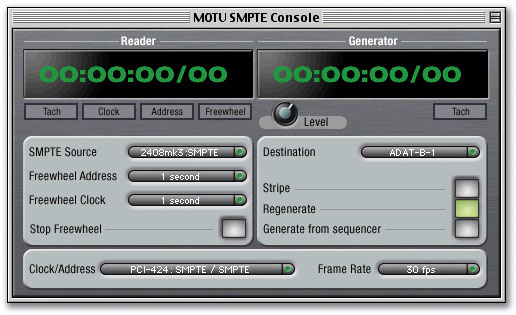 The screen shot shows SMPTE Console settings that make the PCI-424 card resolve to SMPTE timecode (the clock/address setting). The left-hand side of the Console (the 'Reader') shows the input source as the RCA jack on the back of the 2408 that doubles as a S/PDIF input. With this setting the input is switched to an analogue timecode circuit. The right-hand side of the Console (the 'Generator') shows settings made in order to stripe the first track of an ADAT machine connected to output bank B with SMPTE timecode. Although they develop for both Mac and Windows, MOTU are often perceived to have an allegiance with the Macintosh platform, especially as their Digital Performer sequencer is Mac-only. I have used an oscilloscope and signal generator application called Mac The Scope on previous soundcard reviews but have noted that it becomes unstable when addressing the MOTU 896 ASIO driver (see MOTU 896 review in SOS July 2002) This also turned out to be the case with the MOTU PCI-424 ASIO driver for Mac OS 9 (which otherwise functioned perfectly with all host software). Since a comparable application has yet to be developed for OS X (although Signal Scope from Benjamin Faber is looking interesting) I turned to the Windows platform and Rightmark's Audio Analyser, as used by Martin Walker and John Walden in various articles and test reviews. What an interesting experience this turned out to be!
Previous experience with Windows XP had been favourable, so I didn't expect anything untoward when installing the software and hardware in a 2GHz Pentium 4 machine with 512MB of RAM. However, installing the PCI card in slot 5 and booting up created a machine that was very unstable. Launching Cubase caused the machine to restart by itself, and all other sound applications such as the Cuemix Console exhibited freezing behaviour. Dark memories of IRQ conflicts prompted me to try PCI slot 4 (having checked in Device Manager and found that the MOTU card was sharing an IRQ with the graphics card). This made no difference, and the IRQ remained unchanged. I moved the card to slot 2, whereupon it was assigned its own IRQ number and sanity returned (for a short while). Cubase SX was now able to function with the PCI-424 card, but changing and configuring interfaces using the PCI Console, and operations in the Cuemix Console were met with now-familiar freezing and full-on crashing. At this point I decided to get a second opinion, and arranged for the review equipment to be sent to Martin Walker for further testing under Windows. The results of his tests are described in his box, above.
Back on the Mac, I was able to subjectively test sound quality and found all three interfaces able to perform at the very highest levels that we have come to expect from equipment of this price. The HD192 is especially notable for its ability to reproduce acoustic material, where the very high sample rate faithfully captures frequencies approaching 96000Hz, well above the highest frequency recordable on the very highest-end analogue system, and forever burying the psychoacoustic argument against digital recording! Bear in mind, however, that a five-minute project with 20 tracks recorded at 24-bit, 192kHz represents about 3GB of data, and streaming such a project requires a 10MB/s data rate, which is approaching the maximum sustainable transfer rate in many systems. It also obliges the user to use DVD as a backup solution.
Musictrack, MOTU's UK distributor, were kind enough to pass on some comparative figures for dynamic range. It is interesting to see comparisons between the 2408 Mk3 and 896, as well as the review interfaces with their respective predecessors.
| MOTU Interface | Dynamic range in dB |
| 2408 Mk3 | 108 |
| 24I/O | 110 |
| HD192 | 120 |
| 2408 Mk2 | 105 |
| 1296 | 117 |
| 1224 | 116 |
| 828 | 105 |
| 828 Mk2 | 108 |
| 896 | 110 |
Final Thoughts
The Core System concept, with a variety of interfaces designed to connect simultaneously to the same PCI card, has inherent flexibility and expansion options which are not currently offered by any other manufacturer. MOTU have refined and developed original concepts, removing some of the rough edges (literally, in the case of the 2408 Mk3 and 24I/O's enclosures!) and improving the feature sets of what were already highly capable designs. As sample rates and connection options increase, as well as the tendency to dispense with hardware mixers altogether, a modular system that can grow with the demands of your studio looks a good bet.
I used various parts of the system individually and in combination on a Mac with rock-solid reliability. My experience on a Windows PC was not as happy, unfortunately, and Martin Walker also experienced difficulties getting the equipment to work in his PC, so caution is recommended on this front. MOTU claim many happy Windows users, although I did notice a little grumbling on Internet forums when searching for the solution to my own problems.
Sound quality is hard to criticise, Mac installation and configuration was a breeze, and the near-zero-latency monitoring options provided by the on-card DSP and Cuemix Console add to these to make a very attractive package if you are looking for a nerve centre for your studio. The 2408 Mk3 core system, especially, makes an excellent choice for a multi-function studio interface, and the expansion options make this a highly recommended package, at least for Mac users.
Pros
- Flexible expansion options based around a single PCI card.
- Wide range of connectivity and supported sample rates.
- On-card DSP provides near-zero-latency monitoring.
- Excellent UK technical support.
Cons
- Windows performance.
- Some display legends hard to read.
- Lack of mic preamps on all interfaces.
Summary
Although you still need a means of preamplifying microphones, any of these three interfaces will function well individually as a studio nerve centre, and also give the opportunity to expand with the demands of your studio without installing more PCI cards.
information
2408 Mk3 Core system (with PCI card) £995; 2408 Mk3 Expansion (without PCI card) £695; 24I/O Core £1295; 24I/O Expansion £995; HD192 Core £1595; HD192 Expansion £1295. Prices include VAT.
Musictrack +44 (0)1767 313447.