

It's a fair bet that many Windows XP musicians don't even know they have a page file, let alone where it is or what effect it could have on their recording. We reveal all.
Windows XP requires a lot less tweaking than previous Microsoft operating systems to make it suitable for running musical applications, which is great news for us PC musicians using XP. However, it's still not all plain sailing, and there's a lot of conflicting information about the most suitable size for the Windows XP 'page' file, so this month I thought I would explore the various setup options.
With the rather generous page file default setting you may be wasting drive space, while if you initially make the page file too small, Windows may increase its size at an inopportune moment during recording, and ruin an otherwise perfect take. Some musicians even suggest you can disable the page file altogether, to guarantee no audio interruptions, if you have 512MB or more of RAM. But is this a good idea?
Are We All On The Same Page?
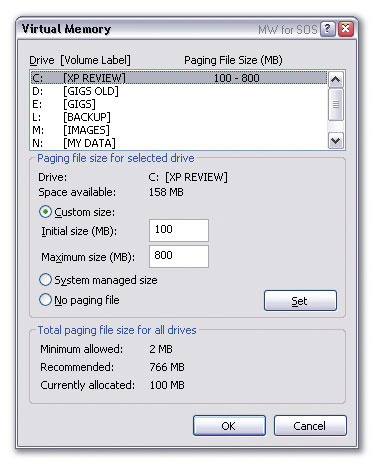 Here are my recommended page file settings for any musician with 512MB or more of RAM. The 800MB is a safety valve; in normal use the pagefile.sys will remain at a fixed 100MB size.First, we'll have a brief recap of the processes at work. An Intel 386 or later processor can address up to 4GB of memory, which the processor manages in 'pages', each of which is 4K in size. Since the vast majority of people have far less physical RAM than 4GB, programs are allowed to occupy as much of this virtual 4GB of space as they wish, but with only the active parts actually in physical RAM. Any remainder is stored in the 'swap' or 'page' file (the first term is used by Win 95, 98, and ME, while the second refers to Win NT, 2000, and XP).
If one of your applications ever tries to access an address that isn't currently sitting in system RAM, this generates an interrupt called a page fault, and the system then retrieves the address either from an application file on your hard drive or from the page file. But data will only be paged out to the page file if you have less RAM than you really need. Otherwise it sits in the Page Pool in RAM, along with current data pages and the file cache (the vcache of Win 9x), which contains data recently read or written to your hard drives.
There is also a non-paged area in RAM for critical code that can't be sent to the page file. Any remaining RAM is normally used to make the file cache larger. This last fact is one that causes a lot of confusion: Microsoft regard unused RAM as wasted space, while many users worry if their free RAM figure becomes low. The most important thing to remember is that if any application requires more physical RAM, some of the file cache will be instantly discarded to make way for it, so we don't have to worry about XP cache size as much as many people think.
Tiny Tips
Although many of us use SiSoftware's Sandra utility to provide loads of information about our PCs, as well as running various benchmarks, it's overkill for those who just want to find out what processor and RAM their machine has. You can normally find out the basics from Windows' System applet in Control Panel, or wade through various pages in your BIOS, but here's an easy option for you.
CPU-Z is a handy 186KB freeware download that interrogates your processor, motherboard and RAM, then provides all the details in one hit. It recognises a comprehensive range of AMD, Intel, and VIA motherboard chipsets and CPUs, plus SiS and nVidia chipsets, and can tell you the size, type, and timing of your memory. It's also a very clean install — just four files in their own folder, with no changes to the system folder or Registry — and runs on Windows 95, 98, ME, NT4, 2000, and XP. So, if you're not sure whether your processor is a Northwood A or B, or whether your RAM is running with CAS2 or CAS3 latency, this must be the quickest and easiest way to find out.
Resizing Or Disabling
You can't actually disable virtual memory, but it is possible to set page file size to zero in the Advanced section of the System applet, under 'Performance'. However, this can sometimes waste lots of RAM, since some applications request large amounts of virtual memory when launched. If a page file exists on your hard drive, this can hold the virtual memory requested, rather than it being permanently stored in physical RAM and possibly not being actively used.
The 'No paging file' option should therefore not be selected, especially since some applications (including Sonic Foundry's Acid, apparently) will lock up if no page file is found. Instead, the Initial size of the page file should be set large enough to cope with your particular set of applications. This should ensure that Windows doesn't suddenly need to resize the page file in the middle of a long take. By default, XP sets up a page file 1.5 times the size of your RAM, but, contrary to popular belief, a PC with a small amount of RAM will require a larger page file to cope with extras than one with 512MB or more of RAM, since there will be more paging going on. However, under XP, even if you've got loads of system RAM, and therefore a much smaller chance of paging, you shouldn't unduly restrict the Maximum page file size.
After some research, I would now say that as a starting point anyone with 256MB of RAM should set the Initial page file size to 250MB, and those with 512MB or more to 100MB. Alternatively, you could take a more scientific approach and measure your peak page file usage, with your worst-case workload, via Cacheman (www.outertech.com), then set the Initial size to double this but not less than 100MB.
The Maximum size limit can be significantly larger if you have lots of spare hard drive space (a figure of 700 or 800MB is suitable), but you'll get an 'out of memory' message if your requirements ever exceed this value, or if your hard drive runs out of space while resizing.
You're not wasting drive space by setting a high Maximum size, since the page file will only grow from its Initial size if your PC needs it when running loads of simultaneous applications (think of it as a safety valve to prevent virtual memory error messages), and this extra will be discarded on the next reboot anyway, so your chosen size will reset itself. Moreover, even if requirements do exceed the Initial size, the page file doesn't get resized as much as temporarily extended until the next boot, and this should result in a minimal amount of extra drive activity each time the file needs to be extended.
If you monitor the size of 'pagefile.sys' in Explorer, you can see if it ever exceeds your Initial size in normal use and, if so, resize accordingly. Otherwise the page file for the majority of musicians with plenty of RAM will probably stay at 100MB. You should also get a tiny bit of extra performance from the Win XP page file if it uses 4K clusters, which is the default for an NTFS formatted drive, and for FAT32 partitions smaller than 8GB.
Moving The Page File
It is possible to decide where the page file is situated, but if it isn't being accessed much there's no point in moving it from the default C: system drive settings chosen by Windows. If you do move it, only do so to a second hard drive that isn't very active. Simply using a different partition on the same drive will result in lots more head-seeking activity, as the drive jumps between the Windows and page file partitions. Moving the file to the same drive as your audio data may also increase seek activity during audio recording and playback.
Even if you do create a page file on a separate fast drive (preferably on a different IDE channel as well), some experts recommend you leave a small file on drive C: for emergency purposes — an Initial size of 2MB and maximum of 50MB is deemed suitable — as otherwise Win 2000/XP may ignore your new settings. This is because early on in the boot process, only the page file actually on the boot drive is available to XP. If you create several page files on different partitions, Win 2000 and XP will automatically choose the one on the drive with the least activity.
Defragmenting
 Once you've set a suitable Initial size for your XP page file, you can give it a one-off defrag with this freeware utility (see main text for more detail).Once you've rebooted with new Initial and Maximum settings and partition location, you'll get slightly faster page file performance if the file is defragmented. Unfortunately the Win 2000/XP defragmenter can't operate on files that are already open, but you can defragment the page file courtesy of the freeware
Sysinternals PageDefrag utility (www.sysinternals.com). When you run it, a listbox will show you how fragmented the page file and various other system files are, and you can decide whether to defrag them on the next boot, or even on every subsequent boot. This utility is best run in conjunction with Microsoft's bundled Defragmenter utility, to make sure that once the new page file is defragmented, the files or free disk space either side of it aren't themselves fragmented. Fortunately, once the page file is defragmented, it will stay that way. Finally, don't worry if your defragmenter can't force the page file to the outermost part of the hard drive. While this position does provide the fastest transfer rates, we're hoping that the page file isn't hit too often, and if it is, leaving it somewhere in the midst of the other system files minimises head seek times — probably more significant in practice than transfer rates.
So, to sum up, the chances of page file resizing will be minimal if you set a realistic Initial size, and setting Maximum to a much greater figure will prevent you from getting low virtual memory messages if you run many apps. Although your free RAM size may look worryingly low if you have a massive file cache, the file cache should speed up many operations until more RAM is actually needed, when the cache should drop in size immediately.
PC Snippets
- The Zalman TNN (Totally No Noise) 500A computer case could well be available by the time you read this. This completely enclosed PC tower case uses no cooling fans (not even in its power supply), and relies on heatpipe technology to transfer heat from the CPU, hard drives, and so on. Unlike most aluminium cases, this one does act as a huge heatsink (complete with cooling fins to increase surface area), since the various heatpipes are directly connected to it, and the PSU circuit board is in direct contact with the case as well. Vibration from the hard drive is also prevented from reaching the case via four dampers along the length of the heatpipes. No price was available at the time of writing, although, judging by the pictures I've examined, this seriously engineered product will probably be an expensive item.
- NEC have announced a small fuel cell that will dramatically extend the battery life of notebook PCs. They intend to launch a notebook with built-in fuel cell, providing a life of about five hours, sometime in 2004, but hope to have a model on the market within two years that provides a life of some 40 hours, about ten times that of current Li-Ion cells. Instead of being recharged, the fuel cell requires a periodic top-up of hydrogen or oxygen, using either hydrogen gas or liquid methanol. Once NEC and rival companies, including Toshiba, get over the current problems of refill safety (methanol is highly corrosive), this looks like a winning technology for anyone who wants to make music on the move.
- Although it's fairly easy to calculate the frequency of each series of standing waves caused by your studio dimensions (F=6720/dimension in inches), it's also useful to plot the three series for length, width, and height on graph paper. This lets you see whether they are spread out fairly evenly, for good audio results, or bunched up at some frequencies, which will cause booms and honks. There are various PC utilities that give a simple list of modes, but Ethan Winer has knocked up a simple DOS-based utility that plots the first 10 axial modes. It ignores the less important oblique and tangential ones, but is still a handy tool if you're about to start a new studio. Ethan would be interested to hear from anyone who wants to turn the utility into a more refined Windows-based one.
www.ethanwiner.com/modecalc.exe
- Version 4.01 of Philippe Goutier's excellent Wavelab application is now available as a free update to existing users, and despite the small incremental change it incorporates a host of improvements, as well as a few bug fixes. You can now automate repetitive tasks using an API (Application Programming Interface), AES-31 is now supported, for importing Nuendo projects as a Wavelab Montage, and there's a new Audio Error Detection & Correction tool. Also new is support for the ShuttlePro, Windows Media 9 and Vorbis Ogg formats, and quite a few CD-grabbing functions, including the import of CD Text. Plextor drive owners can now grab an entire audio CD including any audio in pauses, plus all sub-indexes. The only downside of the upgrade is the rather large (13MB) download size.