

 Photo: Mike Cameron
Lexicon's latest addition to their alphabetically inspired soundcard range is friendly to both your desktop space and your wallet .
Lexicon's Lambda is described as both a 'desktop recording studio' and a 'complete recording solution'. That may be overstating the case slightly, but there's certainly plenty you can do with just this bundle and a medium-spec Mac or PC. The Lambda itself is a compact, chunky device, built into a sturdy-looking plastic case. It's designed to stand upright, occupying as little desk space as possible. It connects to the host computer via USB, and provides a good selection of MIDI and audio connectors. Also included are Lexicon's very nice Pantheon VST reverb plug-in, and a copy of Steinberg's ubiquitous Cubase LE (see boxes).
Installation is very easy. Run the installer program from the CD provided, and attach the Lambda to a USB port when prompted. A few mouse-clicks later you're all set, with all the relevant drivers and software installed.
On The Case
A lot is crammed into the Lambda's compact case. On the front panel are level knobs for the mic and line inputs — there are two of each, and each has a switch to choose between mono or stereo input monitoring — plus Monitor Mix and Output Level knobs. There are also LEDs to indicate an active USB connection and to show whether or not phantom power is switched on, along with a compact LED level meter, complete with clip indicators. Finally, there's a quarter-inch Instrument jack suitable for directly connecting guitars or basses, and a standard 3.5mm headphone socket.
The back panel is no less crowded. There are two line inputs on quarter-inch jacks (note that the first of these is disabled if the front-panel Instrument input is used), and a pair of insert points on TRS quarter-inch sockets for the Lambda's two mic inputs. The mic inputs themselves are on balanced XLR sockets, with optional 48V phantom power. The main output is a stereo pair of line-level quarter-inch sockets, beneath which sit standard MIDI In and Out ports, a button to activate phantom power, and an ordinary USB socket for connecting to the host computer.
The Lambda is not supplied with a mains adaptor, and there's no socket for attaching a third-party one. Instead the unit draws all its power from the host computer via USB. This is a neat solution, in that it keeps cabling to a minimum and doesn't require you to find space for yet another 'wall-wart' on your probably-already-overcrowded plugboards. On other hand, it does mean a fair load is placed on your computer's USB bus. This shouldn't be a problem in the ordinary course of things, although it's something to take into account if you're planning to use the Lambda with a laptop running on batteries — especially if you'll be using phantom-powered mics as well.
Alpha Alternative
Continuing the Greek alphabet theme, another recent addition to Lexicon's range is the Alpha. Priced at £129, it's similar to the Lambda, with one or two differences.
It has only one XLR mic input instead of the Lambda's two, and no phantom power or channel inserts. It adds a stereo pair of line-level outputs on RCA/phono sockets in addition to the quarter-inch outputs. Like the Lambda, it has a pair of quarter-inch line inputs and a front-panel quarter-inch Instrument input for guitar or bass. The same software bundle is included.
If you're on a tight budget, and you can get by with fewer inputs, the Alpha might be a good alternative. For more details see www.lexiconpro.com/ProductDetails.aspx?ProductID=7.
Recording With The Lambda
Getting started with the Lambda is easy. The printed manual covers hardware setup, and provides a good step-by-step introduction to recording in Cubase LE. Newcomers should have no difficulty learning the ropes.
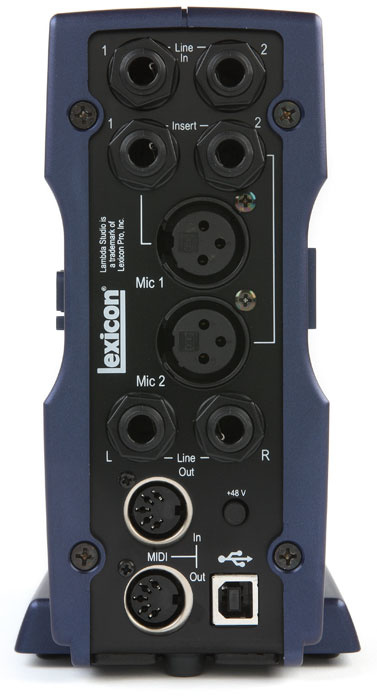 Photo: Mike CameronAs well as being a USB audio and MIDI interface, the Lambda also acts as a 4:2:2 mixer — so a maximum of four sources can be recorded simultaneously, onto a maximum of two independent tracks. Recordings can be 16- or 24-bit, at sample rates of either 44.1 or 48 kHz. The front-panel Mic and Line knobs make setting recording levels easy; each one has a Peak LED to indicate when things are getting too hot. Beneath it, the Output Level knob controls the level at both the main line outputs and the headphone output.
The Monitor Mix knob allows you to adjust how you hear input signals during recording. With the knob turned all the way to the left (Direct) only the 'live' analogue signal will be heard. With the knob turned the other way (Playback) you can monitor your host application's software outputs. Direct monitoring has the advantage of having 'zero' latency — there will be no audible processing delay in the signal. Playback monitoring allows you to listen via software effect plug-ins, at the cost of a certain amount of latency (how much depends upon your computer and software configuration). The Monitor Mix knob provides a convenient way to set a suitable balance between the two signals while recording overdubs.
On Balance
With its four inputs (five if you count the Instrument input), phantom power, channel inserts and flexible monitoring, the Lambda could do away with the need for a separate hardware mixer in a small portable or 'project' recording setup. While you might like to add a hardware compressor or EQ, neither of these would be essential.
With just a single In and a single Out, the Lambda's MIDI capabilities are a bit on the basic side, so if you have lots of external MIDI hardware to control, you may need to make other arrangements. However, if you just need to hook up a keyboard to control one or more VST Instruments, the Lambda will do the job nicely.
Lexicon's Lambda is small enough to provide a portable solution for laptop recording, but could equally be useful in a cramped home studio where desk space is scarce. The front-panel Instrument input and headphone jacks are very convenient, and the Lambda's sensible design puts all the essential controls at your fingertips. It's easy to install, easy to use, and it works well.
Pantheon Reverb
A nice addition to the Lambda bundle is Lexicon's Pantheon VST reverb plug-in. The Lexicon name has been synonymous with high-quality digital reverb for many years, and the Pantheon plug-in has already won its fair share of admirers among users of Cakewalk's Sonar (which includes a bundled version of its own).
 Pantheon ships with 35 preset patches, running the gamut from small rooms to large halls, via plates, chambers and beyond. The presets are all very usable, although one or two of them might be a little on the bright side for some tastes.
When you're ready to move beyond the presets, more than a dozen editable parameters await, allowing every conceivable aspect of the sound to be fine-tuned. With patience, and using the presets as sensible starting points, a wide variety of good-sounding reverbs can be created, ranging from the plausibly naturalistic to the peculiarly artificial.
Although its not impossible to coax a bad sound out of it, for the most part Pantheon works very well. It's always clear and transparent, and some of the small rooms in particular struck me as impressively real-sounding. It doesn't make excessive demands of the host CPU either.
The printed manual is brief but informative, and does a good job of explaining what the different parameters are, and how they're likely to affect the sound. Worth reading.
I've only one complaint. The Pantheon version supplied with this bundle appears to have been crippled to prevent its use in other VST plug-in hosts. Attempting to open it in Audiomulch, for example, brings up an 'Unauthorised Host' dialogue box bearing the message 'Sorry, this host is not authorized to load the Lexicon Pantheon plug-in'. Presumably Lexicon felt they had a good reason for imposing this restriction. From the point of view of the end user, though, it just serves to make a good product slightly less useful. That's a bit of a pity, although it doesn't detract from the plug-in's quality when used within Cubase LE.
Cubase LE
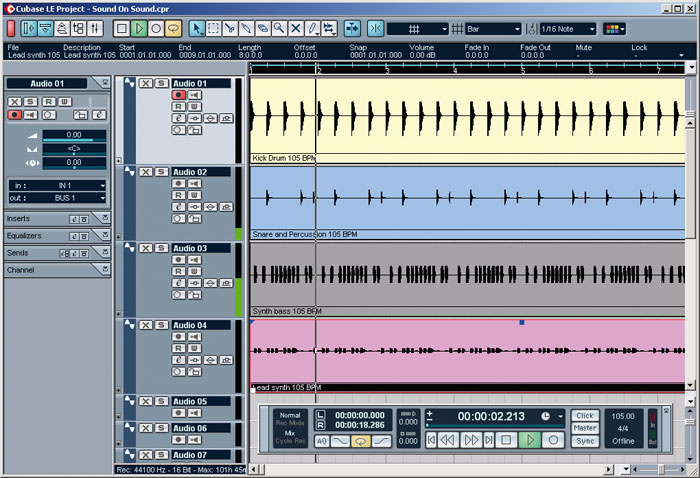 Also included in the Lambda bundle is a copy of Steinberg's feature-limited, entry-level version of their Cubase MIDI and audio sequencing package.
Although a good deal less sophisticated than its full-blown commercial siblings, Cubase LE is nonetheless a very capable program, offering 48 audio and 64 MIDI tracks, two insert and four effect sends per channel, full mix automation, score editing, and up to eight VST instruments, among other features. The Lambda's printed manual includes a useful walk-through guide to configuring the software and making your first recording.
Pros
- XLR mic inputs with phantom power and insert points.
- Convenient front-panel instrument input.
- Pantheon reverb plug-in.
Cons
- Pantheon reverb plug-in not available to hosts other than the bundled Cubase LE.
- No option to use external power supply.
Summary
A compact, flexible and practical solution for small home or portable studios, the Lambda package offers well-built hardware and a useful software bundle, for a reasonable price.
information
£199 including VAT.
Harman Pro +44 (0)1707 668181.
+44 (0)1707 668010.