

Most SOS readers seem either to be setting up a studio or refining their existing setup, and could save money and hassle by doing much of the wiring and installation themselves. We explain how.
 Even if you're only planning a small studio, and you know what kit you'd like to use, the process of setting everything up to work together can present many potential pitfalls, whether you're a complete beginner or an experienced studio user. A studio which has been well thought out will be much more conducive to creativity, so during the next few months I'm going to help to take the sting out of designing and constructing a workable small facility, as well as passing on some of the experience I've gained during my many years working at the BBC and in studio design and installation.
To get us started off, in this article I'll deal with the all-important safety issues surrounding studio installation work, as well as discussing the most common tools required before you begin. Then I'll show you how to set about doing your own studio wiring, including preparing the necessary materials and soldering effectively.
Building A Basic Tool Kit
Building a studio calls for a large number of tools, and the best way of achieving a good end result is to use the correct one for each job. Spending a little time and money on your tool kit will save you a great deal of time and money later. It is far better to buy a good pair of wire cutters and strippers than to butcher metres of cable and end up with leads looking like a dog's dinner. Effective tools do not have to be expensive, but, as with most things, you get what you pay for.
As a starting point, the following tools will be required:
- Small and large wire cutters (sometimes called 'side cutters').
- Wire stripper.
- Small needle-nose pliers.
- Soldering iron with a 18-40W power rating, and preferably a stand.
- Multicore solder.
- Desoldering pump.
- Small electrical screwdriver.
- Medium and large flat-blade screwdrivers.
- Medium and large cross-head screwdrivers.
- Junior hacksaw.
- Utility knife
- Small-to-medium bench vice.
- Simple electrical multimeter with continuity buzzer.
 Automatic or semi-automatic wire strippers (left and right) will usually give the best results, although end strippers (centre top) will also give good results. However, you should avoid the cheap pressed-steel wire strippers (bottom) at all costs!Many of these tools are easily obtained from DIY stores. The small wire cutters, needle-nose pliers, wire stripper and soldering iron are probably best purchased from an electronic parts catalogue. The outlay on a modest tool kit will soon be recouped when you make a few cables instead of purchasing them ready-made. In any event, you will almost certainly have to repair a cable sooner or later, and having the ability to do so could mean the difference between finishing a session and not.
Wire Cutters: Small cutters are used for cutting single wires and fine wires such as small screened cable. I find that the 'flush cut' type are best, as their blades meet accurately to do the job cleanly. This type of cutter should only be used to cut small wires made of soft metals such as copper. If they are used on larger or harder cable, the blades can become indented, or even snap off. Larger cutters should be used to tackle bigger-diameter and harder cables, such as braided types. However, the larger tools can be too cumbersome to use in tight spaces and often crush small cables, rather than cutting them. Remember, when using wire cutters, to protect your eyes against the trimmed ends.
Small Needle-nose Pliers: These are used to form the ends of wires and to hold them while soldering. When using pliers to hold wires, care must be taken not to overheat, and therefore flatten, the wire in question, more of which later.
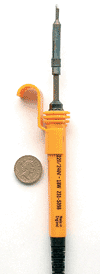 A small soldering iron is all that's necessary for most studio work, and a de-solder pump (below) is also handy.Wire Strippers: Wire strippers almost justify an article of their own, because there are many types at vastly varying prices. The best types will save you hours of frustration, while the cheapest ones are truly ghastly. The plastic automatic type is a fine compromise between cost and effectiveness. With care, they will make a reasonable job of a range of cable diameters. My favourite is the semi-automatic type — they strip the cable very cleanly, although you must have blades that will accommodate all cable diameters that you will use. However, they are also the most expensive. An older style that is usable with great care is the manual end stripper. Finally, and worst of all, are the cheap pressed-steel side strippers. Do not even attempt to do serious cable preparation with this type of tool (to use the word loosely).
Soldering Iron: The tool your plumber friend has offered you just won't do! You will need a small iron with a small-to-medium tip. Irons are rated in Watts and, generally, the higher the wattage, the hotter the iron. The exception to this rule are thermostatically controlled irons, but these tend to be much more expensive. Good results can be obtained with simple irons in the 18-25W range. I prefer this type for general work, as they tend to be light and therefore easy to manoeuvre.
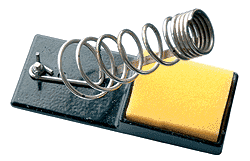 It's worth getting at least a simple stand for your soldering iron — the cleaning pad is optional, but stability is all-important.
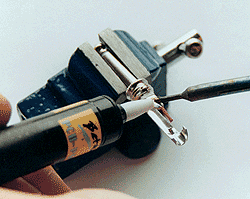 The de-solder pump has a heat-resistant plastic nozzle which can be placed right next to the soldering iron tip to suck up the molten solder.De-solder Pump: This inexpensive tool, often called a 'solder sucker', saves much frustration. It is used to simply remove molten solder from a joint that needs to be dismantled, or to remove excess solder.
Solder: This is not a trivial material. The quality of the solder will directly affect the quality of the joint — and the quality of the joint will directly affect the quality of the sound! Only use solder that is intended for electronic assembly, not types intended for plumbing and so on. Electronic solder is a fine wire, typically 1-2mm diameter, and is an alloy of tin and lead. It contains a substance called flux, and can be identified by the words 'rosin', 'ersin', 'savbit' or 'resin cored'. The best known is sold under the trade name Multicore. For fine work, such as tinning small-diameter wires and soldering small connector pins, I recommend solder of 0.9mm diameter. However, for larger wires and connector terminals, 1.22mm (or even 1.5mm) will be better suited. When resin-cored solder is melted, the flux will give off a small quantity of smoke. Although this smoke is not particularly aggressive, it is best to work in a ventilated area and avoid breathing the fumes directly.
Screwdrivers: There is not an awful lot to say about these, except that the correct size of screwdriver is safer to use. An ill-fitting screwdriver is likely to slip, thereby damaging the screw, the equipment, or you.
Junior Hacksaw: This is the perfect tool for cutting large-diameter or hard cables. Typical examples would include multi-pair cables and heavy-duty speaker leads.
 Utility Knife: These are the simplest tools to use for removing the outer jackets from a range of cables. They must be used with extreme care if an early end to your guitar/keyboard hero days is to be avoided. Always work away from yourself, and be careful not to damage the cable under the outer jacket.
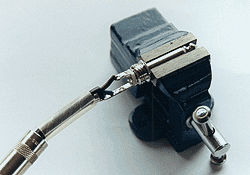
Bench/Table Vice: Vices are used to hold small objects, such as connectors, while soldering, and they act as an invaluable 'third hand'.
Multimeter With Continuity Buzzer: For audio installations, a continuity buzzer is indispensable. This is simply a small buzzer powered by the multimeter's battery via the two test probes. When the probes are connected to each other, the circuit is completed and the buzzer sounds. The buzzer is therefore ideal for tracing connections in cabling and checking for short circuits. Used as directed in this text, the continuity buzzer is absolutely safe. Although the multimeter may also be safely used to measure battery voltages, never connect the probes to sources of mains power or any mains-powered equipment under any circumstances, and remember to double-check whether power cables are really unplugged.
Safety First!
When working on any installation, electrical and physical safety are of utmost importance. As well as carrying out all work to a safe and workmanlike standard, you should give thought to any tools and materials left lying around during construction — this is particularly relevant in the home studio environment, where children and pets may be present. For example, an unattended soldering iron could cause catastrophic injuries to a small child.
ELECTRICAL SAFETY
- Do not work on any power wiring without isolating it from the mains supply! This point may seem obvious, but is that cable you're about to cut really unplugged?
- Beware of damaging mains cables with tools and soldering irons.
- Do not remove any mains earth connections to cure hum loops.
- Do not modify any mains-powered equipment.
- Do not use multiple cables in one mains plug.
- If a moulded-on mains plug is removed for any purpose, render it safe (remove the fuse) and discard it immediately.
- Do not tackle any mains wiring (even plugs) if you do not feel completely competent.
PHYSICAL SAFETY
- Do not leave redundant tools lying around.
- Do not overstretch on ladders
- Beware of untidy cables laying around — they represent a significant trip hazard.
- Work away from yourself with sharp tools such as utility knives.
- Remember that soldering irons remain hot enough to burn for a long time after unplugging.
- Pay attention to warnings included with power tools.
- Wear eye and ear protection when using power tools.
- Beware of flying trimmings when using wire cutters.
- Always lift heavy objects with bent knees and back straight.
- Be aware of children and pets.
- Do not work when tired.
- Do not use any tools under the influence of alcohol!
Many of the above points may seem obvious or trivial, but it's very important to take them seriously.
Soldering & De-soldering Techniques
 Tinning a wire made up of multiple strands makes the wire much easier to handle and solder.Successful soldering is vital at many levels of studio installation. As with any skill, successful soldering is simply a matter of understanding the basics and gaining sufficient practice. The first basic rule is never to use the iron tip to 'carry' solder to the joint. Although it is sometimes tempting, putting a blob of solder on the iron and then dabbing it on the joint will not work. The solder contains flux. which helps it form a good contact with the surfaces being soldered. When a solder blob is placed on the iron tip, the flux burns away, rendering the solder useless and creating what is known as a 'dry joint'.
It is important for both parts of the joint, normally a wire and connector pin (or similar), to be at the same temperature. With a little solder on the tip of the iron to help heat transfer, apply the tip to both parts simultaneously. After a second, apply a little fine electrical solder to the junction of the two parts and the iron tip. The solder will flow neatly, forming a good joint. Almost at the same time, remove the solder and then the iron tip from the joint. With a little practice, you will find that you can make perfect joints in no time at all.
Always keep the iron tip clean. Apply a small amount of solder to the tip and then wipe it off. Normally a small piece of damp (not wet) sponge is used to wipe the tip on. I find it better to use a folded sheet of dry kitchen paper, as this does not cool the tip down and also seems to cause less corrosion of the tip. This should be done as soon as the tip starts to look tarnished and sticky.
The process of 'tinning' is key to good-quality cable work, because it allows you to turn the multiple strands of wire typically found in audio cables into a smooth, solid mass. The solid mass can be dressed, without fraying, using needle-nose pliers, and it solders much more readily than untinned strands.
To practice tinning, you will need some short lengths (75mm is plenty) of thin insulated wire, often referred to as 'hook-up wire'. Start by using your wire strippers to remove around 6mm of the plastic insulation from each piece of wire and twist the strands together.
To 'tin', apply the iron's tip to the twisted strands of wire and, after a second or so, apply a little solder to the junction of the wire and iron tip. The solder will flow into the strands, forming a shiny solid mass. If the result is a dull-looking and crystalline 'dry joint', you probably removed the iron too soon. If, on the other hand, the solder formed a spike as you removed the iron or the plastic insulation shrank up the wire, you left the iron in place too long. Practice makes perfect, so cut as many test pieces of wire as you need to gain experience, and repeat the process until you can reliably achieve a good-looking result.
 Here you can see how it's possible to hold both the wire and the soldering iron, while simultaneously feeding solder to the joint. This technique is useful if your vice is already tied up holding the connector to which you're soldering the wire.Now let's try soldering one of our nicely tinned wires to a connector contact of some sort. The old favourite quarter-inch jack plug is ideal for this.
There are two common types of joint used to connect wires to flat terminals, such as are found in jack plugs. The first, and easiest, is called a lay-on joint. To make a lay-on joint, in addition to tinning the wire end we also need to tin the contact. To do this, place the jack plug in your bench vice so that it is held firmly by the edge, but not tightly enough to damage the plug. Hold the iron tip against the contact for a second and then apply the solder. The solder will flow over the contact. Apply enough solder to cover the hole in the contact without the hole still being visible.
Now we can join our wire to the contact. Apply the iron to the contact once again and as soon as the tinning melts, lay the wire end neatly on the contact. Because both the wire and the contact are pre-tinned, a smooth joint should be formed without the need to add extra solder. The joint should look secure and smooth. If it doesn't, you may need to apply a little more solder. As you will find, this process appears to require at least three hands, but with a little practice you will find it possible to support the wire and feed on a little solder with the same hand.
 For hook-on joints, use your needle-nose pliers to bend the end of the tinned wire in half.A hook-on joint is a little harder to make than the lay-on joint, but is more secure. The down side is that it is harder to remove if you make a mistake. To make a hook-on joint, strip the wire a little longer this time (8mm should be fine), tin the wire as before and then, using your needle-nose pliers, bend the tinned section in half. Hook the wire through the contact (do not tin it this time) and squeeze the bend closed around the contact. Finally, solder the joint with the same method used to tin the contact in the lay-on joint. The joint should look secure and shiny, and the plastic insulation on the wire should not shrink.
At some point you are bound to make a mistake. Perhaps a joint goes so badly that you need to start over, or you connect the wrong wire. Either way, you will need to remove the solder and start again. To do this we use the de-solder pump.
To remove the solder from a joint, heat it up until the solder fully melts and then, holding the heatproof tip of the sucker against the joint and iron tip, press the trigger button. The solder should be drawn up into the sucker, leaving a clean surface. Ironically, it is often helpful to add a little fresh solder to the joint before using the sucker, as this helps the solder to flow and gives the sucker a larger solder mass to grab hold of. The solder sucker will need periodic dismantling to clean out the removed solder.
Now you've had some experience in soldering and de-soldering, you can go on to make cables. Although simple cables are easily purchased in music shops, the principles involved will allow you to make cables that are not available off the shelf. As exercises, we'll make two common audio cables: a jack-to-jack loudspeaker cable and an XLR-to-XLR microphone cable.
Jack-to-jack Cable
This type of cable would typically be used between a guitar amp and speaker cabinet. For any type of cable that is to be used in a 'mobile' environment, it is always best to use metal-bodied connectors. Metal types can withstand much more abuse and, as a result, will be more reliable. There is nothing worse than turning up to a gig to find that a vital cable is unusable because the jack plug got crushed in your gig bag!
Having decided what connectors to use, let's now look at cable choice. The cable used in instrument leads is not suitable as loudspeaker cable. In basic terms, it is not thick enough for the job. A typical guitar, keyboard, or PA amplifier will be rated at perhaps 100 Watts and will require speaker cables capable of passing peak currents of around 5A. From this we can see that an ideal cheap cable choice would be two-core 6A mains cable. This is easily available from your local hardware or DIY store.

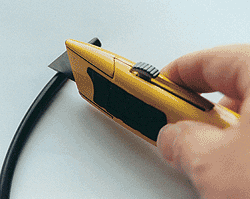 To strip the outer sleeve of a loudspeaker cable, score around the outside and then bend gently.To prepare the cable, we first need to remove the outer jacket. It may be possible to use your cable stripper to do this, but often, with this type of cable, the insulation of the inner wires gets cut or stripped if you do. It is normally better to carefully score the outer plastic with your utility knife (not too deep) around the circumference, about 30mm from the end of the cable. Next, gently bend the cable at the score line until the PVC jacket 'cracks open' all the way around. Once this is done, the length of jacket is easily pulled off. If you find that the inner insulation has been cut when you scored the jacket, you must cut the wires off and start again. It is vital that the inner insulation is intact, as short circuits may otherwise occur and damage the amplifier. Next, we need to cut the inner wires to a suitable length. Bear in mind that the two wires will not be the same length inside a jack plug. This needs careful judgement, as making them too short will mean you have to cut off the wires and start again. If you cut them too long, you will not be able to make a neat job inside the plug. Again, practice makes perfect.
When the inners are cut to length, strip off about 6mm of insulation and tin, as practised earlier. Next, thread the outer body of the plug and then the insulation sleeve over the cable. If you don't do this now, you will have to unsolder your perfect job later and do it again. We all make this mistake — you have been warned!
 Solder the wires to the jack plug, starting with the ground connection and then the signal or centre connection. Fold or tighten the cable grip over the outer jacket for support. I find it best to do this last, so that the heat used to solder the ground connection does not melt the outer jacket at the cable grip. Finally, slide the insulating sleeve over the plug and screw the body on. If your plugs do not come with an insulating sleeve, or you lose the sleeve under the kitchen unit, gently wrap a small length of insulating tape over the connections. It is vital that the connections are covered, so that they don't short inside the metal plug body. Repeat the whole process at the other end of the cable.
You now have a finished cable. All that remains is to test it for continuity and shorts. Do not be tempted to simply plug the cable in and try it. Mistakes may damage the amplifier! (These tests can, of course, be carried out on a suspect ready-made cable, as well, and the test sequence applies to all types of jack-to-jack cable.)
- Set your multimeter to 'continuity', with the buzzer turned on.
- Check that the meter is working correctly, by holding the two probes together. If all is well, the meter should beep.
- To test your cable, start by holding one probe on the tip of one jack, and the other probe on the connector sleeve contact (or body if using metal jacks) — the sleeve connection is separated from the tip by a (normally black) plastic insulator. If the meter beeps, you have a short circuit and will have to unscrew both plug bodies and carefully inspect your work. Remember that there should be a plastic insulating sleeve inside the plug!
- If all is well, we next need to test the cable from end to end. Place one probe on the tip of one plug and the other on the tip of the other plug. The meter should beep. If it doesn't, it is worth checking from the tip of one plug to the body of the other. If this beeps, you have reversed the connections in one plug.
- Finally, hold one probe on one plug body and the other probe on the other body. Again, the meter should beep. If all the tests go well, you may pat yourself on the back and use the cable with confidence.
XLR-to-XLR Mic Cable
 XLR (eXtra Low Resistance) microphone cables differ in construction from jack-to-jack types. Loudspeaker or instrument cables normally have one signal connection and one ground connection, carrying what is called an 'unbalanced' signal. High-quality microphones and audio equipment, on the other hand, have two signal connections and one ground, and carry a 'balanced' signal. The two signal connections are referred to variously as 'Hot/Cold', 'Plus/Minus' and 'Signal/Return', amongst others. The important point is that the two signals are inverted with reference to one another. When these are fed into a mixing console, for example, one signal is re-inverted and added to the other. This results in a signal twice as large as each of the originals. More importantly, any interference picked up in the cable will have the same polarity in both signal connections and will therefore be cancelled out.
Nothing in this world is perfect, and cancellation of these common interference signals is therefore not absolute. (The term used to describe how much cancellation occurs is Common Mode Rejection Ratio, and CMRR falls with frequency.) However, the balanced system is very robust and allows delicate signals, such as those from microphones, to be sent down long cables without major noise problems. The down side, however, is that the cable used must contain three wires — two for the signals and one for the ground.
In all balanced and unbalanced signal cables, the ground connection is also used to 'shield' the signal wires (conductors) from interference. This is achieved in practice by having some kind of braid or foil wrapped around the signal wires and contacting the ground connection. Cable of this type is, not surprisingly, referred to as 'shielded' or 'screened'. Unbalanced shielded cables will contain one signal and shield, while balanced shielded cables contain two signals and shield.
 To prepare a braided balanced cable for soldering to an XLR, tease out the individual strands of the braid (above) and tin them together.
 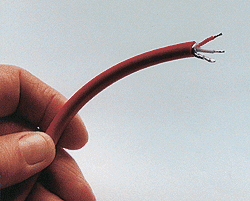 Then cut the signal wires to length, remove the required amount of sleeving, and tin the strands together. The prepared cable should look something like the one above.For our XLR-to-XLR cable we will therefore need two-conductor, shielded cable, and this comes in many types. Some is intended specifically for microphone applications and is robust, yet flexible, while other types designed for installation purposes are usually smaller in diameter, less robust and will not tolerate much flexing without the signal wires breaking. We will also require one male (protruding pins) and one female three-pin XLR connector. Again, metal bodies are best.
Depending upon its physical construction, balanced shielded cable may strip cleanly with the wire stripper. Try removing a short length of jacket (25-30mm) with the stripper and inspect for any damage. If this is not successful, you will need to cut it off and use the utility knife as before. With the jacket removed, the shield will need to be tidied up and tinned. Separate the shield from the signal wires, by teasing out the strands, and twist them neatly, tinning as before. After tinning, inspect the signal wires, to make sure that the shield has not melted into them, causing a short. Next, cut the tinned shield and signal wires to length, with reference to the XLR connector. Normally, all three will be the same length. If the twisted shield is too thick and cumbersome, you may cut off some strands to make it more manageable. Finally, strip and tin the two signal wires.
The two signal wires will have different colours. There is no overall standard for these, so you must decide which you will use for each signal, hot and cold, and stick to it. The standard wiring for an XLR is pin 1 ground (shield), pin 2 hot, and pin 3 cold — the numbers of the pins will be marked on the connectors in very small print. Remember that male and female pin numbers are mirrored. Note that, on older American equipment, the hot and cold pins were reversed. Newer units seem to have adopted the later European standard.
Having remembered to thread the body and any mechanical parts over the cable first, place the connector-pin assembly in the vice and solder the two signal wires, followed by the shield. You may find it easier to tin the signal pins before soldering, but do not do this for the shield, as it will make it hard to insert the twisted strands neatly in the pin. When soldering is complete, reassemble the XLR connectors and tighten the cable clamps.
 Testing is most easily done with both connectors in a vice. Using the multimeter, check continuity between similar numbered pins of both connectors (remember the mirroring), then check for shorts between dissimilarly-numbered pins.
The Final Touch: Cable Marking
Whether the new cable is intended for stage use or is part of a studio loom, it is well worth the trouble to mark both ends clearly. This will save much time and frustration when you are trying to trace problems. For stage use, it will also help you to keep track of your cables. The suppliers listed below supply a range of cable-marking products, but even a neat hand-written ident on white insulating tape is better than nothing. You will need a system to mark your cables — numbering them sequentially is as good as any. In the studio environment, you can then keep a written log of the numbers with reference to their function. This will be examined more closely when we look at planning and documentation later in the series.
Specialist Electronic Suppliers
- RS Components: +44 (0)1536 201201. Trade only, but the full product range is available via Electromail
- Farnell: +44 (0)870 1200 200. Normally trade only, but will accept orders on a credit card.
- CPC: +44 (0)8701 202530
- Studiospares: +44 (0)207 482 1692
- Canford Audio: +44 (0)191 418 1122