

Not only are these applications easier to use than commercial packages that can be confusingly feature heavy, they're also extremely easy on the wallet...
 Musicians new to PC sequencing often feel overwhelmed by the sheer number of features provided by the flagship versions of modern MIDI + Audio sequencing packages, and are on the lookout for easier-to-use applications. Most commercial packages have 'entry-level' versions that are cheaper but may not appear much simpler to the novice, since they merely cap the maximum numbers of simultaneous audio/MIDI tracks, soft synths and insert plug-ins, while their menus remain awash with options. Even some freeware sequencers manage to baffle the newcomer unused to concepts like automation, external clocking, and so on.
On the other hand, not every new PC musician wants to create all their songs using construction-kit software plus thousands of bundled audio loops! There certainly seems to be a demand for serious creative applications that have fewer options and are easier to use, and this is what set me off on my quest to find out what you could achieve with simpler freeware sequencers and audio editors.
Setting The Scene
It never ceases to amaze me how many talented people find the time to develop and continue to refine the amazing freeware applications available, and are generous enough to release them for all the world to use without charge. I'm also surprised at just how many good freeware sequencers are available. Some are free 'lite' versions of more sophisticated products, while others are free for personal, educational and non-commercial use, but you're encouraged to pay a suggested (small) fee for a commercial licence (in other words, if you end up making money from music you create using it).
Other products are simply classified as donationware: you can download and use them free of charge, but users are encouraged to send a modest financial contribution to help pay the developer's bills and encourage further development (often using Paypal, the most popular way for anyone with an email account to securely send or receive on-line payments using their credit card or bank account).
I must mention one particular sequencer application in passing, given the shock waves it has managed to send through the audio community for its slick, professional interface and huge array of functions. Strictly speaking, Reaper (www.cockos.com) is shareware, but given that you can download the full, un-crippled version to try out, some might consider that other freeware sequencers would now be dismissed out of hand. However, this hasn't proved to be the case. As I said in our recent in-depth SOS review, I was most impressed with Reaper, but (like some other musicians) found some of its features initially confusing, and many novices seem to end up bewildered by the number of choices available. The applications I've chosen to feature in this round-up are those that are easy to get into, yet capable enough to accomplish a variety of serious musical tasks. Along the way I did have to discard a few that were either confusing or unreliable: some seem to remain in Beta versions for several years.
Quick & Fun Freebies
If you fancy a quick, fun approach to making sampled music, why not download Richard Spindler's Gungirl Sequencer (http://ggseq.sourceforge.net/Hom...)? Its approach is simplicity itself — you just use the left-hand folder tree to click on your desired sample folder, and drag files from this folder directly onto any of the eight tracks that appear by default beneath the timeline (although you can add and delete tracks as you need). You can loop any section of the timeline while working on your songs, and each track has its own volume control and mute button, while a global slider controls the overall output level.
You can set the 'snap' value in BPM, frames or seconds, so your samples line up easily on the beat, and to help you do this there's an optional info window, when you audition your samples, that displays their length. Once they're positioned on the screen-tracks, you can drag-copy and move your samples singly, or en masse by rubber-banding a box around them, add fades or control their volume envelopes, and even open up a simple sample editor where you can adjust start and end points and apply time-stretching to make multiple files at different tempos fit your songs. You can even export and import packages of songs, plus their associated samples, so you can collaborate with friends. Professionals might mock, but Gungirl is fun, and it's free.
If you want a very simple and compact pattern-based MIDI sequencer, PQN Audio's VstSeq (http://pquenin.free.fr/pqnaudio/...) is a 132KB download that lets you enter and edit notes manually in its pattern windows, which can have between one and eight measures, each of between two and 32 steps, at a tempo of between 30 and 300bpm. You can send its MIDI output to any of four VST Instruments, and then either export your completed pattern as MIDI files to another sequencer, or render them as completed WAV files.
Kristal Audio Engine
The Kristal Audio Engine (www.kreatives.org/kristal) is an audio-only sequencer in a state of flux between freeware and shareware status. The freeware version 1.0.1 was developed between 2003 and 2004 and is still available for free personal and educational use, but commercial users are asked for a modest 24.90 Euros for a single-user licence. Meanwhile, its lead developer created Kristal Labs Software Ltd in 2006, in order to develop a new commercial product, code-named K2, that looks to be nearing completion (you can pre-register to be informed by email when it's ready).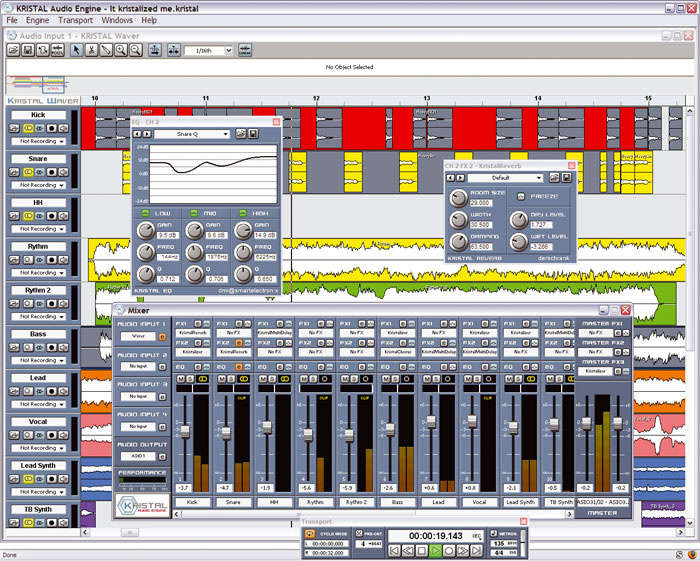
Kristal Audio Engine: With an easy-to-use interface, plus support for both ASIO drivers and VST-format plug-ins, the capable Kristal Audio Engine provides easily enough features for musicians who only require audio recording and playback.
I found the freeware version refreshingly straightforward. It supports either MME/WDM or ASIO (for lower latency) drivers and offers 16 audio tracks at sample rates of between 44.1kHz and 192kHz, which is quite enough for most musicians who want to record a band or their own music using acoustic/electric instruments, and who don't need MIDI or soft synths. I suspect that KAE may also appeal to musicians who record with a hardware multitrack, yet want to mix on PC.
The main workspace for recording, editing and arranging is termed the Kristal Waver, and is a variation on the familiar 'arrange' page, with horizontal tracks, each containing one or more recorded or imported parts and each with its own 'Inspector'-like panel on the left, containing record, monitor and mono/stereo switches. The usual click/drag move and copy functions are available for parts, while you can alter the start and end points, level and fade in/out times of parts using their graphic 'handles'.
Across the top of this page is a tool bar containing select, cut, and glue tools, multi-stage undo/redo, auto-scroll and snap-to-grid options, then an info line providing details of the currently selected part, a Zoom strip giving a graphic overview of the entire song, and a Time Ruler calibrated in bars and beats, seconds or samples, where you define loops and so on.
The transport panel provides another familiar set of controls, including a set of 'tape transport' buttons, left/right locator displays, optional metronome, BPM and time-signature readouts, and (very handy for band recordings) a pre-count function using the metronome, to give you time to prepare yourself before a take.
A lot of the creative work goes on in the floating Mixer window. Each of the 16 tracks has its own channel strip with fader, pan, meter, mute/solo buttons, an integral three-band parametric EQ and two insert slots into which you can load any VST plug-in in your collection (and DX ones, if you first install a suitable DX-to-VST wrapper utility). The stereo Master channels provide three insert slots, and the package also includes a few of its own VST-format plug-ins: the three-band parametric EQ again; a chorus; a reverb with a smooth tail; the Kristaliser limiter/distortion; and the surprisingly versatile Multidelay.
SEQ24: If you want a MIDI-only sequencer optimised for real-time live performances using a clutch of hardware synths, this could be just the job.
The only aspect of KAE that I found initially confusing was the mixer's Audio Input slots. There are four available, each of which can host its own Kristal Waver arrange window or a so-called 'Live IN' plug-in. Strictly speaking, the latter are not plug-ins at all, but mini-mixer windows where you can combine up to eight mono or stereo input signals (assuming you have a corresponding number of inputs on your audio interface), adjust their relative levels and reduce them to a single mono/stereo output signal that you route 'live' (subject to normal latency delays) through the EQ and VST effects in the main KAE mixer.
If, instead, you select 'Kristal Waver' for an Input slot, another arrange window appears, so a theoretical 64 tracks are available across the four Audio Input slots (16 for each Waver window), and as soon as you record/import audio data into any tracks in any Waver window they become automatically connected to a mixer channel. However, although playback across these multiple Waver windows remains in perfect sync, there are no 'tile windows' functions to help you visually line them up, and since the mixer only supports a maximum of 16 channels anyway, I suggest you stick to using one Waver window and avoid the extra options and confusion.
Apart from this, I found using Kristal Audio Engine a very pleasurable experience, and there are some helpful tutorials in the HTML manual on Project Management, Recording, Mixdown and Export, plus how to use VST effects. Some potential users may eventually miss automation and it will be interesting to see what additional features appear in K2, but I suspect that most potential users will be quite happy with what there is.
Other Free Sequencers To Try
Although some sequencers at first appear to be freeware, some turn out to be demo versions of shareware products, either with the save functions disabled, restrictions on song time, or a sub-set of enabled features. Here are some you might like to try out that are either completely free or donationware: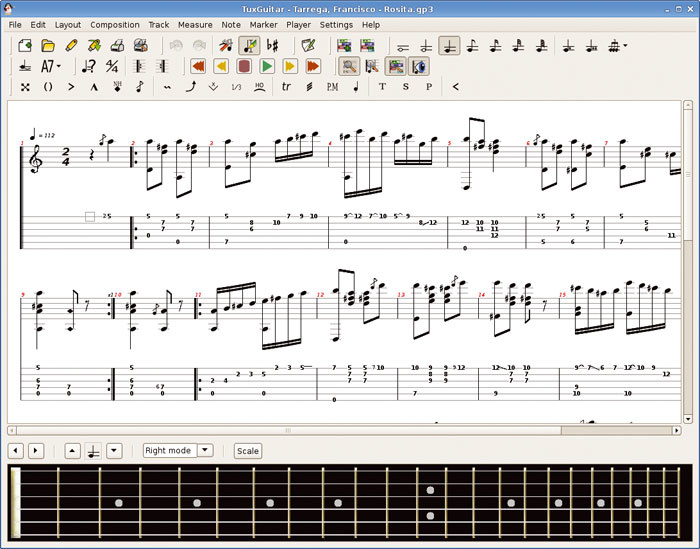
- TuxGuitar: If you're a guitarist, why not check out the freeware TuxGuitar sequencer? It offers a set of features that have been specially tailored for guitar players, as well as a piano-roll editor and a lyric editor.TuxGuitar (www.tuxguitar.com.ar) is a multitrack tablature editor and player with special features for the guitarist, including support for various effects (bend, slide, vibrato, hammer-on/pull-off, grace notes, harmonics and so on), plus a score viewer, piano and lyric editors.
- Sequitur (www.angryredplanet.com) offers "dynamic MIDI-oriented music editing and real-time manipulation" as well as an elegant interface and an interesting 'Echosystem' tool for generating patterns. However, it's still in an early Beta stage and I experienced several crashes while using it, so take care if you try it out.
- The freeware version of Anvil Studio (www.anvilstudio.com) is a more traditional MIDI-based sequencer offering comprehensive staff, lyric, piano-roll, drum, loops, audio and event editors, along with support for a single mono/stereo audio track. This may well suit those with 'read the dots' ability.
- Maize Studio (www.maizesoft.cn) is a 'modular live audio environment' where you build audio devices, connect them in Design View (a virtual patchbay) and see their front panels in Device View. It supports ASIO drivers and VST plug-ins and includes a disk-streaming sampler and audio player.
- Digital Sound Planet (www.digitalsoundplanet.com) have a freeware version of their Quartz Audiomaster, but I suspect that many SOS readers will find its four audio tracks and maximum 16-bit/44.1kHz audio format too restricting for serious use (in fairness, the freeware version is probably intended as a taster for the $90 professional version).
SEQ24
SEQ24 (http://filter24.org/seq24) should please musicians who already have MIDI synths and want a minimalist sequencer for recording and playing MIDI loops, particularly for live performances, where you don't want to be bogged down with loads of features. It runs under both GNU/Linux and Windows, but Windows users do have to initially install two run-time packages before SEQ24 itself, which might be a little confusing for the novice.
However, once this has been done the application itself is very easy to get into, being similar in concept to hardware sequencers such as the Akai MPC range. The main display contains four rows of eight boxes, each of which can contain a sequenced pattern. When you right-click in a box and select 'new', the Pattern Sequence Editor pops up with a traditional piano-roll editor, where you can enter time signature and bar length (between one and 64) for the sequence, and select the MIDI output port and channel to route it to the appropriate synth. You can play notes in from a MIDI keyboard or draw them in using the mouse, and there are various basic editing tools, including undo, quantise and transpose. There's a snap-to-grid function, and beneath the main note display you can view and edit velocity or any other MIDI Controller information. Buttons at the bottom right of the Pattern Sequence Editor control Record arming, MIDI Thru (so you can hear what you're playing before entering record mode), and Sequence to MIDI bus (which toggles playback of your recorded sequence).
Patterns can be saved and loaded individually in Standard MIDI File Format 1, or it's possible to import several MIDI patterns into the main display consecutively, to form a 'screen set' of up to 32 sequences. You can even switch live between up to 32 screen sets (1024 patterns in total).
Once you've recorded and edited a few patterns, you open the Song Editor window, where you can build complex arrangements with them. Each gets its own horizontal track, into which you can drop multiple instances wherever they are required. There are Mute buttons, so you can bring tracks in and out in real time, Left/Right locators for setting up loops, and some basic tools that delete sections, add new sections and copy existing sections of your song.
It's early days for the Windows version (which is still officially in Beta), but I didn't experience any crashes, and after just a few minutes I really got into the real-time approach to song-making — you can leave everything looping while you write new patterns, and then drop these into your composition or jam over the top. There are copious keyboard shortcuts for making changes 'on the fly', and you can even define incoming MIDI events that turn sequences on or off, for Orbital-style live performance mixes.
It's a shame that SEQ24 doesn't include a metronome (although I quickly created a hi-hat part to perform this function), and that it doesn't support soft synths. (Admittedly, the latter isn't its primary function, and you could set up software routing to a soft synth host using a Virtual MIDI cable such as Maple MIDI Tools, downloadable from www.hurchalla.com/MapleMTv356.zip.) However, if you've already got a bunch of MIDI synths and you're just looking for a stripped-down step-sequencing tool for your live performaces, SEQ24 could be just the job!
Luna Free
Luna is described by its developers (www.mutools.com) as an ultra-light application that's a rock-solid musical tool. It supports both audio and MIDI recording and playback. There are two versions: Luna Unlimited (just 29 Euros) and the Luna Free 'lite' version under review here, which is still surprisingly capable. Both versions run on Windows and Mac OS X. The Windows version only supports low-latency ASIO drivers (but if your audio interface lacks these, you could try the freeware ASIO4ALL wrapper from www.asio4all.com).
Once again, there's a familiar arrange page (here named the Composer), consisting of horizontal tracks containing multiple audio or 'MIDI Sequence' parts. There's a useful set of four editing tools (arrow, pencil, eraser and splitter), plus various keyboard-shortcut editing commands, while across the top of the Composer page are (from left to right) a set of menu buttons for File, Edit, and Help functions (containing a manageable total of just 21 options in all), a simple Transport panel with BPM and looping options, and a Part Property panel.
The latter is where you name each part, and route it using the surprisingly versatile features. The novice could simply leave the default routing of all the audio parts direct to the 'Audio Output', but it makes far more sense to instead do it via one of the eight available Racks, which appear in a separate window. Each Rack is a mixer channel with fader, pan, meter, mute, and six slots where you can insert a chain of VST plug-ins. MIDI parts can also be routed to a Rack, except that you would instead insert a VST Instrument in the first slot, followed by a chain of effect plug-ins, as required.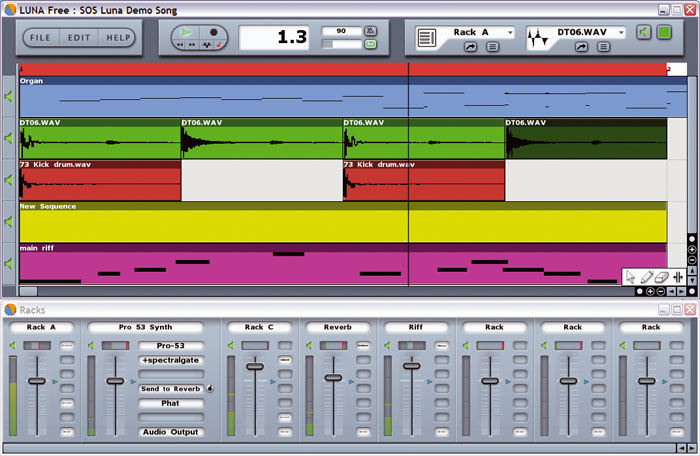
Luna Free: Offering both MIDI and audio recording and playback, and a surprising number of options, including sophisticated routing, yet boasting a simple and relatively easy-to-use interface, Mutools' Luna Free is a capable and versatile sequencer.
But there's far more on offer for those who want to explore further. Each separate Audio or MIDI Sequence part in a track can be routed to a different Rack with different effects or synths, so you could change a track's treatment part-way through a song (the only other sequencer I know that offers part-based effect functions is Samplitude).
You can also route multiple audio and MIDI parts to the same Rack, to treat them with the same plug-in chain, or route parts to any active slot in a Rack. So if, for instance, you had an effect chain comprising chorus, EQ and compressor, you could route some parts to pass through all three effects while others were simply compressed, or EQ'd and compressed. You can also insert a send from one Rack to another (perhaps to add global effects such as reverb).
Recording is a little unusual, in that you first draw in a part of the required length using the pencil tool, choose between an Audio or MIDI Sequence part and then select a file name using a custom file-selector dialogue that I found difficult to get used to. Audio editing is also basic: you can define a new start point, and there are normalise, gain and mute functions that operate on any selection, but you'll need an external editor for more detailed work.
However, MIDI editing provides more possibilities, with both event-list and piano-roll editors available, the latter with a lower area for editing velocity or other controller data, plus a more general set of sequence tools and various essential functions including quantise, transpose, modify velocity/lengths, legato, and so on. More experienced users can also launch a Modular Plug Area where you can directly edit the connections between plug-ins and synths in your Racks.
Overall, Luna Free is the most versatile of the three sequencers under scrutiny here, offering both audio and MIDI support, plus routing possibilities that occasionally rival those of the shareware powerhouse Reaper (see review in SOS June 2007). It will therefore take a little longer to find your way around. However, it still provides a rather more straightforward interface than those of many mainstream packages, that is also considerably easier to get to grips with.
Trying Out Trackers
If you like building up your songs from step-sequenced samples or VST instruments, you may want to investigate a 'Music Tracker' application. Originally developed for the Commodore Amiga platform, there are now quite a few available for the PC (see my July 2004 PC freeware round-up for more info on Trackers (www.soundonsound.com/sos/jul04/articles/pcmusician.htm). Here are some of the latest and greatest that follow in this tradition:
- According to its developers, Buzz (www.buzzmachines.com) is not a sequencer, nor a soft synth, nor a tracker, but all these things and more. You can route its Machines (Buzz objects which either create or modify sound — there are already over 100 available) in real time in the Machine Editor, which is a free-form graphic patchbay where you can connect together synths and effect chains. You can then create songs by chaining together Patterns in the Sequence Editor. Although Buzz itself is no longer being further developed, there's still a thriving community of Buzz users and Machine creators.
- Psycle (http://psycle.pastnotecut.org) is a 'modular music creation studio' that supports VST instruments and effects in both its own and VST formats, and has various similarities to Buzz, offering an advanced Machine View where you connect virtual components together. It features a 64-track step sequencer with loads of facilities.
- Skale Tracker (www.skale.org) supports VST Instruments, MIDI In/Out and 256 virtual channels, and seems to have an enthusiastic following and an active forum, despite the most recent Beta release being in 2004 (its developer has changed job and location, and no updates have therefore been written for some time). The web site was still out of action when I wrote this feature, but nevertheless you can still download the application itself.
Wavosaur
Many freeware sequencers (and even some commercial ones) require an external audio application for more detailed editing. Most people looking for a free PC audio editor have in the past opted for Audacity (which we reviewed in our PC music freeware round-up in SOS July 2004). This package is currently up to version 1.3.3 and now features new repair and EQ effects, timer recording, automatic project save/recover, to help you avoid losing your precious work after a power cut, and an improved selection bar, although it still manages to keep a modest 2.6MB download size (http://audacity.sourceforge.net).
However, Audacity has recently encountered some competition from Wavosaur (www.wavosaur.com) which, as its name suggests, is a Wave editor, although it also supports multi-channel WAV files, AIFF, Amiga IFF, AU, SND, VOX, VOC, OGG, MP3 and RAW sample formats. At just 171KB, it's also one of the tiniest downloads I've ever come across.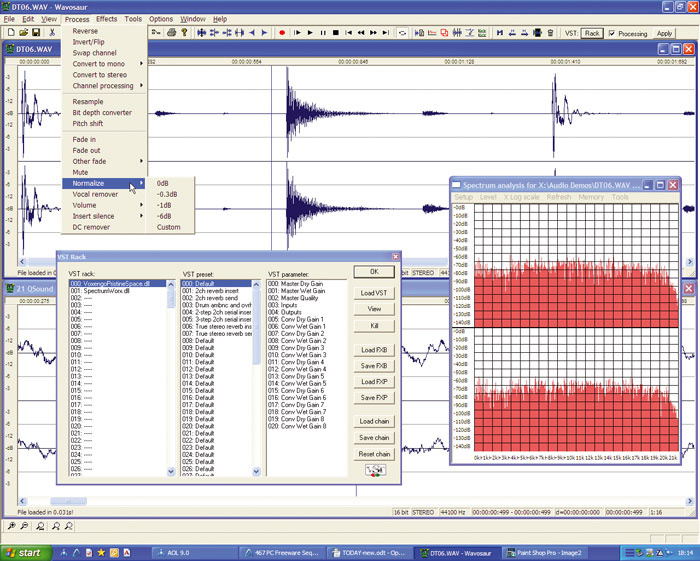
Wavosaur: Many freeware (and even commercial) sequencers rely on an external audio application to perform really detailed edits. The freeware Wavosaur editor may provide all the features you need to supplement your audio sequencing program.
I found Wavosaur very easy to get to grips with, since it uses standard Windows shortcuts for most editing functions, and I liked its ability to use the mouse scroll-wheel for horizontal/vertical zooming of waveforms. You can work with multiple files open simultaneously and copy and paste between them, and there's also a good selection of basic edit functions.
A useful selection of basic audio-processing options, including reverse, bit-reduction, pitch-shifting, fade-in/-out and normalise, is also provided, plus some more unusual effects, such as Truncate (which discards all samples whose level lies above a user-defined threshold) and Gapper (which creates periodic gaps at a user-defined frequency).
Fortunately, Wavosaur does support ASIO as well as Windows WDM drivers, so you get low-latency operation, and it also supports the VST plug-in format, so you can use all your favourite effects. However, like various other aspects of Wavosaur, its VST Rack that accesses these operates in rather an unusual fashion, making it easy to dismiss before you've discovered its true capabilities.
First of all, it doesn't link to a specific VST plug-ins folder: the Load VST button function in the VST Rack window instead lets you browse anywhere on your PC for suitable DLL files. This is flexible, but unnecessarily complicated if you use nested folders for different manufacturers, since you need to navigate to the desired folder. You can chain up to 256 plug-ins, and view them in any combination (although the software can't deal with generic plug-ins that don't have any graphic interface of their own), but it's not until you spot the innocuous tick-box on the VST Rack toolbar labelled 'Processing' that you realise it's possible to audition effects in real time as well as apply them off-line. (Most other applications instead provide a bypass button to allow you to switch the effects off.)
Similarly, in the Tools menu there's a useful selection of view options, including statistics, normal and 3D spectrum analysis and a sonogram, which all provide static displays for the entire audio file. You might conclude that there are no real-time analysis options, until you discover that the Input and Output 'oscilloscopes' both provide a handy selection of phase-scope, spectrum and scrolling sonogram displays in real time, as well as the more normal waveform option.
In other words, Wavosaur is a far more capable program than it at first appears to be, and after an extended session I was impressed, especially as this is an application that's still in its early days. I have noticed a few people reporting instability problems, but then I've also noticed that some people find Audacity frustrating to use. The beauty of the fact that they're freeware programs, obviously, is that you can download both and see which suits you best.