

The Monome may appear to be simple, but hidden beneath its minimalist exterior are practically limitless computer control possibilities...
 Monome are a small company based in Philadelphia, who design and build a range of controller/display boxes that can be interfaced to music software. That in itself isn't too remarkable — the market is awash with fader units and mixing surfaces of various shapes and sizes — but Monome units are something different.
Monome believe in minimalism. Their boxes have no lettering or labels, apart from the word 'Monome' printed in small type on the underside. The control surface is completely uniform: a matrix of identical, anonymous, back-lit buttons. Just looking at a Monome unit is an exercise in Zen: there are none of the controls you might expect to find, such as pan knobs at the top or faders at the bottom. There's no two-row LCD screen showing the current program. A Monome is about as close to a blank sheet of paper as hardware gets.
Another unusual aspect of the Monome hardware is the construction. The boxes themselves are made of walnut treated with teak oil, while the buttons are silicone rubber set into an aluminium faceplate. The materials are sourced locally by Brian Crabtree and Kelli Cain, the company's founders, with a great deal of attention to economic and ecological sustainability, and every unit is hand made; production runs are limited, and there is always a waiting list. The ethical manufacturing policy extends to the packaging, and everything is recyclable paper and cardboard, and there's no polystyrene or bubble-wrap to be seen. What's more, the device doesn't come bundled with software CDs, registration cards, special offers, or any of the other filler that usually accompanies hi-tech products: all software and support comes via the Monome web site and forum, and the company is very active on-line.
This open, minimal philosophy also extends to the internals of the Monome hardware and software. All aspects of the design, including the firmware, are open-source; users are free to adapt the device to their own uses, and Monome supply kits for anyone who wishes to build a custom unit. And, as is common in the open-source world, there is a thriving community of developers and programmers contributing tools and applications for the Monome platform, making it not so much a product as an ecosystem. As a very small outfit, Monome have not paid for advertising or stands at trade shows: they have been completely sustained by the viral nature of the Internet, and by word-of-mouth as their controllers find their way into the hands of artists and touring musicians.
Hardware
There have been two generations of Monome products. The first was the '40h' (named after the hexadecimal notation for 64), featuring an 8x8 matrix of buttons with green LED backlights. This model is no longer available to order, although it forms the basis for the self-build kit.
 'MLR', an open-source, MaxMSP Monome application for live sample-cutting with pattern recording and resampling.The second, current, generation of Monomes is built to a slightly smaller scale (roughly a 10 percent reduction), and features the walnut enclosures. The scale reduction allows for some bigger, higher-resolution models: in addition to the '64' (corresponding to the original 40h) there is a '128' (16 buttons by eight), and the '256' (16 square). All Monome models are compatible and operate identically.
There are plenty of images and videos on the web showing Monome units in action; in the flesh, the '64' I had for review was slightly smaller, and a lot lighter, than expected. The walnut enclosure is very nicely finished. Were it not for the control surface, it might pass for a jewellery box from a craft shop. The Monome connects to the rest of the world via a recessed USB socket on the side (or, perhaps, on top, as there is no 'right way up' for a Monome). The '64' is powered entirely by USB and no other power source is required, although the bigger units require an external PSU.
When the Monome is plugged into a computer... nothing happens, apart from some buttons flashing briefly as part of a self-test. Every button has its own LED, and — joy! — the LEDs are orange, not blue. (Blue LEDs have invaded my studio like a rash, and it's good to know that someone else doesn't like them.) Without any accompanying software, the Monome is a blank slate and has absolutely no stand-alone functionality.
Software
The Monome requires two layers of software before it becomes useful. The first is an OS driver (available for Mac and Windows XP), which establishes the unit as a USB serial device. The second is an application called MonomeSerial which translates the serial protocol into something more useful: MIDI or Open Sound Control (OSC). Although we couldn't test it, MonomeSerial can apparently drive multiple Monome units at the same time, even allowing them to be tiled or mirrored as required.
I've been using OSC for several years in a variety of projects, and there are plenty of software packages and libraries that support it, so it was a natural choice for testing. Since OSC is a network protocol, messages can be passed between computers. My MacBook Pro is pretty crowded in terms of USB hubs and devices, so I installed the Monome drivers on an old Mac Mini and plugged the Monome in there. OSC applications on the MacBook communicated with the Monome over my LAN. If you wanted to control a Monome over the Internet, there would be nothing to stop you.
Once MonomeSerial is running, the Monome sends an OSC or MIDI message whenever a button is pressed or released, and can receive OSC or MIDI messages to turn LEDs on and off, but there's no hardware link between the buttons and the lights: in MIDI parlance, local control is always off. The meaning of the buttons and lights is entirely up to whatever application you're running.
When it comes to generated messages, the Monome 64 features a little surprise. It incorporates an internal accelerometer that detects tilt in two dimensions. With a handheld playing style, tilting the unit forwards and backwards or sideways generates streams of controller data.
There are no commercial applications supporting the Monome as a control surface — yet — but the Monome web site has dozens of open source applications, from simple demos to fully-fledged DJ-style sample slicers and drum machines. In effect, the software development effort for the Monome is driven by the community, rather than the vendor. Just search for 'Monome' on YouTube or Vimeo to see some examples: it's as if every Monome owner has recorded and uploaded a video of their pet application for others to see. There are also VST plug-ins that communicate with the Monome directly via OSC, so it's possible to use the Monome alongside a sequencer like Ableton Live. Since MonomeSerial can generate MIDI, a Monome should also be able to communicate with any package that provides a 'MIDI learn' feature.
Most of the applications have been written using Cycling '74's MaxMSP, which can be used to build both audio applications and VST plug-ins, and which has built-in support for OSC. Some demos have also been written using Chuck, a free audio programming language from Princeton, and I've managed to communicate with the Monome via Java and Python, so the choice of development platform is pretty open.
Open Sound Control
Almost since the birth of MIDI a quarter of a century ago, people have been talking about replacements and enhancements to the original specification, whispering the magic incantation 'MIDI 2.0'. In practice, although there have been numerous additions to the specification over the years, MIDI as a working system has been phenomenally stable, although it has numerous shortcomings: it is slow by today's standards, the protocol is very limited, it requires custom hardware, and it is inconvenient for complex setups.
Meanwhile, a respectable contender for the 'MIDI 2.0' label has been on the scene for over a decade: OSC (Open Sound Control) was developed at the University of California in 1997 and is now used in dozens of hardware and software products, happily co-existing alongside 'classic' MIDI.
OSC is a product of the Internet age: practically all implementations use Internet data packets over Ethernet or wireless, which means that all modern computers and operating systems are equipped to handle OSC out of the box. Networking support comes for free, and if you want to link up multiple computers, a high-speed Ethernet switch is simpler to use, and a lot cheaper, than a multi-port MIDI box.
MIDI is resolutely numeric — all data values are small integers — but OSC can handle integers, floating point numbers and text strings. Messages are constructed and routed using textual names that look very much like web site URLs, making them more readable than MIDI messages: for example, the Monome driver responds to OSC messages like '/40h/led [x] [y] [state]' to turn LEDs on and off, and sends '/40h/press [x] [y] [state]' when buttons are pressed. In fact, in OSC the message naming scheme is open-ended; we've used '/40h' in this example but each device or application can define its own messages.
Because OSC is network based, communication between applications, and between computers, is easy to set up and use, and an OSC network needs far fewer cables and boxes than an equivalent MIDI setup.
The only possible fly in the ointment is that there is no 'guarantee of delivery' for Internet packets, so attempts to use OSC over the public Internet, or even over some wireless networks, might result in data loss and latency issues, but in practice, a local wired Ethernet setup will almost certainly work without any problems.
For more information on OSC, visit www.opensoundcontrol.org.
In Use
Although the Monome has huge potential in terms of what it can be programmed to do, the software available for it mostly comprises a collection of programs written by early adopters and enthusiasts for their own experimentation and performance. Everything has a bit of a home-made appearance, and although some of the documentation is perfectly functional, getting an application to run smoothly can take a bit of fiddling around.
In terms of design and functionality, most of what's out there falls into three main camps. Firstly, there are the step sequencers: usually, a row on the Monome is viewed as a sequence pattern, and the lights indicate active sequence steps with some flash or inversion of an LED to show the currently playing step. An eight-row Monome can potentially provide eight sequencer tracks, but one row is often reserved for mode or control buttons.
Although sequencing usually refers to generating notes for a sound generator, many applications manipulate sample loops, allowing them to be rhythmically rearranged in a step sequence manner. Brian Crabtree's 'MLR' program will map sample loop files to Monome rows, and lay a sample across the buttons of a row. Button pressing results in the sample being rhythmically sliced and re-ordered.
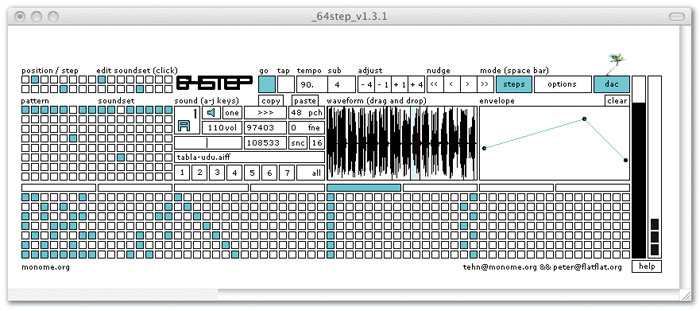 '64step', another open-source MaxMSP Monome application that works as a dynamic step sequencer/sampler with MIDI sync.A second class of Monome application is best described as new keyboard arrangements. A Monome is essentially a two-dimensional keyboard, so it's possible to lay out a particular scale of notes horizontally, and then provide transpositions of the scale on the vertical axis. The application 'Mabalhabla', by Matthew Davidson, lays out each scale with intervals of a fourth and stacks the scales chromatically from top to bottom, leading to some surprisingly jazzy fingerings.
The third type of application is that which tends towards the wacky or algorithmic. There's an implementation of Conway's cellular automation Game Of Life written in the Chuck language: although it's interactive and generates sound, it would be a stretch to describe it as an instrument. The 'Muon' application is an algorithmic sequencer whose behaviour could best be described as emergent: the sequence steps have a degree of intelligence, and as buttons are pressed they fire messages at one another, building feedback loops that can generate polyrhythms.
All these examples operate in a discrete, quantised, digital world of buttons and lights which are either on or off. It is harder, but probably more interesting, to think about mapping a Monome to continuous sound properties like filter, effects and mixer settings. Owners of the smallest Monome 64 have a head start, since the device detects gravity and tilt, so it's easy to play it hand-held and treat it rather like a two dimensional pitch/modulation controller. However, there's no reason why the buttons and lights can't be programmed to behave like continuous controllers. One of Brian Crabtree's videos shows a Monome 128 programmed as a bank of eight faders, each with 16 level settings. Each fader level is displayed as a stack of LEDs like a VU meter, and a press of a button causes the fader to slowly glide its setting to that button's location. OK, so it's not quite in the same league as an automated desk, but it's certainly not unusable.
What all these applications have in common is that they are imposing a higher-level, structured interface onto a simple, homogenous control surface. Admittedly, some applications do a better job of this than others. Application software development for the Monome platform is still in its early stages; with luck, development of toolkits and libraries will lead to applications that are more consistent and easier to use.
Conclusion
Although it's unusual, the idea of a grid-based music controller is not totally unique — Yamaha's Tenori-On (reviewed in the February 2008 issue of Sound On Sound) is a grid-based music controller with onboard sequencer and sound generator, with the same resolution as the top-end Monome, for a lot less money. The Monome is simpler but more versatile, offloading fixed functionality in favour of a varied and growing software base, and a factor in its pricing is the meticulous care taken in its sustainable hand-assembly by a small company. It's up to you to decide whether that's worth the cost.
 As shown by this photo, the Monome is actually smaller than you might think.From the tone of this article, you might conclude that the Monome devices are not really geared to mainstream musicians, even those comfortable with digital systems; we've spent a lot of time talking about software rather than sound or music. There's probably some truth to this: the Monome interface is incredibly sparse, with no concessions to commercial applications, and some software effort is needed before it'll do anything interesting. On the other hand, there is a vibrant community of creative and talented people out there using Monomes on stage and in gallery installations, so it clearly has a niche. It's perhaps best to think of the Monome, and the free software components, as a construction kit for building totally new music and media applications. Some assembly is required, but the result should be worth the effort, and as a bonus you can feel part of a community, rather than just a consumer.
One might also wonder how easy it is to perform with an almost featureless, unlabelled control surface. That very much depends on the application: mapping a piano keyboard to a Monome would probably be frustrating, but a step sequencer is a natural fit. Of course, there's nothing to stop you sticking labels on the faceplate, but part of the appeal of the Monome is that it is so generic: your mental focus is drawn away from the device itself, making you think about the systems and processes behind it. And anything that makes you change the way you think about the creative process must be good.
The Monome Story
Curious to find out more about the company's philosophy, I did a quick Q&A interview with Brian Crabtree of Monome.
What is your background: creative, technical, both, other?
"I certainly grew up making things — tree forts, ludicrously dangerous skateboard ramps, failed parachutes... those were important first steps. Playing musical instruments fought for time with learning computer programming in the DOS days. For the fifth grade science fair, Kelli made a model of a solar-powered modern house using a lazy susan [a rotating food tray] and fibre optics. She received a ribbon, but so did everyone else."
When, and how, did the idea for the Monome controller come about?
"Very quickly after being introduced to MaxMSP in 1999 (when my mind appropriately exploded) it became clear to me that I required a similarly adaptable hardware controller. After many furious mouse-click performances paired with my predisposition towards minimalism, maths, and grids, a 16x16 programmable backlit keypad controller became a sort of desperate fantasy. I envisioned a surface that could be rapidly reconfigured by the host software, suggesting that new applications can be endlessly created. Visual feedback would facilitate intuitive interaction. I imagined a step sequencer becoming virtual sliders becoming an algorithmic simulation. The problem was I knew the equations of electrical engineering, but in school they didn't actually teach us how to build anything.
"A crude single-row was realised a few years later, but the original prototype debuted towards the end of 2002 while I was at CalArts [California Institute of the Arts]. With great help from the kind Internet, it barely worked and was extraordinarily hacked together with a good amount of hot glue. My dad helped drill into the acrylic plate, and despite our best efforts it still ended up quite ugly. Somewhat hilariously, this is the device that so many people saw while my friend Alfred (Daedelus) toured internationally, which started the wave of requests for similar devices."
When, and how, did Monome get going as a company?
"After performing in LA for a few years we posted a short video clip on my modest web site. Somehow this circulated virally with the help of several blogs and as a result the number of requests for devices was incredible. of course I had no idea how to manufacture anything; I'd never made a printed circuit board, the wiring of the prototype took 20 something hours just for the grid, and the parts I used were found in a bin at an electronics salvage depot. Luckily, when Kelli and I met, some of our first projects were large mechanical-robotic art installations where together we learned how to properly build things and use large machines. We were also working for rich megalomaniac Hollywood types, which created remarkable enthusiasm to get away and make it on our own.
"Kelli had an old friend who worked for a silicone moulding company, I quickly learned about circuit production, and we began prototyping. We designed everything for hand assembly, since we knew we'd be doing everything ourselves. Our production process directly evolved out of our art-making practice. After a few months of intense work and relocating to Philadelphia, we made the first edition available and promptly sold enough to cover our costs."
Can you describe a Monome production run?
"We're very glad to have hired a friend part-time recently, and we're certainly not doing as much hand soldering as before. A single edition goes something like this: place incredibly scary orders (huge bills) for PCBs, wood enclosures, keypads, aluminum plates and electronics parts. Screen-print boxes. Co-ordinate circuit assembly (after our initial edition we've happily moved to robot assembly), finish and oil wood enclosures, mechanical assembly, and testing. We do this all in our live/work loft space in Philadelphia, more or less at a single large work table.
"We only take orders through our web site and ship directly, as distribution doesn't make much sense for us at our small scale."
Why do you think the Monome has been so successful?
"I'm hoping it's due to transparency, which helped develop a vibrant user community. We've open-sourced our hardware and software designs as an encouragement for people to adapt our work to their needs and learn how their tools actually work. These users then contribute their new applications back to the community, which then further inspires others to learn and contribute. It's been a bit of an exciting avalanche."
Is it 'mon-ohm' or 'mono-mee'?
"Mon-ohm, like 'monomial', though we've embraced all variations."
Pros
- Beautifully made (and ecologically sensitive).
- Very flexible and configurable software options.
- Vibrant and creative open-source community.
Cons
- No built-in functionality — requires software installation and configuration.
- No UK dealership: ordering is direct from the US and there is a waiting list.
- A bit pricey, and shipping and tax are extra.
Summary
The Monome offers a new and unique take on the idea of a computer control surface, but 'some assembly' is required and you're only going to get out of it what you put in — something that will greatly appeal to some people but put off others.
information
Monome 64, $500; Monome 128, $800; Monome 256, $1400. Prices exclude shipping, import tax and VAT.