

Sonar can help you produce great 'normal' vocals — but it can also do all kinds of crazy things to your voice...
We've already covered how to get really good vocal sounds with Sonar (see /sos/nov09/articles/sonarworkshop_1109.htm), but we've never delved into the world of the strange, the ultra‑pop, and the just plain wrong. So, without further ado, plug in your mic and let's vandalise your voice.
Tremendous Tremolo
After reading about the Tommy James hit 'Crimson and Clover' in a recent issue of Sound On Sound, I thought we'd pay tribute to it by processing the voice through tremolo. Yes, Sonar does have a tremolo, but you have to look for it: it's in the Cakewalk Amp Sim. Here's how to set it up. Sonar's Amp Sim has a tremolo, and there's no law that says you have to use it on guitar. Note the tricky use of phase to create a deeper tremolo effect.
- For Amp Model, choose No Amp (Direct Box).
- For Cabinet Enclosure, choose No Speaker (Direct Out).
- Tick the Mono box for a true tremolo effect. Otherwise, the tremolo is more like auto‑pan.
- Adjust the Tremolo Rate and Depth controls for the desired effect.
Note that there's a limit to the tremolo depth, as the 'straight' vocal remains audible with this technique. Here's a way around that, for a really deep tremolo effect:
- Create a second track identical to the one with the tremolo and flip the second track's phase.
- Now the straight vocal cancels out, so all you hear is the tremolo effect.
- If you un‑tick 'Mono', the panning effect becomes even more pronounced and the overall sound is very much like a true auto‑pan effect.
Here's one final tremolo trick: bring the fader on the out-of-phase channel down to –2.0dB. The tremolo effect now sounds like a fast fluttering rather than a standard tremolo. If you want to add some major variations to the tremolo sound, automate the out-of-phase channel level and experiment with different levels. You'll find all kinds of useful effects.
Pitch Invasion
You know the one: that sort of warbling vocal effect, found mostly in hip‑hop, that causes people to say either "Hey, that's cool!” or run away screaming and holding their ears. V‑Vocal (available in Sonar Producer Edition) is exactly what we need to accomplish this effect.
Actually, it seems that Roland's engineers went out of their way to make sure V‑Vocal could produce natural‑sounding, transparent pitch correction rather than gimmicky effects. But tweak it the right way and you can obliterate all their hard work. The documentation is very helpful, because it tells how to adjust the parameters for the most natural sound. So just do the opposite if you want something that sounds synthetic and plastic. Although V‑Vocal is very deep and offers many different options, here's a quick and dirty way to get maximum warble.
- First, you need a vocal clip. V‑Vocal can work only on an existing clip, not as a real‑time processor.
- Click on the clip to select it and type Shift‑V or right‑click on the clip, select V‑Vocal and choose Create V‑Vocal Clip.
The keyboard keys in V‑Vocal's lower left specify the notes to which you want to quantise the vocal. Clicking on notes toggles between two states: light-blue notes are included in the correction scale, dark‑blue notes are not. So, for example, if you wanted to quantise to a C‑major scale, all the white keys would be light blue and all the black keys would be dark blue.
- For major or minor scales, there's also an easy shortcut. Click on the Scale button, select Major or Minor and click the scale's root note on the keyboard.
- Turn Note to 100, Vibrato to 0 and Sense to 100. This gives the least‑natural pitch correction, which we need for that 'warbly' sound.
- Click on the Correct button to quantise the notes to the scale you chose. Note that there's an undo button, so feel free to experiment.
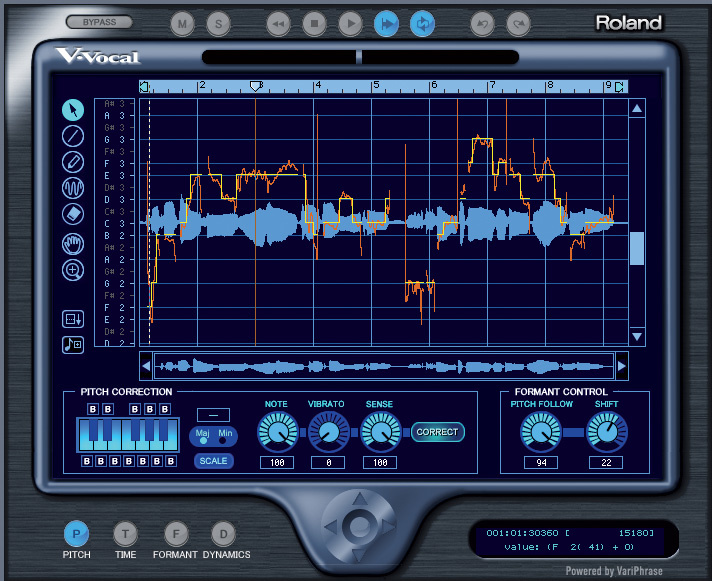 Typical V‑Vocal settings for the warble effect. The orange line represents the original vocal's pitch; the yellow line shows the new, quantised melody. The warble effect happens with abrupt pitch changes.Playing around with the Formant Control knobs can also be fun. The Shift control changes the formant (timbre), but not the pitch. You can make a more exaggerated 'nasal' sound by choosing a number above zero, or bring Darth Vader into the act by dialing in a negative number. The Pitch Follow control determines whether formant follows pitch changes or not, and a setting of zero produces the most unnatural sound.
Also note that when V‑Vocal is not playing, you can right‑click within the V‑Vocal waveform window and choose from four different pitch‑detection algorithms. Standard 1 is what you'll use most of the time, but experiment: pitch perversion is an inexact science. I find that the Precision setting can produce an interestingly different kind of pitch correction under certain conditions.
Telephone Manners
Who can forget the hit song 'Winchester Cathedral' by… I forget. Anyway, it had an unusual vocal effect that sounded like the singer was singing through a telephone or megaphone, and it's easy to achieve that effect in Sonar. While you might think that simply adding a parametric peak to the track will do the job (accentuating the 'mid' frequences that are essential to the telephonic effect), that's not really true, because the vocal's high and low frequencies still remain. You can take the time to use shelving and multiple parametric stages to obtain this effect, there's an easier way that uses the out‑of‑phase trick we used for the tremolo. Adding a parametric peak to one track, while throwing the other track out of phase, produces the most convincing telephone voice effect.
After recording a vocal, duplicate the track and flick the phase switch so that the two tracks are out of phase. If you play them back, you should hear nothing because they'll cancel. Next, apply a parametric peak to just one of the tracks. This peak will poke through the frequency response and everything else will cancel, giving an emulation of the famous 'telephone voice'.
Viva La Vocoder!
Sonar has had a vocoder in it for several versions now, and I don't know why Cakewalk don't make a big deal about this. Anyway, you're about to find out how to use it! The secret is the Pentagon I virtual instrument, as it has a vocoder function. However, you have to insert it properly.
- Do not insert Pentagon into a track using the Insert / Soft Synth command, as we'll be using it as a processor. Instead, right‑click in an audio track effects bin and go to Soft Synths / Pentagon I. We'll call this the audio/instrument track, as it has characteristics of both.
- Next, create a MIDI track to drive the audio/instrument track and assign its MIDI output to the Pentagon I.
- Assign the audio/instrument track input to your mic's audio input source (ie. from your audio interface) and set the audio/instrument track Input Echo to On.
- Call up the Pentagon patch you want to use as the vocoder carrier, then click on the Pentagon I logo and go to Voice Modulator / On.
- If you want a more 'voice‑like' effect, click on the Pentagon I logo and go to Formant Filter / On.
- Speak into the mic, play your keyboard, and voilà, instant vocoder.
 Who knew Sonar had a vocoder? It does, but it's called the Pentagon I soft synth.

Note that you're not limited to using a source plugged into a Sonar audio input to do the vocoding. You could just as easily load a drum part into the audio/instrument track and use that to modulate the Pentagon I's current patch. You can also edit the Pentagon I's filter, LFO, VCA and other controls while all this is playing, and even do the equivalent of 'gating' the vocoded signal by setting a short amplitude decay time on the Pentagon I's amplifier. This causes the patch sound to decay rapidly, and when there's no signal left, there's nothing for the mic to vocode.
There's a lesson here: next time you're annoyed because you don't have a particular type of effect, don't worry, because if you dig into Sonar deep enough you'll probably find something that comes pretty close to what you want, or maybe even something better.