

Understanding how to program SFZ files opens up lots of ways to better exploit what Sonar's bundled soft synths have to offer. Don't panic: it's easier than you might think...
Sonar 7 is positively bristling with soft synths, including z3ta+ (the subject of last issue's workshop article), the TTS1 GM module, DreamStation, Pentagon I, PSYN II, Roland GrooveSynth, and the underrated Cyclone. And there's another group of soft synths, including DropZone, RXP, SFZ, Session Drummer 2 and LE versions of Dimension and Rapture, that all have something in common: they can load SFZ-format files. Should you care? Yes, you should, and here's why.
The SFZ File Format
The SFZ file format is not unlike the concept of Soundfonts, where you can load a ready-to-go multisampled sound — not just the samples — as one file. We touched on SFZ files in the Sonar workshop in SOS April 2007 (www.soundonsound.com/sos/apr07/articles/sonarworkshop_0407.htm), which described Session Drummer 2 and how to create your own drum kits by collecting various samples, then assigning them to pads with SFZ-format files. However, the SFZ concept goes much further than that simple example, so we'll explore the subject further here.
Unlike Soundfonts, which are monolithic files, the SFZ file-format has two components: a group of samples, and a text file that 'points' to these samples and defines what to do with them. The text file describes, for example, a sample's root key and key range. But it can also define the velocity range over which the sample should play, filtering and envelope characteristics, whether notes should play based on particular controller values, looping, level, pan, effects, and many more parameters.
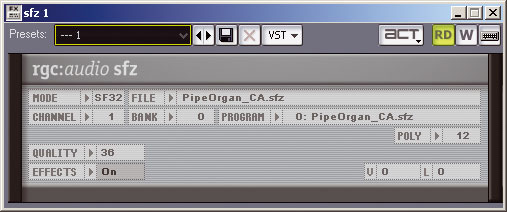 The SFZ Player is a free download that works in any VST-compatible host, not just Sonar.However, note that not all SFZcompatible instruments respond to all these commands; if you try to load an SFZ file with commands that an instrument doesn't recognise (possibly due to an SFZ v2 definition file being loaded into an SFZ v1-compatible instrument), the program will generate an error log in the form of a text message. Fortunately, nothing crashes, and the worst that can happen is that the file won't load until you eliminate (or fix, in the case of a typo or syntax error) the problematic command.
It's worth mentioning that the SFZ spec is license-free, even for commercial applications. For example, if you want to sell a set of SFZ-compatible multisamples for use in the Cakewalk synths, you needn't pay any kind of fee or royalty.
Why bother learning about SFZ files? Well, there are three main reasons. Firstly, if you like to create your own sounds you can make far more sophisticated ones for SFZ-compatible instruments if you know how the SFZ format works. The files you create will also load into other SFZ-aware instruments (particularly if you limit yourself to using commands from the version 1.0 SFZ spec). Secondly, by editing SFZ files you can overcome some of the limitations of the LE versions of Rapture and Dimension included in Sonar 7. It's been pointed out that you can't adjust tuning in the LE versions, which can be a real problem if, say, you've recorded a piano track where the piano was in tune with itself, but not tuned to concert pitch and you then want to add an overdub. If you know your way around SFZ, you can edit the tuning of the SFZ file that's loaded into the instrument, and get around the problem that way. Finally, SFZ files facilitate cross-host collaboration. The SFZ Player included in Sonar 7 is a VST plug-in that works with any VST-compatible host, and is available as a free download from www.project5.com/products/instruments/sfz_player/default.asp. The interface isn't fancy, but it will play back SFZ files and it also offers built-in effects and several modes for loading sounds (including streaming from disk).
As to why this is important, suppose you're using Sonar, a friend is using Ableton Live, and you want to collaborate on a part based on some samples you've grabbed. String those samples together into an SFZ file, have your friend download the player, send the SFZ file to your friend, and you can swap parts back and forth. You can even use really big samples, because the SFZ player supports compressed Ogg Vorbis files. So you can create a compressed, 'draft' version of the SFZ file, then substitute a full version with WAV files when it's mixdown time.
Creating Your First SFZ File
Creating an SFZ file is not unlike writing software code, but don't panic: it's easier than writing music! Despite the many commands, you don't need to learn all of them, and the syntax is pretty straightforward. Although you can 'reverse-engineer' existing SFZ files to figure out the syntax, it's helpful to have a list of the available commands, and you can find one at www.cakewalk.com/DevXchange/sfz.asp, or check out Appendix A in the book Cakewalk Synthesizers by Simon Cann (published by Thomson Course Technology).
As an example of how the SFZ protocol can dress up a sample, suppose you've sampled a guitar power chord in D and extracted a wavetable from it — a short segment, with loop points added in an audio editor (we'll call the sample GuitWavetable_D1.WAV). It won't sound like much by itself, but let's create an SFZ file from it, and load it into SFZ Player.
Arguably the two most crucial SFZ concepts are Region and Group. Region defines a particular waveform's characteristics, while Group defines the characteristics of a group of regions. For example, a typical Region command would be to define a sample's key range, while a typical Group command might add an attack time to all samples in an SFZ multisample. Another important element is the Comment. You can include comments in the definition file simply by adding a couple of slashes in front of the comment, on the same line; the slashes tell SFZ to ignore the rest of what's on the line.
 All the opcodes (commands) for the 1.0 version of the SFZ spec are listed and described on Cakewalk's web site.Here's a suggested procedure for getting started with SFZ files.
1. Create a folder for the samples you plan to use. I called mine GuitarWavetables.
2. Drag the sample(s) you want to use into the folder. In this example, I used only one sample, to avoid complications.
3. Open a text editor such as Notepad (the simpler the better — you don't need formatting adding extraneous characters to the underlying text file). If you use a word processor like Word, save the file as plain MS-DOS text.
4. Add some comments to identify the SFZ file, such as:
// SFZ Definition File
// Simple Guitar Wavetable File
5. Let's turn this wavetable into a region that spans the full range of the keyboard. To do this we need to add a line that specifies the root key and the key range, and tells the file where to find the sample. Here's the syntax:
<region> pitch_keycenter=D1 lokey=C0 hikey=C8 sample=GuitWavetable_D1.WAV
Pitch_keycenter is the root key, lokey is the lowest key the sample should cover, hikey is the highest key it should cover, and sample defines the sample's name. As the definition file and sample are in the same folder, there's no need to specify the folder that holds the sample. If the definition file is outside the folder, change the 'sample=' line to include the folder, as follows:
sample=GuitarWavetables\
GuitWavetable_D1.WAV
6. Save this text file, under the file name you want to use (for example, 'GuitarPowerChordWave'), in the GuitarWavetables folder. You could save it anywhere, but if you do it this way and you move the folder, the text definition file and samples move together.
7. Open an SFZ-compatible instrument — say, Dimension LE. Click in the Load Multisample window that says 'Empty', then navigate to the desired SFZ file. Double-click on it, and now you should hear it when you play Dimension. If you don't, there might be a typo in your text file; check any error message for clues as to what's wrong.
Going Further
OK, we can play back a waveform... big deal. Let's make things more interesting by loading two versions of the same waveform and detuning them slightly. This involves adding a tune= description; we'll tune one down five cents and the other up five cents. Here's how the file looks:
<region> pitch_keycenter=D1 lokey=C0 hikey=C8 tune=-5 sample=GuitWavetable_D1.WAV
<region> pitch_keycenter=D1 lokey=C0 hikey=C8 tune=5 sample=GuitWavetable_D1.WAV
Now let's pan one of the waveforms towards the right and the other towards the left. This involves adding a descriptor of 'pan=', where the value must be between 100 and 100.
Next up, we'll add one more version of the waveform in the centre of the stereo image, but dropped down an octave to give a big bass sound. We basically add a line like the ones above, but omit tune= and add a 'transpose=-12' command.
Loading the SFZ file now loads all three waveforms, panned as desired, with the middle waveform dropped down an octave. But it sounds a little buzzy for a bass, so let's add some filtering, with a decay envelope. This is a good time for the <group> function, as we can apply the same filtering to all three oscillators with just one line. And here is that line, which should be placed at the top of the file:
<group> fil_type=lpf_2p cutoff=300 ampeg_decay=5 ampeg_sustain=0 fileg_decay=.5 fileg_sustain=0 fileg_depth=3600
 Click in the Load Multisample field in Dimension or Rapture and a Load Multisample browser will appear; navigate to what you want to load. The Garritan Pocket Orchestra samples for Dimension LE are a rich source of SFZ files.Here's what each function means:
fil_type=lpf_2p
This indicates that the filter type is a low-pass filter with two poles.
cutoff=300
Filter cutoff in Hertz.
ampeg_decay=5
The amplitude envelope generator has a decay of five seconds.
ampeg_sustain=0
The amplitude envelope generator has a sustain of zero percent.
fileg_decay=.5
The filter envelope generator has a decay of 0.5 seconds.
fileg_sustain=0
The filter envelope generator has a sustain of zero percent.
fileg_depth=3600
The filter envelope generator depth is 3600 cents (three octaves).
As you work with SFZ files, you'll find they're pretty tolerant. For example, the sample names can have spaces and include any special characters other than '=', and you can insert blank lines between lines in the SFZ definition text file. But one inviolable rule is that there can't be a space on either side of the '=' sign.
Overcoming LE Limitations
Rapture LE and Dimension LE are useful additions to Sonar 7, but obviously they have limitations compared to the full versions. For example, with Dimension LE you can edit two stages of DSP, a filter, and some global FX — and no other parameters such as tuning, transpose and envelope attack. However, if the sound you want to load into either of these LE versions is based on an SFZ file, you can modify it well beyond what you can do with the instruments themselves. (Note that these instruments often load simple WAV or other file types instead of the more complex SFZ types; in this case, editing becomes more difficult because you have to first turn the WAV file into an SFZ file, and if you're going to put that much effort into programming, you might want to just upgrade to the full versions that have increased editability.)
Let's look at a Dimension patch, 'Hammond Jazz 3'. This loads an SFZ file called 'Hammond jazz.sfz', so it's ripe for editing. We'll take that Hammond sound and turn it into a pipe organ by creating two additional layers, one an octave above and one an octave below the original. We'll pan the octave-higher and main layers right and left respectively, with the lower octave in the middle. Then we'll tweak attack and release times, as well as adding some EQ.
To find the SFZ file, go to C:\Program Files\Cakewalk\Dimension LE\Multisamples\Organs and open 'Hammond Jazz.sfz' in Notepad. Here's what it looks like:
<region> sample=Hammond Jazz\HBj1slC_2H-S.wav key=c3 hikey=f3
<region> sample=Hammond Jazz\HBj1slC_3H-S.wav key=c4 hikey=f4
<region> sample=Hammond Jazz\HBj1slC_4H-S.wav key=c5 hikey=f5
<region> sample=Hammond Jazz\HBj1slD_5H-S.wav key=d6 hikey=f6
<region> sample=Hammond Jazz\HBj1slC_6H-S.wav key=c7 hikey=f7
<region> sample=Hammond Jazz\HBj1slF#1H-S.wav key=f#2 hikey=b2 lokey=c1
<region> sample=Hammond Jazz\HBj1slF#2H-S.wav key=f#3 hikey=b3
<region> sample=Hammond Jazz\HBj1slF#3H-S.wav key=f#4 hikey=b4
<region> sample=Hammond Jazz\HBj1slF#4H-S.wav key=f#5 hikey=c#6
<region> sample=Hammond Jazz\HBj1slF#5H-S.wav key=f#6 hikey=b6
This shows that the SFZ definition file basically points to 10 samples, with root keys at various octaves of C or F#, and spreads them across the keyboard as a traditional multisample. Note that it doesn't use the 'pitch_center=' statement, for two reasons: first, because Dimension LE doesn't recognise it; and second, because the 'key=' statement sets the root key, low key, and high key to the same value. You can add modifiers to this, like 'lokey=' and 'hikey=' statements, as needed.
Before this block of <region> statements, add a <group> statement as follows, to modify all of these regions:
<group> ampeg_attack=0.2 ampeg_release=2 pan=-100 eq1_freq=4000 eq1_bw=2 eq1_gain=20
These parameters add an amplifier EG attack of 0.2 seconds, amplifier EG release time of two seconds, pan full left, and one stage of EQ (with a frequency of 4kHz, a two-octave bandwidth, and 20dB gain).
Now we'll add another region an octave lower, and put a similar <group> statement before it. We'll simply use one of the existing samples and, to minimise memory consumption, as this sample plays more of a supporting role, we'll just stretch it across the full keyboard range.
<group> ampeg_attack=0.2 ampeg_release=1 transpose=-12 eq1_freq=2000 eq1_bw=4 eq1_gain=20
<region> sample=Hammond Jazz\HBj1slC_4H-S.wav key=c5 lokey=c0 hikey=c8
The group statement is very similar to the previous one, except that the sample has been transposed down 12 semitones, the pan statement is omitted, so the sample pans to the centre, and the EQ's centre frequency is 2kHz instead of 4kHz. The sample's root key is C5, and the sample is stretched down to C0 and up to C8.
Next, we'll add the final new region, which is an octave higher. Again, we'll put a <group> statement in front of it.
<group> ampeg_attack=0.2 ampeg_release=1 transpose=12 pan=100
<region> sample=Hammond Jazz\HBj1slC_4H-S.wav key=c5 lokey=c0 hikey=c8
The group statement adds the familiar attack and release, but transposes up 12 semitones and pans full right. The region statement takes the same sample used for the octave-lower sound and stretches it across the full keyboard.
I should add that although we've made a lot of changes to the SFZ file, it's still being processed by Dimension LE's 'Hammond Jazz 3' patch. As a result, if you take this SFZ file and load it into SFZ player, it won't sound the same because it won't be using the various Dimension parameters that are part of the 'Hammond Jazz 3' patch.
Are We There Yet?
Explaining all this may make creating SFZ files seem complex, but really it isn't, if you have the opcodes in front of you, and the process soon becomes second nature.
For example, I found an SFZ bass patch that produced a great clav-like sound when I transposed it up a couple of octaves, but the attack sounded cartoon-like when transposed up that high. So I just used the 'offset=' command to start playback of the samples past the attack. And while I was at it, I added a very short attack time to cover up the click caused by starting part-way through the sample, and a decay time to give a more percussive envelope. The editing took a couple of minutes at most; I saved the SFZ file so I could use this particular multisample again.
Creating SFZ files might not replace your favourite leisure activity, but it's a powerful protocol that's pretty easy to use. Modify some files to do your bidding and you'll be hooked!