

How can you improve a MIDI + Audio sequencer that’s already as comprehensive as Sonar? Cakewalk have added some impressive new plug-ins, but they’ve also gone back to basics to take MIDI editing to new levels of flexibility.
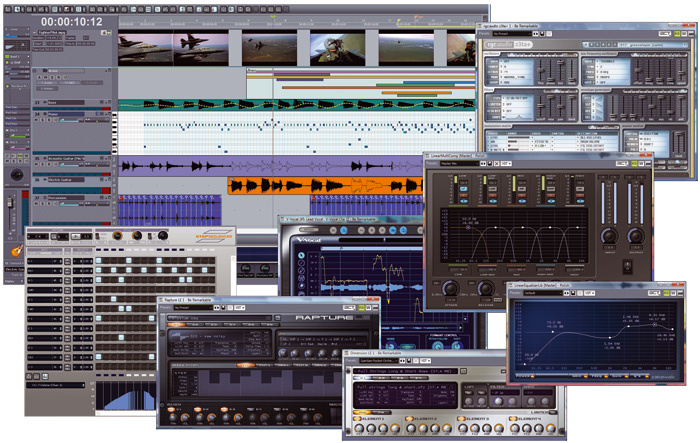 An overview of the new features in Sonar 7.It must be something about the festive season. Cakewalk have now established an update groove where new versions of their flagship, Sonar, are released in time for SOS’s December issue. This seems to ensure that all Sonar users can treat themselves to a little year-end cheer with a Santa’s sack of new features for their favourite sequencer.
When examining software that’s just hit an increment of ‘7’, not to mention making its seventh SOS appearance, you just have to make assumptions rather than start from scratch. If you aren’t familiar with the basics of Sonar, the ‘Sonar History’ box lists the back issues to dig up or reference on the SOS web site.
The very short story is that Sonar is a mature digital audio workstation that merges MIDI and audio sequencing, a hefty suite of virtual instruments, audio effects and MIDI processing. It offers unlimited audio and MIDI tracks (your PC allowing), the excellent Audio Snap rhythmic and tempo control system, solid video integration, surround mixing and a powerhouse of audio and MIDI manipulation and processing options that rival and often better the competition.
It’s a stable environment built on solid code that can be customised to suit almost any way of working. While Sonar has quite a foothold in so-called ‘urban’ music production — due perhaps to its clip- and loop-based operation, and also to its big library of ready-to-go audio and MIDI material — it is not just an electro workhorse. Through–composed, mega–multitracked scores for film or TV can be accommodated just as easily.
More Of Everything
I think it’s fair to say that Sonar 7, while an impressive update, isn’t what you might call a paradigm shift. Like all the major DAW platforms, it already handles everything from MP3 files to high-bit-rate audio, integrates effects and virtual instrument plug-ins, and offers video functionality and loop-based composition. Cakewalk know when they’re onto a good thing, so for the most part, improvements are incremental rather than radical.
The most surprising novelty, perhaps, is in the area of MIDI handling. Working with MIDI has seldom been so flexible, on any platform. There are new ways of doing almost everything — and some might even make experienced users do a double take. A new Step Sequencer view has also been added. It’s like an analogue sequencer morphed with a step-input editor and a window you might find on a Roland MC50, and is the most fun I’ve had with a DAW for a while.
Buying funky plug-in developers RGC Audio a couple of years ago gave Cakewalk some great virtual instruments; Pentagon I is a killer synth that’s been bundled since v5, and v7 brings us their Z3ta+ 1.5 as a freebie. Add LE versions of Cakewalk’s own Rapture and Dimension (the latter bundled with Garritan Pocket Orchestra) and the DropZone quick-and-easy sample player to what is already provided (don’t forget Session Drummer from v6), and you barely need to bother with any other plug-ins.
Effects processing has been beefed up, too: a proper mastering EQ and compressor — as well as an amazing peak limiter — are now part of your Cakewalk rack, and side-chaining has finally been added to many of the supplied effects. And that’s not to mention external insert points, allowing you to easily add real hardware signal processing to your Sonar sessions.
A crossover between audio and MIDI concerns the really rather good V-Vocal Monophonic vocal processor that’s based on Roland’s Variphrase technology: it now offers pitch-to-MIDI options that border on the unbelievable.
Moving out of the system, there are new file formats to export to, integrated CD ripping, built-in audio CD burning, and a very useful ‘Publisher’ tool, upgraded from the module supplied with Project 5, that takes oa lot of the pain out of putting your mixes onto the Internet.
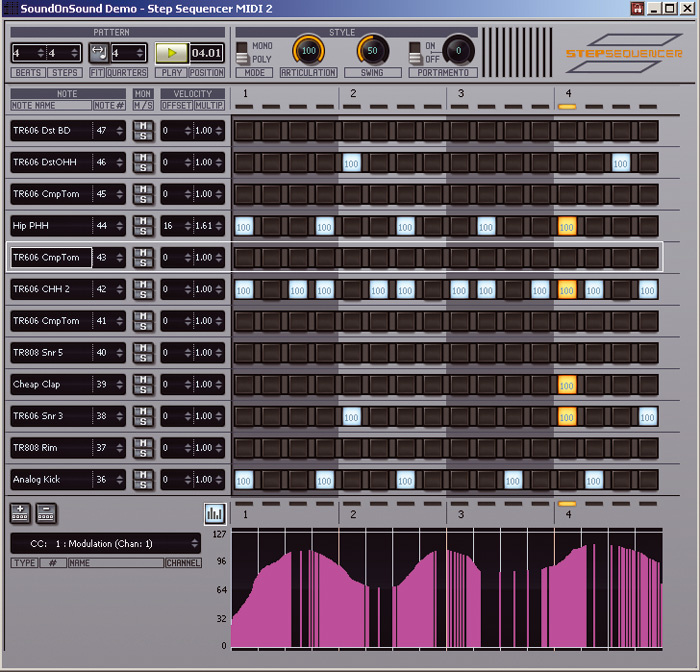 This instance of the new Step Sequencer view is being used to create a pattern for a TR606 drum-machine patch in the Roland-derived Groove Synth plug-in. Note how drum names appear in the note column; normally, note names would be displayed.
The High Stepper
You might think, more or less correctly, that MIDI handling was pretty well sorted in Sonar. After all, its great-granddaddy (Twelve Tone Systems’ Cakewalk) started life handling just MIDI, in pre-DAW times. But that doesn’t mean a new way of looking at things won’t yield results. In the case of Sonar 7, the results amount to probably the most significant part of the update. Where other platforms keep massaging audio and plug-ins, Cakewalk have gone back to basics.
But first, let’s look at the Step Sequencer View. Insert a virtual instrument into the track list, select this option, and the link is automatically made. Once you start creating a ‘sequence’, a groove clip is also automatically placed in the track event window, and it can be resized just the same as a normal MIDI groove clip, to create repeats of the pattern being generated. In fact, MIDI clips can be converted to Step Sequencer clips.
We can already visualise and edit MIDI via piano roll, event list and staff score–based views, each of which can handle step input with looping if required. What the Step Sequencer does — and the screen shot above should make this immediately clear — is to behave like a drum-machine pattern, with the precision of note/step entry that implies. You’re presented with rows of steps that can be enabled or disabled to create a monophonic or polyphonic pattern. The number of rows appears to be just about unlimited — they can certainly run off the screen and become unmanageable — and the number of steps is also very flexible.
What you’re working with is a measure, but you’re obviously not restricted to four beats in the bar, or 16 steps to the beat: each measure can have up to 64 beats, each of which can have up to 16 steps. That’s a maximum of 1024 steps for each measure/pattern, if you can handle it. A separate pane also allows you to edit controller data in step-sequencer fashion; it stretches to keep up with however many steps are assigned to the pattern.
Perfect for creating drum patterns, this view is a funky way to make music in general. Each row can be assigned its own note to output, so you don’t have to think chromatically at all. Just assign the notes that you know you want to use in a given pattern. Feel pentatonic, on a root note of C? Then just have five, 10, 15 or however many rows that output C, D, F, G and A in the desired octave ranges.
This view feels like an analogue step sequencer, in that you’re free to assign notes to rows in your own, precise, way, but is so much more powerful than many classic sequencers. For a start, it can operate monophonically or polyphonically, each step can have its own velocity value, and there’s control over portamento, swing and articulation/hold.
A parameter labelled ‘Fit to Quarters’ made me look twice. What this does is force the pattern, however many steps or beats it has, to last for whatever number of quarter notes you assign. The result is polyrhythmic — you might have a five-beat pattern that you force to play for four quarter notes, which is five-against-four. Beyond this simple example you could create some rather extreme polyrhythms that even, perhaps, Bill Bruford would find challenging to play.
MIDI Matters
 The PRV mouse tool configuration window, where 20 parameters and various actions are assigned to your mouse for each of the three tools.The most significant operational change to the MIDI engine as a whole is the behaviour of the mouse tools in the Piano Roll view. They are still, as with previous versions of Sonar, Select, Draw and Erase tools, but now each is completely customisable. You decide what your mouse controls will do while you’re editing MIDI data. That’s a dizzying concept in some ways, because we usually just learn what a software developer offers us.
There are about 20 different operations, including selecting, drawing, erasing, slip–editing and transposing, that you can assign to mouse actions, alone or in combination with the Ctrl, Shift and Alt keys. You can have the action of each tool vary according to where you click in a note or data, and much more. You’re free to overlap assignments, so you could have your most–used operations work the same way for all the tools, but add special edit operations for each tool in a way that suits you.
It’s quite wonderfully powerful, and effectively means that your most-used operations can be squished into one set of actions. You’ll never need to wonder whether you’re working with the right tool, since you’re in control of how the tools behave.
There are default settings, of course, so you can carry on using the tools in a similar way to Sonar 6. What’s particularly funky is that Cakewalk have provided presets that match the MIDI operations in other popular applications such as Logic, Cubase and Digital Performer. If you find yourself switching between software platforms — or making the move to Sonar — you won’t have to learn a new way to manipulate MIDI data.
The Piano Roll view has also been beefed up and polished in general, with a list of changes that’s too long to detail here. Let’s just say that we have improved use of colour, multi-lane controller editing, real-time drag quantise and new approaches to splitting, glueing and muting notes.
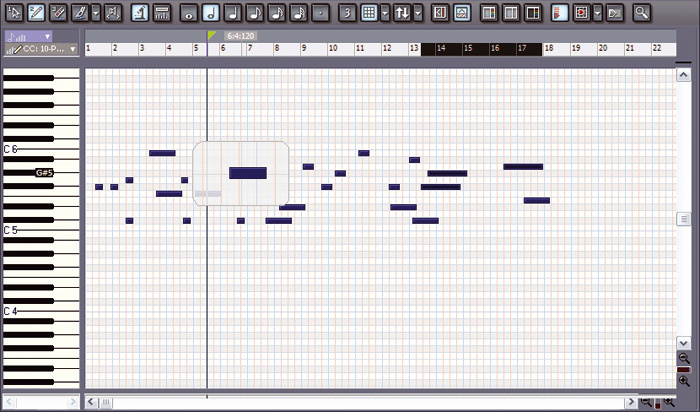 The MIDI Magnifier can offer an easy way into editing busy MIDI tracks.I’d just got over the shock of ultimate freedom with mouse tools when I discovered what might be the most startling MIDI novelty: the Piano Roll Microscope, or MIDI magnifier. If you have a busy track in the Piano Roll view, engaging the microscope (by clicking the button with a microscope in it, of course, in the tool bar) lets you magnify notes and work on them without having to fully zoom in. It’s quite spooky at first, when you haven’t yet absorbed all the new features of v7 and aren’t expecting it!
Voices Off
In all, Cakewalk have bundled a pretty good set of basic instruments with Sonar, but who’d honestly say no to some more?
As listed in the intro, we now have RGC Audio’s Z3ta+ 1.5, an analogue-style synth using ‘exclusive’ band-limited waveshaping technology. What that boils down to is wavetable synthesis; each of the synth’s six (yes, six) ‘oscillators’ can play back any one of 60 built-in waveforms or six user-loadable waveforms.
Add six LFOs, two stereo resonant filters, comprehensive waveshaping for each oscillator, eight six-stage EGs, comprehensive modulation matrix and an arpeggiator, for goodness’ sake, and you see the power on offer. In retrospect, ‘analogue–style’ doesn’t really do it. Straight out of the box, this became one of my favourite toys. Most fun to be had with Z3ta+? Hold your mouse-click over the grey strip at the bottom of the window: instant mouse music!
Cakewalk are also making a big fuss about Rapture LE and Dimension LE. They’re rather limited compared to the full commercial packages, but still just about useful. (Check out the SOS reviews for Rapture and Dimension in August 2006 and May 2006 respectively.) Neither synth offers much in the way of real, deep editing. The patch libraries are large, though, and you can fool around with offset parameters to create variation patches, which can be saved. Dimension LE is especially welcome, with its big, instantly useable library, including the Garritan Pocket Orchestra, created just for the synth.
Rapture, if the LE taste is anything to go by, is an impressively powerful synth. There are some amazing things the programmers are doing with modulation across the six-element voices that make up Rapture patches. The synth is based around very small, single-cycle samples and is dubbed a wavetable synth for this reason. Sounds a bit like the start of Z3ta+’s spec, doesn’t it?
Dimension LE offers this feature but can also load larger samples — including REX2 loop files — but no editing is possible beyond a handful of controls. With REX loops, it’s even possible to drag a MIDI File from the main window to a MIDI track that will then trigger the loop. The Garritan Pocket Orchestra set is worth having, with a fabulous harpsichord, great percussion and harp, pretty good strings, useable woodwinds (with some excellent layers) and cursory brass. Not bad for free.
 DropZone will load two audio files of practically any format you care to throw at it. Note the keyboard: when a REX loop is loaded, the first octave plays the loop in semitone transpositions, while the remainder of the highlighted keys play each individual slice. The same goes for an attached MIDI keyboard.One highly frustrating aspect of Dimension LE is that its uneditable parameters include pitch, rendering the proper use of REX loops almost impossible. But there is a solution. Yet another new Sonar 7 virtual instrument is DropZone, a two-layer sample–based device that makes it easy to integrate playable samples and loops into your track. This device also plays REX files, but lacks Dimension LE’s MIDI File export option. What I did was load a REX loop into Dimension LE to get the trigger MIDI File, then assigned the resulting MIDI track to a DropZone and loaded the same REX into that. Bingo: not much more editability, but at least control over pitch.
You don’t just have to load one sample or a loop into DropZone or Dimension LE, either: Sonar 7 sample devices can load Soundfonts and RGC Audio’s free, minimalist SFX multisample distribution format.
Effective Listening
Built-in effects processing has been a high point for Sonar users, especially since v5’s Perfect Space convolution reverb and v6’s VC64 Vintage Channel. This is really good stuff to get for free.
The bread-and-butter effects from Cakewalk and Sonitus are still here, of course, but there have been some changes. Side–chain inputs have been added to the Sonitus compressor and gate effects and the VC64 Vintage Channel from v6; one is also present in the new Boost 11, of which more in a second. Side–chaining basically causes the audio being processed to respond to the level of a second audio signal; common uses include ducking instrumental tracks underneath a vocal, by routing the vocal to the side-chain on a bus compressor then routing the instrumental tracks to that bus; and gating a synth pad from a hi-hat or percussion track, so that it acquires a rhythmic quality. The side-chain inputs are not available when loading one of the effects into clip or surround bus FX bins. The modified plug-ins just behave as normal in these cases.
The most impressive of the new plug–ins are a trio of serious mastering tools. The LP64 Linear Phase EQ and Multiband Compressor are CPU-heavy (relative to most of the other supplied effects plug-ins) tools for the discerning audio tweakhead. Linear phase means that there are no phase shifts at different frequency ranges during processing. Different frequency ranges going out of alignment or interfering with each other is a common side-effect of some processors; it can lead to desirable fuzziness in some cases but more often than not adds unwanted muddiness and distortion.
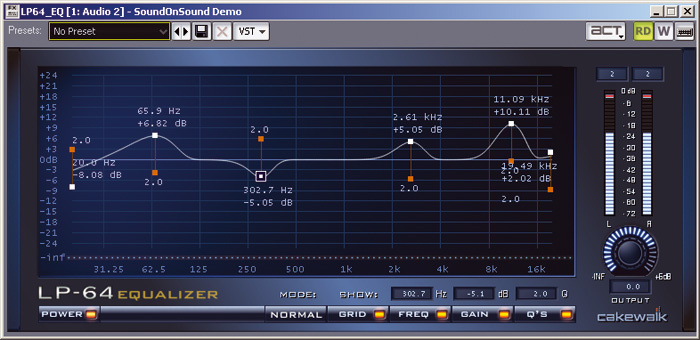 The eccentric equalisation curve on the display for this LP64 equaliser did have a legitimate purpose. Parameters can be changed by dragging the display, or altering their values in the lower part of the screen.As simple as it may look, the LP64 equaliser is the ultimate in flexibility: you work with a curve upon which it is possible to place as many as 20 ‘control points’, each of which has its own adjustable frequency, gain and bandwidth (Q). The display is very precise in showing the curve and important parameters. The plug-in can even be automated, should you wish.
This is one instance where I think a collection of presets might have been handy, even if it just provided some typical curves that might suit different kinds of programme material. Still, for all its power, the equaliser is easy enough to work with using just your ears.
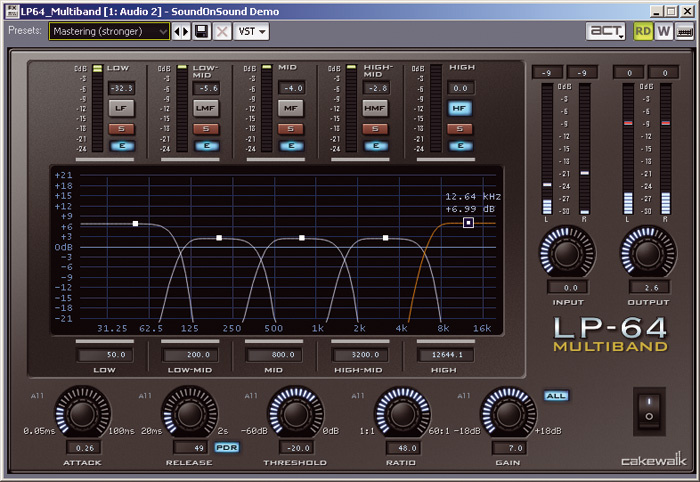 The LP64 multi-band Compressor is a fine example of its type.Where there’s a mastering EQ, there must be a mastering compressor, and the LP64 Multiband Compressor is the LP64 EQ’s match. The interface to this rather over-specified monster is a little more daunting than that of the EQ, but is still very clear. This is no mean feat considering that the device has no fewer than five frequency bands. The user has complete control of the frequency span of each band and the amount of compression that is applied.
Another great display provides feedback over frequency, level and so on, and each frequency band has its own attack, release, threshold, ratio and gain parameters; there’s also a programme-dependent release option. Two presets are supplied: ‘Mastering (stronger)’ and ‘Mastering (lighter)’. It works for me!
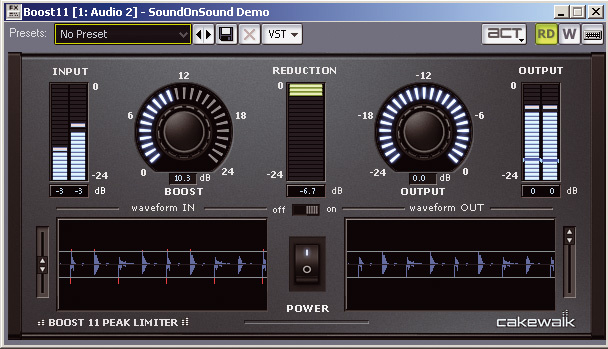 Boost 11: just plug and go for instant volume maximisation.Good as these two devices are — and they are top-drawer in every way — I live for plug–ins such as the new Boost 11 peak limiter. This is one of those brilliant ‘plug it in and leave it’ tools that you always hope a signal processor (especially a software one) is going to be.
All you’re provided with are two controls, an on/off switch and a dual display, and they are all you need. The plug-in then gets on with the job of tracking peaks and limiting them, causing the audio input to come out as loud as it can be with nothing much in the way of unwanted artifacts. Its ‘lookahead’ algorithm may well have a lot to do with its success.
The first few times I used Boost 11, I didn’t even have to change either of the knobs. The output was a much more ‘impactful’ version of what went in, with no pumping, no chattering and no blooming. It is possible to make it sound crap by pushing the input level too far, but there’s a big window that opens between ‘magic’ to ‘obvious but acceptable’ before the ‘totally crap’ point is reached.
And There’s More...
 A difficult, intricate vocal line is tracked by V-Vocal 1.5, and a reasonably faithful MIDI performance derived from it.There are a load of other improvements in different areas of the program. First of all, there’s the new pitch-to-MIDI option for the V-Vocal pitch, timing, formant and dynamics manipulation tool.
I just never expect this kind of thing to work, let alone work well, but here it does. Be warned that the ‘garbage in/garbage out’ maxim was never more applicable than when working with pitch–to–MIDI. But if you have a clean, steady, well-pitched input, you’ll get an accurate MIDI representation in a startlingly short period of time. The process can handle vibrato and bends, but if your singer produces a dead note, or something very expressive, you may get misreads. These are easily spotted, though, and you can drag the wrong notes to the correct pitches, either in V-Vocal before processing or in the new MIDI part.
Sonar 7 supports a range of new audio file formats, both for import and export, including AIFF, CAF, FLAC, Ogg and Sony Wave-64. This last gives it the capability to record large files and projects of over 2GB in size. Also among the new file formats supported is Sound Designer II, as used mainly by Digidesign software, especially in older versions of Pro Tools. However, SDII is exclusively a Mac audio format, and moving these files to the PC is not straightforward. These issues can be resolved within Sonar 7 but I found them a little long-winded, especially since I have a little free tool (visit www.railjonrogut.com/sdTwoWav.htm) that speedily converts SD2 files to the WAV format with no faffing at all.
Sonar has had CD-burning capabilities before, but now there’s tighter integration. Audio can be ripped right off a CD using one of the file import commands, and burning CDs is just as easy.
 Cakewalk Publisher gets your tracks ready for your on-line presence.Cakewalk Publisher is another way to get audio out of your software. With it, you can create a customised streaming music player, with a playlist of the desired music, and upload it via FTP to a web site. Simple. Publisher generates simple HTML tags that allows the audio player to be displayed on any other web site.
While I’m hoovering up new things, I feel I should mention something to do with video. I play with video a lot these days, and I’ve discovered that although Sonar doesn’t explicitly support MP4 video files — as produced by my digital camera — it will load them just fine. It’ll even extract the audio from MP4 files, if needed.
It’s worth noting, for anyone considering Sonar for the first time, that the software comes with a pretty good printed User’s Guide that’s full of great tutorials. A full manual is supplied in PDF format, and it is a monster. Sonar 6 had a document of over 900 pages; the v7 manual weighs in at nearly 1600 pages. I shudder to think of the unwieldiness of a printed version. One to dip into, I think! I can’t think how else Cakewalk could have done this — we do need the information — but that is a huge document to try to read on screen, or simply search. Even so, not all facilities supplied with Sonar 7 are mentioned in here. For example, Alien Connections’ Revalver SE, in new MkII form, is included in all its valve-amp simulation, virtual mini-rack glory, but you don’t get any data about it until you hit F1, after loading the plug-in, and read its help file.
Before I go, I’ll just mention multi-lane controller editing and note event colours that reflect velocity: just two of many worthy innovations that I simply haven’t enough space to discuss. And perhaps I could hint at the ‘dim solo’ function — it’s audio soloing, but reduces the volume of non-soloed tracks, rather than fully muting them, so that you can work on the isolated track in a less isolated fashion. And why not plug ‘X-ray windows’, another neat feature that’s almost as spooky as MIDI Magnifier? Press Shift-X and the window that’s currently on top turns opaque, allowing you to work on windows underneath without closing or minimising the uppermost window. This great feature is applicable to Synth Rack, Audio Snap palette, plug-ins, the floating Piano Roll view and a few other windows.
Conclusion
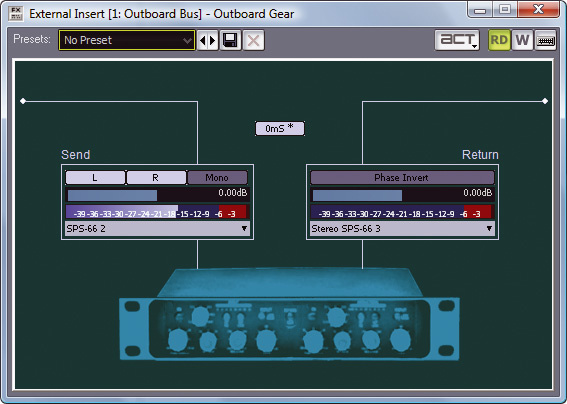 Interfacing external signal processing is now as easy as this insert graphic implies.The new v7 set of toys have virtually no negative consequences for established working methods in Sonar — everything integrates into the environment in a way that is instantly familiar. Some of the new devices are processor-heavy, but overall we’re still in the same ballpark in terms of computer load. Even the MIDI enhancements are managed in a way that should have little impact on experienced users; any surprises will definitely be of the pleasant kind. For the most part, you can carry on working the way you always have, but may have to just step back every now and then for a little while and take stock of what your mouse is doing — and don’t let the MIDI Magnifier alarm you. It is your friend.
The MIDI enhancements in Sonar 7 are subtle, but run deep. The mastering tools, the step sequencer and the free Z3ta+ synth are other highlights, but there’s so much more going on at various levels that make the Sonar experience even more streamlined and efficient. Oh, and the retail price of both editions is actually cheaper than a year ago, even though there’s tons more inside the box. Bonus! Merry Christmas.
Sonar History
The Sonar line has been covered in detail in Sound On Sound, from the time when the software was called Cakewalk and was distributed by Twelve Tone Systems! But keeping with the Sonar family, we should just point you in the direction of the SOS web site. Not only will you find Craig Anderton’s ongoing Sonar workshop series up there, amongst other features dedicated to the software, but also the following series of incremental reviews:
June 2001: Sonarwww.soundonsound.com/sos/jun01/articles/cakewalksonar.asp
- June 2002: Sonar 2
www.soundonsound.com/sos/Jun02/articles/sonar2.asp
- February 2004: Sonar 3
www.soundonsound.com/sos/feb04/articles/cakewalksonar3.htm
- January 2005: Sonar 4
www.soundonsound.com/sos/jan05/articles/sonar4.htm
- December 2005: Sonar 5
www.soundonsound.com/sos/dec05/articles/cakewalksonar5.htm
- December 2006: Sonar 6
System Requirements
Recommended minimum system: Windows XP or Vista (32- and 64-bit); Pentium 4 2.8GHz or AMD Athlon 64 2800+; 1GB RAM; 1280 x 960, 24-bit colour monitor; 6GB hard disk space; MIDI interface; WDM or ASIO audio interface; DVD drive.
For the first time in a Sonar review, we’re going to mention a Mac under ‘system requirements’. Not only was Sonar one of the first music applications to fully embrace the latest 64-bit PC architecture and become 100 percent Vista-compatible, but the package is also quite friendly with the latest Macs. Adventurous Apple users will find that Sonar is a perfect fit for the Boot Camp approach to running Windows applications. You need a new Intel-equipped Mac, Boot Camp, a copy of Windows XP or Vista and Sonar 7!
Studio Edition
Sonar Studio 7 is a viable option if cash is an issue and you don’t need all the big-gun options. The core program is still powerful, capable of hosting whatever plug-ins you’d like to add, and handles MIDI and audio in just the same way as Producer. What you don’t get is the following: the LP64 mastering tools, the Z3ta+ synth, the VC64 Vintage Channel plug-in, V-Vocal, Audio Snap, surround mixing and processing tools, the Psyn II and Pentagon I synths, the XP groove instrument, Perfect Space convolution reverb and Lexicon Pantheon reverb. Sorry.
Stop Press
Literally just as I was finishing this review, a bug-fix update for Sonar 7 was released — register your software and get the download now! I must say that I didn’t really encounter any issues during my review period, but it’s good to see Cakewalk on the ball. Quite a few minor problems have been fixed with v7.0.1, but it seems that not all these problems affected all users. The list isn’t vast but there’s too much to include here, so head to www.cakewalk.com/support/kb/kb20071015.asp for the full low-down.
Pros
- The Step Sequencer view is much more than a drum-programming tool.
- The new mastering plug-ins are superb.
- Z3ta+ is a great synth to have for nothing.
- V-Vocal pitch-to-MIDI conversion really works.
Cons
- Huge PDF manual is unwieldy.
- LE versions of Rapture and Dimension walk a thin line of full usability.
Summary
Sonar just keeps getting better. On paper, this update doesn’t at first seem earth-shattering, but closer examination quickly reveals enough novelty and creative stimulation to warrant making the move.
information
Producer Edition £349; Studio Edition £219. Prices include VAT.Edirol Europe +44 (0)20 8747 5949.