

I've carefully wired up my gear using all balanced inputs and outputs, and proper balanced cables, but I'm still getting occasional digital hash in the background. What have I missed?
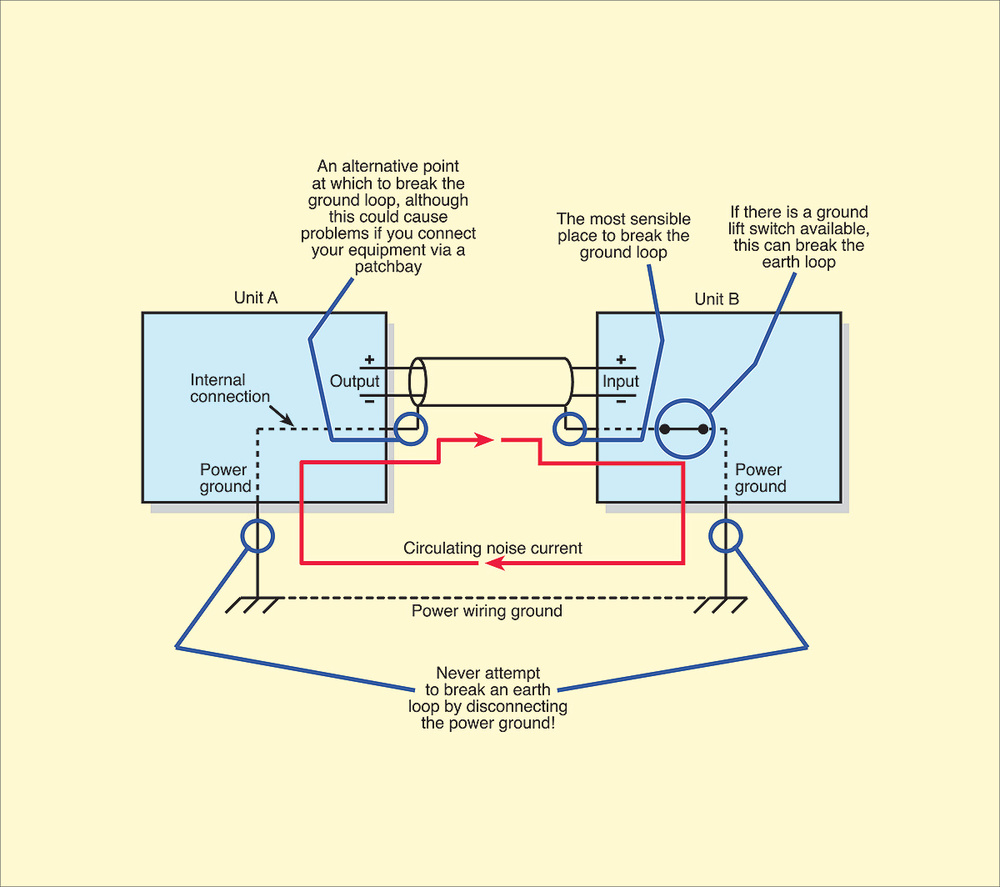 Even with balanced cables you can sometimes experience ground loops, so here's the best place to break one without risking RF interference.
Jamie, via email
SOS columnist Martin Walker replies: Ground‑loop problems can be absolutely infuriating, and I wrote a step‑by‑step guide to tracking them down back in SOS July 2005 (/sos/jul05/articles/qa0705_1.htm). In essence, you have to temporarily unplug all the cables between your power amp and mixer. If the noises go away, you've found the location of your problem. If not, plug them back in and try unplugging whatever gear is plugged into the mixer — and so on down the chain.
The majority of ground‑loop problems occur with unbalanced connections, so my next advice would have been to replace the offending unbalanced cable with a balanced or pseudo‑balanced version. However, as you've found, sometimes such problems occur even in fully balanced setups where you carefully connect balanced outputs of one device to balanced inputs of another via 'two‑core plus screen' balanced cables.
I recently had just such a problem in my own studio and, to make it even worse, it was an intermittent one, so whenever I got close to discovering its cause, it mysteriously vanished again. Here's what I did to track it down, so others can try some similar detective work in their own setups.
First of all, you've got to be systematic, and note down everything you try, particularly with an intermittent problem, so you don't have to start from scratch every time it occurs. In my case, I could hear the digital low‑level hash through my loudspeakers even with my power‑amp level controls turned fully down, and it also persisted when I turned off the D‑A converter box feeding my power amp. However, it completely disappeared as soon as I disconnected both cables between the D‑A output and power amp input.
These quick tests confirmed that the noise wasn't coming from the output of the converter, or from the power amp itself, but instead from a ground loop completed when the two were connected. However, just like you, I was already using balanced cables. I double‑checked the wiring of both of my XLR balanced cables and there were no errors: the screen of the cable was connected to pin 1 at each end, the red core connected to pin 2 at each end, and the blue (or black) core to pin 3 at each end. So far, so good.
Next, I double‑checked with a multimeter that there was no electrical connection between the metalwork of the two devices via my equipment rack (a common source of ground‑loop problems, and curable by bolting one of the devices to the rack using insulated washers or 'Humfrees'). Again, there was no problem.
The best wiring for balanced audio equipment is to tie the cable screen to the metal chassis (right where it enters the chassis) at both ends of the cable, which guarantees the best possible protection from RFI (Radio Frequency Interference). However, this assumes that the interconnected equipment is internally grounded properly, and this is where things can go awry. The cure is to disconnect one end of the cable screen, and the best choice to minimise the possibility of RFI is the input end (as shown in the diagram).
By this time, my intermittent problem had disappeared again, so here's another tip. I carefully cut the screen wire of one of my two cables just before it arrived at pin 1 of the XLR plug, but left the other cable unmodified. Then, the next time the ground loop problem occurred a few days later I quickly unplugged the unmodified cable, whereupon the noise disappeared immediately. This proved that I'd correctly tracked down the problem, and modifying the other cable in the same way ensured that it never happened again.