

If you've ever spent hours mixing only to be confronted with a wall of mud, you might need to think harder about how to use reverb and delay in your mixes - and some simple tricks can yield dramatic results.
 Reverb and delay are arguably the most common effects used at mixdown, but because they find so many different uses in this context they can seem bewildering to musicians who are still in the process of getting to grips with the fundamentals of studio production — those setting up a home studio, perhaps, or those enrolled in a music technology course for the first time.
Part of the problem inevitably stems from the wide range of different devices available that can supply these types of effects, and from their frequently inscrutable editing parameters. There is, however, an enormous amount of information on hand to demystify such technicalities, not least in Sound On Sound 's on-line article archive (see the 'Further Reading' box for some suggestions). Furthermore, the preset-led nature of many effects units these days makes it unnecessary for the beginner to delve very far into their algorithmic innards, and to be honest I think there are quicker results to be gained at the outset by working from presets, and leaving most of the effects parameters well alone!
As I see it, the more pressing difficulty when starting out is dealing with basic practical questions such as how many different effects to use, which effects to apply to which instrument, and how to decide on suitable levels. So in this article I'll be trying to eliminate some of the guesswork by suggesting a basic general-purpose approach to using reverb and delay while mixing. In the process I'll pinpoint some things to watch out for when surfing reverb presets, as well as highlighting the handful of effects parameters and techniques that make the biggest impact with the least effort.

 Sends are your friends: whether you're using hardware or software, reverb and delay are usually used as send effects — because that way you're creating a 'space' that can be shared by different tracks.However, I've always felt that there's only so much you can communicate in print alone when you're dealing with mixing techniques, so I've also put together a bunch of audio examples so that you can judge for yourself how useful each of my proposed methods is in practice. You can download them in MP3 or WAV format from the SOS web site at www.soundonsound.com/sos/ jul08/articles/reverb1audio.htm.
On the most fundamental level, both delay and reverb are about adding the characteristics of an acoustic environment, either by creating simple echoes or by simulating more complex patterns of sonic reflections. The reason these effects are usually so important at mixdown is because the individual parts in most modern multitrack projects communicate very little in the way of a common sense of space, and as such sound a bit 'dislocated', rather than seeming to belong on the same record. Obviously, synthesizers and sampled sounds often have no sense of acoustic realism to them at all, but even miked instruments are often recorded very close up, to reduce room reflections as much as possible, allowing decisions about the nature of the production's overall acoustic space to be deferred until the final mixdown.
For this reason, the primary objective of reverbs and delays is to reconnect tracks that have no inherent connection by giving them some shared acoustic characteristics, and it's this task that's the subject of the article at hand. Naturally, there are creative applications of reverbs and delays too, but these are window-dressing in most mixes (as well as being very much more a matter of personal taste), and will do your mix little good if the main edifice doesn't really cohere properly.
Send Effects & Mix Balance
Because the underlying aim is to give the separate tracks something in common, it makes sense to set up your plug-ins or hardware processors so that the same effect can be applied to multiple tracks at the same time. Whether you're using a hardware or a software mixer, the manner of doing this is pretty much the same. First of all you set up the output of your effects processor to feed a spare stereo mixer channel; then you set up a separate mix of your tracks specifically for the effects processor and send it to the unit's inputs, whereupon the effected signal feeds back into the mix. By changing the levels of the different tracks in the send mix, you determine how much of the effect is added to each track.
 When using send effects, make sure that the effect is set to 100 percent wet. Some plug-ins, such as the UAD1 Plate 140 reverb, have this setting as a default, but not all do, so remember to check — otherwise when you send a signal to the effect, that signal will not just get the reverb, it will become louder, ruining the balance of your mix.
In hardware systems, the mixer will have auxiliary send controls which allow you to create a number of independent effects-send mixes, each mix appearing on a separate output socket. By connecting different effects units to the mixer's different auxiliary-send outputs, you can drive several independent effects at once, assuming that you have enough free mixer inputs through which to return their outputs. In software, a separate mixer channel usually needs to be created to hold the effect plug-in, whereupon auxiliary sends can be created on each relevant mixer channel to feed it. (This is exactly the kind of setup I used in Cockos Reaper to create my audio examples, using a section of an otherwise dry multitrack project.)
Irrespective of which kind of system you work in, though, there are two important things that you need to bear in mind if you're going to ensure that this kind of effect configuration (usually called a 'send effect' or 'effect loop') works properly. The first thing is that you need to make sure the processors or plug-ins you're using only output effects, not a mix of processed and unprocessed signals, otherwise changing any auxiliary send level will also have an impact on that track's overall volume. Some effects units have separate level settings for effected ('wet') and uneffected ('dry') signals, while others offer a Mix Balance control, which needs to be set to one extreme (usually labelled something like '100 percent wet') to stop any unprocessed signal breaking through.
The second thing to ensure is that each channel's auxiliary send is taken from a point in the signal path after the channel's fader — in other words, that you use what is called a 'post-fade' auxiliary send. That way the amount of effects for any instrument will vary naturally as its channel fader is moved. If you fed the auxiliary send from before the fader, then you could, for example, fade a track completely down and you'd still be hearing its reverb — rarely a desirable state of affairs except for the occasional special effect.
Listen To the On-line Examples
As usual, we've placed a number of audio examples discussed in this article on-line at www.soundonsound.com/sos/jul08/articles/reverb1audio.htm
Choosing Reverb Presets
Now that we're clear on how to set up the necessary connections, it's time to start considering the effects themselves. First of all, let's start by looking at how you can use just reverb to draw a final mix together, and then we'll build on that to show the subtly different possibilities that are afforded by delay effects.
As I've already mentioned, there are enough things for newcomers to mixing to worry about without programming their own reverbs from scratch, so I would certainly recommend starting from presets where possible. However, this tactic only lets you off the hook to a certain degree, because it's still up to you to select the right processor and preset for the task. Here are a few tips.
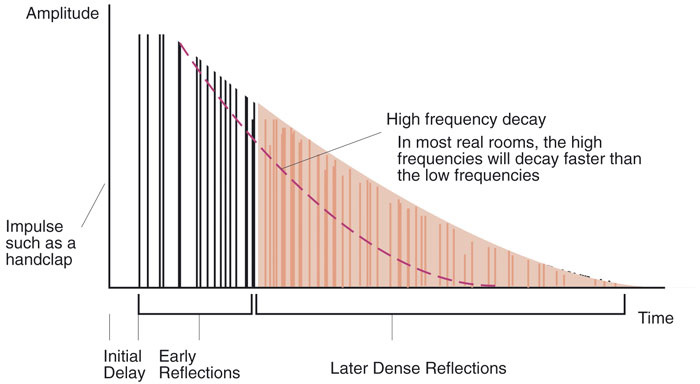 For reverb, it often makes sense to start with a preset, but knowing what makes a reverb patch can help when it comes to final tweaks. In particular, notice the three phases of initial delay (or pre-delay), the early reflections and the dense reflections of the reverb tail, and how high frequencies tend to decay more quickly than lower ones.The first, and probably most useful, thing I can say is that you should ignore the preset names and instead try to imagine the kind of space you want your mix to inhabit — picturing a real environment can help focus the mind here, although this may not help as much if you're trying to create a more other-worldly sound. A wrong choice in this regard can be almost impossible to sort out during mixing, whereas a reverb with the right kind of inherent acoustic signature but the wrong tone and/or length can usually be tweaked into better shape comparatively easily. It's not uncommon for me to wade through a couple of dozen presets before I find one that instinctively feels like it fits the mix in hand, and it's vital that you don't hurry this process.
Beyond that rather intangible decision, though, there are a few other more down-to-earth things to consider. First of all, if you have a choice of reverb processors or plug-ins, be wary of any that produce a metallic sort of sound, particularly in response to noisy tracks like drums. To show what I mean by this, let me turn to the first of my audio examples: the Reverb1 and Reverb2 audio files. The former has a pronounced metallic ring to it, whereas the latter (while still far from perfect) is a bit better behaved in this regard, and is likely to prove much more usable. The problem with metallic resonances is that, by the time the reverb is at a level where it's doing its job, the overtones become too clearly audible, unpleasantly colouring the mix as a whole and making the effect sound too obvious. Reverbs with obvious resonant 'character' do have their uses at the mix, but typically for other, more specialised tasks beyond the scope of this article, so it's best to steer clear of them to begin with. (It's worth pointing out that the Reverb1 file also veers off to one side of the stereo image as it decays, which isn't ideal either.)
Another basic principle when looking for reverbs that will bind a mix together is to tread carefully with any that seem to have very prominent frequency extremes. Neither very high frequencies nor very low frequencies are much use when using reverb to bind a track together, the former tending to make the reverb too audible in its own right, and the latter reducing punch at the low end of the mix where definition is normally really important.
Further Reverb Reading
If you find that you're struggling with effects-related jargon, or you just want to know a bit more about different reverb types and plug-in parameters, head over to the SOS web site at www.soundonsound.com and check out the extensive article archive, which has thousands of free-to-view articles for you to browse. You can search the articles yourself, using the search function, but if you're short on time then here are a few of the most useful on the subject of reverb and delay:
- Reverb: Frequently Asked Questions (SOS May 2000) www.soundonsound.com/sos/may00/articles/reverb.htm
- Advanced Reverberation (SOS October & November 2001) www.soundonsound.com/sos/Oct01/articles/advancedreverb1.asp and www.soundonsound.com/sos/Nov01/articles/advancedreverb2.asp
- Sequencer Reverb & Delay Masterclasses (SOS June & July 2003) www.soundonsound.com/sos/Jun03/articles/sequencerreverb.asp and www.soundonsound.com/sos/Jul03/articles/sequencerdelay.asp
- Using Reverb & Delay In Cubase (SOS October 2007) www.soundonsound.com/sos/oct07/articles/cubasetechnique_1007.htm
- Improving The Sound Of Your Reverb (SOS August 1996) www.soundonsound.com/sos/1996_articles/aug96/improvedreverb.html
- Choosing The Right Reverb (SOS March 2006) www.soundonsound.com/sos/mar06/articles/usingreverb.htm
- Convolution Processing With Impulse Responses (SOS April 2005) www.soundonsound.com/sos/apr05/articles/impulse.htm
Tweaking Reverbs: The Controls To Reach For First
If you're lucky, you might have selected a reverb preset that's perfect for your track. In my experience, though, no preset ever seems to fit the mix like a glove, and I routinely tweak the reverb sound in a variety of ways while mixing, to make it match better. What I also find is that amongst the forest of reverb parameters frequently provided, some end up being much more useful than others, so here are a few pointers for getting the quickest results.