

I've worked with tape and ADAT in the past, but have been out of recording for a few years. I'm just getting back into it and have got my first computer recording setup, with a PC and a Focusrite Saffire Pro 40 audio interface, but I'm confused by the buffer settings: what buffer size should I use in my projects?
Dom Gately, via email
SOS Reviews Editor Matt Houghton replies: When it comes to buffer settings, there's a trade‑off between achieving low latency and reducing the strain on your computer's CPU. The smaller the buffer size, the greater the burden placed on your CPU, but you'll get lower latencies (for less audible delay), which is what you want when monitoring recordings through your sequencer and any processing. Similarly, the greater the buffer size, the greater the latency, but with less strain being placed on the CPU. If the latency is too low, you'll hear pops, clicks and glitches as your computer struggles to keep up. You're not doing any damage, so if you need low latency, try setting it down as low as you can until you hear those glitches and then raise it up a little. 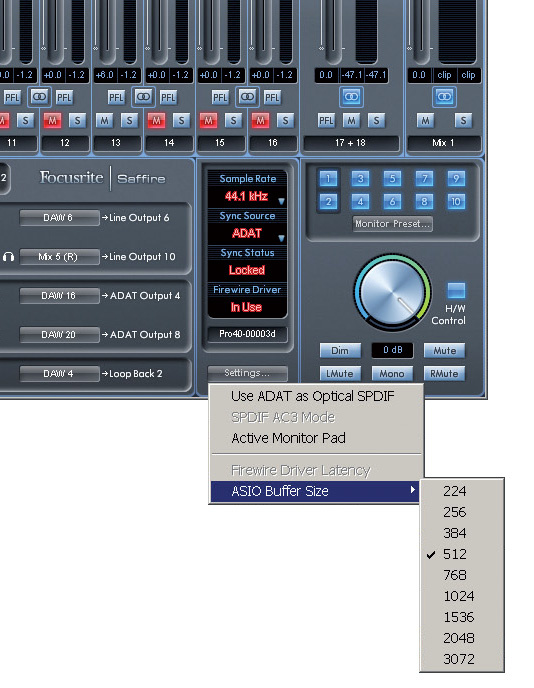 The smaller the buffer size, the greater the strain on your computer, though you'll experience less latency. If you need low latency, set the buffer size as small as your computer can manage without producing clicks and pops.
When mixing, you're likely to need more processing power as you start to add more and more plug‑ins. So if starting a project from scratch, I'd usually set buffer size as low as possible while recording or playing parts via a MIDI keyboard, but increase it later, when the recording was finished and I was ready to begin mixing in earnest. It's also worth mentioning that, while tracking, it should be fine to use a 'lite' version of a reverb plug‑in for artist monitoring duties, if this helps take the strain off your CPU, and replace it later on when you want to sculpt the sound for your mix.
SOS Features Editor Sam Inglis adds: It's not clear from the question what sort of recordings you're making. However, unless you're using soft synths or samplers, it might be better to use the Saffire Pro 40's mixer utility to set up a low‑latency monitor mix. That way the question of buffer size becomes largely irrelevant.