Kali’s new Santa Monica speakers are their most advanced yet.
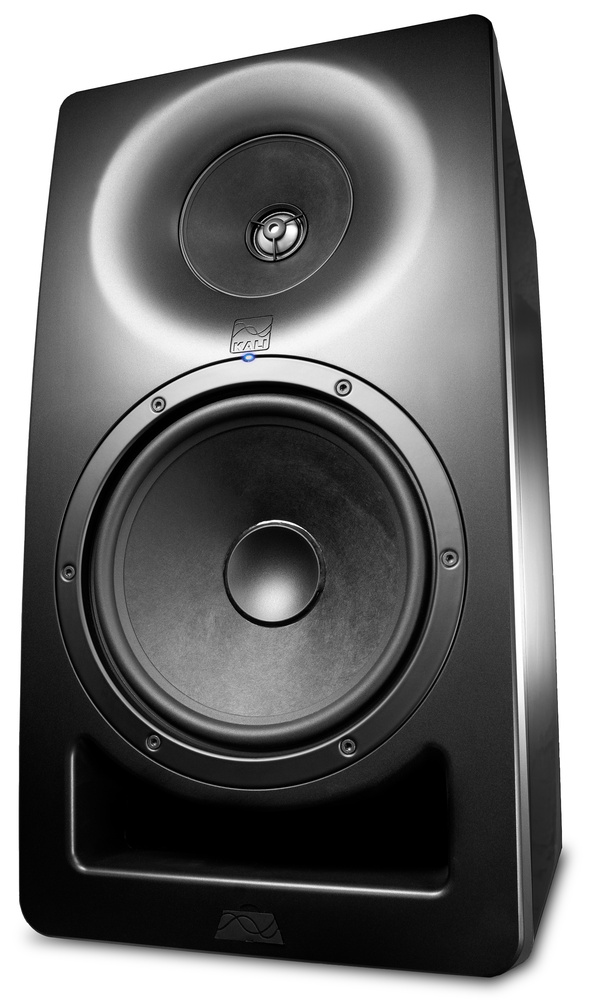 Kali Audio’s SM (Santa Monica) series monitors are arguably their most ambitious design so far, boasting advanced features like user‑editable DSP that can be controlled through software. This enables the user to adjust delays, levels and eight bands of parametric EQ. Available in five‑ and eight‑inch versions and priced per speaker rather than in pairs, the SM monitors follow an active three‑way format but, unusually, the mid driver and tweeter are coaxial, which helps stabilise imaging and also allows for a more compact cabinet. For those who don’t need the control software and who already have high‑quality power amplifiers, passive versions are also available to order.
This review covers the SM‑8, which is driven by a total of 300 Watts of Class‑D power and has an LF reach of 37Hz (‑10dB), with its ‑3dB points at 43Hz and 21kHz (‑10dB at 35kHz). It can cruise at a level of 94dB SPL at one metre but can handle peaks of up to 119dB. A one‑inch metal‑domed tweeter is set in the centre of a four‑inch, paper‑coned midrange driver; the woofer also uses a paper cone. Kali describe both cone drivers as having an ‘optimised’ profile, but they don’t elaborate on that! The woofer crosses over to the mids at 280Hz, while the mid/high crossover point is at 2.8kHz. The THD at 90dB (at one metre) is specified as around 0.5%.
The front‑ported cabinets weigh 14.5kg each, and measure 48.26 x 25.4 x 30.5cm (HWD). They are compact enough to use in medium‑sized studios, though the SM‑5 might be a more appropriate choice for the smaller studio. While most studio users working in stereo will mount the speakers on platforms or stands, those setting up immersive sound systems may need to use wall mounts, to which end the speakers have threaded mounting points on both the top and bottom of the cabinet, designed for a 4.25 x 2‑inch bolt pattern. On the front of the cabinet is a Kali Audio logo, which engages standby mode when double‑tapped.
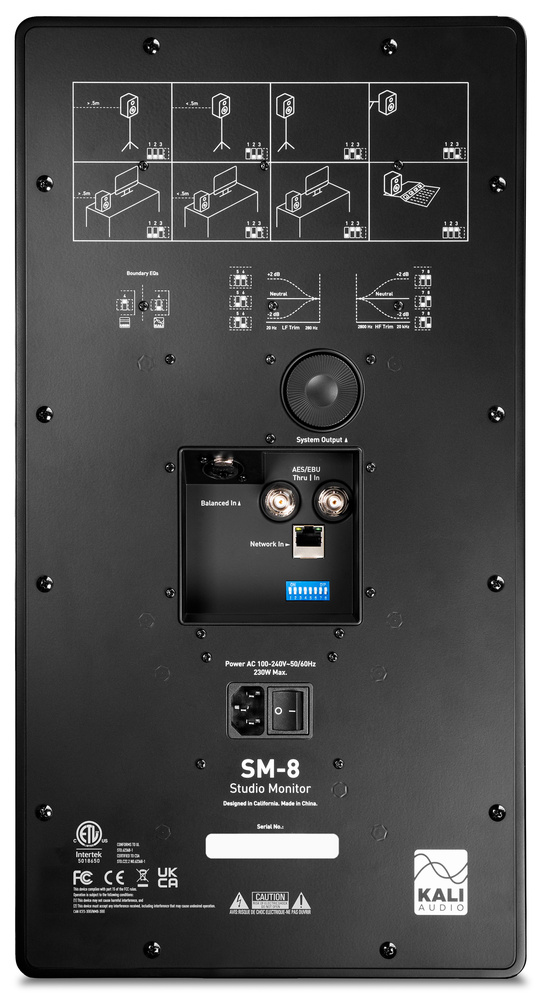 The SM‑8 can accept analogue audio via a balanced combi jack/XLR socket, or digital AES3 via BNC connectors. The Ethernet port allows for connection to a computer running the Kali Control Panel software.Audio may be fed into the speakers either as traditional analogue via a balanced combi XLR/jack, or as a digital signal encoded as AES3 via a BNC socket. Ethernet (RJ45) and USB‑A are available for the DSP control. A set of DIP switches on the rear panel allows for the usual upper and lower shelving EQ settings, as well as compensation for boundary proximity, but there’s also a setting (switch four) for accessing control over the DSP EQ. Other than that, there’s a large recessed rotary control on the rear panel that can be used for setting the input level, with a range of ‑12 to +6 dB.
Remote Control
The Kali Control Panel software runs on macOS and Windows, and gives the user access to eight parametric EQ bands, each of which can be set to peaking, high/low shelving, or high‑/low‑pass filtering (first‑ or second‑order). It is possible to delay the output by up to 10ms, as well as applying a level trim. For stereo use, the delays will not be needed, but they can be very useful in a multi‑speaker setup such as surround or Atmos. These parameters are handled by the same DSP module that looks after crossover duties, so there’s no additional latency penalty on top of the system’s 3ms processing time.
Kali Control Panel is not in itself a room‑correction package, but it can load KEQ files or be used in conjunction with the free Room EQ Wizard software to generate the necessary EQ curves. Working this way avoids the need for a separate room‑correction product and also avoids the hassle of using a plug‑in‑based correction system, where operator error can lead to the monitor processing also affecting the mixed song file. It might have been easier for the user if the system could automate the room‑correction process using a flat‑response microphone, but the DSP‑hosted feature set does provide the necessary tools, and there’s information on doing your own room correction on the Kali website. Kali’s recommended room‑calibration procedures are outlined there, and in situations where the user wishes to perform their own room measurements, Kali say they can provide room‑tuning files for a small fee per speaker.
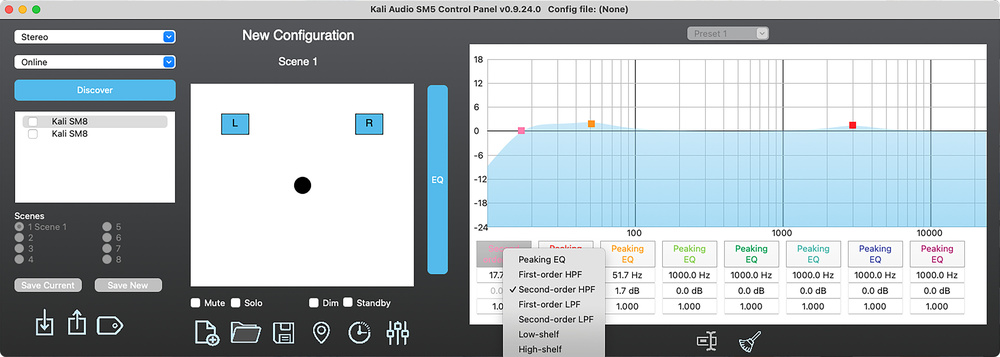 Kali Control Panel can work in Online mode, where monitors are networked to the computer and changes can be auditioned instantly, or in Offline mode, where profiles are saved onto a USB drive and manually loaded into each speaker.
The control software works in both Online Mode, where each speaker is connected to a network via an Ethernet switcher (but not connected directly to the computer) and Ethernet cables, or in Offline Mode, where a USB stick can be used to transfer the necessary correction files onto the speakers. If used online, the speakers can be switched between different tuning presets stored in the software. Offline, a USB stick can be used to transfer one speaker’s settings at a time via a USB port in the front of the speaker cabinet. The built‑in DSP is powerful enough to implement useful room correction as long as you’re well enough versed in the tech to be able to figure out what is needed.
In online mode, EQ changes can be heard in real time, allowing the user to tweak the response to, for example, match more closely a known pair of speakers or headphones. I checked out the online mode by hooking the SM‑8s up to my studio’s Ethernet switcher; once the speakers are connected, LEDs flash on each speaker’s rear panel next to the Ethernet port. Once the software is running, it asks to search for connected speakers, after which each speaker can be muted or soloed individually as well as having its own EQ settings applied. Several sets of EQ settings can be saved as presets. The resultant EQ curve is shown on screen.
In offline mode, the USB stick used to transfer EQ curves needs to be formatted for FAT32, and to hold only the data for one speaker at a time. The USB port is hidden behind a shaped, rubbery cover on the speaker’s front panel, and transfer of settings is initiated when the USB stick is plugged in.
Performance
In my room the speakers worked perfectly well without the EQ, though it was informative to try adjusting the EQ settings to see how close I could get the sound to match that of my Event Opals. Only the smallest adjustments were needed to get very close indeed, and while I’ve always thought my Opals gave the driest, tightest kick sound I’ve heard from a ported speaker, the SM‑8s were if anything slightly better damped.
There’s real depth in the lows but without the obvious overhang heard from most ported designs of this size...
Once set up in the room, the sound comes over as clear, three‑dimensional and with a strong sense of stereo width. There’s real depth in the lows but without the obvious overhang heard from some ported designs of this size, while the coaxial drivers share the mids and highs in a transparent and effortless way.
Clearly, a speaker of this quality will only give of its best in a room that has reasonably effective acoustic treatment, even if you use a room‑correction program. Untreated or badly treated rooms may still have significant resonances caused by undamped room modes, especially at the lower end of the audio spectrum, and the nature of a room mode is that once the sound that excites the mode has gone, the sound energy in the room at the mode’s resonant frequency takes time to die away. In other words, resonances are a time‑domain issue and, if significant, can’t be fixed by a frequency‑domain band‑aid. Conversely, if the room is treated to minimise resonances, then an EQ‑based system can bring about a useful improvement in monitoring accuracy. It would also be worthwhile treating speakers of this calibre to a really good speaker platform, such as one of the IsoAcoustics range.
Summary
The SM‑8 is a very capable studio monitor, suitable for serious stereo mixing or immersive audio work. While priced at the upper end of even a serious home‑studio budget, the cost is not excessive given the performance on offer, and I can see this speaker appealing to audio professionals working in mid‑sized studios. Its coaxial mid/tweeter architecture provides precise stereo imaging with clear detail, and the eight‑inch woofer handles low frequencies effectively and cleanly. The DSP tuning capabilities can be used for room correction through appropriate calibration procedures, with the caveats already explained, and for smaller rooms the SM‑5 would be a sensible alternative.
Pros
- Well‑balanced sound with tight bass and clear detail.
- Comprehensive onboard EQ that may also be used for room correction in conjunction with suitable room measurement tools.
Cons
- It would have been useful if a full room correction process had been built in.
Summary
A highly capable three‑way active monitor with useful DSP tuning, allowing you to upload correction curves obtained through third‑party measurement systems.
Information
When you purchase via links on our site, SOS may earn an affiliate commission. More info...