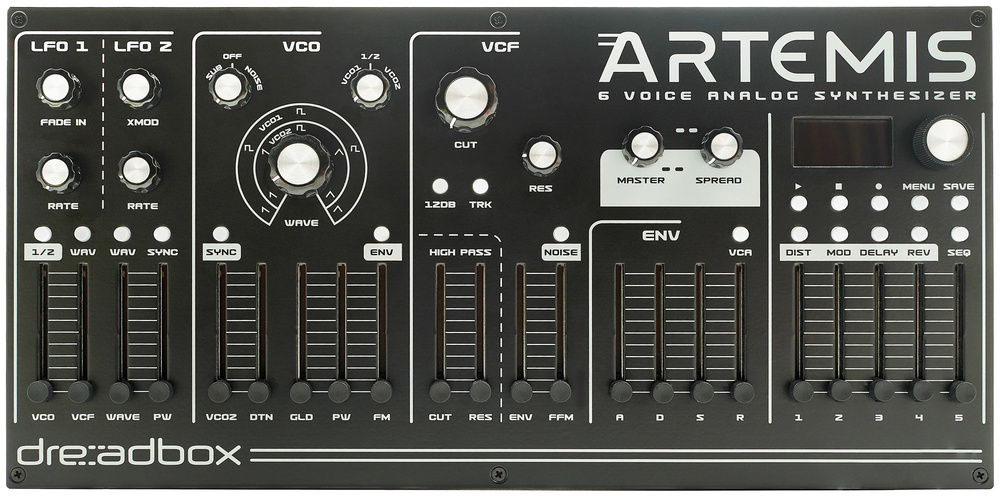
Dreadbox are aiming high with the ambitious Artemis.
The Greek synthsmiths at Dreadbox have steadily built a reputation for affordable desktop analogue instruments with a satisfying helping of mojo. The Artemis slides into their portfolio at the top end with a two‑oscillator, six‑voice analogue polysynth that aims to nail the sweet spot between desktop affordability and the mythical ‘big synth’ sound. But does it succeed?
First Impressions
Out of the box, the Artemis makes a great impression. It’s compact but not cramped, with a metal chassis that feels durable and heavy. The control surface is covered with a mixture of knobs and sliders, with each section clearly delineated. A small OLED display is used for patch navigation, settings, and access to certain functions that lack front‑panel controls.
The Artemis is in desktop territory, measuring 375 x 185 x 55mm and weighing just under 2.5kg. It is on the larger end of desktop synths and avoids the toy‑like feel afflicting some other desktop devices. It’s an instrument that tries to deliver the knob‑per‑function satisfaction of flagship synths and succeeds, mostly.
One of the Artemis’ big selling points is the generous effects section, supplied by the effects gurus at Sinevibes. The effects section allows up to four stereo effects per patch, with a dedicated front‑panel control section. Whilst the synthesizer section is predominantly analogue, the effects are all digital.
SOS News Editor Luke travelled to Dreadbox HQ in Athens where we were treated to a demonstration of the Artemis. Watch the video below...
Voice Architecture
At the heart of the Artemis is a true analogue signal path featuring two VCOs per voice, a sub‑oscillator, and a noise generator. Unfortunately, you cannot use both simultaneously — it’s either sub or noise, you choose. Each oscillator offers five waveshapes (sine, triangle, saw, square and noise) and can smoothly crossfade between each, although, to reduce front‑panel complexity, the waveform morphing for each oscillator is controlled by the same knob and the modulation is also shared, so if you modulate a waveform, both oscillators change equally. There is also pulse‑width modulation and hard sync.
Oscillator 1 can modulate oscillator 2’s frequency for more harmonic complexity. It’s linear FM, so you don’t suffer from the detuning problems of exponential FM, which is a welcome feature. However, the Amount slider never felt like it went far enough. The results always felt a bit tame, and it was difficult to push the synth into ‘wild’ FM territory.
Oscillator 2 can be tuned relative to the first up to two octaves in either direction. There’s also a fine‑tune slider, but this only increases the pitch of oscillator 2, which is less than ideal because if you detune a couple of oscillators, you ideally want one oscillator pitched down and one up so that the perceived centre point is perfectly in tune. You can still detune the patch overall to compensate, but this is done by accessing the patch options and adjusting the overall patch detune in the menu. The Oscillator 2 Detuned control also doubles up as a unison detune.
Unison comes in three flavours. Standard unison will stack and detune six voices for thick mono sounds. Duo Mode makes Artemis duophonic for two pairs of three‑voice unison. And finally, Tri Mode gives you three pairs of two‑voice unison. The Spread control, which bounces voices left and right, will also affect unison voices for massive stereo unison patches.
The oscillators sound rich and satisfyingly analogue, which we’ve come to expect from a Dreadbox synth. There’s a low‑end presence worthy of any good vintage polysynth, and the highs don’t sound harsh or shrill even with the filter wide open.
I am a big fan of the filter section. There are two filters: a 24dB/oct low‑pass filter with a switchable 12dB mode and a resonant high‑pass filter. There is no information about the lineage of the filter design. The low‑pass suffers a little from low‑end loss as you crank the resonance, but it’s not as severe as some, and it can scream with the best of them, especially when you crank the Drive parameter. There’s also a separate high‑pass filter with fully adjustable resonance (yay!). Filter tracking (just three settings; off, half and full), a dedicated filter envelope, and filter FM (from oscillator 2 or the noise source) complete a highly capable yet ergonomically designed filter section.
Modulation
Each voice has access to two ADSR envelopes and two LFOs. The envelopes are fairly vanilla and are fixed to filter frequency and VCA. They share a set of ADSR sliders on the front panel, and a button switches the focus of the sliders from one envelope to the other (or both with a long press). The filter envelope also has a dedicated control for FM amount. That’s as far as envelope modulation goes. There is no way to assign envelopes to anything other than VCA, filter cutoff or FM amount. If you need more destinations, the LFOs can be repurposed with a one‑shot ‘envelope mode’.
The LFOs can operate per voice, globally, or sync’ed to an internal or external clock. They must be switched together, however, meaning that you cannot have LFO 1 running freely while LFO 2 is set to per‑voice. There are dedicated front‑panel controls for LFO rates, waveform switching, fade‑in (LFO 1 only), LFO cross‑modulation, and sliders for VCO and VCF modulation amount (LFO 1 only), as well as oscillator waveform and pulse‑width modulation (LFO 2 only). There are no other destinations for LFO or envelope modulation. There is a modulation matrix, but it only deals with assigning incoming MIDI, such as velocity, aftertouch, mod wheel, and a single MIDI control change (CC74).
The mod matrix feels much more flexible than the fixed architecture of the envelopes and LFOs. By diving into the menu and selecting, for example, velocity, you can add velocity modulation to almost any front‑panel control by just moving a physical control. You can easily assign velocity to obvious things, such as filter cutoff, but also to more esoteric destinations, like glide amount, filter resonance, and even effects parameters. It’s a shame that this flexibility is limited to just a few MIDI sources, as it would greatly expand sound design potential if LFOs, envelopes (and, dare I say, oscillators) were added to the list.
Perhaps one of the reasons this isn’t possible is that the modulation matrix, small as it is, isn’t very transparent. The menu contains a single line for, say, velocity, and once you add a destination or two (I couldn’t detect any limit on the number), they become invisible. After which, the only way to alter any given amount is to reapply it or clear everything. The good news is that this modulation matrix allows for some wonderfully complex sound design to occur via velocity, mod wheel, aftertouch and CC74.
Effects Engine
The result of Dreadbox’s partnership with Sinevibes is some of the best onboard synth effects I’ve had the pleasure of using. You get four effects simultaneously: distortion/bit‑crush, chorus/ensemble, delay and reverb. All are stereo and have a generous number of variations to choose from. For example, the distortion effect (first in the chain) has 15 different distortion, saturation and wavefolding algorithms. The modulation section has 11 variations of flangers, phasers, choruses and pitch‑shifters. There are four flavours of delay, and five reverbs, including some lovely granular cloud reverbs, Eventide‑style shimmers, BBD delay emulations, and even a kooky random repeater. It is an impressive selection, made all the more interesting by their ability to be modulated via incoming MIDI.
The distortion and reverb options are excellent, and the modulation and delay options are OK. One notable omission is the lack of a tempo sync option on any of the delays, which is a shame and also confusing because the global tempo is visible on the effects screens.
Overall, the effects feel integral to the Artemis experience. Many of the included presets are, understandably, dripping with effects. Whilst this might irk some people, the fact is that these are great‑sounding effects, and the combination of Dreadbox’s signature analogue muscle, along with some primo digital effects, is an intoxicating cocktail.
Each step can include up to six notes and supports ties, rests and velocity. There’s also a probability setting to add a bit of variation to pattern loops.
Sequencer & Arpeggiator
The Artemis includes a 64‑step polyphonic sequencer and an arpeggiator. The sequencer is pattern‑based, with real‑time and step input options. Each step can include up to six notes and supports ties, rests and velocity. There’s also a probability setting to add a bit of variation to pattern loops. Both sequencer and arpeggiator can be sync’ed to clock (at various divisions) and respond to incoming MIDI transport data. The arpeggiator features a standard selection of patterns and offers the same probability, swing and gate length options as the sequencer. Oddly, there’s no octave control for those massive keyboard‑sweep arpeggios. Neither the sequencer nor the arpeggiator will win any innovation awards, but they are valuable additions nonetheless.
Preset Management & Storage
The Artemis includes 512 patch memory slots (eight banks of 64). Preset management is handled via the OLED screen, using the data encoder to scroll through presets and press and scroll to change banks. The review unit I received had only around 150 presets, with the remaining 350+ presets set to an initialised patch. As someone who likes to ‘roll my own’, this does not bother me at all, but if you’re a preset player, this might come as a bit of a disappointment. Hopefully, more presets will be added over time.
One aspect of preset management that does bother me is that, despite having an OLED screen, you cannot name presets. Instead, they are referred to by their bank and preset number (eg. C32). It makes it almost impossible to find a favourite preset unless you write down its bank and number on a piece of paper and keep it handy. It’s also annoying not to have a compare function when saving presets, as it’s impossible to know whether you are saving over a good preset (or even whether the slot in question is empty).
There is no patch editor or librarian software at present, but you can dump individual banks via SysEx for backup. Overall, the preset handling could use some love. Proper naming, a favourites system, and compare when saving would improve things dramatically.
In Use
There is a lot to like about the Dreadbox Artemis. The core analogue synthesis engine is powerful and capable of a wide variety of classic analogue sounds. Deep, solid basses, Juno‑like poly strings, soft FM bells, rich pads, fat unison leads, classic analogue brass, and industrial effects are all on display. When you add Sinevibes’ generous effects section, a new, more modern set of sounds emerges. Thanks to the lush reverb, ambient pads and soundscapes are a particular speciality, but glitchy modular sequences, filthy distortions, enormo‑unison stabs and otherworldly landscapes are all possible.
Dreadbox are a company primarily known for their good value. Almost all of the synths in their current desktop line‑up cost €400 or less. The most expensive, Nymphes, is another six‑voice analogue polysynth and will cost you just over €400. The Artemis, on the other hand, is closer to €1100. Some of that extra cost is justifiable: more controls, an OLED screen, and the excellent Sinevbes effects. However, the analogue polysynth side still feels somewhat compromised. Sub‑oscillator or noise source, but not both. Shared waveform controls for both oscillators. No flexible envelope or LFO routing. No patch names. Hidden modulations that make reverse‑engineering patches rather difficult. No tempo‑sync’ed delays. When you compare some of the alternatives in the same price bracket, these limitations begin to matter, and while they might be forgivable at €400, I’m not sure if they are at €1100. I know I’m comparing analogue with digital, but in terms of a touchy‑feely experience — the everyday knob‑tweaking of using a synth — the ASM Hydrasynth is an excellent example of a near‑perfect user experience at a similar price that I feel Artemis doesn’t quite reach.
It is an excellent all‑rounder and would make a great ‘only’ analogue polysynth for smaller setups.
Having said all of that, I cannot leave you with the impression that I did not like the Artemis — quite the contrary. I don’t think there is any synth fan who will not appreciate the breadth of sounds it can make. It can sound expensive or nasty, depending on your preference. It is an excellent all‑rounder and would make a great ‘only’ analogue polysynth for smaller setups. Need to emulate a fat Moog bass one day? A Juno pad the next? A moody granular cloud‑soaked drone the day after? The Artemis has you covered.
Round The Back
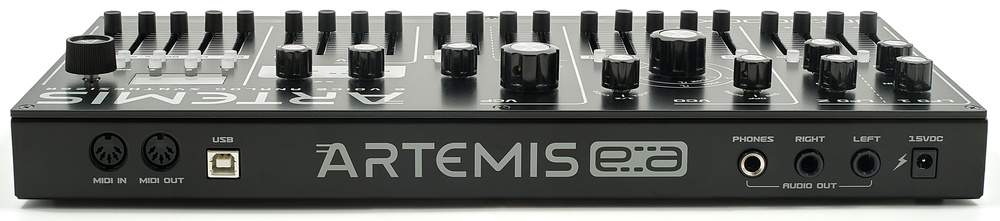
Connectivity is solid: unbalanced quarter‑inch outputs, headphone out, MIDI in/out on five‑pin DIN and USB, and a USB‑B port for MIDI. Power is supplied via a standard 15V DC barrel connector (PSU included).
There’s no CV/gate or audio input, which is a shame, given how nice the onboard effects are. MPE support enables integration with expressive controllers, such as the ROLI Seaboard, Linnstrument or Osmose.
Pros
- Six‑voice analogue polyphony with the signature Dreadbox mojo.
- Excellent stereo effects from Sinevibes.
- MPE support.
Cons
- Despite being a flagship, it’s still a slightly compromised user experience.
- No patch naming, despite having a screen.
- Limited LFO and envelope routing.
Summary
The Artemis is Dreadbox’s new flagship desktop synth. It is more expensive than many of their other offerings, but you get some fantastic Sinevibes effects, which complement the more traditional six‑voice analogue synthesizer engine very nicely. It is most certainly a treat for the ears, even if some aspects of the user experience could use some polish.
Information
$1499
When you purchase via links on our site, SOS may earn an affiliate commission. More info...

When you purchase via links on our site, SOS may earn an affiliate commission. More info...