This compact converter offers an easy way to expand your audio interface.
Ferrofish now have quite a range of A‑D and D‑A converters, and cater for a variety of digital connection protocols including MADI, ADAT and Dante. For review here is one of their smallest models, a half‑rack‑width device called the Pulse 8 AE, and it’s intended to act as an I/O expander for audio interfaces with ADAT ports.
Features & Operation
We’ll start on the rear panel, since the connectivity tells you most, if not quite all, of the story. Power comes from an included inline switch‑mode supply, which attaches to the device through a 2.54mm barrel jack. Thoughtfully, this has a screw‑on connector to keep the power cord firmly attached. Once hooked up to mains power, the Pulse 8 AE boots up in… well, let’s just say instantly, because while technically there may be a short delay, it doesn’t feel like there is.
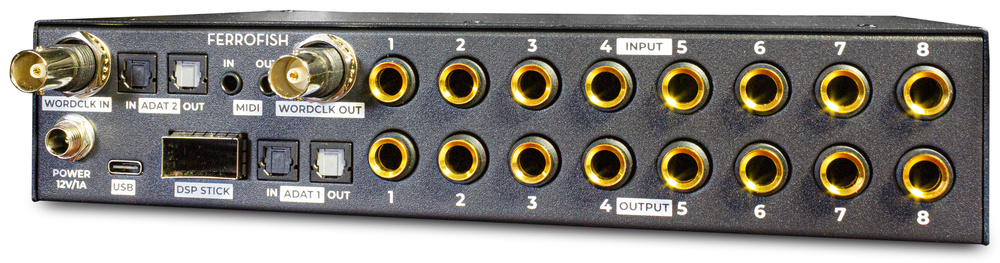 Alongside the analogue and digital I/O are MIDI TRS sockets and a USB connector, to allow for connection to the RemoteFish control software and firmware updates.
The balanced analogue line‑level inputs and outputs (eight of each) are presented on quarter‑inch TRS jacks, with adequate space between them for the vast majority of jack connectors to fit alongside each other. There are also two pairs of ADAT ports for the digital I/O. Technically, you need only one pair for all eight channels, of course, but the ADAT protocol limits such setups to a maximum sample rate of 48kHz. The dual ports allow the device to use the S/MUX protocol to convert all channels at up to 96kHz (higher sample rates up to 192kHz are supported, but that halves the channel count). More unusual, compared with other converters, is that the Pulse 8 AE can act as a signal router that can address all the analogue I/O and the maximum of 16 ADAT I/O channels individually.
The Pulse 8 AE can sync with the attached device over the ADAT Lightpipe connection, of course, but there’s also the option of word clock, for which there are both in and out BNC connectors. This allows the Pulse 8 to act as the clock master or slave to another device, and in the latter scenario it can pass word clock along to a third device. Other rear‑panel I/O (whose functionality I’ll return to below) include MIDI in and out on mini‑jack connectors (fine by me; there’s no way DIN connectors would fit on this panel), a USB‑C port, and a larger slot reserved for future DSP expansion. There are not yet any current or promised expansions, but Ferrofish see this as a means of future‑proofing the unit.
On the front, there’s a headphone jack on the left, and the amp seemed to have plenty of juice in reserve when feeding my various headphones (I tried it with Audeze LCD‑Xs, Sennheiser HD650s and Audio‑Technica ATH‑W3000ANVs). It was good to see in the on‑screen menus that there’s the ability to limit the headphone output by up to 18dB below the maximum — basically this means you can set it up to ensure sensible levels with your regular headphones when the level is set to maximum. On the far right is a backlit power on/standby button (press for on, press and hold a few seconds for off).
In between these is a very crisp and clear colour TFT display, along with two more buttons and a rotary encoder for navigating the on‑screen menus and making selections. The upper button, marked with three backlit horizontal lines, brings up the menu, and you then use the encoder to navigate and the same button to make selections. The other button (a backlit ‘X’ symbol) exits the current menu layer. These controls are context sensitive, so help you do what you want that bit more easily than might otherwise have been the case. For example, when in the home screen (showing the meters when sync is established, or a No Lock warning if not), turning the encoder sets the headphone level. Do that, then hit the upper button, and you can choose the headphone source, which can be any digital or analogue input, whether single channels for mono or adjacent‑channel stereo pairs. If, when in the default screen, you instead hit the three‑lines button first, you’ll be presented with a radial menu, whose icons you select to access various sub‑menus.
These sub‑menus allow you to change the clock settings, set the headphone routing setup, save and load presets, access system setup options, control the channel input gains and output levels, and configure the routing. You can also set any MIDI channel to respond to CC controller data separately for the mini‑jack and USB connections, and you can specify whether or not the word clock input is terminated... and much more besides. You can even lock the unit so that only the headphone level can be tweaked from the front panel (there’s a code to lock/unlock it on a sticker on the base, but I might be tempted to engrave it on the base because once locked only this code will unlock it).
The A‑D and D‑A converter options include the ability to set the filter types.
The sub‑menu style will feel familiar to anyone who has used Ferrofish converters before, but there are plenty of interesting options not available on, for example, my Ferrofish A32, to allow you to configure the unit to meet your own needs. For instance, the A‑D and D‑A converter options include the ability to set the filter types: as Minimum Phase, Linear Phase Apodizing, Linear Phase Fast Roll‑Off and various others. There are eight options for each converter, and they each strike a different balance between things like phase response, impulse response and HF roll‑off; they’re all made possible by the ES9017 and ES9840Q chips used. Honestly, though, these converters sounded good to me on the default Minimum Phase setting, and I don’t recommend changing it unless you know what you’re looking for here.
The gain/level of the analogue line inputs and outputs can also be changed using the menu, and you can do this for individual channels, stereo pairs, with four channels ganged, or for all eight channels at once. Again, it’s all very easy, and the feedback given on screen, with virtual faders and a dBu value for each channel, is really clear. The analogue outputs have a maximum output level of +20dBu, but the virtual faders can back this off by up to 28dB (to give ‑8dBu) in 1dB steps, while the inputs can accept a maximum of +20dBu and have up to 28dB of gain available, again in 1dB steps. The connections are balanced, but there are instructions in the manual for connecting unbalanced equipment. While we’re talking numbers, the quoted SNR and THD+N figures might not be world‑beating — the chips used here are capable of better — but they’re respectable, and slightly better than my older A32, with which I remain very happy.
Verdict
The bottom line is that this is a good‑sounding and remarkably compact A‑D/D‑A converter with very little direct competition: there are now few ADAT converters out there that give you dedicated line I/O without the mic preamps and so on, and when it comes to eight‑channel ones there are even fewer. The SSL Alpha 8 (reviewed in SOS May 2025) is the most obvious alternative but while that boasts better technical specs and some features that the Pulse 8 AE lacks, the Ferrofish device gives it a good run for its money and offers some different features of its own. It’s also more keenly priced and half the size. Subjectively it sounds great, and one thing that Ferrofish have long got spot on and continue to do so is the great on‑screen feedback and easy‑access menus. All food for thought when weighing up your options...
RemoteFish Sofware
Accompanying the Pulse 8 AE is a version of Ferrofish’s RemoteFish software, which may be familiar if you’ve used previous Ferrofish converters but which was updated during the review period to work with the new Pulse 8 AE. RemoteFish communicates with the Pulse 8 AE using MIDI, either via the Pulse 8’s two TRS mini‑jack connectors and a MIDI interface, or over a direct USB connection with your computer.
 Some of RemoteFish’s tabbed screens.
RemoteFish is a simple and unfussy affair: it doesn’t offer any more functionality than you can access on the hardware (in fact, it offers slightly less), and it might not win awards for graphic design; but ‘focused and unfussy’ is arguably not a bad thing, and it can certainly make managing some functions more convenient. For example, if you want to experiment with different routing options and save them as presets, then it’s a lot easier to click on a grid in the software than scroll and select using the single hardware knob. There’s one window with five tabs, which not only allow remote control of the hardware, but also update to reflect any changes you make using the hardware’s controls.
On the left, the connected unit is identified. Tab 1 is the Main view, with input and output metering for the analogue channels (graphically similar to the hardware), a level control, a mute switch and source selection for the headphone out. Tab 2 lets you set the analogue input gain and output level for each channel. Tab 3 provides a simple channel routing matrix, with blue outlines making it easy to spot the currently selected cell. At the time of writing, tab 4 appears a little buggy: it’s intended to save/recall presets, but while recall of presets saved on the hardware works fine, the software save facility didn’t — Ferrofish are aware, and as I write a fix is on the way.
Finally, we have a Settings tab, which provides firmware details and allows you to switch word clock BNC termination on/off. There are a few hardware functions that aren’t accessible via the software (eg. changing the converter filter type) but nothing I’d miss in normal use. All in all, it works well, but some common OS‑style touches, such as a simpler horizontal/vertical drag option for the knobs and modifier‑key multi‑fader selection could be useful future embellishments.
Summary
A compact and decent‑sounding line‑level ADAT converter, with some useful features, for a competitive price.
Information
£519 including VAT.
Synthax UK +44 (0)1727 821 870.
When you purchase via links on our site, SOS may earn an affiliate commission. More info...

When you purchase via links on our site, SOS may earn an affiliate commission. More info...