


MIDI pedals are more sophisticated and configurable today than they once were, which is great news. But it does mean the quality of the setup software is really important...
There was a time, not so very long ago, when a MIDI floor controller that did anything more than just send Program Change messages was considered something really sophisticated. Increasingly, however, MIDI foot controllers are expected to be fully programmable and able to send whatever MIDI messages your devices may be able to receive and process. Which means, of course, that you have to be able to programme them, and that’s not everybody’s metaphorical cup of tea. Device‑specific controllers, pre‑programmed with the necessary commands to make the most of a particular unit, give the user the satisfaction of being ‘immediately usable’, but you’d always want the option to do some programming of your own. And exactly how much fun that is, or isn’t, is what divides the men from the boys in this world.
Fortunately, the MFC1, from Jamstik — the people who, in my opinion, make the world’s best MIDI guitars — is programmable from the company’s Creator control app: the same one that works with their MIDI guitars. You can program directly on the unit itself, of course, but you may not actually want to once you’ve tried doing it from the app. Being, as I am, from an era when you had to be happy fiddling about in hexadecimal if you wanted to do anything out of the ordinary with MIDI, I count myself well versed in this stuff... but these days, I have to admit, if I know that I want to program a specific action with a unit like this, I’d much rather just find it in the Creator software ‘actions library’ and assign it to an on‑screen control destination rather than having to try to recall exactly which CC does what, and is it ‘0x7fH’ for ‘On’, or is that ‘Off’? The world has moved on.
Well Connected
The MFC1 features three sturdy, momentary (non‑latching) footswitches, each encircled by coloured LED rings, providing visual feedback during operation, with three rotary encoders above, each with a with push‑down switch incorporated. A 32‑character backlit screen shows current parameters and values, as well as allowing navigation through menus and settings. The number and range of connectivity options is a clue to the MFC1’s flexibility in being able to handle a range of diverse setups: USB MIDI in (USB‑A — the ‘flat one’) allows the MFC1 to act as a MIDI host to other devices; USB MIDI out (Type B — the ‘square one’) facilitates outgoing communication with computers and other MIDI‑compatible devices; standard five‑pin MIDI out offers connection for non‑USB‑MIDI devices; quarter‑inch jack for an external expression or sustain pedal... and finally a 9V DC power input. The MFC1 will, of course, take power from a USB connection, but it is good to have the alternative for any scenario in which you are not able to use the USB out. You might want to control a synth or an effects unit, connecting just via the ‘legacy’ five‑pin port.
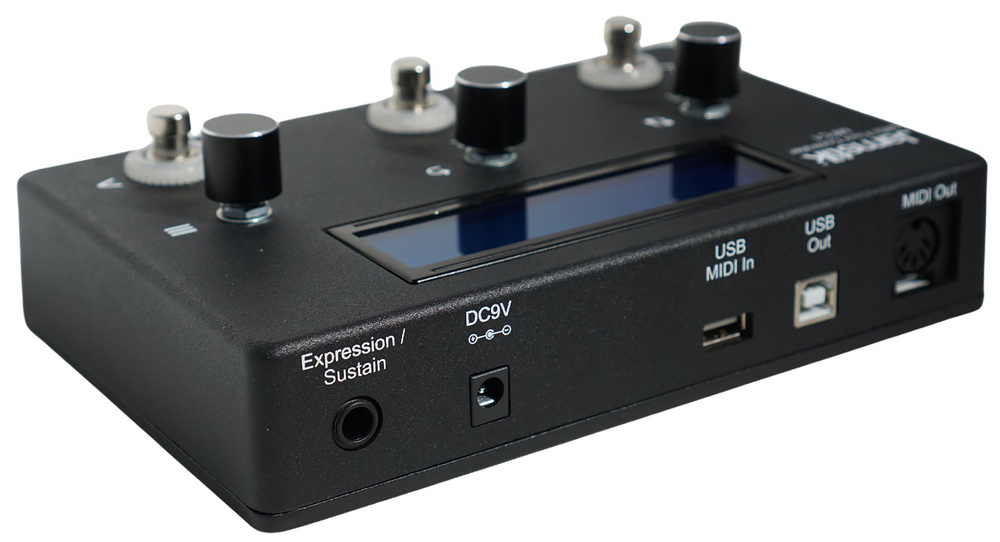 The MFC1 can be powered using USB or a pedalboard‑style 9V supply, which is useful if you need the USB connection for other things.
Using the Jamstik Creator application (standalone app for Mac and PC, and VST3/AUv3/AAX plug‑in) you can select from a range of nine pre‑configured onboard stored setups (aka Profiles) or save your own control assignments for particular workflows and preferences. The footswitches and encoders can be assigned to literally anything within the lexicon of MIDI: CC messages (Continuous Controllers) to modulate parameters such as volume, pan, and effects; PC messages (Program Change) to select between presets or patches; MIDI notes, to trigger samples; and MMC transport controls to offer hands‑free control of DAW functions like Play, Stop and Record.
But best of all, for Jamstik MIDI guitar users at least, the MFC1 offers direct control over Jamstik MIDI guitar parameters and device settings such as pitch‑bend, string envelope and MIDI modes, at the same time as passing through incoming MIDI data from the instrument. So, in a DAW‑recording scenario, your Jamstik would be connected to the USB MIDI in port and the USB out to the host computer, with SysEx and controller messages going from the MFC1 to the Jamstik, while note data is recorded in the DAW. Of course, if you’re not using a computer at all, perhaps using the Jamstik guitar to play a hardware synth, the Jamstik‑specific messages available within the MFC1 will allow you to still change important Jamstik parameters without needing access to the Creator software. Of course, it doesn’t have to be a Jamstik guitar that you are connecting, it could be another hardware synth, but they tend to have onboard access to settings, whereas a Jamstik guitar does not.
The rotary controllers are used for onboard programming if you are not using the app, but their inclusion hints at this being useful as a simple desktop MIDI controller, as well as for underfoot use.
The rotary controllers are used for onboard programming if you are not using the app, but their inclusion hints at this being useful as a simple desktop MIDI controller, as well as for underfoot use. If you want mouse‑free control of volume and pan on whatever DAW mixer channel is currently selected, you can just set up a profile for CC7 and CC10. Logic users beware, however: Logic’s mixer doesn’t default to using these parameters, so you have to remember to go into Project Settings / MIDI and enable the setting ‘Control Change 7/10 Controls Volume/Pan of Channel Strip Objects’. I’m not sure if other DAWs require something similar, but if it is not working in Logic, that’s probably why.
Another great application is using the MFC1 to control your DAW’s transport using MMC (MIDI Machine Control) messages, which is especially useful for MIDI guitar players who want to keep both hands free for the instrument. Again, Logic users will want to navigate their way down to Settings / MIDI / MIDI Sync Project Settings and enable ‘Listen to MIDI Machine Control’. Other DAWs may vary, but there’s a great resource on the Jamstik website: search for ‘MFC1 Third Party Software Profile Guides’.
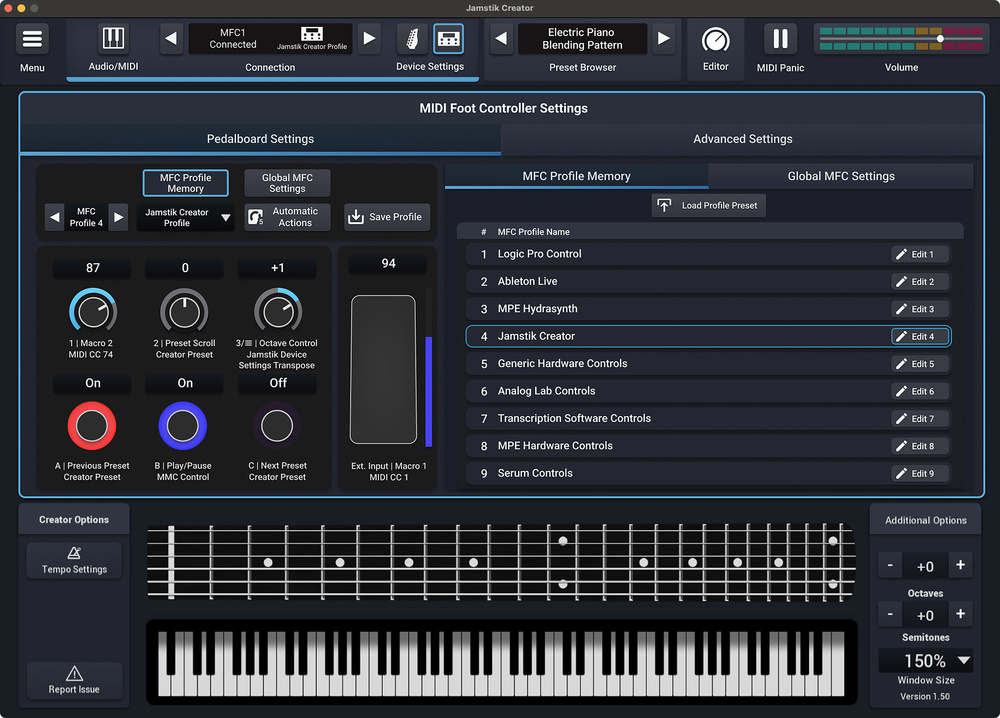 The MFC1 is easily programmable using the same app that’s used to configure Jamstik’s instruments.
Flexible & Easy To Program
There’s plenty of choice now in the MIDI foot controller sector, and there are plenty that are more ambitious than the MFC1 in the number of footswitches available — a Morningstar MC6 or Singular Sound MIDI Maestro at a comparable price point are both fully programmable and offer six and eight footswitchable functions respectively. But if you are a Jamstik MIDI guitar user, I’d say this is clearly the one to have. I know you can change all these parameters from the app, but being able to instantly transpose in octaves or semitones, or enable pitch‑bend only when you want it without having to take your attention away from the composition to look at the app, really does help to maintain a creative flow state.
But the big one, for me, is being able to easily switch between MIDI modes — MPE mode is great for working with the Creator plug‑in’s own synth voices, but the density of MPE data will overwhelm any virtual instrument that isn’t set up for it. I’ll often have a project using some Creator MPE instruments and some of the integral Logic instruments. Jumping between tracks to add parts using the different instruments requires a change of mode every time, and it’s brilliant to do it just from a footswitch. And the user colour‑coding available on the footswitches leaves me in no doubt as to which mode I’m in. Competitively priced, easy to program and seemingly built to last, be sure to give the MFC1 a look when shopping for a MIDI floor controller, especially if you are a Jamstik MIDI guitar user.
Summary
A flexible MIDI controller with a wide range of applications, but especially useful for the Jamstik MIDI guitar player.