

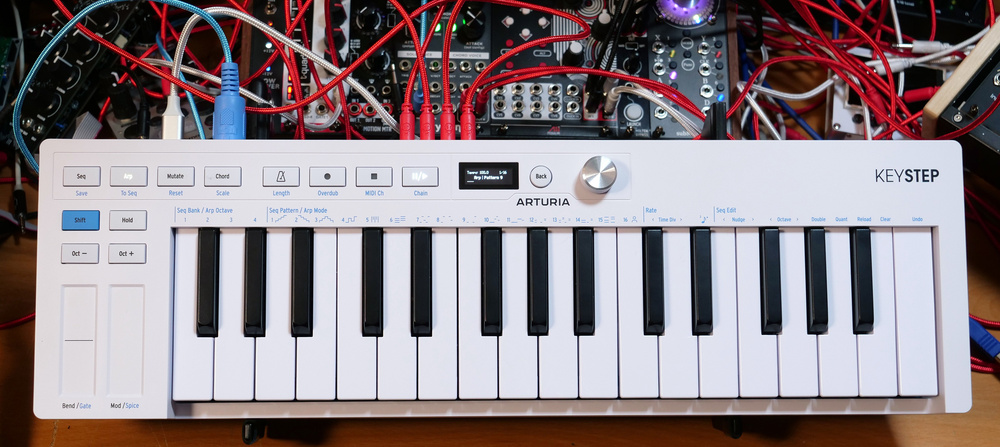
Arturia have reinvented the much‑loved KeyStep controller keyboard.
The KeyStep and its derivatives have become almost ubiquitous in the synth community. You see them everywhere at synthesizer shows and on YouTube videos and they’re clearly a perfect fit for anyone working with MIDI, software and hardware. And so, with a product so useful and successfully baked into our workflows, it takes quite a bit of gumption to attempt to improve it. This will be a story of losses and gains, and whether that’s a happy story depends on what you see as important in a multifunctional two‑and‑a‑half octave compact MIDI controller.
New Hardware
My first impressions are that it’s the same form factor of the original but with the knobs removed. It’s fairly light, made of relatively robust plastic, and shallow in depth. The plastic knobs and squishy buttons have been replaced with a row of hard plastic but nicely clickable buttons, a tiny OLED screen and a silver hi‑fi knob that stands a bit too proud. This feels like a regressive step back into screens and menus, which causes me to wince a little, but we will see what the interface offers before passing judgment. More pleasing are the little graphical clues printed along the top of the keys that hint at patterns and note structures.
At the back, we have a USB‑C port for power and connection next to a very welcome on/off switch, although we have lost the option for DC power. We then have full‑size MIDI in and out ports, 3.5mm sync in and out, a quarter‑inch sustain port and a bunch of 3.5mm CV outputs. We get an additional CV mod output to add to the original pitch, gate and mod jacks. Something I’ve always found curious about the KeyStep range is that Arturia talk about the compact depth enabling you to be closer to the thing you’re controlling, except you have all these ports getting in the way as their cables spew out the back. I would have liked to have seen these ports running along the front panel, or pushed to the sides to enable you to butt the KeyStep up against its hardware destination. I would also like to have seen the labels of the ports printed on the front panel, as they do with the KeyStep Pro, to save me writing them on with a Sharpie so that I don’t have to turn the keyboard on its edge every time I want to patch it in.
 The back panel loses its DC power socket, but gains an on/off switch. The full‑size MIDI ports remain mercifully intact, and the CV section has gained an extra mod output.
One thing I am very grateful for is the removal of the micro‑switch sync options panel. I imagine we have the screen to thank for that. In fact, there’s quite a lot we can thank the screen for. I no...
You are reading one of the locked Subscribers-only articles from our latest 5 issues.
You've read 30% of this article for FREE, so to continue reading...
- ✅ Log in - if you have a Digital Subscription you bought from SoundOnSound.com
- ⬇️ Buy & Download this Single Article in PDF format £0.83 GBP$1.49 USD
For less than the price of a coffee, buy now and immediately download to your computer, tablet or mobile. - ⬇️ ⬇️ ⬇️ Buy & Download the FULL ISSUE PDF
Our 'full SOS magazine' for smartphone/tablet/computer. More info... - 📲 Buy a DIGITAL subscription (or 📖 📲 Print + Digital sub)
Instantly unlock ALL Premium web articles! We often release online-only content.
Visit our ShopStore.