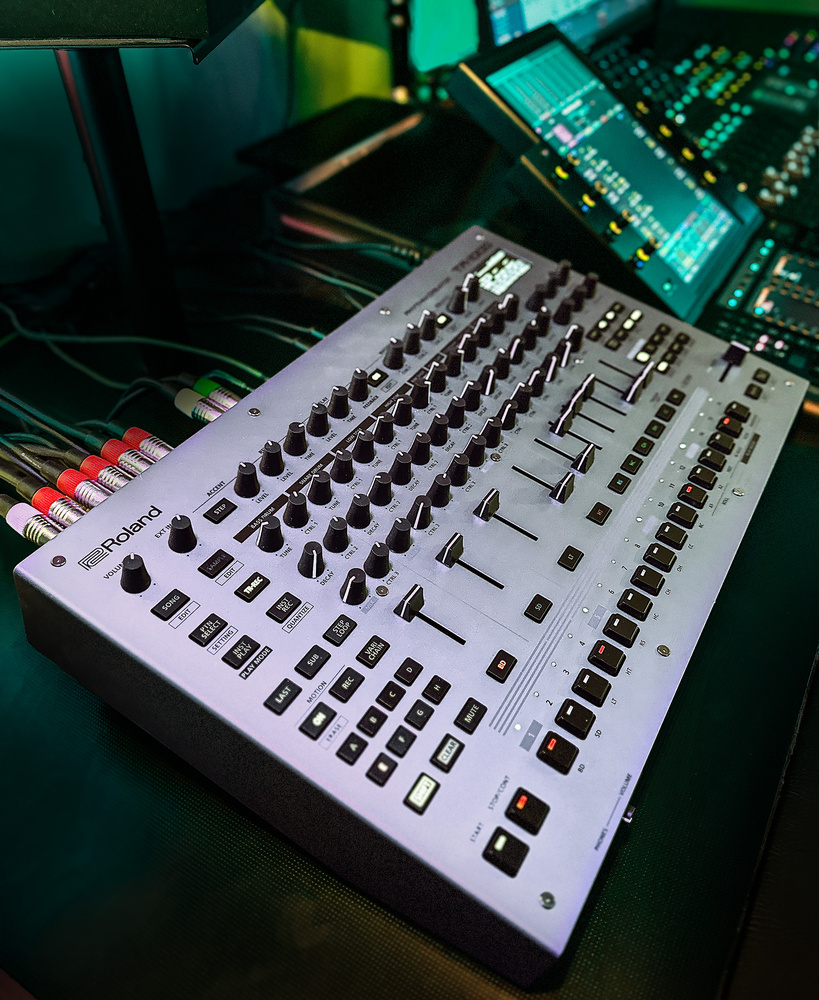
Elegantly combining analogue and digital, and balancing programming with performance, the TR‑1000 is the best drum machine Roland have ever made.
Music production gear is often designed with aggressive price points in mind and that means compromises, but the brief for a true flagship product should be more of a ‘give them what they want and we’ll figure out the money later’ vibe. Initial reactions suggest that the TR‑1000 is indeed the pro drum machine we wanted from Roland. Join us as we explore Roland’s vision of an analogue drum machine for modern times.
The Big Picture
The TR‑1000 expands both physically and functionally on Roland’s primary general‑purpose drum machine of recent years: the TR‑8S. It adds analogue drum voices to the digitally synthesized and sample‑based sources, new features like sample slicing and bpm matching, and a much improved user interface.
The instrument follows the layout of the TR‑8S, but moves away from the black plastic Aira build to a more serious‑feeling metallic silver chassis. There’s some resemblance to the MkII Elektron flagships; while the step keys reference the 909 they are more like Elektron’s, and there’s a modulation crossfader like the Octatrack.
Comparisons with the Analog Rytm were inevitable as it’s the reference point in my studio for a modern hybrid drum machine. But it’s fair to say that everyone has been influenced by Elektron’s conventions in recent years. And if Roland had asked me what I wanted it would have been the TR‑8S’s form factor with the Rytm’s functionality. In the end the 1000 has kept all of what makes the 8S unique, and crossed over into the territory of multiple rival units.
Sat next to an 8S or Rytm, the TR‑1000 is massive. It’s a heavy, chunky wedge built to be a studio centrepiece and pro touring instrument. The thickness and raked panel make room for that analogue synth circuitry as well as an internal power supply, and the resulting rear‑panel space has been stocked with a full set of split track outputs, full‑sized MIDI, USB ports, some analogue trigger/CV connectivity and more.
The panel design comes from the TR‑8S, which itself was an evolution of the 808/909’s track columns and step keys. As we’ve said before, the faders are a defining feature, typically slammed up and down in place of mutes rather than used for setting balances. It’s hard to explain why this makes these machines so playable — it just does.
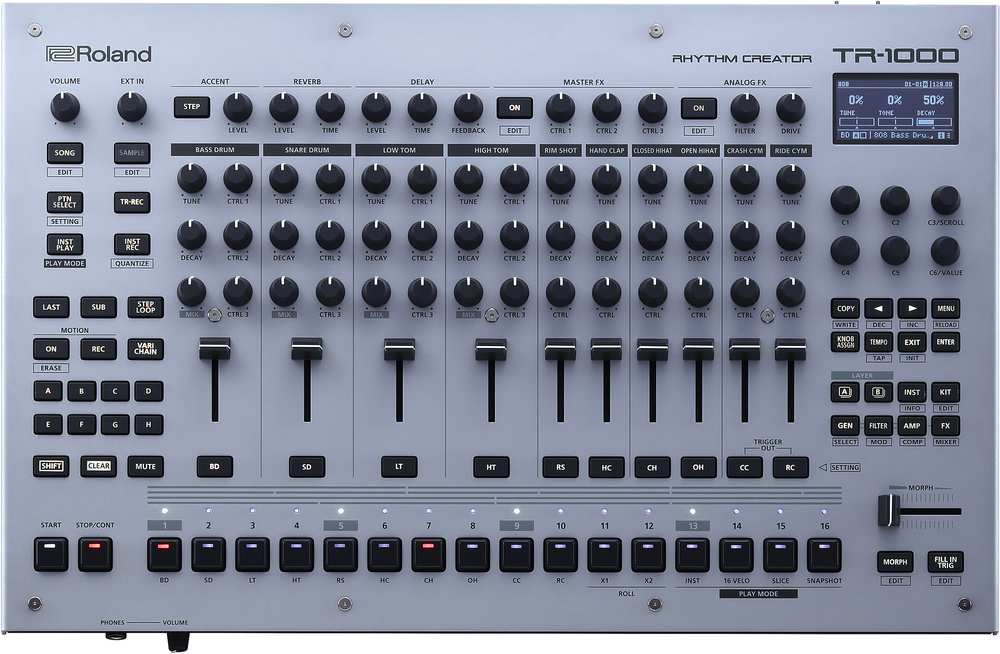 The panel is similar to the TR‑8S, but the display and encoders offer much easier editing.
Fader count is down from 11 to 10, but notice channels 1‑4 are double width with six knobs. These are dual‑layer tracks; more on that in a bit. There’s a proper screen instead of a text display, supported by six encoders. This, along with the wealth of dedicated buttons and a generally better‑thought‑out UI make working with the TR‑1000 faster and easier. You’re much less reliant on assigning knobs as you can achieve most sound design and editing tasks quickly from the screen. But first, let’s dive into sounds.
Analogue Soul
This is, I’ll say up front, a great drum machine in general, but it’s the analogue piece that’s caused most excitement. The TR‑1000 has 16 synth circuits taken from the 808 and 909, skewed towards the 808 as the 909 had some sample‑based sounds. Although channels are named on the panel, any of the analogue sounds can be used on any track, but only once per kit of course.
Let’s zoom in on the 808 kick as it’s so iconic. The TR‑1000 808 kick has the same two shaping parameters as the original: Tone, which affects the transient click; and Decay, which adjusts the length of the subby boom that accompanies it. The 1000 version also gets a Tune control. It doesn’t disappoint, delivering that air‑shaking thump.
The decay can go way longer than the original. In fact once you get to about 70 percent the circuit oscillates indefinitely, giving you a sub tone that you can shape with the track’s envelopes, filter and LFO. This makes sense, as in modern hip‑hop production ‘808 bass’ is more associated with sustained bass lines than kick drums. However, as we’ll see there’s not really a great workflow for melodically sequencing or playing the TR‑1000, at least in this first release.
In short, both analogue kicks sound mint, as do all the other analogue circuits. And many have extended capabilities, such as the hand clap with controls for clap size and tail level. Not everything is covered. There’s no mid tom, but the other toms can cover its range. Also absent are any of the switched modes on the 808: congas, claves and maracas. For these you’ll need to go digital.
A super cool feature of the analogue voices is dynamic responsiveness to velocity, and not just in terms of level. For example, the levels of the Snappy component of the snares and the membrane sound on the toms increase relative to the body tones with harder hits. The TR‑1000 has no velocity‑sensitive pads, not even the single tap button found on the TR‑8S, but it does have the usual Accent system for pushing some steps, and a ‘weak note’ entry option, giving you three basic levels. It’s easy to adjust the velocities of notes in a pattern more finely by holding and dialling in a value. Triggers from MIDI inputs also respect velocity.
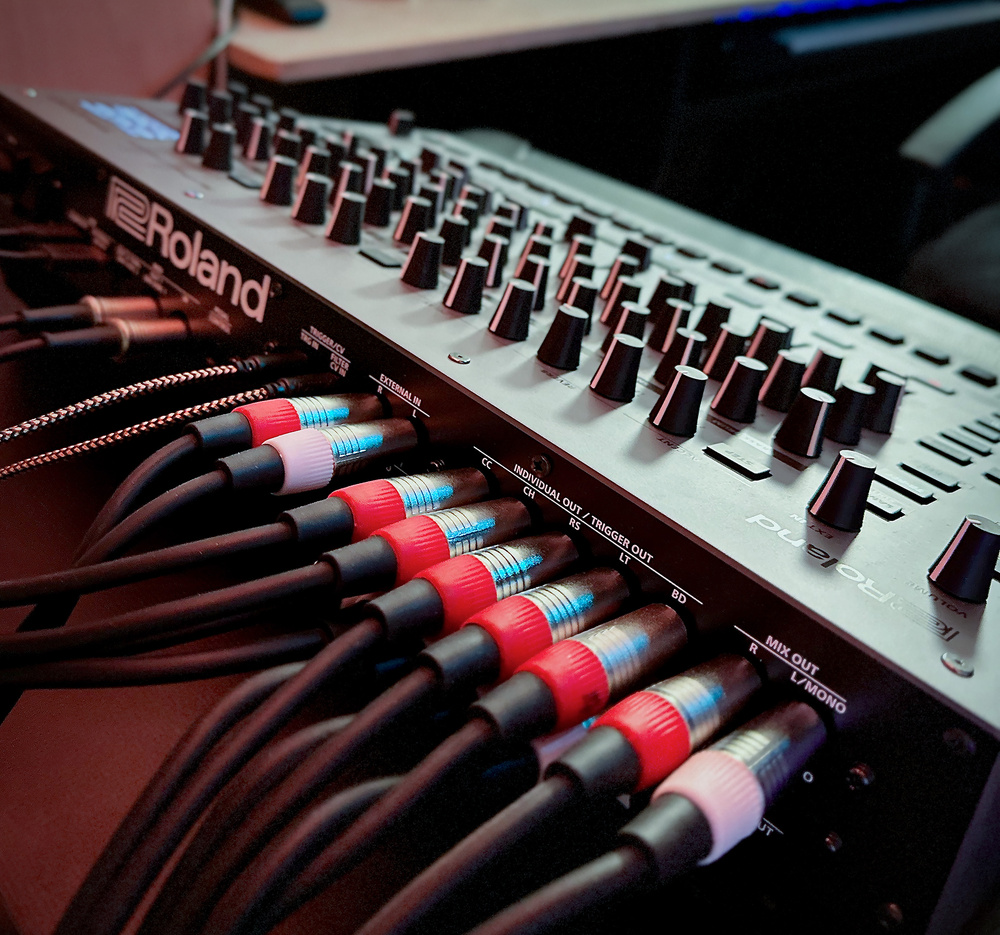 All 10 channels are split out, and there’s a direct out from the analogue effects for a pure analogue path. The only thing missing is a dedicated aux send.
Digital Heart
Roland’s Analogue Circuit Behaviour DSP was first seen on the TR‑8, recreating the 808 and 909 sounds by building the circuits virtually, and staying mostly faithful to the original controls. ACB has evolved over successive instruments like the Boutique machines, adding sounds from the other TRs and some new and extended control ranges. In fact some ACB sounds like the 6x, 8x and 9x kicks can be switched between the TR8 and Boutique versions, in either the original or long decay modes that these units offered.
ACB models provide the classic sounds from other great instruments like the 606 and CR‑78, as well as 8x and 9x sounds that aren’t rebuilt in analogue here. But beyond that, Roland have pimped the ACB patches, unlocking control over many new parameters within the component parts of the algorithms, so they are great to have alongside the analogue versions.
For example, the 808 Snare now has independent control of the levels and decays of the tone (body) part of the sound and the ‘snappy’ noise. The tone circuit is a blend of two basic oscillators, which can now be detuned. The hand clap is even more bendable: you can set the speed and decay of the flammed bursts that approximate a clap, and the tone and decay of the filtered noise that simulates reverb. Perhaps whimsically, the cowbell is completely deconstructed and mod‑able. It’s fascinating to see the workings of these original synth circuits, and to explore new sounds with them.
As well as ACB, the TR‑1000 offers FM and virtual analogue sound engines, PCM sounds and samples. The seven FM models are versatile for both drum and tonal sounds, deserving much more than a single sentence... but there’s so much more to get to!
The virtual analogue (VA) models are part of the ACB set, and provide oscillators with all the usual subtractive synth waveforms, with pitch envelopes and PWM as well as the other standard track resources of filters, envelopes and effects. A cool use of a dual track could be to make a two‑osc synth voice. PCM sounds are a mainstay on Roland instruments, and the TR‑1000 has a ton that you can use without using up any of your project’s sample slots.
Difference Engine
If you line up the analogue 808 or 909 kicks against the digitally modelled versions in their default states, they sound different. This is largely because the analogue patches start off pitched way down compared to the ACBs. With pitches matched the 808s are very close although the ACB can’t do the infinite release. The 909s on the other hand always sound different, with the ACB version having a kind of subtle grind to its tone (that’s nice) compared to the purer starting point of the analogue. The TR‑1000’s version of the 909 has Tune and Pitch control, slightly confusingly named as Tune seems to affect the pitch envelope while Pitch offsets the overall tuning.
Comparing the analogue and DSP Roland drums is an interesting exercise, but I also spent some time listening to original 808s and 909s and comparing the new analogue versions. I don’t have the originals at home to experiment with but there’s no shortage of examples to be found on YouTube.
Of course all the 40 year‑old instruments are slightly different (often modded) and have a lot of miles on them. And that might explain the slight difference I hear on the 808 front. Taken as a whole, listening to a complete pattern, the TR‑1000’s 808 sounds very present and vivid. I don’t want to say bright because that’s not quite it — it sounds new and fresh. Classic 808s have a subtle dustiness or mid scoop to them to my ears. Both are wonderful. With the 909 I’d say it’s too close to call.
Fat Channels
Tracks 1‑4 on the TR‑1000 combine two channels. This seems inspired by the Analog Rytm, which can layer analogue and sample sources on each track. Layering sounds is obviously useful for thickening sounds, combining a transient with a tone, or just experimenting, but the TR‑1000’s dual tracks can do more than this.
Using the Layer A and B buttons you can manage and edit the two channels partially independently. You can load two sound sources — a mixture of analogue and digital/sample‑based, both analogue or both digital. 808 and 909 combined perhaps? Or maybe an FM sound and a PCM, or whatever. The two sides are independent voices with their own filters and envelopes. They share the track’s LFO and mix settings including the compressor, track effect, panning and sends. They share the track’s mix settings, which include the compressor, track effect, panning and sends. An excellent feature for layering that I don’t think I’ve seen elsewhere is a polarity flip and timing offset on every source.
The double channels have a Mix knob, generally used for blending the two layers, but which can be reassigned like the other knobs. Placing triggers in a double track’s sequence plays both sounds, but you can break this link. Holding either of the layer buttons allows you to place step triggers for either sound independently.
I enjoyed layering a punchy kick with a sub with them triggering together for four‑on‑the‑floor, then interspersing some subs for some groove and rumble underneath. I also tried putting closed and open hats on a dual track and programming their steps separately. Other thoughts were to put the same sound on both layers and use the Mix control to switch between two different patterns, or assign to the Morph fader to juggle between loops. Which leads us to...
Samples
We complete our tour of the sound options with the sample engine. There are 2000 or so samples pre‑loaded, with 46GB of space for importing or capturing your own. Sample browsing is integrated with the unified sound generator selection process. I really like how you don’t have to think about engines or track types: tracks just become the appropriate type depending on what you load in.
You can sample from the external inputs or resample from the internal mix, or any submix of tracks. You can also capture over USB, although the lack of class compliance limits this to computers, not phones or other USB streaming instruments. By the way, external sources are fed into the mix and can access the effects and side‑chain, and external input parameters can be modulated by the master section LFO. I’d love it if you could assign the external inputs as track sources (as on the MC‑707) but that’s not possible.
Sampling can be triggered manually, with a threshold, or by pattern start. You can also predefine a length in steps, which is great for resampling to a loop. You can trigger sampling during playback and assign the sample to a track without stopping — great! The missing piece is sync’ed sampling during playback — it’s so close to the Holy Grail of real‑time loop sampling while jamming. One for the firmware wishlist.
Otherwise, the 1000 does a good job supporting loops and long samples, even stems. There’s real‑time bpm matching with multiple stretch algorithms. Sample playback stops with the transport rather than continuing indefinitely, and there’s a Playthru mode that stops a longer sample from resetting to the start every bar. (Although a slight bug was needing to trim a tiny bit off the end to get it to retrigger every pass). One frustration: you have to figure out the bpm of a sample and dial it in manually. Most samplers will at least have a guess at source bpm based on sample length.
More proof that Roland have thrown everything at this machine: there’s full‑featured slicing functionality. Matching the Digitakt II’s recent update, the TR‑1000 even has transient detection and editable slice points. Slices have independent tuning and stretch settings and share track features like the filter and envelopes. A dedicated Instant Play sub‑mode puts slices on the step keys for real‑time playback and record, and you can dial in slices per step in the classic TR mode.
 The 808 kick generator and track modules revealed in the editor app.
Sequencing
Pattern creation follows the familiar workflow from the modern TR and MC boxes. In TR‑Rec mode you enter step triggers in the time‑honoured fashion. Instant Play turns the step keys into playable triggers, with the first 10 playing the tracks, then 11 and 12 acting as roll (repeat) modifiers. Inst Rec uses this layout for real‑time recording (although no metronome!). A huge departure from previous generations is support for unquantised recording and editable micro‑timing. The TR sound might have made its name in house, techno and electro, but is as popular now in genres that thrive on more feel and looseness.
Hold a step and you make a range of quick adjustments such as velocity, timing and probability. Visual guides help with dialling in sub‑steps (ratchets), and setting triggers to play only on some cycles. Fine resolution timing adjustment is displayed on a horizontal meter; this, I discovered by accident, can be set with the Morph fader and displayed on the step lights. Nice touch!
At the track level you can push or pull each of your pattern’s lanes with micro‑timing, set shuffle, and choose different directions and lengths. Track Rotate is interesting. I always appreciate a nudge function on a sequencer to move all steps left or right. Rotate does this non‑destructively, offsetting the playhead for the track, which you can see running along the step lights out of phase with the main position.
Roland have kept the TR‑8S system of pattern Variations triggered from a cluster of eight buttons. Variations are always a maximum of 16 steps, so creating longer patterns requires chaining Variations by holding more than one button. While this is different to how most machines work (but the same as Novation’s Circuit), my brain seems to find this easier to keep track of than having one long pattern in a patch.
Patterns also have up to four fills, triggered from the Fill button. Like the TR‑8S, you have to choose an active fill in the Edit screen, which means you’re probably only ever going to use one. I like the momentary fill mode, which punches in while you hold the button. Which brings me to my number one TR‑8S complaint not addressed here. There’s no instant Variation or pattern change mode. Changes are always queued, which is a shame, especially if you’re working with breaks. There is, however, a Step Loop button, which I’ll take over a fill system any day.
Finally, the TR‑1000 has a proper song mode, where you can create a playlist of patterns and Variations. It’s flexible enough to be useful for arrangement and a longer live performance, or simply as a way to chain Variations out of their natural sequence.
Motion
Motion, or parameter automation, in the TR‑1000 is much the same as on the TR‑8s and the MC‑707. Motion captures movements or settings of panel knobs: that’s the knobs on each drum track and the effects controls along the top. You can capture real‑time movements, or hold a sequencer step and dial in values pinned to that step.
While per‑step motion capture appears to follow Elektron’s ‘parameter lock’ convention it does not behave in the same way at all. In what’s quite a common issue on sequencers, dialling in settings on one step does not affect the step in isolation. Steps with no explicit motion get swept along for the ride. If it’s the first step to be written, the values will affect the whole pattern. And even when not, parameters will extend to every subsequent step up until the next automated step. So, if you want to write things specifically to one step you have to write them, then go to the next step and reinstate all the previous values.
This is why trying to capture a melodic sequence is problematic. Although many of the sound sources offer semitone pitch settings, programming a tune feels like hitting a moving target as you end up affecting multiple steps. I hope this is revised at some point. In the meantime, there’s one feature that does make this easier...
Snapshots don’t do what I expected. I imagined Maschine’s Snapshot system, which stores and recalls the states of all parameters in a project. Snapshots on the TR‑1000 package the settings of a single track into one of 16 slots, accessed from the step keys in another Instant Play mode. In this mode you can play and record a track with multiple variations. Thus you have a workaround for melodic sequencing: store a set of tuned Snapshots then play them into the sequencer. There isn’t a way to drop Snapshots into TR‑Rec mode though, or select them after the fact like Slices.
Performance
While detailed programming and arrangement is possible on the TR‑1000, it lends itself to getting something basic going then messing with it in an improvisational way. In fact, time spent on prep and programming is better invested setting up effects, knob assignments (which can be multi‑parameter macros) and the other new performance features than on making a ton of patterns and variations. And it’s always simple to throw a group of faders up or down to change things up.
The new star performer is the Morph fader, which can be used to introduce a whole set of sonic changes in one swipe. You might be thinking Octatrack fader, but it’s more like the Quick Performance knob on the Analog Rytm. While the Octatrack fader moves between two scenes of absolute parameter values, Morph applies relative offsets to the current control values on the panel. At the right end of the fader’s travel no offsets are applied; modulation is applied gradually as you move left.
Sixteen separate Morph configurations can be stored and recalled from the step keys. A fun way to make use of this — and to emulate a Scene‑style workflow — is to park the fader fully left, then tap different keys for immediate jumps between sound states. Like Snapshots, the Morph fader is limited to modulating parameters assigned to panel knobs, which is kind of a shame because you might not want to use up a knob just so the Morph can get to it, and there are parameters it can’t reach like the Kit mod.
There are two stages of master effects: digital and analogue. The digital slot is interchangeable with effects that will be familiar from other Roland beat machines. One of these is Scatter, the beat repeater and mangler first found on the TR‑8, and which is a great candidate for Morph fader assignment. The analogue stage has a multi‑mode filter, which you can use for the usual breakdown tricks of cutting the low or high end; and a lovely saturated Drive. Alongside these are master sections for the shared (and not particularly outstanding) reverb and delay send effects.
Modern Conveniences
As well as bringing the workflow and interface up to modern expectations, there’s a solid level of digital connectivity and control. Alongside all the analogue audio I/O there’s both USB‑C for connecting to a computer, and a USB‑A port for external devices. The latter can be used for connecting storage devices for sample import, but will also host a class‑compliant MIDI controller.
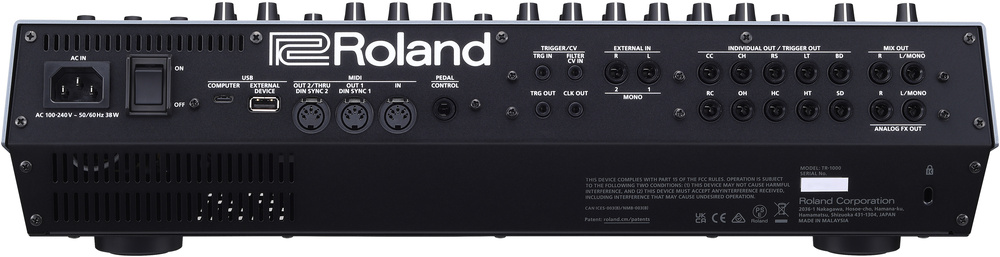 Round the back we have an IEC mains inlet and power switch; USB‑C and A ports; MIDI in, out and out 2/thru ports (two of which double up as DIN Sync); a quarter‑inch pedal input; 3.5mm sockets for trigger in, filter CV control, trigger out and clock out; two quarter‑inch audio inputs; 10 quarter‑inch individual audio or trigger outputs; and finally, also on quarter‑inch jacks, the main audio outs and dedicated analogue effects outputs. Phew!
With the driver installed the TR‑1000 shows up on your computer as an audio device, streaming in all tracks individually plus the main stereo mix. It also goes above and beyond on the output side. Multi‑channel routing back to the TR‑1000 provides a stereo connection to the external sampling input (which runs through the effects) but also direct routing to the mix output and all the individual track outs, which could be super useful in a live scenario.
A surprisingly good desktop app gives you comprehensive real‑time control and visual feedback. It would be great to see this as a plug‑in at some point for sync’ed recall, and maybe even for automation and audio streaming in your DAW. Sample and slice editing is excellent. The app can also be used to transfer samples to the TR‑1000. This is a very basic dropbox kind of workflow. A proper sample manager where you could see and sort what’s on the machine would be ideal.
Conclusion
The TR‑1000 has been several years in the making. You can imagine that Roland really wanted to do something special if they were going to revisit these heritage analogue sounds. They went back to some of the original artists using the TRs, listened to feedback, tested many original and modded instruments, and rebuilt the circuits with modern components. But they clearly didn’t want just to build their own clones. The analogue voices are more versatile and controllable, even while they can serve up the OG goodness, and merging them with their modern platform gives you so much more than just a reissued 808 or 909.
The combination of digital synthesis, PCM and a proper sampler is exciting and compelling. And there are all the split outputs, both analogue and digital, that make this a grown‑up pro studio or live instrument. This of course adds up and puts a premium price on the TR‑1000. But we routinely review flagship synths and audio interfaces in these pages that cost a lot more.
While it feels like a real privilege to have all this drum synthesis power in one place, it’s the performance and playability factor that does it for me.
While it feels like a real privilege to have all this drum synthesis power in one place, it’s the performance and playability factor that does it for me. The TR‑8S has this, but can also be frustrating to interact with when doing anything other than twiddling controls. The TR‑1000 has overcome this, and added even more fun with Morphing and Snapshots. All the little ways you can make quick changes add up, and every session with the TR‑1000 turns into a jam. It feels like an instrument and in that, as much as in the sound, Roland have recaptured and honoured the spirit of those original genre‑defining machines.
Pros
- It’s an analogue 808 and 909...
- ...with many other synth and sample capabilities.
- Much improved file and control workflows.
- Unquantised recording and programming.
- Sample slicing, looping and stem playback.
- Multi‑channel analogue and USB audio I/O.
Cons
- No straightforward melodic sequencing.
- Per‑step motion has unpredictable results.
- Still no instant takeover mode for patterns.
Summary
A best‑of‑both‑worlds pro drum machine that’s hugely fun and inspiring to play.
Information
£2286 including VAT.
$2699.99
When you purchase via links on our site, SOS may earn an affiliate commission. More info...

When you purchase via links on our site, SOS may earn an affiliate commission. More info...