

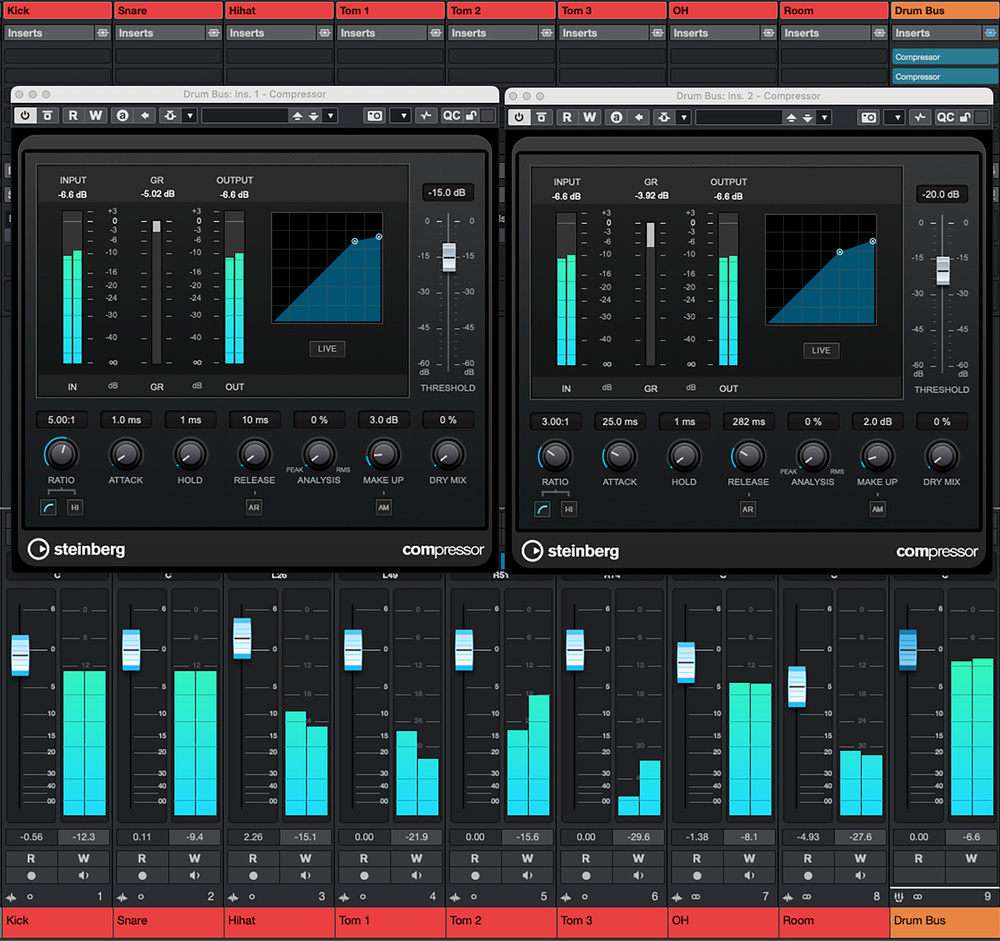
 Screen 1: With two instances of Compressor on your drum bus, you can both tame transients and add some extra punch, without losing the natural sound of the kit.
Add impact and attitude to your drum parts with Cubase’s stock dynamics plug‑ins!
When you’re mixing, there are lots of processing options that can make a significant contribution to your acoustic drum sound, but dynamics processing can be particularly useful when the musical style or nature of the mix mean the drums must make a larger‑than‑life impact. Such processing might come in the form of gating, expansion, compression, limiting, transient shaping, clipping and even as a side‑effect of tape emulations, amp/speaker sims, saturation and distortion.
So what, on this front, does Cubase’s stock plug‑in collection have to offer? With the aid of some audio examples (available on the SOS website: https://sosm.ag/cubase-1225), we’ll explore all that in this article. It’s a big subject, though, so to keep things focused and ensure that all the techniques I cover below can be achieved in any Cubase versions from Elements upwards, I’ll concentrate mostly on compression, transient shaping and saturation.
Remember that the multitude of options at your disposal always includes doing nothing!
And I’ll add one final note before we dive in: remember that the multitude of options at your disposal always includes doing nothing! Your first job is always to listen carefully, and if your drums were recorded well and sound great, then just balancing the faders and allowing the glorious natural dynamics of the kit and performance to be the star of the show may well be enough, particularly if you have any bus processing going on. It’s not an unrealistic prospect, if you’re happy to live without winning an award for crafting the loudest mix in history!
Drums, Naturally
Normally, though, you’ll want at least to reign in some aspects of the performance/recording just a little, even if you don’t want to overtly change the energy or character of the part. For such duties, you don’t need to look for anything special: Cubase’s standard Compressor plug‑in is a transparent and very flexible tool, and well up to the job. An instance, or possibly two in series, placed on your drum subgroup might well be all that’s required.
The first screen shows a setup with two Compressor plug‑ins, each instance having different attack and release times so they react differently. The first is intended just to catch the highest peaks in the signal. Its threshold has been adjusted so that compression is triggered only by the loudest section of a hit: the initial transient. But, the very fast attack and release times mean that as soon as the transient has passed through (and thus the signal level drops below the threshold), the compression ceases quickly — the gain reduction meter should almost just ‘flicker’ to indicate this short‑lived processing.
The ratio you can set to taste, and you can juggle the ratio and threshold controls to finesse the amount and character of gain reduction this compressor gives you. But note that generally you’ll want more assertive settings than the (roughly) 2:1 you might opt for on a mix bus; I used 5:1 in this example. Incidentally, if you crank the ratio up to 8:1 (the maximum ratio the Compressor plug‑in offers), it starts to become something like limiting, and if that’s what you’re after, you could easily use an instance of Cubase’s Limiter here instead. Personally, I like having the additional control offered by Compressor. Once configured, and you’ve noted the maximum gain reduction (around 6dB in this example), you can then apply a little make‑up gain (I used a fairly conservative 3dB here). Because we’re pulling down the peaks, the end result is a sound with less overall dynamic range, but with the sustained portion of each hit...
You are reading one of the locked Subscribers-only articles from our latest 5 issues.
You've read 30% of this article for FREE, so to continue reading...
- ✅ Log in - if you have a Digital Subscription you bought from SoundOnSound.com
- ⬇️ Buy & Download this Single Article in PDF format £0.83 GBP$1.49 USD
For less than the price of a coffee, buy now and immediately download to your computer, tablet or mobile. - ⬇️ ⬇️ ⬇️ Buy & Download the FULL ISSUE PDF
Our 'full SOS magazine' for smartphone/tablet/computer. More info... - 📲 Buy a DIGITAL subscription (or 📖 📲 Print + Digital sub)
Instantly unlock ALL Premium web articles! We often release online-only content.
Visit our ShopStore.