

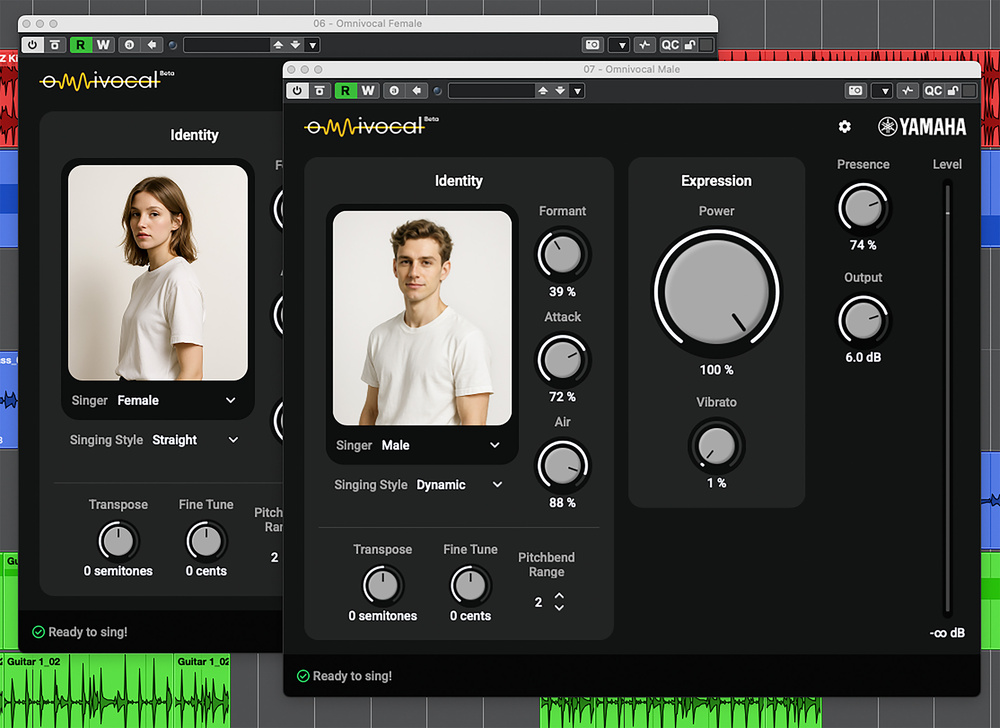
 The initial beta release of Omnivocal ships with two voice characters.
Find out just what’s possible — and what’s not — with Cubase’s new virtual vocalist.
Steinberg dropped something of a leftfield surprise with Cubase 15: the inclusion of Yamaha’s Omnivocal. Supplied initially in a beta form but available to Pro, Artist and Elements users, Omnivocal is a virtual vocalist instrument plug‑in. Of course, Yamaha have a longstanding history in vocal synthesis — for example, it was way back in March 2004 that we first reviewed their Vocaloid software, whose synthetic vocals have spawned something of their own genre online, particularly within the anime/manga world. But in recent years, developers such as Dreamtonics and ACE Studio have used AI techniques to push vocal synthesis technology forwards, allowing users to craft remarkably natural‑sounding and expressive vocal lines from a virtual instrument in much the same way as they might for a virtual string or wind instrument.
On the surface, it would appear that Omnivocal aims to do something similar — in essence, you just instantiate it on an instrument track, record (or program) a standard MIDI clip with the desired melody, and Omnivocal will then synthesize a human vocal to ‘sing’ those notes. So for those who’ve upgraded to Cubase 15 or are considering it, let’s find out exactly what you can expect from your new virtual session singer...
Singing Lessons
As with other virtual instruments, you can choose between different sounding presets. In its current beta form Omnivocal lets you choose between a male or a female singer, but I gather more options featuring different singing characters are planned for the future. You also get a number of parameters that can adjust the sound character of each singer. For example, you can pick between Straight (more subdued) and Dynamic (more expressive) singing styles.
There are also automatable parameters, such as Formant, Attack, Air, Power and Vibrato, all of which can change the character of the vocal delivery. You can automate these parameters, but they require the synthesis engine to re‑render the sung vocal to reflect your changes. While this happens automatically and very quickly in the background, it does mean that you can’t actually adjust these controls in real time like you might with, for example, a synth’s filter cutoff. That said, pitch‑bend data and the Presence (a tonal control) and Output dials operate outside the vocal synthesis engine, so they can be adjusted in real time.
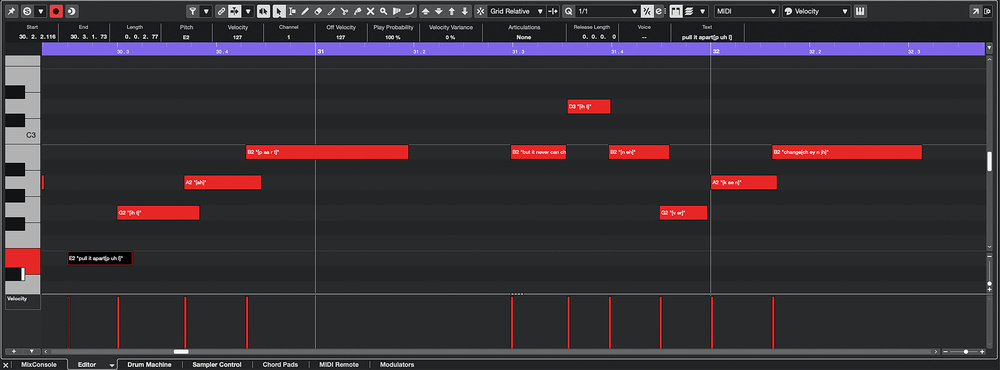 The Text box allows you to add lyrics for Omnivocal to sing.
Initially, your melodic line will be sung with an ‘ah’ vowel sound for each note, but you can enter your own lyrics in the Text box on the MIDI Editor’s Info line. It has to be said that, in its current beta form, this aspect of Omnivocal feels a little cumbersome in operation. You can enter lyrics one note at...
You are reading one of the locked Subscribers-only articles from our latest 5 issues.
You've read 30% of this article for FREE, so to continue reading...
- ✅ Log in - if you have a Digital Subscription you bought from SoundOnSound.com
- ⬇️ Buy & Download this Single Article in PDF format £0.83 GBP$1.49 USD
For less than the price of a coffee, buy now and immediately download to your computer, tablet or mobile. - ⬇️ ⬇️ ⬇️ Buy & Download the FULL ISSUE PDF
Our 'full SOS magazine' for smartphone/tablet/computer. More info... - 📲 Buy a DIGITAL subscription (or 📖 📲 Print + Digital sub)
Instantly unlock ALL Premium web articles! We often release online-only content.
Visit our ShopStore.