

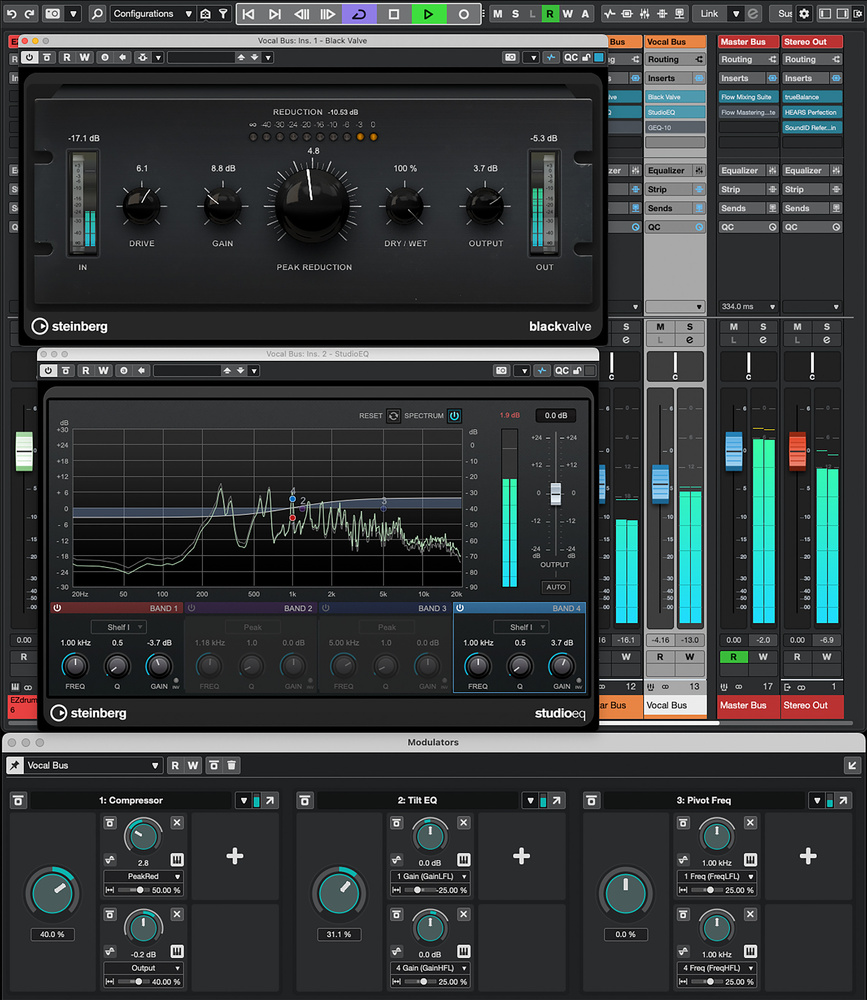
 Three Macro Knob Modulators provide broad‑brush control over compression and EQ on each of the main audio busses (group channels) within this project
Could Flow‑style macro controls, courtesy of Cubase’s powerful Modulators, enable you to mix more quickly?
When I’m mixing, after making some initial adjustments to individual tracks that are very obviously required, I’ll often shift my focus pretty quickly to the buses — both my various instrument subgroups and the stereo master. My intention is to make rapid progress by applying broad‑brush strokes to the mix, before my ears grow too accustomed to the sound. In general, this will involve setting an initial static mix balance between the instrument groups using the faders, and then some decisions around compression and EQ.
I recently explored — and was impressed by — Softube’s Flow Mixing Suite (my review is in this very issue), and found it really useful at this stage of a mix, and its macro controls particularly intrigued me. They’re a set of knobs that can each be mapped to control one or more key parameters in a multi‑plug‑in signal chain. For example, a single ‘compression’ macro control might influence both the threshold and make‑up gain controls of a dynamics plug‑in, so that as you turn the macro control, it applies more compression by lowering the threshold, but simultaneously increases the make‑up gain to compensate for the loss in level. As well as saving you having to turn two knobs to achieve one task, this approach means you don’t have to keep opening/closing individual plug‑ins, and you can keep your screen relatively uncluttered.
But of course, impressive as it is, the Softube system works only with Softube’s plug‑ins, and so, with this experience fresh in my mind, I decided to see if I might emulate the approach in Cubase, using the Pro version’s Modulator feature. It worked pretty well, and below I’ll take you through some examples.
There isn’t a tilt EQ in Cubase’s stock plug‑in collection... but with a little bit of Modulator magic you can create one based on the stock Studio EQ.
One‑knob Wonder
Let’s start with that compressor example. For this experiment, I instantiated Cubase’s Black Valve plug‑in on my project’s main lead vocal bus, but you could apply the same principles to any of Cubase’s stock compressors, used on any audio signal. With my vocal bus (a group channel) selected, I opened the Modulator panel in the Project window’s Lower Zone, then popped that open as a separate floating window (use the arrow button, located top right of the pane). That let me see it alongside the MixConsole, not just in the Project window.
In the Modulator panel,...
You are reading one of the locked Subscribers-only articles from our latest 5 issues.
You've read 30% of this article for FREE, so to continue reading...
- ✅ Log in - if you have a Digital Subscription you bought from SoundOnSound.com
- ⬇️ Buy & Download this Single Article in PDF format £0.83 GBP$1.49 USD
For less than the price of a coffee, buy now and immediately download to your computer, tablet or mobile. - ⬇️ ⬇️ ⬇️ Buy & Download the FULL ISSUE PDF
Our 'full SOS magazine' for smartphone/tablet/computer. More info... - 📲 Buy a DIGITAL subscription (or 📖 📲 Print + Digital sub)
Instantly unlock ALL Premium web articles! We often release online-only content.
Visit our ShopStore.