

You are here

Softube Flow Mixing Suite

Effect & Processor Plug-in Collection By John Walden
Published March 2026

Softube Flow Mixing Suite

Can Softube’s Flow Mixing Suite cover all your mix processing needs within a single plug‑in collection?

Just over a year ago, Softube entered the world of plug‑in subscription bundles with their Flow Mastering Suite (see the separate box), and now they’ve added an option aimed at different users: Flow Mixing Suite. Despite the name, Flow Mixing Suite is more than a collection of mixing‑focused plug‑ins...

Let It Flow

But that’s where I’ll begin! The plug‑in collection is comprehensive, spanning EQs, compressors, channel strips, reverbs, delays, guitar amps/cabs, saturation, modulation, stereo width/spatial, vocoder, clipping and lo‑fi categories. At the time of writing, the Suite added 78 plug‑ins (VST, AU or AAX formats) to my computer, so if I tried to detail all of them here, I’d fill the magazine! Softube’s website includes an up‑to‑date list, though, and suffice it to say that you’ll find modern takes on core processing tasks, a number of the plug‑ins designed for close integration to Softube’s Console 1 control surface, and plenty of emulated classics here.

The second element of the package is the dedicated Flow Mixing Suite plug‑in. As with Flow Mastering Suite’s similar plug‑in, it’s a ‘mothership’ plug‑in, supplied with a collection of presets Softube call Flows. Each Flow comprises a plug‑in signal chain that’s designed to handle a specific mixing task — they’re helpfully categorised for common duties such as Drums, Vocals, Guitars, Keys, Creative, MixBus and Sends — and when you load a Flow preset, you can control and/or edit the individual plug‑in settings and the signal chain from the single GUI. Softube aim to update the list of Flows regularly, with free‑to‑download artist‑created Flow Packs, but at the time of writing three Packs were available: Lo‑Fi Chill, MixbusTv Modern Production, and RAFFER Vocal Styles.
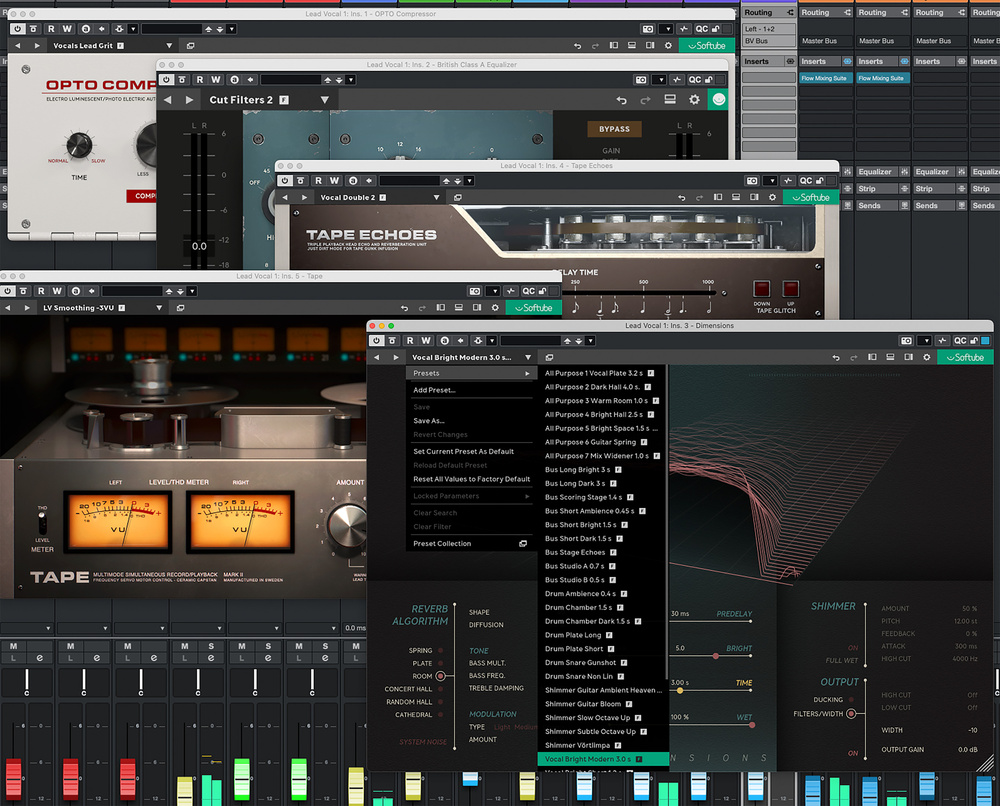
All of the plug‑ins can be used individually if you prefer that workflow and, whether used within the host or outside it, each includes its own set of useful presets.All of the plug‑ins can be used individually if you prefer that workflow and, whether used within the host or outside it, each includes its own set of useful presets.

As a further sweetener for those still on the fence with the subscription model is that it’s a ‘subscribe to own’ model. For each month of subscription, the user earns credits towards purchasing your favourite plug‑ins on a perpetual basis. Each credit is about double the value of the monthly subscription, so it would take a while to be able to acquire all 78 plug‑ins this way, but if you eventually decide to dispense with the subscription, you have the chance to keep a select few favourites in perpetuity. To my mind, it’s a welcome feature.

Perfect Host

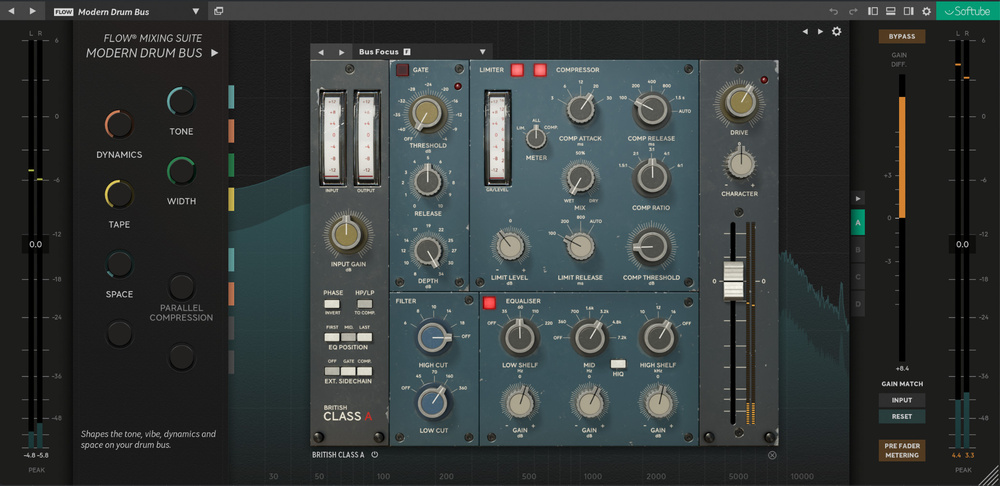
The individual plug‑ins are generally exceptionally good and, of course, they can be hosted in your DAW in the usual way. But the Flow Mixing Suite mothership plug‑in is intended to facilitate a more efficient workflow, and there are three main ways in which it can do so. First, the Flow presets provide instant access to some very well‑designed signal chains, spanning various routine mixing tasks. Similar to a DAW’s track presets facility, then, but with presets tailored to these plug‑ins, and which are accessible whatever DAW you’re using. Second, once a Flow is loaded, you can access each plug‑in from a single window, which can help keep your screen tidy. And third, a Flow Controls Panel, on the right, hosts macro controls for swift and easy access to the key parameters of different plug‑ins in the signal chain. The macros’ functions are specific to each Flow, and often they’ll give you all the control you need.

A macro control can act on multiple parameters in one or multiple plug‑ins — hover over the macro control and the GUI will display the linked parameters. And if you click on the macro control, the main plug‑in associated with it is brought into focus so you can access its full control set. This central portion of the GUI also provides an overview of the full signal chain, and lets you bring any of the individual plug‑ins in the current chain into focus, adjust the signal‑chain order, and add and remove plug‑ins.

The macro control system (left) and collection of Flow presets (right) in the suite’s host plug‑in aim to make it quicker and easier to make your mix decisions.The macro control system (left) and collection of Flow presets (right) in the suite’s host plug‑in aim to make it quicker and easier to make your mix decisions.

This all adds up to make possible a very neat workflow. One practical observation is that some of the more complex plug‑ins will occasionally require you to resize the mothership plug‑in window if you wish to see all their details. Also, while building your own user signal chains from the ground up is a very straightforward process, it’s possible to assign only a single parameter to each macro control. (If instead you edit a supplied preset and save it as a user preset, the pre‑configured macro knob assignments are retained). Thankfully, Softube’s documentation suggests this may change in the future.

Pop‑open panels on the left and right of the mothership plug‑in include useful metering, and A/B/C/D buttons so you can quickly compare different settings for the current preset. There’s useful visual feedback on the overall difference in level between the Flow’s input and output, and a Gain Match button automatically adjusts the output gain to minimise this difference. Overall, I think the host plug‑in’s design is very well thought out and easy to navigate.

One For All?

So, what’s it like trying to mix an entire project using only the Flow Mixing Suite? I put that to the test with a couple of recent projects that I’d previously mixed with my go‑to tool, and I have to say my experience was very positive: rewarding, interesting and pleasurable.

I found it rewarding simply because — with or without the Flow Mixing Suite host plug‑in — the 70‑plus individual plug‑ins really are very good indeed. Whether you want clinical precision or colourful character, the range of dynamics and EQ tools — those that sit right at the heart of any mix — is particularly impressive, with plenty of choices in both categories. In fact, with just a couple of exceptions that I’ll discuss below, the coverage across the board, from reverb and delay, to saturation, limiting and clipping, means you have an abundance of quality options.

It interested me because I was already familiar with the mixes, and the available plug‑in choices led me to rethink some aspects of each mix. For example, one of Softube’s more recent plug‑ins, Layers, presented some excellent options for turning simple left/right backing vocals into a real feature of the mix, and proved very capable at transforming mono guitars into beautiful stereo. I also loved the range of delay options for vocals, from the controlled sound of Echoes, through to the characterful effects of Tape Echoes and Tube Delay. The Dimensions reverb also impressed me.

The plug‑in suite is stuffed with interesting options, including the very impressive Layers (pictured).The plug‑in suite is stuffed with interesting options, including the very impressive Layers (pictured).

The pleasurable bit was partly sonic, of course, but it also came from the efficiency. Having already worked on these mixes, I knew the broad direction I was going in, but I found that the combination of host plug‑in and a suitable Flow as a starting point let me get things into the right ballpark very quickly indeed, making it easy to keep the focus on the musicality and energy of the track as a whole. Fine‑tuning my preset starting points was also a pretty slick experience, especially as I gained more experience with the macro control system.

The bottom line is that if I’d taken a punt on the Flow Mixing Suite as my primary source of plug‑ins for mixing, I’d be entirely confident in the quality I could deliver and speed at which I could work. Is there anything I’d miss? Not massively — there really is a vast range. As someone who works with a lot of electric guitar‑based music, though, I’d be reluctant to ditch my favourite third‑party amp/effects modellers in favour of Softube’s Metal, Vintage and Bass Amp Room — though they’re decent enough, and I could more than manage with them should I need to. Similarly, while the Suite’s Vocal Tuner is a capable automatic pitch‑correction plug‑in (with features not unlike AutoTune 2026, including a low latency mode), I sometimes needed to look elsewhere for more advanced control over pitch‑correction.

If I’d taken a punt on the Flow Mixing Suite as my primary source of plug‑ins for mixing, I’d be entirely confident in the quality I could deliver and speed at which I could work.

Go With The Flow

Rage against the machine or not, subscription‑based access to plug‑in bundles is a business model that’s here to stay. If you’re running a studio or mixing service as a going concern, frankly, the monthly subscription for something like the Flow Mixing Suite is a modest overhead to cover alongside your rent, electricity, Internet services and so on. That situation may be different from the perspective of a home/project studio owner or independent artist still finding their feet, though the subscription model does at least mean you don’t have to invest lots up front to get instant access to all the tools you might ever need — and the subscribe‑to‑own idea has some appeal too.

There are competing subscription services from the likes of Universal Audio, Slate Digital and Waves, amongst others, but I’ll happily tell you that this is a very impressive plug‑in bundle, the host plug‑in delivers a generally smooth workflow, and the Flow presets provide great starting points to speed up your initial mix configuration. If my personal solar‑powered desert island recording studio happened to combine just the Flow Mixing Suite alongside my DAW of choice, I’d be more than happy while I awaited rescue — and if I were to produce a duff mix or three, that would be entirely down to me not the tools! It’s top‑notch stuff for a relatively modest monthly cost.

Master This

Released in 2024, Softube’s Flow Mastering Suite offers a similar configuration to the Flow Mixing Suite described in this review. It features a more compact suite of (currently) 17 individual plug‑ins alongside a similar host plug‑in. While there’s some overlap between the two sets of plug‑ins, Flow Mastering Suite’s selection and the preset Flows provided are aimed squarely at mastering duties. The host plug‑in operates in a very similar fashion, although the macro controls appear along the top panel of the GUI. The plug‑in also makes it very easy to set the target loudness of your eventual master. And if you’d rather go all‑in with Softube, you can opt for the Complete Suite, which gives you all that the Mastering and Mixing Suites have to offer, plus a compact selection of classic synth emulations.

Pros

  • Top‑quality suite of plug‑ins for almost any mixing task.
  • Host plug‑in and Flow presets make for an efficient workflow.
  • Modest monthly cost given the quality and quantity of options it provides.

Cons

  • Accepting the monthly subscription commitment required to maintain access.

Summary

This professional suite of plug‑ins is capable of handling almost any mixing task, and delivers considerable value for a modest monthly outlay.

Information

$14.99 per month ‘subscribe to own’ plan (credits toward the purchase of perpetual licences for individual plug‑ins are added to your account each month).

www.softube.com

$14.99 per month ‘subscribe to own’ plan (credits toward the purchase of perpetual licences for individual plug‑ins are added to your account each month).

www.softube.com