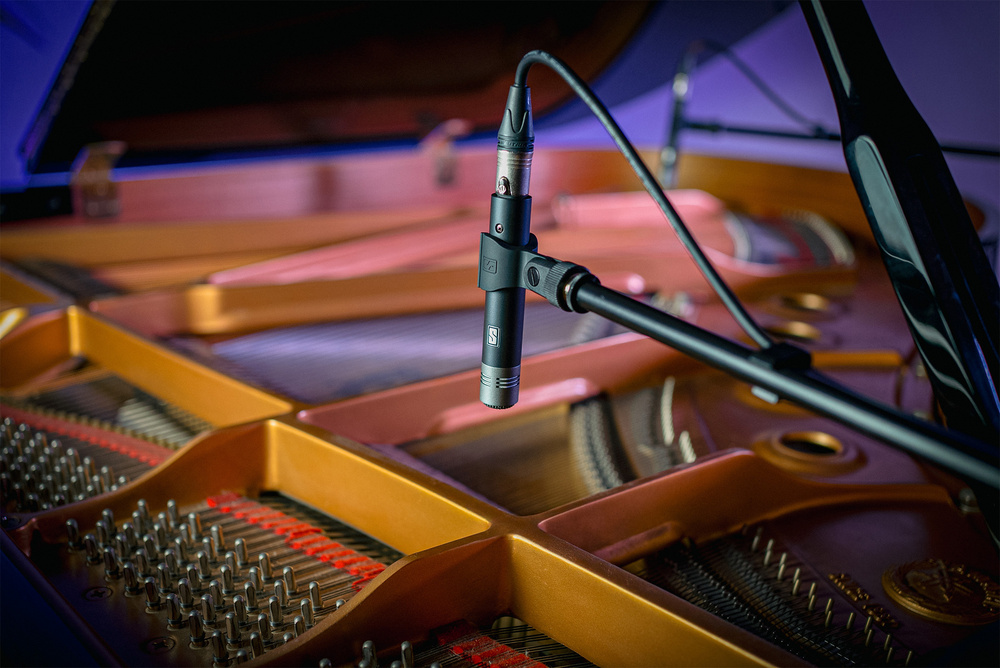
The latest entry to Slate Digital’s VMS range promises unparalleled flexibility when recording instruments.
Like their earlier ML‑1A and ML‑2 systems, Slate Digital’s new ML‑2A modelling microphone works in conjunction with the company’s VMS (Virtual Microphone System) software to replicate the sound of multiple classic microphones. This is made possible by the use of a known input from a factory‑calibrated microphone — the ML‑2A itself.
For home studios, the ML‑2A offers an affordable alternative to buying multiple microphones of different types, though the system could also be a real time‑saver in commercial studios. The whole package comprises two small‑diaphragm cardioid capacitor ML‑2A microphones, a stereo bar and mounting hardware, all of which fit into a semi‑rigid zip‑up carry case. Users can access a total of 27 mic models from within the VMS software — the Classic Instruments pack and a new Radio France Instruments pack come as standard. While those packs include some classic ‘vocal mics’, the emphasis here is mostly on mics you’d expect to use on instruments, which makes a useful contrast to most other mic‑modelling systems. Authorisation of the software is via an iLok account and two authorisations are included. Available in all the mainstream plug‑in formats for both macOS and Windows, the VMS plug‑in can be instantiated in mono or stereo.
This latest incarnation is built on the foundations of previous versions, rather than being a complete redesign of the package, but then if it ain’t broke, why try to fix it? After all, the original VMS package is over a decade old and has grown to become very well established. The models include both large‑ and small‑diaphragm capacitor microphones, plus a number of well‑known dynamic microphones including ribbon mics. The software runs in real time and can be used when recording as long as you have a low‑latency audio interface running at a suitably low buffer size. It’s also of course possible to audition different mic emulations after recording.
Designed to provide a linear frequency response with minimal distortion, the included ML‑2A microphones offer a neutral baseline input for the modelling process. Each mic features a pad switch to enable it to handle the high SPLs of, for example, brass, guitar amps or kick drums. The maximum level handling with the pad engaged is in the region of 156dB SPL. There’s also a low‑cut filter switch.
Naturally, there are some limitations to mic modelling, as the off‑axis response of different microphones can be quite different, and there are also differences in the way the proximity effect affects the low end when working up close. However, I would imagine that most users will use the mics on‑axis, and any low‑end changes due to proximity effect can be adjusted in the VMS plug‑in.
Inside VMS
As with previous versions of VMS, the source microphone is selected at the top left of the plug‑in window, while the centre panel shows all the available mic models as well as sliders for input trim and a variable Rumble (low‑cut) filter, which goes up to 160Hz. Mics can be browsed by Pack or by Type; the Classic Instruments pack has 19 models and the Radio France Instruments pack boasts eight. Once a mic has been selected, a large image of that microphone is shown in the centre panel. At the bottom of the plug‑in there’s metering, plus controls for adjusting the pan and stereo width. The width effect works by adding a delayed signal to the left channel and subtracting the same delayed signal from the right, so that summing to mono cancels out the effect while leaving the dry signal intact. An Intensity control adjusts the strength of the modelling so that the user can balance the original characteristics of the ML‑2A mic with those of the modelled mic, for when a ‘fully modelled’ sound isn’t needed. It is even possible to push the control beyond 100 percent to overexaggerate the target mic’s characteristics. A Proximity slider adjusts the amount of proximity effect for the current model.
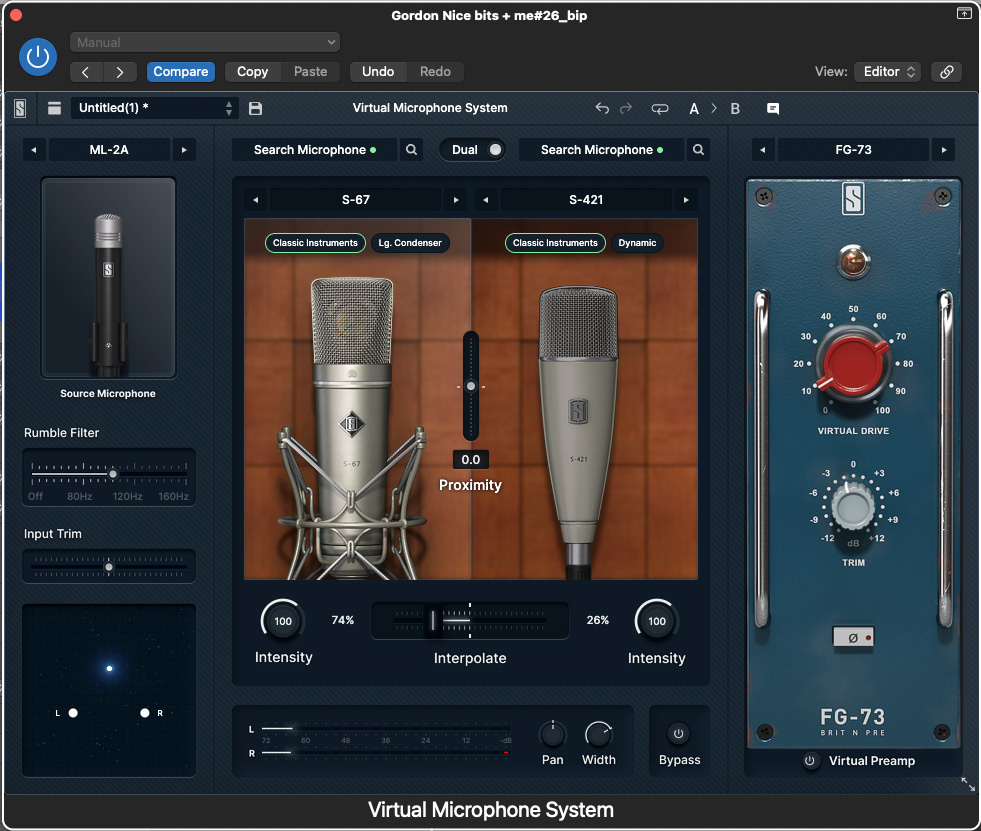 By default, the VMS plug‑in lets you apply a single microphone emulation to your ML‑2A recordings. However, by engaging the Dual switch at the top, you can load up a second mic model, blending the characteristics of the two using the Interpolate slider.
To the right of the GUI is the output stage, which can be set to Default, offering only output level trim and polarity‑invert controls, or to one of two classic hardware preamp emulations. The blue panel/red knob graphic of the FG‑73 leaves little doubt as to what is being modelled here, and the trim and polarity‑invert controls are joined by a Virtual Drive control for adding warmth. The second of the emulations is the FG‑76 (based on a Telefunken design), again with suitably vintage graphics, offering the same control options as for the FG‑73. Both the mic‑modelling section and the preamp section have individual bypass buttons.
One very intriguing option is the ability to blend the characteristics of two different mic models. Engage the Dual switch at the top of the plug‑in and another microphone slot opens up, allowing you to choose a second mic model. An Interpolate fader also appears, letting you adjust the blend of characteristics. This is more than just a crossfader though; it actually interpolates between the underlying parameters of the two microphone models.
Performance
Switching microphone types after recording is a very practical way to find out which microphone best suits a particular sound source. Normal and Dynamic versions are available for some models, where the Dynamic versions are optimised for louder sources. The Classic bundle includes emulations of well‑known microphones such as the Neumann U87 and U47, the AKG C414, the Sennheiser 451 plus a number of other classic small‑ and large‑diaphragm capacitor mic models. Dynamic mics are also well represented, including the usual suspects such as the Shure SM57, the Sennheiser MD 421 and the Electro‑Voice RE20, alongside a few custom drum mics. Among the ribbons we have a Royer R‑121 emulation.
The differences between the mics are not always as obvious as you might expect, but the subtleties inherent in each type are captured very convincingly. Even if you have some of the ‘real’ mics in your locker, trying VMS first might help you get a feel for how well each of them might suit a particular sound source, without the need to keep setting up and connecting different microphones. If VMS indicates, for example, that a U87 is the best option for a particular source, you can then set up your own U87 and be fairly confident of the result. Equally, if one of the other models gives the best result and you don’t have that particular microphone in your locker, then you can stick with the VMS version.
Having the vintage preamp emulations with variable drive provides a means to add controlled warmth to the mic models, and the emulations do a fine job of capturing the essential vintage character of the originals. That Width control is also useful, as it adds a slightly roomy quality to the sound, which can be effective in pushing sounds further back in the mix so that they appear to sit behind the main parts.
VMS can be viewed as a very flexible microphone toolkit that goes beyond specific microphone emulations.
Summary
Not having anywhere near all of the original mics on hand for comparison, it would be overreaching to try to evaluate the absolute accuracy of all the VMS models, and in the case of many vintage mics, no two examples sound quite the same anyway. The more important question to ask is how well VMS works in offering a broad choice of microphones that allow the user to choose the best options by ear. A pure emulation won’t always be the best choice, which is why the user is given the option to reduce (or overemphasise) the strength of the modelling process. Similarly, the ability to combine two mic models may well produce something that works better than relying on a single model. In this respect then, VMS can be viewed as a very flexible microphone toolkit that goes beyond specific microphone emulations.
When discussing mic choices, many users think of vocals first, but having a wide choice of instrument‑focused models as provided by the ML‑2A bodes well for things like acoustic guitar recording, while picking the right mics for a drum recording session or for miking guitar amps can also make a huge difference. If your favourite setting uses a combination of mic types, you can always save it as a preset in the VMS plug‑in. The included preamp models are also very welcome and could be used with existing microphones or previously recorded tracks by bypassing the mic modelling. Note that although the focus of the ML‑2A system is instrument recording, it is still possible to get good‑sounding vocal results as long as you use a good pop shield with the mics.
As the package comes with two microphones and a stereo bar, a number of stereo‑miking techniques can be explored, taking into account that the included mics have a fixed cardioid pattern. Equally, the mics can be used separately, feeding two different instances of VMS.
Overall, the ML‑2A package feels to me like a good balance between value, choice, flexibility and ease of use.
Pros
- Attractively priced.
- A sensible range of classic microphone models for instrument use.
- Easy to use.
- Musically valid results including the option to blend mic models.
- The included microphones produce good results on their own.
Cons
- Nothing at the price.
Summary
Comprising two mics plus a stereo bar, mounting hardware and a case, the ML‑2A bundle would represent good value even without the VMS software. With it, it becomes an incredibly flexible tool for recording instruments.
Information
£358.80 including VAT.
$399
When you purchase via links on our site, SOS may earn an affiliate commission. More info...