

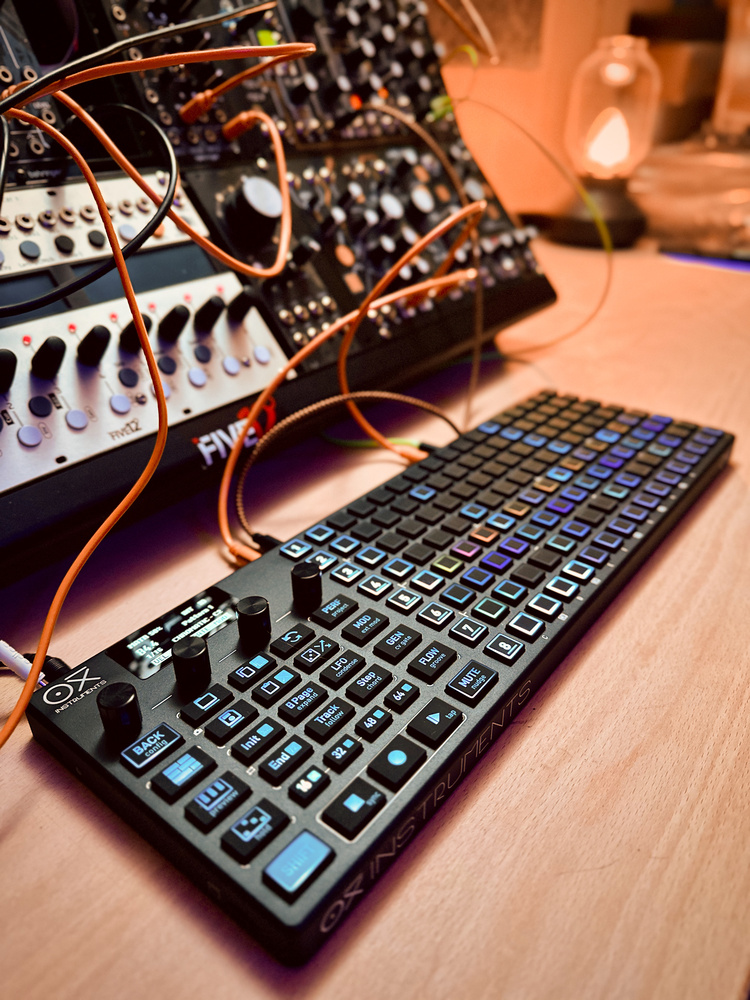
The OXI MkII is a sequencing powerhouse — could it be ‘the one true sequencer’ so many of us are looking for?
In the ongoing quest for the perfect sequencer, I’ve wanted to get my hands on an OXI One for a while. Now, as the MkII version ups its game with twice as many tracks and new dedicated performance features, could the OXI be ‘the One’?
The OXI One MkII is a standalone desktop sequencer with flexible MIDI, USB, Bluetooth and CV/gate connectivity. It has eight top‑level tracks that can host various sequencer types, including polyphonic and multitrack variants. Patterns, arrangements and modulations are created and managed on an 8x16 pad grid taking up two thirds of the slim unit’s panel.
The build is solid and surprisingly heavy thanks to the metal chassis. Even so, it comes with a terrific carry case, which also has a pocket to stow cables and the optional OXI Split MIDI breakout box. The left third of the panel groups all the mode and operation buttons. Above these is an OLED display supported by four metal, indented encoders. The whole feel is rather luxurious. All essential legending is on the backlit buttons so dark or low‑lit conditions aren’t a problem.
On the left edge you have an SD card slot (new to the MkII) and a USB‑C port, which provides computer comms, USB hosting and charging for the internal battery. The battery is rated at a generous eight hours of use, and I regularly got more than that. Along the back there’s a single TRS MIDI I/O pair, clock in and out, a CV input (which is actually two inputs if you use a stereo splitter) and eight outputs each for CV and gate. A mini HDMI port labelled Pipe connects to the optional OXI Pipe Eurorack module, which brings most of the analogue connections conveniently into a rack.
 To save you the trouble of turning this magazine upside down, the rear panel hosts eight 3.5mm gate outputs, eight 3.5mm CV outputs, a mini HDMI port for connecting to the optional Pipe Eurorack module, and a final section of 3.5mm ports for CV in, clock in, clock out and MIDI in/out.
One II 101
The obvious place to start exploring was with a mono sequence. Diving into the main settings for Sequencer 1 revealed options for MIDI output (All, USB, TRS, Bluetooth) and channel, Program Change and Sequencer Mode. A separate, dedicated view for assigning analogue voice outputs turns the pad grid into a routing matrix, with the first eight pads on each row choosing CV outputs and the second picking gates.
Returning to the main view, you can start adding triggers/notes using the grid as a piano roll. Setting a scale other than Chromatic from the display will give you at least a full octave on the grid. The encoder labelled Octave adjusts the root, but tapping it toggles it into scroll mode so you can zip the grid’s display range up and down.
The other encoders are set to Velocity, Gate and Repeat and follow a standard convention on the OXI One: adjusting an encoder offsets the value for all notes, but tapping switches the grid into a bar chart mode where you can set the focused parameter for each trigger. You can also add triggers from these views, which is a fast and effective way to create dynamic sequences in Velocity mode. Flipping through the modes was the first of many times I encountered the one issue with the encoders, which is that they are not aligned with the four parameters on the display. You will repeatedly reach for the middle two encoders to control parameters 1 and 4 until your brain begins to lock in the required muscle memory.
If you don’t want to program a sequence manually, Gen mode provides a fully featured Euclidean sequencer, which can be saved and recalled in any patterns that use it. There’s also a Random pattern generator which creates patterns within specified parameters. On top of this, Random Perform lets you apply varying degrees of randomisation to different sequence parameters non‑destructively. The states of all these factors can be saved to pattern slots.
Talking of which, Save/Load operation was one of the areas where intuition broke down and I had to fall back on the manual. In fact I had to re‑look this up several times. Separate Save and Load buttons turn the main pads into a storage grid where you can park up to 16 patterns per track. An important point that bit me multiple times is that you must save before loading another pattern or you’ll lose your work in the previous one. The Load view can serve as a general launcher for playing all the patterns in your project, although as we’ll see later the Arranger gives you a way to organise your patterns more intentionally.
Notes can be tied beyond a single step simply by holding the first and last steps. Pattern length can be set by holding the Init or End buttons and tapping in the grid. While holding both buttons you can quickly set and change a loop zone within your pattern. Maximum pattern length is 128 steps, or eight pages. The page buttons double as nudge buttons (with Shift) to transpose or move your whole sequence. The Track button accesses playback options like direction and step division. Steps can be slowed...
You are reading one of the locked Subscribers-only articles from our latest 5 issues.
You've read 30% of this article for FREE, so to continue reading...
- ✅ Log in - if you have a Digital Subscription you bought from SoundOnSound.com
- ⬇️ Buy & Download this Single Article in PDF format £0.83 GBP$1.49 USD
For less than the price of a coffee, buy now and immediately download to your computer, tablet or mobile. - ⬇️ ⬇️ ⬇️ Buy & Download the FULL ISSUE PDF
Our 'full SOS magazine' for smartphone/tablet/computer. More info... - 📲 Buy a DIGITAL subscription (or 📖 📲 Print + Digital sub)
Instantly unlock ALL Premium web articles! We often release online-only content.
Visit our ShopStore.