

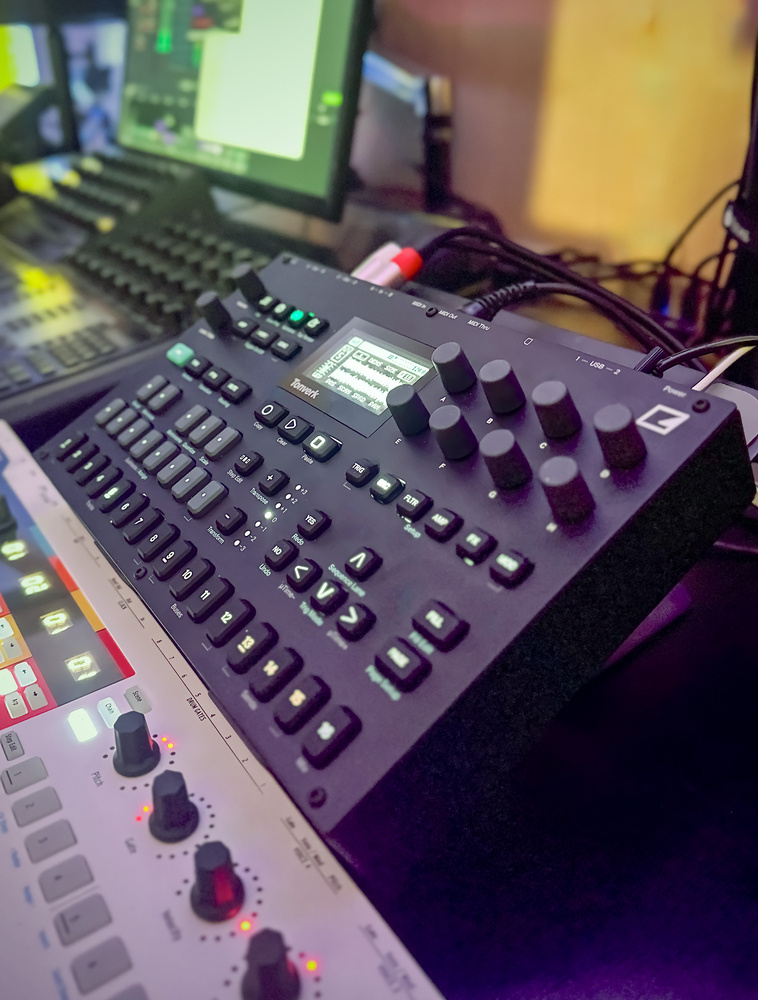
Is Elektron’s polyphonic sampling workstation their most musical device yet?
Rumours circulated before the Tonverk emerged that Elektron were working on a new instrument that could be something a bit different. Inevitably, disparate wishlists were projected onto this chimerical wonderbox: it would surely be the next‑gen Octatrack, a Syntakt ‘Pro’ or a mashup of the Syntakt and Digitakt. Any of these would have been terrific, but the Tonverk is in fact something new to the line‑up: a polyphonic sampler. So, can Elektron’s distinctive approach bring something new to this category, and is it sufficiently different from their other offerings to warrant a whole new instrument? Let’s find out.
The Tonverk slides in between the compact Digi units and flagship Analog Rytm, Analog Four and Octatrack instruments in both size and price. It looks like a stretched Digitakt, with the narrower trig keys of the Digitone. These adjustments allow the 16 track/step buttons to be laid out in one row, in turn making space for an octave of piano‑format keys like on the Analog Four. I/O has been expanded with some extra outputs. USB‑C ports are used for power and connectivity, and storage is via SD card, both firsts for Elektron.
Pick & Mix
Swappable sound engines (‘machines’) are a standard feature on Elektron’s instruments, but the Tonverk takes modularity to the next level with effects machines and a flexible routing and mixing architecture. The 16 tracks follow a mixer‑like layout, with eight source tracks for audio or MIDI, four versatile bus tracks, three effects returns and a master. This is one of the most interesting things the Tonverk brings to the table, facilitating sound design, performance setups, and external hardware configs.
The eight instrument tracks can operate in four sampler modes or as MIDI tracks. The Single Player and Multi Player modes are traditional, polyphonic sample players, aimed primarily at melodic performance. These are supported by the familiar pattern‑based Elektron sequencing environment, where you can drop steps from the main trig keys, picking pitches from the mini keyboard; or you can play and record from the mini keyboard or a connected controller. More than with any other Elektron device, I had a keyboard controller connected most of the time.
The Single Player machine lets you pick a sample, manipulate it, and pitch it across notes. You can set a loop point for the sustain (and optionally release) stages of your amp envelope, with smooth loop crossfading that makes it easy to turn any sample into a playable instrument. The Tonverk is not really set up for playing or capturing rhythmic loops, however. You can do it but there’s no time‑stretching or bpm matching so it’s an old‑school manual pitching process.
The Multi Player is for multisampled instruments: those built up from a set of key and velocity mapped samples. This of course allows for much more dynamic, expressive and pitch‑consistent instruments, benefiting from that connected keyboard. The factory library includes a set of multisampled instruments or you can make your own using the onboard Autosampler. There’s currently no way to create Multi Player sounds from samples, or to edit the samples and mappings within a patch.
My chief issue with the Tonverk though is the lack of preview capability when browsing for sounds other than single samples, which is a flow killer when getting down ideas. Other Elektron instruments are mainly dealing with single samples or synth patches, so it’s easier to audition. With multi‑instruments and kits, a device could do with audio previews or the ability to temporarily load in place. On the Tonverk you have to load a patch into a track to hear it, so if you don’t want to lose all your track settings you need to make a habit of using the Memorize & Recall feature.
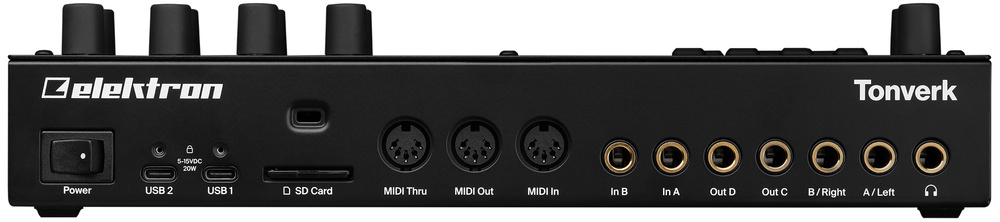 Round the back we find a power switch, twin USB‑C ports, an SD card slot, MIDI in, out and thru sockets, and two inputs, four outputs and a headphone out on quarter‑inch jacks.
Subtracks & Grains
The Tonverk also caters for one‑shots and beats, but rather than using the one‑sound‑per‑track approach of the other Elektron grooveboxes, it leverages its polyphony in the Subtrack machine: an eight‑track drum machine within any single track. When a Subtrack track is selected, the eight ‘white’ notes on the mini keyboard each host a different sample, with separately addressable sequencer lanes.
Importantly, each Subtrack voice has its own VCA, filter and LFOs. Track effects are shared, and a ‘super track’ lane takes care of automation and parameter locks for this layer. The main limitation of Subtracks is that sends are at the track level, so if you want to keep your kicks...
You are reading one of the locked Subscribers-only articles from our latest 5 issues.
You've read 30% of this article for FREE, so to continue reading...
- ✅ Log in - if you have a Digital Subscription you bought from SoundOnSound.com
- ⬇️ Buy & Download this Single Article in PDF format £0.83 GBP$1.49 USD
For less than the price of a coffee, buy now and immediately download to your computer, tablet or mobile. - ⬇️ ⬇️ ⬇️ Buy & Download the FULL ISSUE PDF
Our 'full SOS magazine' for smartphone/tablet/computer. More info... - 📲 Buy a DIGITAL subscription (or 📖 📲 Print + Digital sub)
Instantly unlock ALL Premium web articles! We often release online-only content.
Visit our ShopStore.