

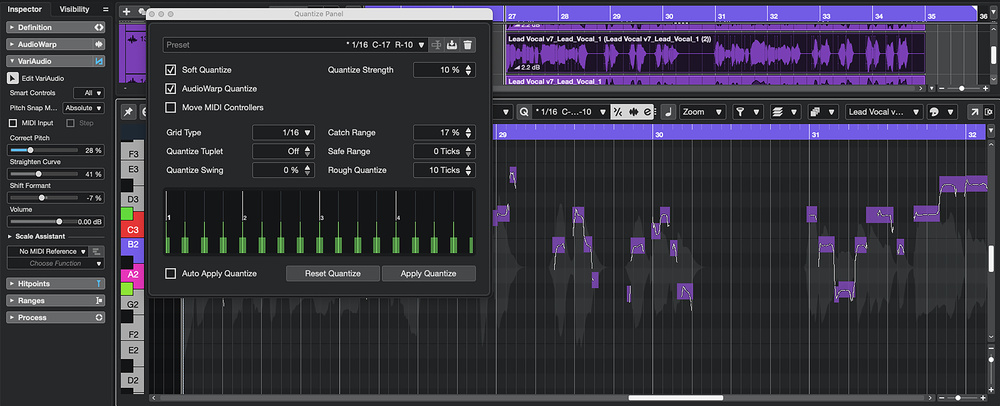
 A combination of subtle VariAudio pitch correction and equally gentle AudioWarp Quantize can create a believable vocal double from a duplicate of the original lead vocal.
Need to fake a double from a single vocal? Cubase has plenty of options...
When it comes to vocal doubles, if you want to keep things sounding ‘natural’ then nothing beats a well‑sung second pass. There are plenty of circumstances where that might not be possible, but thankfully, if you have only a single lead line and need a double on the double, Cubase has a number of tools that can fake one. And if you already have the Artist or Pro version of Cubase 15, you now have yet another option at your disposal: the new PitchShifter plug‑in. In this article, I’ll explore a range of options. I’ve also created some audio demonstrations that you can find on the SOS website at: https://sosm.ag/cubase-0426
Something Old
When vocals are authentically doubled‑tracked by a singer, the differences in both pitch and timing of the performances lend the part a sense of additional ‘weight’ and, with suitable panning, width. Generally, it works best when those pitch and timing differences are pretty small, and being sufficiently consistent across two or more vocal performances can require considerable control on the part of a singer — but, of course, some after‑the‑fact audio editing can help to a degree.
Assuming, though, that you need to fake such a double, Artist and Pro users have a particularly powerful option that exploits VariAudio and AudioWarp. We considered exactly this combination in SOS October 2022 (https://sosm.ag/cubase-1022-doubling), including the possibility of generating harmony parts. That approach still works well, so I’ll reiterate the key steps here as they pertain to creating a vocal double, but do dip into that article if you want more detail.
The first step is simply to duplicate the lead vocal track. Open this duplicate in the Sample Editor, and in the Sample Editor’s VariAudio panel activate VariAudio. This will populate the Sample Editor display with note objects, and if you select these and then trigger playback, you can (back in the VariAudio panel) make minor adjustments to the Correct Pitch, Straighten Curve and Shift Formant sliders. As you do, you’ll start to hear the original and ‘double’ vocals deviate from each other.
For the same clip, a next step is to move to the Hitpoints panel, and ensure Edit Hitpoints is activated (Hitpoints might appear...
You are reading one of the locked Subscribers-only articles from our latest 5 issues.
You've read 30% of this article for FREE, so to continue reading...
- ✅ Log in - if you have a Digital Subscription you bought from SoundOnSound.com
- ⬇️ Buy & Download this Single Article in PDF format £0.83 GBP$1.49 USD
For less than the price of a coffee, buy now and immediately download to your computer, tablet or mobile. - ⬇️ ⬇️ ⬇️ Buy & Download the FULL ISSUE PDF
Our 'full SOS magazine' for smartphone/tablet/computer. More info... - 📲 Buy a DIGITAL subscription (or 📖 📲 Print + Digital sub)
Instantly unlock ALL Premium web articles! We often release online-only content.
Visit our ShopStore.