

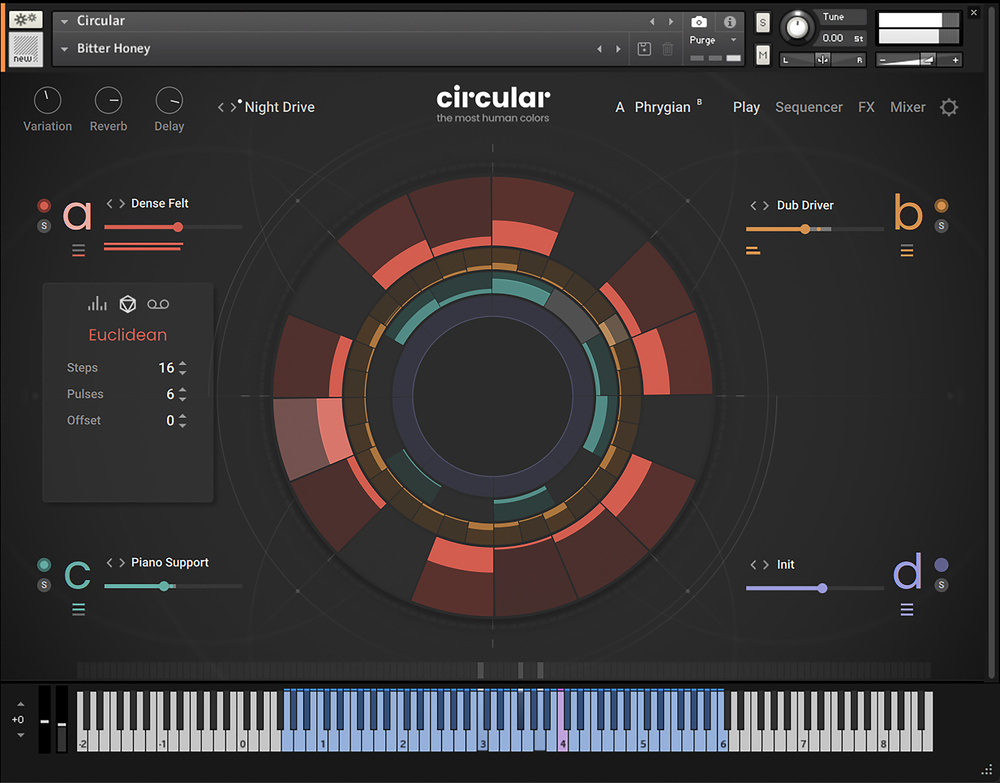
 The central display in Circular’s Play page provides easy access to some of the sequencing options while also being hypnotic to watch.
NI’s Circular offers a dizzying range of creative possibilities.
Designed by Frank Elting (the mind behind three of NI’s popular granular Kontakt instruments, Straylight, Pharlight and Ashlight), and with sound‑design input from the Most Human Colors, Samuel Estes and the Solos, NI’s Circular comes from a stellar team. It also boasts an intriguing concept, UI and feature set. So, is Circular going to help you keep your musical world going round? Time to explore...
Circular Tour
Let’s start with a brief summary of Circular’s main features. In essence, Circular provides a four‑layer, sample‑based sound engine for use within Kontakt (full version or Kontakt Player). It ships with some 9GB of sample data which suggests the 168 included sounds are deeply sampled. The sounds themselves are derived from a wide range of sources including guitars, music boxes, prepared pianos, tuned metalwork, various brass instruments, vocals and a range of synths, some familiar and some processed to give a more unusual sonic flavour. The individual sounds are very classy and easily good enough to make the sonic cut in even the most demanding of musical contexts.
From these source sounds, the design team have built around 250 presets (Kontakt Snapshots) divided into Atmospheres and Sequences. You can, of course, build your own Snapshots based upon the included sounds and, rather wonderfully, you can also load your own (single) samples into any of Circular’s four sound layers and then make use of the full sequencing, effects and modulation options the engine provides.
A four‑layer sound engine is a familiar virtual instrument format but where Circular gets interesting is in the features it combines to trigger, sequence, modulate and process those sounds. This is also where things get pretty deep and, while there is a lot of instant gratification to be had from the supplied Snapshots, I think it’s fair to say that Circular does require you to dip more than a toe in the shallow end if you want to fully appreciate what it is capable of. Space precludes a comprehensive description here, but I’ll try to summarise the main elements before exploring one or two of the more interesting elements in more detail to give a sense of what’s possible. Hold on tight...
Circular Simplicity?
Circular’s controls are laid out across four main pages — Play, Sequencer, FX and Mixer — accessed via the tab headers contained within the ever‑present toolbar at the top of the UI. The toolbar also provides access to three macro‑style knobs (part of the modulation system; by default, the Variation knob is linked to your mod wheel for hands‑on operation), the main Snapshot preset browser, key/scale settings (no duff notes allowed from Circular’s powerful sequencing/arpeggiation features) and global Settings (Circular can support polyphonic aftertouch and MPE; the response can be adjusted here).
The Play page provides easy access to the four sound layers. You can pick the individual sounds, adjust their relative levels, and decide which incoming MIDI notes (highest, lowest, all) each layer will be triggered by. However, via the very attractive central circular graphic, you can also begin to create and edit sequences for each of the four layers. This graphical interface is obviously where Circular derives its name from. It reminds me of Patterning, one of my favourite iOS music apps (see the October 2018 review) and, as we will see in a minute, it shares one key feature with that app. Selecting one of the four layers — A, B, C or D — brings that to the foreground for manual editing within the circular display and also pops open a panel that provides options for generating either random or Euclidean patterns or enabling a MIDI record function. The latter lets you play Circular in real time and then drag and drop the full Circular performance to (up to) four tracks within your DAW should you wish.
Not So Simple Sequencer
However, it’s the Sequencer page where you begin to see Circular’s true depth. Again, selecting one of the four slots brings its sequencer settings into view. There is obviously a lot going on here but a key feature to note is that, like Patterning, the sequences for the four layers are completely independent of each other. Should you wish, you can therefore specify different settings for elements such as step counts (up to 64 steps), step playback rates, playback directions and step lengths in each layer. If polyrhythmic patterns appeal, Circular has you covered in a rather impressive fashion.
There is obviously a lot going on here but a key feature to note is that, like Patterning, the sequences for the four layers are completely independent of each other.
The pattern lanes are arranged in three vertical sections with Step Duration, the Parameter Lane (actually five lanes for Velocity, Probability, Note (pitch), Length and Step FX) and Sound Lane. Amongst a whole host of options here are the ability to specify per‑step values for Step Duration, Step FX and the sound used. Yes, you can load a different sound (from the presets or a user sample) on a per‑step basis. If you want, for example, a single lane to provide a compact set of drum or percussion samples, then that’s totally possible.
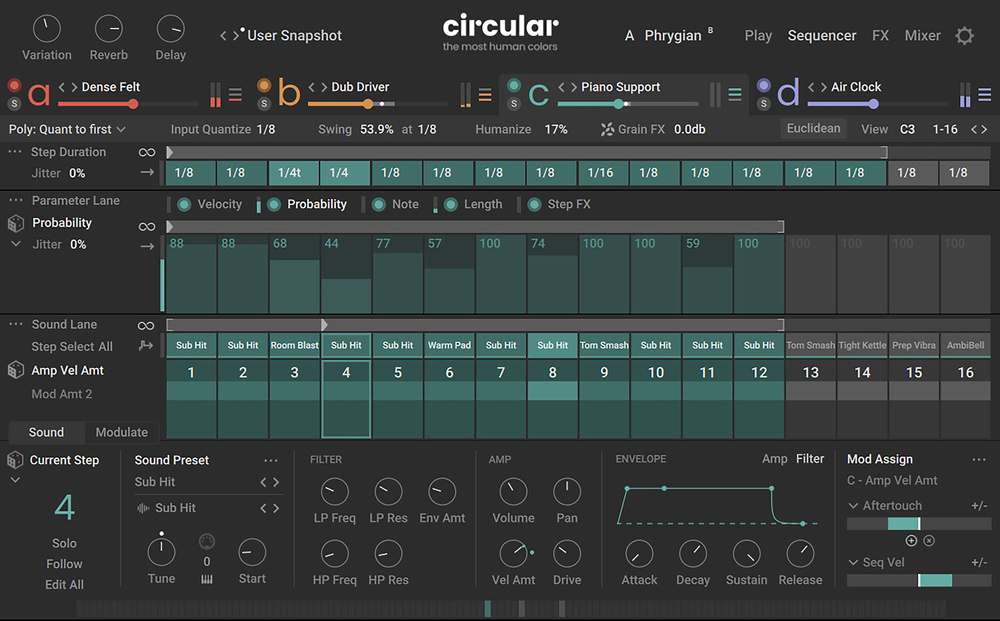 The Sequencer page is where Circular gets deep.
For each of the four layers, you can choose from a number of different sequencing modes. This includes a No Sequencing option so the sound within a layer can just be freely played via the MIDI keyboard. The PDF manual does a good job of explaining the purpose of these various modes but, whether you want sustained polyphonic playback for chords, or arpeggiation for more melodic playback, it’s all possible. Interestingly, the step counts, loop range, and loop starting point can be configured differently within each of the three lane zones of the UI (and differently between each of the four layers). And, as well as lots of randomisation options within the sequencing engine, this includes the option to randomise the starting step.
At the base of the Sequencer page is a further panel with two tabs. The Sound tab gives you a set of synth‑engine‑like controls, including tuning, filter, amp and envelope options that can be configured differently for each sound within the Sound Lane as opposed to just the overall A, B, C or D layer. The Modulate panel lets you configure the two LFO and Shaper modulators. Other modulation sources include velocity, aftertouch, the macro knobs, key tracking, MPE slide, and a few others. Clicking on one of Circular’s parameters in the Sequencer, FX or Mixer pages brings that parameter’s modulation setting into this panel, where you can link it to any two modulation sources and edit how the modulation is configured. Again, it’s powerful stuff.
Full Rack
Circular doesn’t skimp on the effects options either. As well as insert (four per layer), global (again, four slots) and two send effects, you also get three per‑step effects. The layer effects are fairly conventional and mainly draw from Kontakt’s built‑in repertoire of effects (reverb, delay, compression, EQ, modulation), but the per‑step effects — which operate on the sequencer notes — have all sorts of creative options amongst them including bending, ornamentation, gater, tape, arpeggiation, rachet and grain. The latter are very cool and operate via the Grain FX bus. Again, this offers four slots. There are some truly weird and wonderful options to be found here.
However, this is topped off by the fact that you can use modulation to control in real time which of the three per‑step effects is active. The possibilities are mind‑boggling.
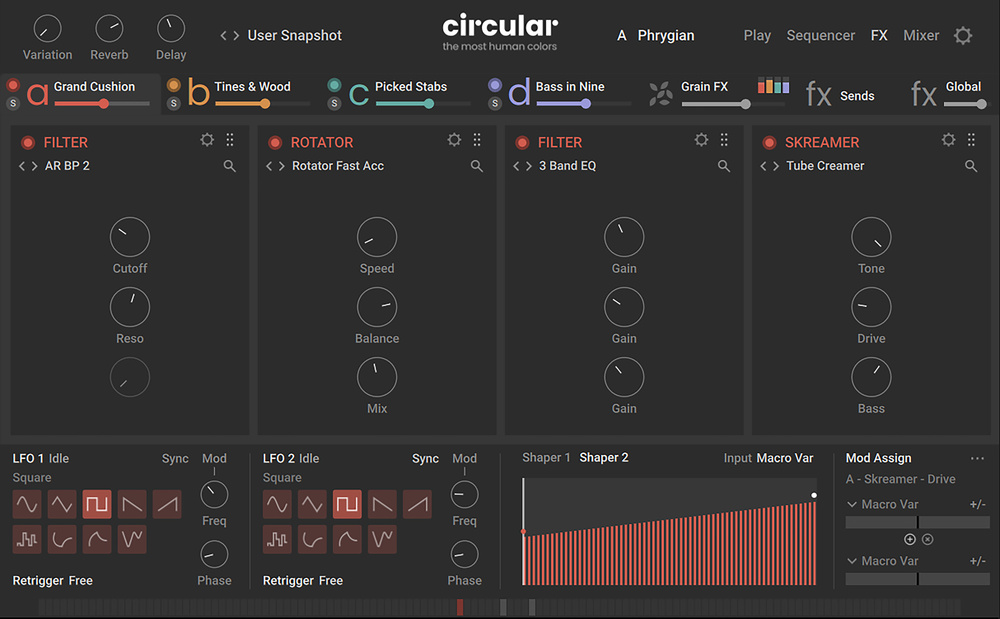 With comprehensive effects, modulation and mixing features, you are not short of sound‑design options.
The Argument For Circular?
The included Snapshot presets provide an excellent demonstration of how good Circular can sound but, even here, some time is needed to fully grasp what can be done. The various presets exploit the engine’s capabilities in different ways and you do have to put some effort into working out just how to exploit each one in a musical context, particularly in terms of the modulation and multi‑layered sequence triggering.
This is the kind of tool where you could easily create a complete cue from a single Snapshot, once you have mastered the various modulation possibilities.
However, did I mention that Circular is deep? I did... and it is. It’s also not likely to be in the casual purchase price range for most potential users so, before you take the plunge, do be aware that I think it requires a genuine investment of time to realise the very considerable creative possibilities it has to offer. That said, the rewards are worth it; Circular sounds fabulous in a quirky, hypnotic kind of a way and, while it might not be for everyone, working film, TV and other media composers looking for a modern hybrid sound palette that combines organic and contemporary elements will undoubtedly appreciate the scoring potential. This is the kind of tool where you could easily create a complete cue from a single Snapshot, once you have mastered the various modulation possibilities. It’s also an instrument that electronic music producers could put to very good use. OK, so this is perhaps not an instrument for those that prefer to paddle in the shallower end of the virtual instrument world, but if you are prepared to dive deep, then hold your breath; Circular has plenty of wonders to explore.
Pros
- Fantastic sounds for modern scoring applications and electronic music styles.
- Very deep feature set.
Cons
- For some, the very deep feature set!
Summary
With a high‑quality sound set, and a powerful four‑layer sequencing feature, Circular has plenty to offer media and electronic music composers provided they are prepared to dig deep.