

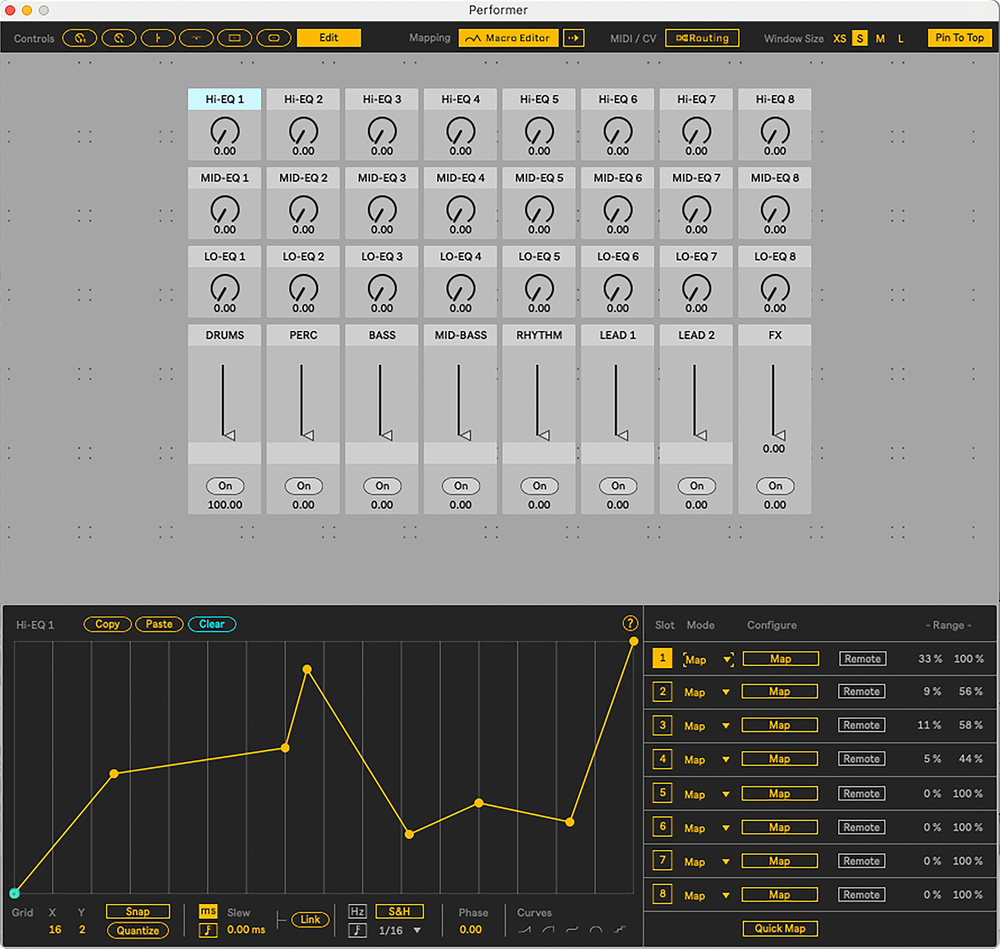
 My Novation Launch Control XL recreated using the Performer device, with the mapping editor.
We dive into a new Performance Pack that could change the way you use Live.
Ableton Live was built from the ground up for the art of live electronic music performance — the clue’s in the name! Its defining innovation, Clip View, was a groundbreaking method of triggering audio and MIDI clips in real time. Arrangement View, whilst more conventional, could capture those live performances, or be used for straightforward composition and mixing.
But even after two decades of development, there’s still room to improve Live’s performance abilities. Whilst plenty of innovation comes from Ableton themselves, the integration of the Max For Live (M4L) platform has enabled users themselves to extend Live’s functionality to meet their own needs, and often the wider community’s too.
One such M4L developer is Itfah (of the techno duo Skinnerbox), who is the brains behind this Performance Pack. Comprising four devices, it comes bundled with Live 12 and whilst primarily aimed at live performance, they also offer features that can supercharge more conventional music production.
As well as being a touring musician of long experience, Itfah has also previously designed Smile, an acid‑line generator; and Microtuner, the official Ableton device that paved the way for Live’s current and extensive micro‑tuning integration (covered in the SOS February 2025 column).
The best devices solve real‑world problems, and for Itfah, these devices work around some of the limitations he’s found frustrating in his many years of performing with Live. For example, whilst MIDI mapping in Live is quick to set up, the mapping curves themselves are strictly linear. And whilst their range can be edited, fine‑tuning them is fiddly in Live’s small ‘MIDI Mappings’ panel. Once several mappings have been created, finding and editing them quickly becomes complicated.
Performer: A Turbo Charged Mapper
The first device, Performer, completely reimagines MIDI mapping. At its simplest, you can recreate your physical controller on‑screen, complete with knobs, faders and buttons. Itfah considers this to be almost a ‘third view’ for Live, alongside the Clip and Arrangement screens, and which gives performers instant visual feedback on what’s mapped and their current state.
That’s only the start, though. Curves can be exponential, stepped, quantised or completely custom‑drawn. For example, you could design a knob that sweeps a low‑pass filter in its left half and a high‑pass filter in the right half. Or create a response curve that provides extra resolution around a sweet spot.
Performer then allows up to eight parameters to be easily mapped from each control. Imagine a single knob controlling a filter sweep, a pitch‑bend and a reverb send, all moving at different rates across its range. One simple use case could create those classic tension and release moments — the very essence of live electronic music.
Mappings aren’t limited to simple device parameters either: it’s possible to send notes, CC data, NRPN data (with their 16,384 steps of resolution), and even tempo.
Sending notes from a knob or fader might seem like a strange — or even mad — thing to want to do, but one online demonstration shows a fader divided into eight zones, each sending a note to a Drum Rack as the fader crosses it. This might also sound like a recipe for chaos, but in a stroke of design genius there is a quantise setting so each note is sent in time, meshing perfectly with the rest of the track.
Variations: Instant Recall
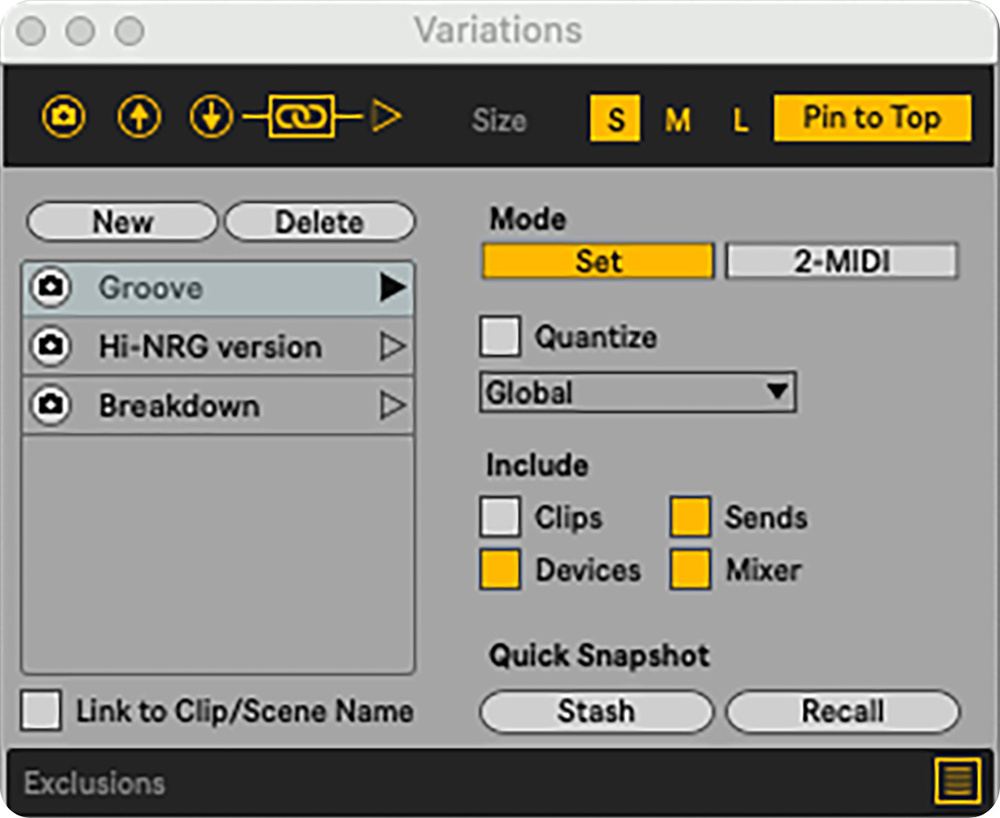 The Variations device looks a lot like Macros but allows you to store multiple snapshots of Ableton’s complete state.If the Performer device is about sculpting sound with continuous control movements, Variations is about switching instantly between states. It allows the current state of Live and all of its parameters to be saved and then recalled immediately. And not just one state, but multiple states.
In practice, this means you could be building tension during a track — muting drums, filtering synths and riding effects — then snap back to the original groove with a single click. There’s no need to be retriggering individual clips or scenes, or trying to manage the settings of a particular synth or effect rack manually. It’s an incredibly powerful feature, and intuitively implemented.
Again, it’s not limited to live performance use; this could be used during mixdown. Take snapshots of a mix as you go and then quickly and easily switch between them. Instead of saving multiple versions of a mix with increasingly convoluted names like ‘Mix 2b v3 dry‑vox‑A’, you can simply store mix states as Variations and flip between them for comparison. You can even name them!
Prearranger: Writing Backwards
Prearranger is quite a wild device and needs a bit more planning to use, but could meet some specific contexts, such as those in which no contact with Live during a performance is the goal. (Save the audience the spectacle of you prodding a laptop whilst you build up a looping track). The standard Live process is to record clips and arrange them into a piece of music. This turns that process upside down: pre‑arrange your song and record audio and MIDI into the clips as the arrangement plays through.
You pre‑define (in Arrange View) where clips will record, setting their input source, length and loop behaviour. More than one channel can be set, and when ready you start the arrangement playing and simply do the performance — there’s no need to interact with Live from that point.
For example: bar nine records four bars of audio from channel 1 and loops it. At bar 17, channel 2 records for a bar. At bar 21, a two‑bar MIDI loop is captured from channel 4. Later, those loops reappear at bar 33 automatically, creating structure without further intervention. It’s a radical rethinking of the song creation process.
Arrangement Looper: Quick Cycles
Arrange Looper is perhaps the simplest of the four devices. It provides four loop slots for cycling within an Arrangement. Place it on any channel (though Main makes sense), and when engaged it will cycle the current Arrangement at that point according to the Cycle time set in the loop slot (minimum length a quarter bar).
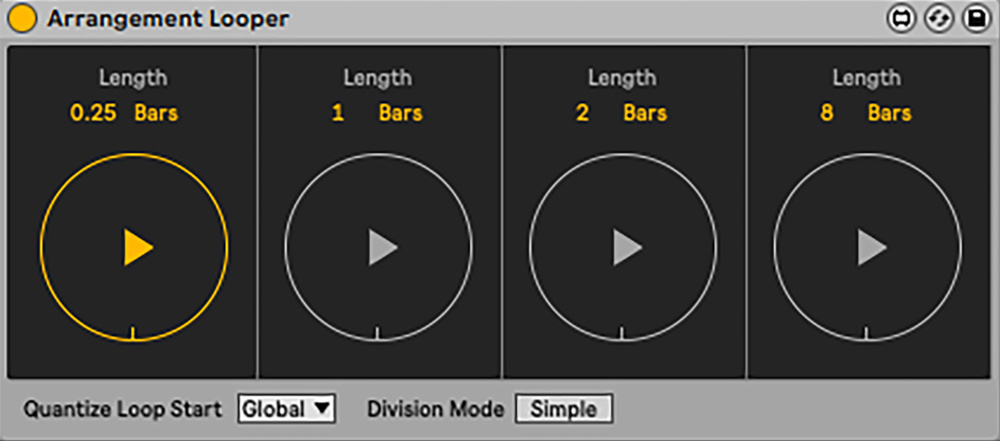 The Arrangement Looper updates Ableton’s Cycle parameter for quick ‘in the moment’ arrangement loops.
It’s great for buying more time at the end of a track or sequence, as Ableton themselves suggest. Note this only affects material playing from Arrangement View, not Session Clips; but within those limits it could be a handy safety net for transitions and not running out of music whilst an arrangement is playing!
These four devices really emphasise the strengths of the Max For Live ecosystem, showing how it can extend functionality by anyone prepared to learn the platform.
Live Supercharged
These four devices really emphasise the strengths of the Max For Live ecosystem, showing how it can extend functionality by anyone prepared to learn the platform. It’s great to see them bundled with Live 12 as a clever way to add functionality without having to commit them to the core feature set — a kind of ‘testing ground’ that ultimately benefits everyone.
For performers, then, these devices could be essential tools. For producers and others, they’re a reminder that Max For Live is a powerful platform of extended functionality — and that there’s a large number more to be discovered.
What Is NRPN?
Most MIDI control is handled using Continuous Controllers (CCs): 128 different controllers, with 128 possible steps of resolution for each. For many uses — filter cutoff, volume, pan — that’s fine, but even 128 steps can be noticeable in some contexts.
NRPN stands for Non‑Registered Parameter Number. It’s a way of extending MIDI control beyond the 128 CCs by combining pairs of controller messages. This makes it possible to address far more parameters — and, crucially, with much higher resolution: up to 16,384 steps instead of 128.
In practice, NRPN has been used by hardware synths and effects units to give deep access to parameters that weren’t available via ordinary CCs. It’s powerful, but the implementation varies between manufacturers, which is why it can seem a bit arcane.