

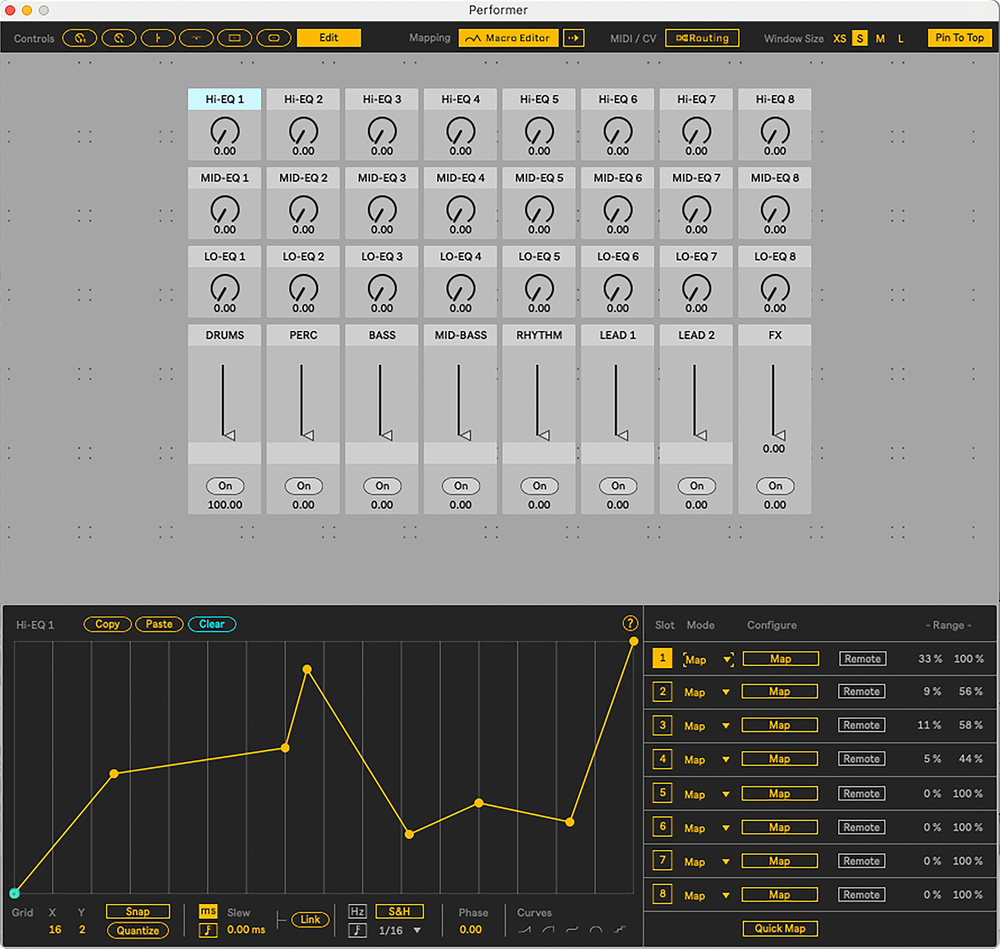
 My Novation Launch Control XL recreated using the Performer device, with the mapping editor.
We dive into a new Performance Pack that could change the way you use Live.
Ableton Live was built from the ground up for the art of live electronic music performance — the clue’s in the name! Its defining innovation, Clip View, was a groundbreaking method of triggering audio and MIDI clips in real time. Arrangement View, whilst more conventional, could capture those live performances, or be used for straightforward composition and mixing.
But even after two decades of development, there’s still room to improve Live’s performance abilities. Whilst plenty of innovation comes from Ableton themselves, the integration of the Max For Live (M4L) platform has enabled users themselves to extend Live’s functionality to meet their own needs, and often the wider community’s too.
One such M4L developer is Itfah (of the techno duo Skinnerbox), who is the brains behind this Performance Pack. Comprising four devices, it comes bundled with Live 12 and whilst primarily aimed at live performance, they also offer features that can supercharge more conventional music production.
As well as being a touring musician of long experience, Itfah has also previously designed Smile, an acid‑line generator; and Microtuner, the official Ableton device that paved the way for Live’s current and extensive micro‑tuning integration (covered in the SOS February 2025 column).
The best devices solve real‑world problems, and for Itfah, these devices work around some of the limitations he’s found frustrating in his many years of performing with Live. For example, whilst MIDI mapping in Live is quick to set up, the mapping curves themselves are strictly linear. And whilst their range can be edited, fine‑tuning them is fiddly in Live’s small ‘MIDI Mappings’ panel. Once several mappings have been created, finding and editing them quickly becomes complicated.
Performer: A Turbo Charged Mapper
The first device, Performer, completely reimagines MIDI mapping. At its simplest, you can recreate your physical controller on‑screen, complete with knobs, faders and buttons. Itfah considers this to be almost a ‘third view’ for Live, alongside the Clip and Arrangement screens, and which gives performers instant visual feedback on what’s mapped and their current state.
That’s only the start, though. Curves can be exponential, stepped, quantised or completely custom‑drawn. For example, you could design a knob...
You are reading one of the locked Subscribers-only articles from our latest 5 issues.
You've read 30% of this article for FREE, so to continue reading...
- ✅ Log in - if you have a Digital Subscription you bought from SoundOnSound.com
- ⬇️ Buy & Download this Single Article in PDF format £0.83 GBP$1.49 USD
For less than the price of a coffee, buy now and immediately download to your computer, tablet or mobile. - ⬇️ ⬇️ ⬇️ Buy & Download the FULL ISSUE PDF
Our 'full SOS magazine' for smartphone/tablet/computer. More info... - 📲 Buy a DIGITAL subscription (or 📖 📲 Print + Digital sub)
Instantly unlock ALL Premium web articles! We often release online-only content.
Visit our ShopStore.