

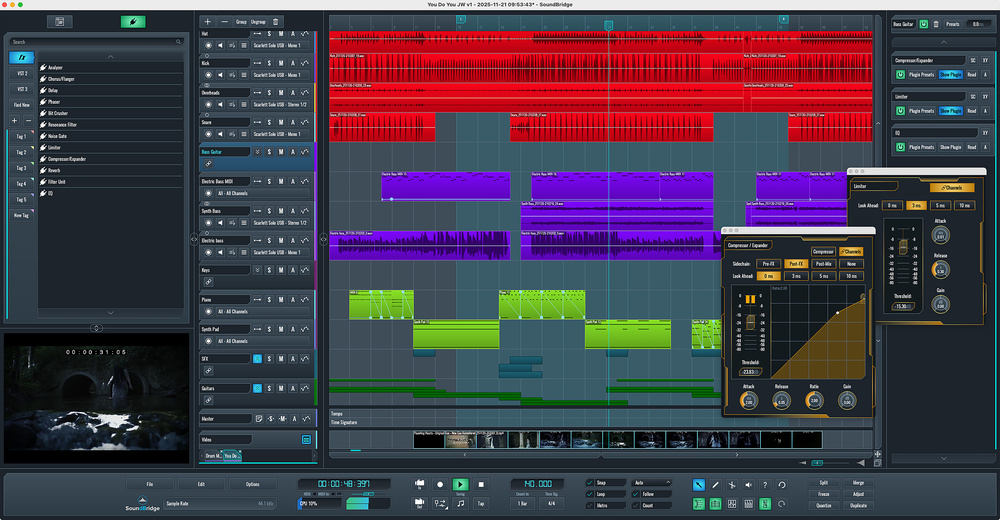
 SoundBridge DAW; all the core features you need and a minimum of clutter.
The world is not short of DAWs, so what sets SoundBridge’s offering apart?
There are undoubtedly some big hitters within the DAW software sector. The likes of Pro Tools, Logic Pro, Cubase, Ableton Live, Studio One and Reaper have a considerable market share and there are plenty of other very creditable alternatives that also have an established profile, albeit with a somewhat smaller (although no less dedicated) user base. With so many impressive options already available, it’s therefore a pretty brave developer who decides to try and establish a foothold within the DAW marketplace with yet another alternative. However, SoundBridge appear to be such a developer. So, if your own personal search for the perfect DAW is still ongoing, is SoundBridge DAW worthy of serious consideration?
Music History
While SoundBridge DAW may be unfamiliar to many SOS readers, it does have some history. The software started life in 2016 under a different name — Lumit — and at that stage it was a Windows‑only application. However, a couple of years down the line, the software’s UI was restyled, and it was rebranded as SoundBridge DAW. It has evolved considerably over the subsequent years, and at the time of this review, it is sitting at v2.10.2 and is available for both Windows and macOS platforms.
SoundBridge point to two very intentional design elements that make SoundBridge DAW distinct. First, the DAW is built around a streamlined feature set that is tightly focused on core tasks and avoids any distracting feature bloat. Second, and as a direct consequence of the first, SoundBridge DAW offers an equally streamlined UI and, as a result, should be very easy to navigate.
Access to SoundBridge DAW is provided via three routes. First, a free version is available. This is a fully functional DAW but with a limited track count and minus some of the more premium features. The ‘Everything Bundle’ — which includes the full version of SoundBridge DAW, the RitMix virtual drum machine instrument, the reChord arpeggiator plug‑in and a Sound Bank sample library — is then available via two payment options; a monthly/annual subscription model ($9.99/month) or via a lifetime licence (a one‑off payment of $199.99 and which apparently includes lifetime upgrades). Sensibly, SoundBridge also offer a 14‑day free trial for the subscription model so, whichever way you might then eventually choose to pay, you can try before you buy even with the full version.
Bridge Foundations
On paper at least, SoundBridge DAW may be streamlined, but it’s built on some fairly solid — and suitably sensible — choices, with core elements that you might find within most popular DAWs. The Sequencer window provides a familiar track versus time layout where you can build your project’s arrangement of audio or MIDI clips. The equally familiar Mixer window provides the usual fader, pan, solo and mute functionality for each track within your project. The Transport Bar combines the usual transport and metronome controls along with access to key editing tools and the Files, Edit and Options menus. It also includes a useful CPU load meter.
Other familiar elements include key sub‑windows such as the Audio Editor, MIDI Editor and Automation Editor. The panel on the left of the UI can be toggled between a File Browser (allowing you to search for media content on your file system) and Plugin Browser views. The latter lets you browse whatever effect or instrument plug‑ins you have installed, including the compact stock effects collection provided with SoundBridge DAW itself.
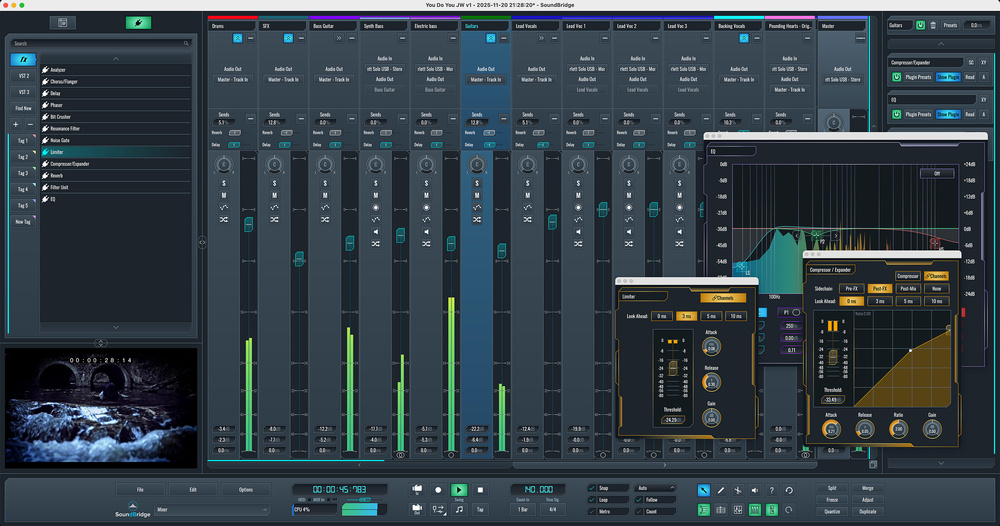 The Mixer window provides flexibility in expanding/collapsing track groups. The Plugin Browser (far left) makes it easy to add insert effects on the selected track within the Insert Rack (far right).
The Plugin Browser provides the main route by which you can insert effects onto individual tracks/channels. This is one process that is perhaps handled in a somewhat less conventional — although perfectly sensible — fashion. An Insert Rack panel can be displayed on the right side of the UI (you can toggle it on/off via a dedicated button within the Transport Bar). This panel then lets you manage the insert effects for the currently selected Sequencer window track or Mixer window channel. You can add effects to this Rack by simply dragging and dropping them from the Plugin Browser. It’s perhaps less familiar that having the inserts ‘in line’ on your Mixer channels but it does mean that the main Mixer window is less cluttered. It’s a workflow approach that soon becomes very familiar and you can pop open any of the individual plug‑ins from the Insert Rack as required.
The RitMix drum machine is the only virtual instrument included. However, you do also get a built‑in Sampler that can be assigned to any MIDI track within a project. This concept is not unlike the Sampler offered within Cubase but, in SoundBridge DAW, you get the option of using multiple samples within a single Sampler instance, configuring round‑robins, velocity layering, and note mapping ranges for each sample, alongside the usual tools for sample editing, ADSR, filtering and loop slicing. There is considerable potential here providing you are up for the DIY sound construction work required.
 SoundBridge DAW’s Sampler lets you build quite sophisticated sample‑based instruments from any sample material.
SoundBridge’s website talks about recapturing the joy of ’90s/early‑2000s music making and that ethos extends to the graphical style of the UI. Of course, personal tastes vary but I can sense a hint of FL Studio in the graphical approach and there is a somewhat retro vibe. You can customise aspects of the colour scheme (including a number of alternative skins), brightness, contrast and scaling if you feel the need. Most of the individual windows can also be floated to suit your workflow preferences.
Finally, amongst other elements of the core feature list, media composers should note that SoundBridge includes video playback support and a video track for music‑to‑picture work. However, while the audio routing options available within the Mixer are more than flexible enough to let you utilise the multiple audio outputs your audio interface might offer, currently there doesn’t appear to be any formal support for surround‑sound‑style panning, nor export of final mixes in anything other than stereo formats.
Record, Edit, Arrange, Mix
Most recording projects can be boiled down into four stages — recording, editing, arranging and mixing — although it may often involve an iterative back and forth between these stages. So, in practice, how well equipped is SoundBridge DAW to support you as you deal with each of these fundamental stages of your recording project?
Well, before you get started, SoundBridge’s Preferences dialogue (from the Options menu) provides all you need to configure your connected audio and MIDI hardware. I had no problems getting the software to work with two different audio interfaces (one 2‑in/2‑out and one 14‑in/12‑out) at a suitably small buffer size, or with my Novation Impulse MIDI keyboard/controller. This was a painless experience.
Buttons at the top of the Sequencer window’s track list section allow you to add, delete and group tracks. When adding tracks, you can choose between Audio, MIDI or Return types, each with fairly obvious functions. For MIDI tracks, you can either drag and drop a suitable VSTi from the Plugin Browser to the track’s Insert Rack or associate it with an instance of the Sampler. Effects plug‑ins can be added to all three of these track types in the same way. All the usual track labelling and colour‑coding options are also provided.
The process SoundBridge DAW uses to assign tracks to a group — essentially creating audio busses within the audio signal flow — is perhaps slightly quirky compared to many other DAWs but it is rather nicely implemented. So, for example, if you have a set of guitar tracks and you want to assign them to a bus, you simply select the tracks within the Sequencer window, and then hit the Group button at the top of the track list. A Group track then appears above the selected tracks within the Sequencer window and to the left of the selected tracks within the Mixer. A button on the Group track lets you ‘collapse’ the display of the individual tracks. This essentially acts like folders do in some other DAWs so, in essence, the track grouping feature combines both functions; audio busses for audio routing and folders for project organisation. It’s rather neat and works very well.
Unless I missed something obvious, the only down side of the process is that you can’t separate the Group track from its associated individual tracks within the track list or Mixer displays so, if you prefer to position all your audio busses (that is, Group tracks) far‑right of the Mixer track display (much as you might find them on a traditional hardware console), that doesn’t seem to be possible. That said, the collapsing status is mirrored within the Mixer, so if you just want to focus on your Group tracks at some stage within the mixing process, you simply collapse all the groups to leave yourself with a set of Group track fader strips.
Audio recording, whether done one track at a time or in a multitrack session, worked smoothly. This included using SoundBridge DAW’s internal monitoring option (to use internal plug‑in processing while recording, for example) and direct monitoring functionality on my audio interface. If my experience here was typical, then with a suitable number of audio inputs, you could easily deploy SoundBridge DAW in something like a full band recording session. MIDI recording was equally efficient, and the DAW seemed to provide very solid support for my usual go‑to virtual instruments from the likes of NI (including Kontakt), Toontrack and EastWest.
 The Audio Editor provides a compact but carefully chosen set of tools for editing your audio clips.
Once you get to the editing and arranging elements of your project, SoundBridge DAW’s approach provides some tried and tested options. Audio and MIDI clips can be moved, copied, deleted and otherwise laid out along the Sequencer window’s timeline much as you might do in almost any DAW. Clicking on either an audio or MIDI clip within the Sequencer window pops open that clip in the appropriate editor window in the lower half of the UI. The Audio Editor offers a compact selection of tools including fades, looping behaviour, gain, gain automation, pitch and time‑stretch. Rather neatly, you also get the option to bounce the selected audio to an instance of the Sampler. The MIDI Editor is similarly streamlined but covers all the essentials for editing note data, dealing with note velocity and drawing in or editing MIDI CC data. With one (very welcome) exception, the KISS design makes both the editing and arranging experience very straightforward. Track freezing is also supported.
 Comping from multiple takes is well executed and, as shown here, includes support for multi‑channel comping from things such as multitracked drum recordings.
That exception? Well, it’s an impressive system for creating comps from multiple takes and that makes putting together things like vocals or instrument solos very straightforward. Rather wonderfully, however, this system also supports comping from multi‑channel recordings so, for example, if you have several takes (these can be shown as a ‘take list’ within the Sequencer window) from a multitracked acoustic drum recording, when you select a section from one take (for example, based upon the snare mic), it ensures that the same time selection from all the other channels within that same take are also selected. Anyone who regularly deals with editing of multi‑channel performances will welcome this — far from basic — element of the feature set.
For the mixing stage, you get both the main Mixer window and a ‘mini mixer’ view that can be seen in the lower half of the Sequencer window. Aside from the somewhat different take this offers on viewing track‑level insert effects (in the right‑side Insert Rack), and the way Group channels are fixed in position alongside their individual track members, it provides all the essentials required for fully customising and automating your mix. The bottom of each channel strip contains the core controls (fader, pan...), while the upper section displays a Send control for every Return (effect bus) that you have added and provides access to the audio routing options available for each track. One rather neat design element is that channel meters for muted channels still show activity, but in a dark blue colour rather than the default green/yellow used for those channels that are not muted.
 The mini mixer view can be displayed beneath the Sequencer window and provides the same options for collapsing/expanding track displays as available within the main Mixer window.
Talking Stock
SoundBridge DAW does come bundled with some ‘stock’ effects and instrument plug‑ins but if there is one obvious area where users might feel the need to supplement SoundBridge’s feature set, this is it. The effects options cover many of the essentials, so you get decent EQ, compressor/expander, limiter, reverb and delay options, all of which do their job. There is also a selection of modulation‑type effects and a couple of basic filter choices. However, if you need more creative multi‑effects, guitar rig simulation or pitch correction, then you need to look elsewhere. If budget is an issue, SoundBridge’s website has a set of useful links for expanding your effects choices including some free/low‑cost suggestions.
 RitMix provides a solid take on the virtual drum machine concept.
In terms of virtual instruments, the Sampler track is undoubtedly very capable and flexible but, in the main, it does require you to roll your own sounds. With the paid versions of SoundBridge DAW, the bundled RitMix drum instrument is actually pretty capable and a lot of fun to use. It is supplied with a good range of kit presets that cover various electronic music styles and also includes a couple of decent acoustic options. You can load your own samples — including loops — and build those into your own kits. The instrument features its own mixing and effects section and, while you can obviously trigger it via MIDI, it also has an integrated step sequencer. You can create sequences manually or record them from MIDI input. Perhaps my only gripe is that you can only display the sequencer data for one pad at any one time. A sequencer grid display option would be a nice addition although, of course, you could just use the standard MIDI editor to serve the same purpose. As noted earlier, SoundBridge DAW played nicely with the third‑party virtual instruments I used with it but I’m sure potential users would welcome the addition of a bundled synth VSTi within the package, even if only as a ‘getting started’ instrument.
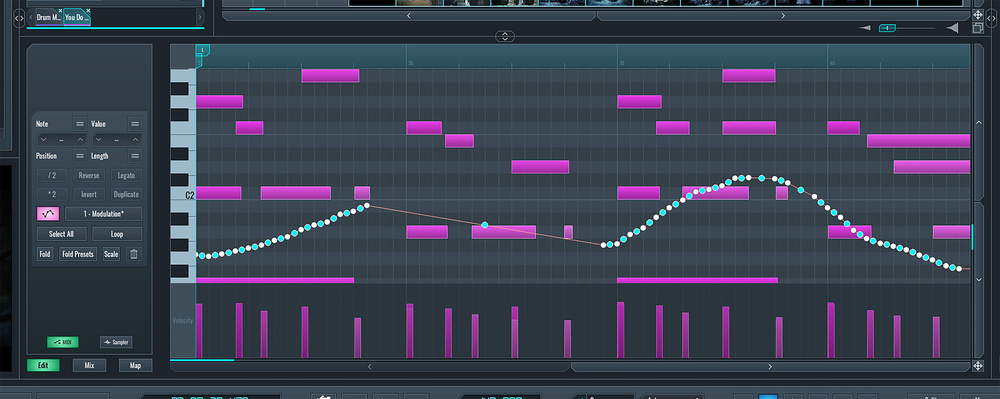 The MIDI Editor provides an easy‑to‑use environment for manual editing of your MIDI data.
For MIDI tracks, you also get the option to add MIDI effects plug‑ins within the Insert Rack and, again, the reChord arpeggiator plug‑in is bundled with the paid version of the DAW. This provides plenty of options and includes a wide range of preset arpeggio patterns. Again, if you want further MIDI effects options, you will have to source them from elsewhere.
Which DAW To Open?
So, as a product, SoundBridge DAW provides a perfectly competent software platform for music production. With that (suitably important) box firmly ticked, perhaps the more interesting questions are (a) how does it fare against the established competition? and (b) who might be tempted to consider adopting it?
Free version aside, the low cost of entry provided by the monthly subscription may well be attractive to some aspiring music producers looking for their first serious DAW. Pro Tools is perhaps the most obvious subscription‑based platform of the established big names. The current pricing of the Pro Tools Artist version is in the same ballpark as SoundBdrige DAW. While clearly not providing all the features of the Studio or Ultimate Pro Tools versions, Artist is still a very accomplished platform for general recording and music production work.
For those wanting a perpetual purchase option, SoundBridge DAW’s currently lifetime licence pricing puts it directly up against Logic Pro. Apple’s flagship DAW is both powerful and deep but, of course, it’s macOS only. For Windows‑based users, Ableton Live 12 Standard is perhaps a little more expensive (depending on your territory), while Cubase offers either the Elements edition (for a lower price) or the Artist edition (for a higher price) compared to SoundBridge, but both of these editions could easily claim to serve your core needs in a DAW.
The point of these comparisons is simply to demonstrate that price is perhaps not necessarily a deciding factor in choosing between one of the established DAWs or a product with (currently at least) a somewhat lower profile. So, if you are going to be persuaded to give SoundBridge DAW a punt over any of the established DAW products, other factors may be more significant. Of course, that might simply be a contrary steak; some folks are just more inclined to stay away from mainstream products or developers. The opposite is also true, however, and opting for a mainstream choice is undoubtedly going to be a factor if you regularly collaborate with other users of those products. That said, you might have already spent time with any of the more high‑profile DAWs and simply not gelled; SoundBridge DAW might therefore provide an alternative to consider.
Price comparisons can obviously change quickly but I do think SoundBridge DAW has one distinctive feature where it might have an edge. Money aside, switching DAWs can often bring a considerable sense of disorientation and, initially at least, this can considerably slow the workflow. In this regard, I think the design of SoundBridge DAW is very astute. With just a few exceptions, it handles the core recording, editing, arranging and mixing tasks in a fashion that draws from established practice; that sense of disorientation is therefore kept to a minimum. In addition, the focused — but very well chosen — feature set makes for a much gentler learning curve than some of the competition. Whether an experienced DAW user or not, you ought to be up and running quickly.
SoundBridge DAW is a solid, competent, fuss‑free music production environment that’s easy to get to grips with.
I can’t tell you how these various factors might balance out in your own personal DAW purchase decision process. What I can tell you is that SoundBridge DAW is a solid, competent, fuss‑free music production environment that’s easy to get to grips with. Providing you are willing to look beyond the usual suspects, if you are still searching for your DAW soulmate, the 14‑day free trial provides a no‑risk option worth exploring.
Pros
- Well‑chosen streamlined feature set.
- Gentle learning curve compared to some DAW software.
- Solid performance.
Cons
- Up against some excellent established competition.
- May require supplementing with additional third‑party effects/instruments.
Summary
SoundBridge DAW may be up against some excellent established competition, but it is a very solid DAW with a well‑chosen core feature set and a gentle learning curve.
Information
SoundBridge DAW subscription $9.99/month; lifetime licence $199.99. Prices include VAT.
SoundBridge DAW Subscription $9.99/month; Liftime license $199.99