

You are here

AFK Audio Drumbeam

MIDI Percussion Pad By Mark Gordon
Published February 2026

Drumbeam

AFK Audio’s Drumbeam is a percussion pad with a difference.

MIDI percussion pads come in a whole range of shapes and sizes... except they don’t, really! Almost all follow the tried and trusted layout of nine or more square pads, in a grid format, with a central LCD screen and a selection of rear‑panel connections. That’s why your first sight of the Drumbeam, from German start‑up company AFK Audio, is genuinely a surprise.

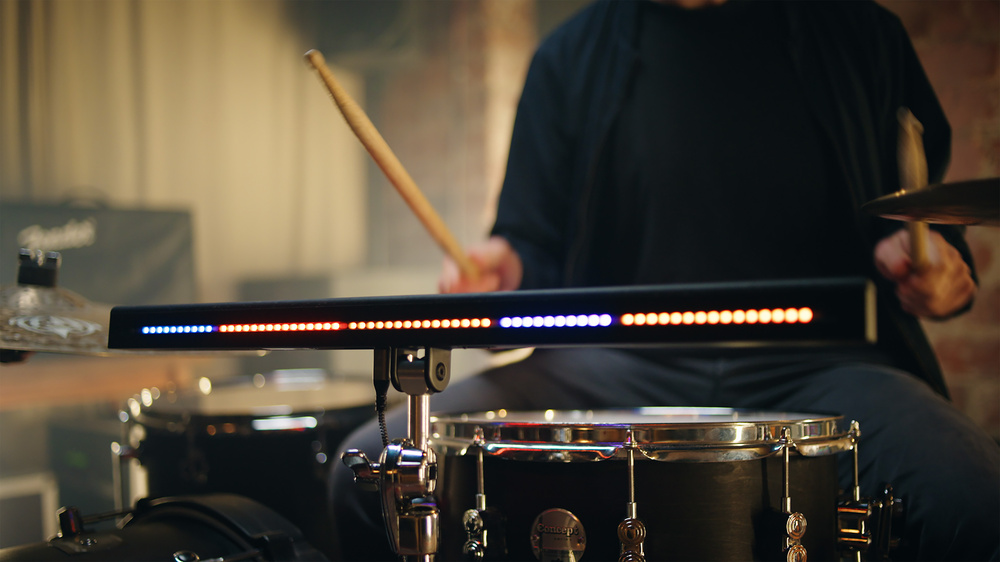
At around 21 inches in length and one inch square, this unusual‑looking multi‑touch MIDI controller is designed to be played primarily with drumsticks and can be configured with up to 12 individual zones along its length. Each zone, when struck, can either send out MIDI notes or Continuous Controller messages. Bucking the trend is often commendable, but are looks deceptive — is this really something new, innovative and, most importantly, usable?

Beam Me Up

The Drumbeam is constructed from milled aluminium, giving it a professional, weighty feel that belies its compact form. The top ‘striking’ surface is covered with a thick silicon pad, and a series of 72 individual LEDs run the length of the unit on both the back and front, indicating the individual playing zones.

The underside of the device features an integrated mounting bracket that, along with the included multi‑mount adaptor, enables you to attach the Drumbeam to a standard M8 threaded cymbal stand or clamp. To the left of the mounting bracket are the connections to the outside world: a USB‑C socket that provides both power and MIDI connectivity to your computer, and two 3.5mm TRS sockets. By way of the included TRS‑to‑MIDI cable, they offer a standard five‑pin MIDI in/out connection. A further 3.5mm jack socket provides a trigger input that can be connected to an external drum pad or trigger.

To the right of the mounting bracket are two raised buttons that enable you to scroll back and forth through the eight presets that can be stored in the Drumbeam itself.

Make Light Work

When you first power up the Drumbeam, the LED strips spark into life with a colourful rainbow animation, before settling to display a default preset, in this case three distinct yellow zones, each separated by two blank LEDs.

Each Drumbeam preset can be configured with up to 12 individual zones along its length, each with its own LED colour. As I mentioned, each zone can send out MIDI notes and Continuous Controller messages. The unique and somewhat minimalist form factor of the Drumbeam precludes the inclusion of a display so any configuration is done within the Drumbeam app. Let’s dive in.

Although the Drumbeam connects to a Mac or PC via USB‑C for its MIDI connectivity (and power), it utilises a built‑in Wi‑Fi connection to communicate with its web‑based editing app. With your computer, tablet or phone connected to the Drumbeam Wi‑Fi hotspot, typing ‘drumbeam.local’ into any browser launches the editing app, which opens in Preset view.

The app’s Segment view is where you can edit the pad zones and set the LED colours.The app’s Segment view is where you can edit the pad zones and set the LED colours.

Both sets of LEDs, front and rear, can be configured independently, potentially giving the audience a completely different viewing experience during a live performance. The front‑facing LEDs can be configured to Highlight, Flash, Sparkle or Beam via the Animation drop‑down menu, with the user‑facing LEDs simply flashing more brightly when struck. You also have the option of inserting zero, one, two or three blank LEDs of spacing, to help you differentiate between zones.

Within the Preset view, you can toggle whether the preset will globally send MIDI notes or MIDI CC information, and activate the trigger input. You can also configure the musical scale and Octave and Squeeze parameters — more about these options later.

Clicking on one of the zones in the app, or striking it on the Drumbeam itself, opens the detailed Segment view. Here you can add and remove zones, modify individual zone size, and set the colour of the LEDs on both the front and rear of the Drumbeam. In addition to each zone having its own MIDI note, MIDI channel and Continuous Controller, you can also limit the dynamic range or controller value range, as well as applying velocity curves.

Hit It With Your Rhythm Stick

I quickly configured a preset comprising four zones with MIDI notes assigned to the kick, snare and open and closed hi‑hat of a virtual drum instrument running within my DAW, and within a few seconds was happily bashing out a rhythm. Integrating the external trigger input into the preset worked very well and allowed me to connect an electronic bass drum, giving the setup the feel of a kit.

While the Drumbeam certainly lends itself to percussive applications, it works equally well in pitch‑based scenarios, where zones assigned to notes can play melodies or bass lines. The Musical Scale and Octave parameters I mentioned earlier come into play when creating a pitch‑based preset. You can select a starting note, octave and scale, and the Drumbeam automatically populates the zones you have created with notes within that scale. Also linked to more melodic usage is the Squeeze parameter. As you might gather from its name, this allows you to place your hand around the Drumbeam and literally squeeze the playing surface to send out Continuous Controller, pitch‑bend or even note data, similar to the methods employed by the Roli Seaboard keyboards. The LEDs will pulse in unison with the physical interaction and, with careful adjustment of the sensitivity parameter and a little practice, you can add feeling and expression into a performance, alongside a visual element.

The MIDI Continuous Controller data sent from the Drumbeam is based on positional information. This is something I first encountered in the Korg MPS‑10, which I reviewed in SOS last year. Rather than the value of the controller data being determined by velocity, it is dictated by where the pad is struck within a zone — a far‑left strike sends a value of 0 and a far‑right one a value of 127. As you strike a zone from left to right you can open a filter, sweep an EQ or affect any parameter of a connected instrument that can respond to a CC command.

Up to eight presets can be stored in the Drumbeam itself (and even remotely selected via Program Change commands), but you can configure up to eight banks within the app. Selecting a bank within the app instantly reconfigures the Drumbeam to that combination of eight presets, which can then be stepped through using the buttons on the underside of the unit.

The Drumbeam is a real joy to play, and its design is a breath of fresh air, allowing you to configure it in almost any way you can imagine.

Heavy Hitter

Overall, the Drumbeam is a real joy to play, and its design is a breath of fresh air, allowing you to configure it in almost any way you can imagine. The option to assign your own colour scheme to each preset is also a real bonus. Roland, Alesis and Korg have introduced this feature in their latest percussion controllers, and I’ve found it invaluable as a way of identifying which sound is on which pad. Along with the audience‑facing animation options, it also makes the Drumbeam look very cool from a live performance perspective.

Configuration is easy via the neatly designed app, and the Wi‑Fi connection means you don’t need to be physically attached to a computer to perform edits.

Although the Drumbeam’s name appears to place it firmly in the percussion controller arena, the ability to assign MIDI notes and play melodies adds a very useful extra dimension. There’s something about using a controller so far removed from a keyboard that makes you play differently, which potentially stimulates creativity.

I can see the Drumbeam having a place in the studio but, with its innovative design and the visual appeal of the LEDs, I feel it’s far better suited to live performance. It would work well as an electronic hybrid addition to an acoustic drum kit, and also as a way for DJs or keyboard players to play simple parts, open filters, add samples or trigger loops live.

At around £400, it isn’t a cheap option, especially as it generates no sounds of its own, but it is well made, highly configurable and will suit many different types of performer and applications. Its flashing, sparkling or beaming LEDs add the bonus of an eye‑catching light show on a darkened stage.

Bang On: Feel & Dynamics

AFK Audio have done extensive research into playing surfaces, and the thick silicon option they have chosen feels great when played with drumsticks. The rebound is natural, and adjustment of the sensitivity setting within the app allows for articulate playing, with fast strokes captured accurately. Dynamics translate well but perhaps are not as nuanced as you might find with a dedicated percussion controller or piano keyboard. Having said that, I don’t think the subtle articulations offered by a mesh drum pad or SPD‑SX type of controller are where the Drumbeam’s strengths lie. Regardless of the number of zones you create, there is no crosstalk between them. Even with a full 12 zones and no blank LEDs separating them, each zone plays perfectly although it certainly helps, if only visually, to have some demarcation between zones.

Pros

  • Unique design.
  • Rugged and roadworthy.
  • Good mounting options.
  • Additional trigger input.
  • Easy‑to‑use app.
  • Endlessly configurable.

Cons

  • A little less dynamic than other drum pads.
  • Comparatively expensive, as it has no built‑in sounds.

Summary

A well‑made, highly configurable performance tool that offers a different slant on the ‘percussion pad’ concept.

Information

€429 including VAT.

www.afk-audio.de