

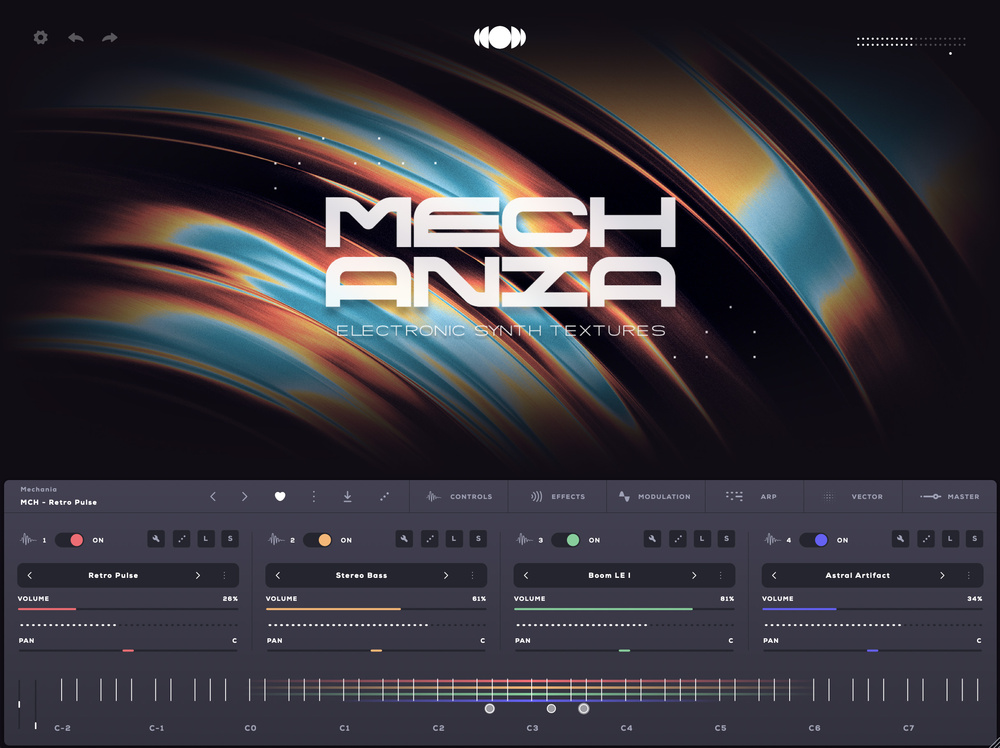
 Audiomodern’s Soundbox free engine allows you to blend up to four sample‑based instruments, including those drawn from their own collection of inexpensive sound expansion packs.
Audiomodern’s Soundbox is a virtual instrument engine that combines depth with ease of use — and it’s free!
Audiomodern may be an unfamiliar name to some SOS readers, but over recent years the company have built up a compact catalogue of products that contains some very interesting creative tools such as Riffer, Playbeat, Chordjam and Filterstep. Their latest venture is Soundbox and, while it is not their first virtual instrument (check out the Opacity II review in the March 2021 issue of SOS), it is a somewhat more ambitious step into that world. Indeed, Soundbox is actually a virtual instrument engine and the sounds for use with that engine come in the form of expansion packs. In that sense, the broad approach has parallels with Kontakt and its many libraries, although at present, the Soundbox ecosystem is very much in its early stages.
The Soundbox engine itself is a free‑to‑download product. It’s available as a standalone application, in standard plug‑in formats for macOS and Windows, and is also available for iOS. The Mechanica and Spectra expansion packs are also free downloads and provide a collection of sounds built from various synth textures. You can, therefore, explore Soundbox — with a specific feature limitation I’ll say more about below — without any up‑front cost. There is a growing range of expansion packs starting at a very modest €29$29 and, stylistically, these are most likely to appeal to media composers or those working in more abstract/ambient musical styles. If you buy any one of the paid expansions, a licence key is provided that unlocks the full feature set of the engine.
So, as a new virtual instrument platform, just what has Soundbox got to offer? Let’s find out...
What’s In The Box?
Soundbox is, essentially, a platform for sample‑based virtual instruments. That engine supports presets consisting of up to four individual layers, each of which can be built from a multisampled (including velocity layers) instrument. The expansion packs provide collections of these presets, presets for individual layers and, of course, the underlying sample base from which they are built.
As well as browsing capabilities that allow you to explore the content at each level — pack, global preset and layer preset — the UI provides compact control sets for each layer. The selection of controls has been very carefully chosen. Yes, you get the obvious per‑layer volume and pan options but, laid out in a strip within the centre of the UI, are various tabs — Controls, Effects, Modulation, Arp, Vector and Master — each of which provides further sound‑design possibilities. For example, the Controls tab provides, among other things, full ADSR envelopes for each layer, while the Effects tab provides four per‑layer effects slots, with a selection of the usual effect suspects available to choose from.
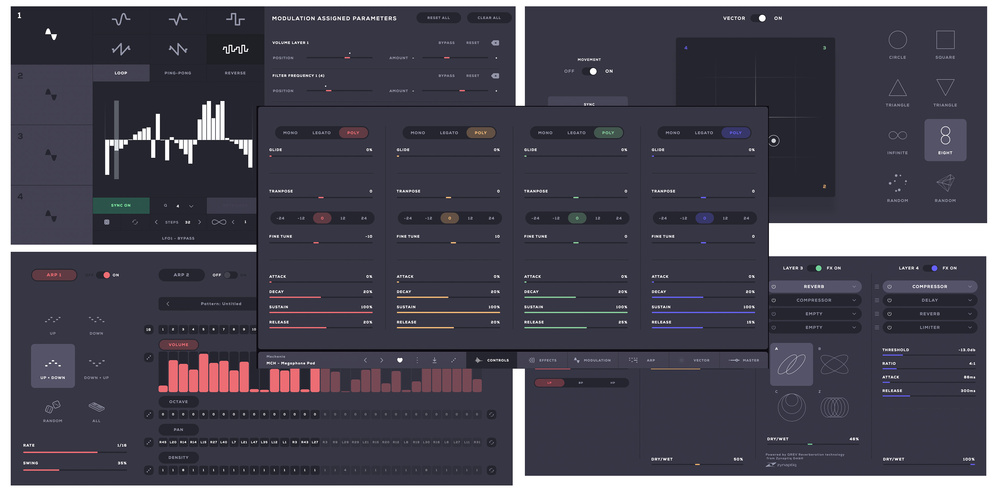 Soundbox provides lots of user‑friendly options for sound design including modulation, automated sound blending, arpeggiators, effects and – centre‑front – per‑layer mixing and ADSR envelopes.
The Modulation tab provides four LFOs, with a selection of waveshapes available including an (up to) 32‑step pattern sequencer. The latter includes a very neat randomisation function, allowing its pattern to shift after a selected number of cycles. Multiple parameters can be linked to any of the four modulators and the usual modulation depth options (positive and negative) are included. You also get options for linking engine parameters to the mod wheel or other controllers. The Arp tab provides some typical up/down combinations and independent 32‑step arpeggiators for each layer with lanes for per‑step control of volume, octave, pan and density (a stutter‑like effect). These work very well but it would be useful if you could compress/expand the values within the volume and pan lanes as a single operation. Maybe that’s a feature for an update?
The Vector tab provides an X/Y pad for either automated or real‑time control over the blend between the four layers. There are preset shapes/patterns, options to sync to the host tempo and to control the overall magnitude of the blend changes. The X/Y pad’s node essentially automates the volume parameters of each layer. Finally, the Master tab provides an additional four‑slot effects rack with an identical selection of effects choices to those found in the layer effects but (obviously!) applied at the global level.
Positioned in various places around the UI are some randomise buttons (three dot icons) if you want to take potluck on preset, layer or parameter choices. If you have tweaked some settings to your liking, you can also save global presets or layer presets. Equally, you can save patterns within the arpeggiator, although it’s a shame there aren’t (currently at least) any supplied presets to get you started. Finally, it’s worth noting that Soundbox supports MIDI Polyphonic Expression (MPE) and multi‑touch via a suitable touchscreen.
Bigger On The Inside
As with other sample player engines (Kontakt or Opus, for example), you need to add content to put the engine to good use. For Soundbox, content comes in the form of expansions and, if Audiomodern’s current offering are anything to go by, the format of these seems to opt for fairly compact, sonically focused, and accessibly priced. Audiomodern currently have seven expansions listed on their website. As mentioned earlier, Mechanica (a collection of electronic synth sounds) and Spectra (ambient electronic sounds) are free to download and deliver 15 global presets and around 1GB of sample content. The current paid‑for offerings are Morphia (Modern Cinematic Toolkit), Cosmo (Keys & Beyond), Kromium (Contemporary Abstract Strings) Voxmotive (New Age & ambient; Cinematic Vocals), and Opacity (cinematic guitar sounds), with prices ranging from €29$29 to €39$39.
As the titles and taglines suggest, all of these are aimed very much at media and/or ambient/electronic composers. I had access to all of these expansions during the review period and, while each offers a fairly compact set of underlying sounds, the quality is uniformly high, and the sound design very well done. These are easily sounds you could imagine using in a commercial film or TV score.
Space precludes a full examination of all of these titles but, as it was seeing a trailer for Morphia that first put Soundbox on my own radar, it serves as a good example of what’s on offer. This expansion provides a collection of impacts, hits, bold sound effects and some atmospheric textures. With 1.4GB of samples, and some 21 full presets, this is a very impressive option at a pocket money price point. In this case, each preset occupies just a single layer within the engine, but each then provides a collection of related sounds mapped across a MIDI key range. Each MIDI note offers a different sound, and you can, of course, trigger multiple sounds at the same time to add further variety. Equally, you could then customise your own presets using multiple layers for additional combinations. Add in the effects and sound‑design tools and, in short, there is plenty of potential mileage from the supplied content and, most importantly, the quality of the sounds themselves is really very good. With all that the Soundbox engine has to offer, Morphia represents an absolute bargain as a collection of cinematic hits and impacts.
Voxmotive provides a collection of presets that are dominated by a combination of vocal ‘phrase’ collections in various keys and sound‑designed, vowel‑based vocal pads. The overall mood is ethereal, mysterious and beautifully atmospheric. Kromium’s string‑based sounds deserve their ‘abstract’ product description. This has horror written all over it; scary, dark and suitably sinister, with a combination of playable sounds, textures and sound effects. Cosmo’s keys‑based collection includes playable melodic instruments and various pads or textures and, while perhaps not quite as dark as Kromium, this is still a toolkit for tension and mystery moods with the occasional (slightly disturbing) childlike melody instrument included for good measure.
Encouragingly (for Audiomodern at least), third‑party developers are already getting involved in expansion pack production. For example, both Kompose Audio and Cinematic Alpha have multiple expansion packs available on their websites and, as with Audiomodern’s own titles, these are modestly priced. Currently, the focus appears to be mainly on pads, soundscapes and textures but Kompose Audio’s options include Choir which, if the demos are representative, can do an excellent turn with ensemble female choir vowel sounds... and it’s priced under €20.
Playing In The Soundbox Sandbox
All of the technical features described so far are available in the unlicensed (free) version of Soundbox. However, if you have purchased one of Audiomodern’s own paid‑for expansions from their website, licensing your copy of Soundbox then unlocks the Sample & Mapping features, and the small spanner icon within each of the main Layer panels then provides access to this element of the feature set. If you have even a modest DIY sound‑design streak (even if only to have full control over sounds provided within any expansion packs), this will undoubtedly be of interest.
When you access this page with a preset loaded, you can see — and edit — the samples used in the construction of the sound, including the sample mapping across the keyboard, and basic sample playback properties such as volume, pan, tuning, sample start/end, fade in/out, loop points and reverse. This includes options for defining the MIDI note range a specific sample is mapped across and the MIDI velocity response for a sample (or multiple samples if you select them in the lower panel). You can add multiple sample layers to a single key or group of keys, with each layer set to respond to different MIDI velocity ranges, allowing you to create instruments with velocity‑based response. Velocity layers can be set to overlap, providing smooth transitions between such velocity layers.
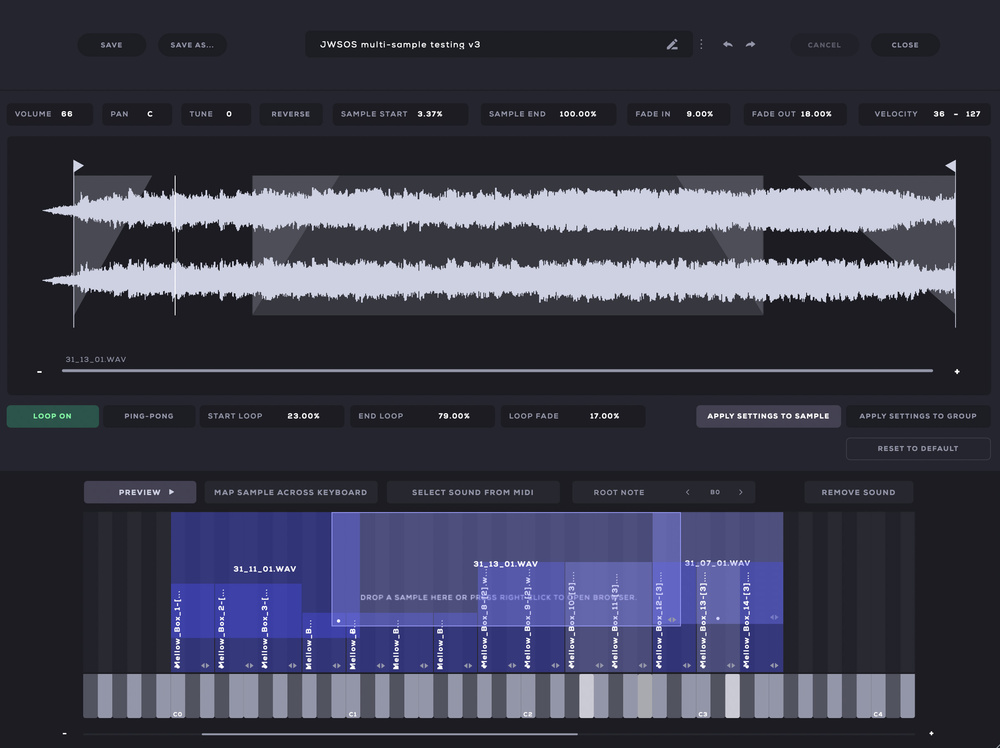 Once you purchase one of Audiomodern’s own expansion packs, you can unlock the full Sample & mapping feature set within Soundbox.
And, yes, you can import your own samples into Soundbox so, once unlocked, these elements of the feature set allow you to build your own multisampled, multi‑velocity‑layer instruments from scratch. Indeed, Audiomodern are happy to encourage you to create your own instruments, or even full expansion packs, and share them with others. This is, presumably, exactly what companies such as Kompose Audio and Cinematic Alpha have done with their own expansions (of course, using their own sample sets cleared for commercial use).
Having spent some time building a few basic sounds myself (including the core of a multi‑velocity acoustic drum kit), I have to say I was very impressed. Audiomodern have managed to make a process that some users might find intimidating remarkably straightforward. By focusing on just the most important options required for constructing a multisampled/multi‑velocity virtual instrument, this element of Soundbox is a bit of a hidden gem.
Open The Box?
If you already have an established workflow built around a set of virtual instruments, adding a new platform into the mix can sometimes feel like rather too much effort. I’m not sure that’s the case with Soundbox. While Audiomodern have already indicated that they will, over time, build on the existing feature set, I think they have made some very shrewd decisions with the initial design. The learning curve is, therefore, mercifully short and I would imagine almost any user would feel very comfortable — even with the Sample & Mapping features — with just a few hours of use.
Of course, Soundbox’s long‑term success (or otherwise) will depend upon it both establishing a suitable user base and getting a community of third‑party developers interested in providing content. The first of these is more likely given the very low cost of initial access and, while there is an element of chicken and egg here, hopefully the second will follow if developers see a market for expansion packs amongst a growing user‑base.
If you like to create your own sounds from scratch, this is one of the most accessible toolsets I’ve ever used for the job.
I sincerely hope that Audiomodern see some success on both these fronts. Soundbox is a pleasure to use and, even in its first iteration, provides a very capable platform for sample‑based virtual instrument sounds. Whether your budget is modest or mega, I’d encourage any media composer to take a look at Soundbox. It’s well worth exploring, there are already some genuinely useful expansion pack sounds available and, if you like to create your own sounds from scratch, this is one of the most accessible toolsets I’ve ever used for the job. Soundbox ticks a heck of a lot of boxes; spend the (ridiculously small amount of) money, open the box, and be prepared to enjoy the sounds.
Pros
- Brilliant balance between features and ease of use.
- Existing Audiomodern expansions sound great.
- Already attracting third‑pary developers into expansion pack production.
- Very capable toolset for DIY sound building.
Cons
- At this price, none.
Summary
With a no‑fuss user interface, some quality expansion pack sounds available from the off and, once licensed, the option to build your own multisampled virtual instruments, Soundbox is a bit of a gem. Oh, and don’t forget the very modest price!
Information
Free. Expansions from €29 including VAT.
Free — Expansions From $29.