


Can a MIDI interface really make a difference? Innerclock Systems think so.
Australia’s Innerclock Systems have been around for 20 years, but you may never have heard of them. They specialise in a niche corner of the music technology market: MIDI timing and synchronisation. They obsess over jitter, port alignment and sample accuracy, and create tools that work to eliminate the timing problems inherent in music production.
Until now, they have mainly focused on MIDI clock generators. The GridLock II promises a lot more: it is their new flagship MIDI interface. In fact, Innerclock Systems are billing it as the first ever “professional” MIDI interface. Why?
Well, there are certainly a lot of ports, both USB and 5‑pin. It supports 5‑pin MIDI, USB MIDI, DIN‑Sync and CV/Gate. There are also some very impressive specs on timing, which promise event, clock and port‑to‑port accuracy to within a few microseconds. The customisable firmware allows you to create virtual OS system ports for each instrument in your studio. Then there’s the clock generation, which also promises frightening accuracy, and, crucially, the ability to shift clocks independently across all available ports so that all your externally clocked gear is perfectly in sync. In short, it might be the most over‑engineered MIDI interface ever made.
Hardware
Let’s look at the physicals first. The GridLock II is a desktop USB 3 MIDI interface with ports on the front and back. It can also be rackmounted using a custom 19‑inch rackmounting kit. It’s a fairly chunky unit measuring 190 x 235 x 70mm. On the rear are eight 5‑pin DIN ports. These can carry any MIDI or DIN‑Sync data, switchable per port. There is also a pair of DB25 connectors for the optional VTX‑1 Eurorack CV breakout box, which provides 16 CV outputs. Innerclock tell me that additional breakout box formats are coming.
Around the front, you’ll find eight more 5‑pin DIN ports. Four are MIDI outputs, two are MIDI inputs, and two are dedicated DIN‑Sync outputs. You’ll also find two USB‑A 2.0 ports and two USB‑B 2.0 ports. The two USB‑A ports will support powered hubs, allowing you to connect up to four USB devices each. The USB‑B ports are host ports, enabling you to connect to another computer or hardware device that supports host connections, such as an iPad or a modern Akai MPC. Each host connection will provide four new virtual ports on the host. There is also a dedicated headphone output that provides an accurate click track. Perfect for drummers or anyone needing a reference clock.
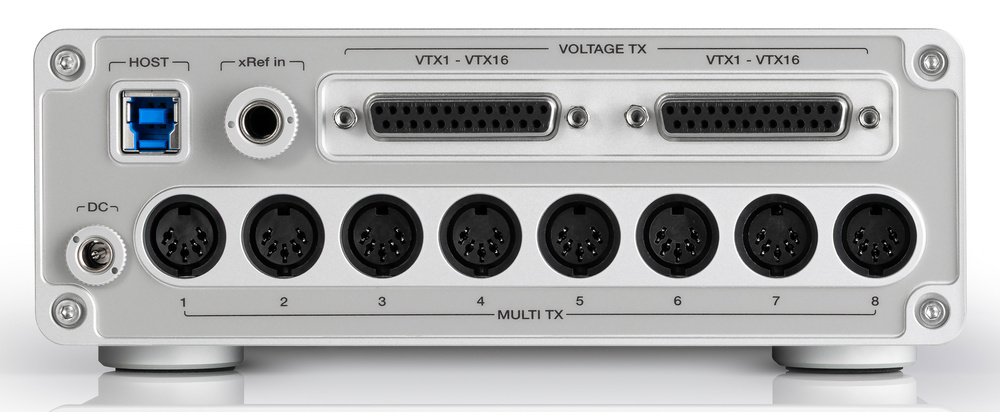 On the GridLock II’s back panel we find a USB‑B port, another eight 5‑pin DIN sockets, and two DB25 connectors for connecting optional breakout boxes.
Between the physical and USB MIDI ports, there are a potential 28 MIDI outputs (eight of which are switchable to DIN‑Sync), 10 MIDI inputs, and two dedicated DIN‑Sync outputs. Plus 16 CV outputs. That should be enough to drive any small to medium‑sized studio, but if you need more, you can connect up to four units, for a total of 112 MIDI outputs, 40 MIDI inputs and 64 CV outputs. Innerclock claim the port‑to‑port alignment across the entire system is accurate to a few microseconds, which is seriously impressive.
To connect the GridLock II to your computer, you need a USB 3 connection and a pair of spare audio outputs on your audio interface. The audio outputs provide a sample‑accurate analogue clock via the included GridLock II plug‑in (available in VST3, AU and AAX formats). The GridLock II converts this audio clock to latency‑free MIDI clock, DIN‑Sync and voltage clock signals. You assign a track containing the plug‑in to your spare audio outputs, and GridLock II will take care of the rest.
The point of having GridLock II generate the clock, instead of the DAW, is that it eliminates DAW‑specific timing and latency issues. Also, every port can have different clock divisions, swing and time shifting, which means you can compensate for any instrument’s inherent lag by shifting the clock so that each one is perfectly aligned to the grid. It’s a very impressive system. There is nothing...
You are reading one of the locked Subscribers-only articles from our latest 5 issues.
You've read 30% of this article for FREE, so to continue reading...
- ✅ Log in - if you have a Digital Subscription you bought from SoundOnSound.com
- ⬇️ Buy & Download this Single Article in PDF format £0.83 GBP$1.49 USD
For less than the price of a coffee, buy now and immediately download to your computer, tablet or mobile. - ⬇️ ⬇️ ⬇️ Buy & Download the FULL ISSUE PDF
Our 'full SOS magazine' for smartphone/tablet/computer. More info... - 📲 Buy a DIGITAL subscription (or 📖 📲 Print + Digital sub)
Instantly unlock ALL Premium web articles! We often release online-only content.
Visit our ShopStore.